
Appearance
Chapter 14: LSASS and Windows Authentication Architecture
Introduction
If you've ever wondered why Mimikatz is so effective, the answer lies in understanding a single process: LSASS (Local Security Authority Subsystem Service). In my experience teaching Windows security, this is the chapter that separates those who memorize attack commands from those who truly understand Windows security architecture. Once you understand why LSASS exists and what it does, everything about credential theft makes sense.
LSASS is the beating heart of Windows authentication. Every time a user logs on, every Kerberos ticket that's issued, every NTLM authentication that occurs—all of it flows through LSASS. And because Windows was designed to provide Single Sign-On (SSO), LSASS must maintain authentication material in memory so users don't have to re-enter their passwords constantly. This design decision, made decades ago for user convenience, is why credential theft tools like Mimikatz are possible.
I often describe LSASS as the "identity safe" of Windows. It holds the keys to every identity that has authenticated to the system. As an operator, if you can open that safe (which requires Administrator/SYSTEM access and SeDebugPrivilege), you can impersonate anyone who has logged onto that machine. As a defender, understanding what's in that safe—and how to protect it—is fundamental to securing your environment.
This chapter establishes the architectural foundation you need before we dive into the specific extraction techniques. We'll explore LSASS's internal components, the Security Support Providers (SSPs) that implement different authentication protocols, and why certain credentials appear in certain forms. This knowledge is what separates script kiddies from security professionals.
Technical Foundation
The Local Security Authority Subsystem
The Local Security Authority (LSA) is a protected subsystem that maintains all aspects of local security on a Windows system. It's implemented primarily by the lsass.exe process, which runs as SYSTEM and starts early in the boot process.
Core Responsibilities of LSA
| Function | Description |
|---|---|
| User Authentication | Validates credentials against SAM, AD, or other identity stores |
| Access Token Creation | Generates security tokens containing user SID, group memberships, and privileges |
| Security Policy Enforcement | Enforces password policies, account lockout, audit policies |
| Credential Management | Caches credentials for Single Sign-On |
| Security Auditing | Generates security audit events |
| Protected Storage | Manages LSA Secrets and DPAPI |
LSASS Process Characteristics
Process Name: lsass.exe
Path: C:\Windows\System32\lsass.exe
Parent: wininit.exe (Session 0)
User: NT AUTHORITY\SYSTEM
Session: 0 (Service Session)
Integrity: System
Critical Nature: LSASS is so essential that Windows monitors it closely. If LSASS crashes or is terminated, Windows triggers an automatic reboot within 60 seconds. This is a fail-safe—if the security core is compromised, Windows would rather restart than continue in an insecure state.
LSASS Internal Architecture
LSASS is not a monolithic process; it loads multiple DLLs that implement different security functions.
Key DLLs Loaded by LSASS
| DLL | Function |
|---|---|
lsasrv.dll | Core LSA Server - authentication logic, credential encryption keys |
samsrv.dll | Security Account Manager Server - local account management |
kerberos.dll | Kerberos SSP - domain authentication |
msv1_0.dll | NTLM SSP - NTLM authentication |
wdigest.dll | WDigest SSP - HTTP Digest authentication |
tspkg.dll | Terminal Services Package - RDP authentication |
livessp.dll | Microsoft Account SSP - Live/MSA authentication |
cloudap.dll | Cloud Authentication Package - Azure AD |
schannel.dll | Secure Channel - TLS/SSL authentication |
bcrypt.dll | Cryptographic primitives |
ncrypt.dll | Key storage |
Memory Layout Concepts
LSASS organizes its memory into several key areas:
1. Logon Session Table
- Contains an entry for each active logon session
- Indexed by LUID (Logon Unique Identifier)
- Links to per-SSP credential structures
2. SSP Credential Structures
- Each SSP maintains its own credential format
- Encrypted with session-specific keys
- Decryption keys stored in
lsasrv.dlldata structures
3. Encryption Key Storage
- Located in
lsasrv.dlladdress space - Keys generated at boot, remain constant until reboot
- Mimikatz locates these keys first before decrypting credentials
The Security Support Provider Interface (SSPI)
SSPI is the Windows API that provides a common interface for authentication. It allows applications to use multiple authentication protocols without understanding their internal details.
Architecture
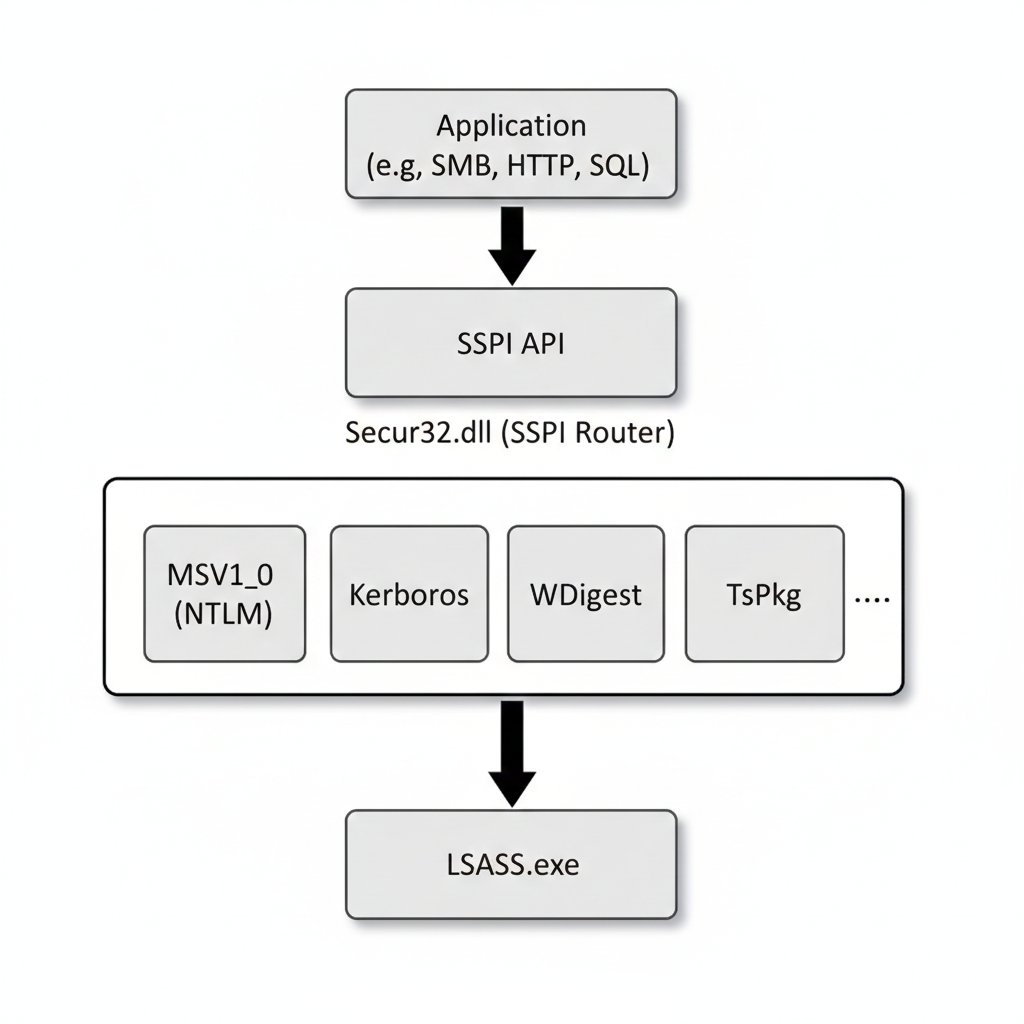
How SSPs Are Loaded
Boot Time: LSASS reads the
Security Packagesvalue from:HKLM\SYSTEM\CurrentControlSet\Control\Lsa\Security PackagesDLL Loading: For each registered package, LSASS loads the corresponding DLL
Initialization: Each SSP's
SpInitialize()function is calledRegistration: The SSP registers its authentication functions with LSASS
Default Security Packages (Windows 10/11)
kerberos
msv1_0
schannel
wdigest
tspkg
pku2u
cloudAP
Credential Caching for SSO
The fundamental reason LSASS contains extractable credentials is Single Sign-On (SSO). When you log onto Windows at 8 AM, you expect to access file shares, email, and web applications throughout the day without re-entering your password. To enable this, LSASS must cache authentication material.
What Gets Cached (and Why)
| SSP | What's Cached | Why |
|---|---|---|
| MSV1_0 | NTLM hash | Challenge-response requires the hash |
| Kerberos | TGT, session keys, service tickets | Ticket-based auth requires cached tickets |
| WDigest | Cleartext password | HTTP Digest algorithm needs the password |
| TsPkg | Cleartext password | RDP credential delegation |
| CredSSP | Cleartext password | Remote credential delegation |
The Encryption Layer
Microsoft understood that caching credentials is dangerous, so they encrypt them:
Pre-Windows 8.1/2012 R2:
- 3DES encryption
- Keys in
lsasrv.dllstatic structures
Windows 8.1/2012 R2 and later:
- AES-256 encryption
- Keys in
lsasrv.dlldynamic structures - Per-session encryption in some cases
The Critical Flaw: The encryption keys must also be in LSASS memory (otherwise, how would LSASS decrypt credentials for SSO?). Mimikatz locates these keys and performs the decryption itself. The encryption is protection against passive memory dumps, not against an active attacker with LSASS access.
Logon Sessions and Types
Every authentication creates a Logon Session in LSASS, identified by a Logon Unique Identifier (LUID). The type of logon affects what credentials are cached.
Logon Types
| Type | Value | Description | Credential Caching |
|---|---|---|---|
| Interactive | 2 | Console logon | Full credentials cached |
| Network | 3 | SMB, RPC, etc. | Hash only (no delegation) |
| Batch | 4 | Scheduled tasks | Depends on configuration |
| Service | 5 | Service startup | Usually hash only |
| Unlock | 7 | Workstation unlock | Full credentials cached |
| NetworkCleartext | 8 | IIS Basic auth | Cleartext available |
| NewCredentials | 9 | runas /netonly | New network identity |
| RemoteInteractive | 10 | RDP | Full credentials cached on target |
| CachedInteractive | 11 | Cached domain logon | Limited to cached creds |
Operational Significance
Interactive (Type 2) and RemoteInteractive (Type 10) are the most valuable for attackers because they cache full credentials, potentially including cleartext passwords (if WDigest is enabled) or delegation tokens.
Network (Type 3) logons are less valuable because only the hash is available—there's no way to derive the cleartext or delegation credentials from a Type 3 session.
Session Duration and Credential Lifetime
Credentials remain in LSASS memory for the duration of the logon session:
Active Sessions:
- As long as the user is logged on, credentials are cached
- RDP sessions that are disconnected (not logged off) keep credentials
Session Termination:
- Logoff clears the session's credentials
- Reboot clears all cached credentials
klist purgeonly clears Kerberos tickets, not NTLM hashes
The "RDP Trap": When administrators RDP to a server and disconnect instead of logging off, their credentials remain in that server's LSASS indefinitely. I've found Domain Admin credentials on servers that were "used once, three months ago" because the admin disconnected instead of logging off.
Detailed SSP Analysis
MSV1_0 - NTLM Authentication
The MSV1_0 SSP handles NTLM and LM authentication. It's the "fallback" when Kerberos isn't available.
Credential Storage:
- Stores NTLM hash (MD4 of Unicode password)
- Stores LM hash if enabled (rare in modern systems)
- Used for local and workgroup authentication
- Used when Kerberos fails or isn't available
Data Structures:
c
typedef struct _MSV1_0_PRIMARY_CREDENTIAL {
    LUID LogonId;
    UNICODE_STRING UserName;
    UNICODE_STRING Domain;
    BYTE NtHash[16];      // NTLM hash
    BYTE LmHash[16];      // LM hash (if enabled)
    // ... additional fields
} MSV1_0_PRIMARY_CREDENTIAL;
Extraction: sekurlsa::msv
Kerberos SSP
Handles domain authentication using the Kerberos protocol.
Credential Storage:
- TGT (Ticket Granting Ticket)
- Service tickets for accessed resources
- Session encryption keys
- Password-derived keys (AES, RC4)
Ticket Lifetime:
- TGT: 10 hours (default), renewable for 7 days
- Service tickets: 10 hours (default)
Extraction: sekurlsa::kerberos, sekurlsa::tickets, sekurlsa::ekeys
WDigest SSP
Legacy SSP for HTTP Digest authentication.
The Cleartext Problem: The HTTP Digest authentication algorithm (RFC 2617) computes:
Response = MD5(MD5(username:realm:password):nonce:MD5(method:uri))This algorithm requires the cleartext password—there's no hash-based shortcut. Therefore, WDigest must store the cleartext password in memory.
Historical Context:
- Pre-Windows 8.1: Cleartext caching enabled by default
- Windows 8.1+: Cleartext caching disabled by default
- Can be re-enabled via registry
Registry Control:
HKLM\SYSTEM\CurrentControlSet\Control\SecurityProviders\WDigest
UseLogonCredential = 0 (disabled) or 1 (enabled)
Extraction: sekurlsa::wdigest
TsPkg - Terminal Services Package
Handles RDP and Remote Desktop authentication.
Credential Storage:
- Cleartext password for credential delegation
- Required when the target server needs to access network resources on your behalf
Operational Note: Even when WDigest is disabled, TsPkg often contains cleartext passwords for RDP sessions. This is because RDP with Network Level Authentication (NLA) may require credential delegation.
Extraction: sekurlsa::tspkg
CredSSP
Credential Security Support Provider for RDP delegation.
Purpose: Allows credentials to be delegated to the RDP target server so it can authenticate to other resources as you.
Modes:
- Default: Credentials sent to server
- Restricted Admin: No credential delegation
- Remote Credential Guard: Credentials never leave client
Extraction: Part of sekurlsa::logonpasswords
LiveSSP
Handles Microsoft Account (Live/MSA) authentication.
Credential Storage:
- Microsoft account credentials for hybrid-joined devices
- Tokens for Microsoft cloud services
Extraction: Part of sekurlsa::logonpasswords
CloudAP
Azure AD authentication provider (Windows 10+).
Credential Storage:
- Primary Refresh Tokens (PRTs)
- Azure AD authentication artifacts
Extraction: Specialized tools required; covered in advanced chapters
Diagnostic Commands and Enumeration
While this chapter focuses on architecture, several Mimikatz commands help enumerate the authentication landscape.
sekurlsa::logonpasswords (Diagnostic View)
Beyond extraction, this command shows you the authentication state of the system:
mimikatz # sekurlsa::logonpasswords

Authentication Id : 0 ; 453821 (00000000:0006eb3d)
Session           : Interactive from 1
User Name         : admin
Domain            : CORP
Logon Server      : DC01
Logon Time        : 2/5/2026 9:15:32 AM
SID               : S-1-5-21-...-1001
Information Revealed:
- Active logon sessions
- Logon types and times
- Which users have authenticated
- Which SSPs have cached credentials
kerberos::list
Lists Kerberos tickets in the current session:
mimikatz # kerberos::list

[00000000] - 0x00000012 - aes256_hmac
   Start/End/MaxRenew: 2/5/2026 9:00:00 AM ; 2/5/2026 7:00:00 PM ; 2/12/2026 9:00:00 AM
   Server Name: krbtgt/CORP.LOCAL @ CORP.LOCAL
   Client Name: admin @ CORP.LOCAL
   Flags: 0x40e10000 -> forwardable renewable initial pre_authent
token::list
Shows access tokens, which are the result of authentication:
mimikatz # token::list

Token Id  : 0
User name : CORP\admin
SID name  : S-1-5-21-...-1001
Attack Implications
Understanding LSASS architecture reveals several attack patterns:
Why SeDebugPrivilege is Critical
To read LSASS memory, you need PROCESS_VM_READ access to the process. LSASS runs as SYSTEM with high integrity. The SeDebugPrivilege privilege allows a process to open ANY process regardless of its security context.
The Attack Chain:
- Gain Administrator access (which grants
SeDebugPrivilegeby default) - Enable the privilege:
privilege::debug - Open LSASS with read access
- Locate encryption keys in
lsasrv.dll - Locate encrypted credentials in SSP structures
- Decrypt credentials
Why Encryption Doesn't Help (Without Hardware Isolation)
LSASS encrypts credentials to protect against:
- Passive memory dumps (e.g., crash dump analysis)
- Offline analysis of hibernation files
But encryption CANNOT protect against:
- An active attacker with LSASS access
- Because the decryption keys are also in LSASS memory
The Only Real Solutions:
- LSA Protection (PPL) - Blocks unauthorized LSASS access
- Credential Guard - Moves credentials to hardware-isolated VM
- Not caching credentials at all (breaks SSO)
Logon Type Attack Patterns
Targeting Interactive Sessions:
- Look for Type 2 and Type 10 logons
- These have full credentials cached
- RDP sessions are especially valuable
The Network Logon Limitation:
- Type 3 logons only have hashes
- Still useful for Pass-the-Hash
- Cannot get cleartext or delegation tokens
Detection and IOCs
LSASS Access Monitoring
Sysmon Event ID 10 - Process Access:
xml
<Event>
  <EventData>
    <Data Name="SourceImage">C:\temp\suspicious.exe</Data>
    <Data Name="TargetImage">C:\Windows\System32\lsass.exe</Data>
    <Data Name="GrantedAccess">0x1010</Data>
  </EventData>
</Event>
Key Access Masks:
| Mask | Access Rights | Suspicion Level |
|---|---|---|
| 0x0010 | PROCESS_VM_READ | Medium |
| 0x1010 | +PROCESS_QUERY_LIMITED_INFO | High |
| 0x1410 | +PROCESS_QUERY_INFORMATION | High |
| 0x143a | Common Mimikatz pattern | Critical |
| 0x1fffff | PROCESS_ALL_ACCESS | Critical |
Legitimate LSASS Accessors
Build a baseline of processes that legitimately access LSASS:
- Windows Defender / Antivirus
- EDR agents
- LSASS itself (self-access)
- Task Manager (limited access)
- Performance monitoring tools
Registry Monitoring
WDigest Configuration:
Key: HKLM\SYSTEM\CurrentControlSet\Control\SecurityProviders\WDigest
Value: UseLogonCredential
Alert if changed to: 1
Security Packages:
Key: HKLM\SYSTEM\CurrentControlSet\Control\Lsa
Value: Security Packages
Alert if: Unknown package added
Behavioral Indicators
| Behavior | Indicator |
|---|---|
| Token elevation followed by LSASS access | Likely credential theft |
| LSASS access from non-standard path | Likely malicious tool |
| LSASS access with write permissions | Injection attempt |
| Unknown DLL loaded into LSASS | SSP injection |
Defensive Strategies
1. Enable LSA Protection (RunAsPPL)
Protected Process Light prevents unauthorized processes from accessing LSASS.
Implementation:
HKLM\SYSTEM\CurrentControlSet\Control\Lsa
RunAsPPL = 1 (DWORD)
Requires reboot to take effect.
Impact:
- Mimikatz
sekurlsa::commands fail - Attackers must use kernel drivers or exploits
2. Deploy Windows Credential Guard
Credential Guard uses virtualization-based security (VBS) to isolate credentials from the main OS.
Requirements:
- Windows 10 Enterprise/Education or Server 2016+
- UEFI with Secure Boot
- Virtualization extensions (Intel VT-x/AMD-V)
- TPM 2.0 (recommended)
Impact:
- NTLM hashes, Kerberos keys not in LSASS memory
- Mimikatz shows empty or placeholder values
3. Disable WDigest Credential Caching
Ensure cleartext passwords are not cached:
HKLM\SYSTEM\CurrentControlSet\Control\SecurityProviders\WDigest
UseLogonCredential = 0 (DWORD)
Deploy via Group Policy for enterprise coverage.
4. Use Remote Credential Guard for RDP
Prevents credentials from being sent to RDP target:
Client-side:
cmd
mstsc.exe /remoteGuardPolicy:
Computer Configuration > Administrative Templates > System > Credentials Delegation
> Restrict delegation of credentials to remote servers
5. Implement Restricted Admin Mode for RDP
Alternative to Remote Credential Guard (works with older servers):
cmd
mstsc.exe /restrictedAdminNote: Enables Pass-the-Hash to RDP but prevents credential caching.
6. Enforce Logoff Instead of Disconnect
Train administrators to log off from RDP sessions rather than disconnect. Disconnected sessions leave credentials cached indefinitely.
7. Reduce Cached Credential Lifetime
Configure shorter ticket lifetimes:
# Domain GPO: Kerberos Policy
Maximum lifetime for user ticket: 4 hours (instead of 10)
Maximum lifetime for user ticket renewal: 1 day (instead of 7)
8. Deploy Tiered Administration
Ensure Domain Admin credentials never touch workstations:
- Tier 0: Domain Controllers, PKI, identity systems
- Tier 1: Servers
- Tier 2: Workstations
Comparison: Credential Protection Methods
| Protection | Stops Memory Extraction | Stops Offline Extraction | Deployment Complexity |
|---|---|---|---|
| None | No | No | N/A |
| LSA Protection (PPL) | Mostly (requires kernel bypass) | No | Low |
| Credential Guard | Yes | Yes (for protected creds) | Medium |
| Remote Credential Guard | Yes (for RDP) | N/A | Low |
| No credential caching | Yes | Yes | Breaks SSO |
Operational Considerations
Understanding Your Target Environment
Before credential extraction, understand the authentication landscape:
Check protection mechanisms:
reg query HKLM\SYSTEM\CurrentControlSet\Control\Lsa /v RunAsPPLCheck WDigest status:
reg query HKLM\SYSTEM\CurrentControlSet\Control\SecurityProviders\WDigest /v UseLogonCredentialList logon sessions:
query session
qwinsta
Maximizing Credential Yield
- Target systems with interactive sessions (workstations, jump servers)
- Look for disconnected RDP sessions
- Servers with many service accounts may have valuable credentials
- Check after business hours—sessions from the day remain cached
Avoiding Detection
- Understand what your access pattern looks like
- Build allowlist bypass if possible
- Consider timing—extraction during high-activity periods may be less anomalous
Practical Lab Exercises
Exercise 1: Enumerate LSASS Architecture
Objective: Understand LSASS in your lab environment.
Steps:
Open Task Manager and locate lsass.exe:
- Note the PID, memory usage, and user (SYSTEM)
Use Process Explorer (Sysinternals):
- View LSASS properties
- List loaded DLLs (verify SSPs are loaded)
- View handles and threads
Check LSA protection status:
cmdreg query HKLM\SYSTEM\CurrentControlSet\Control\Lsa /v RunAsPPLCheck registered Security Packages:
cmdreg query "HKLM\SYSTEM\CurrentControlSet\Control\Lsa" /v "Security Packages"
Exercise 2: Explore Logon Sessions
Objective: Understand logon sessions and types.
Steps:
List current sessions:
cmdqwinstaRun Mimikatz to view sessions:
mimikatz # privilege::debug
mimikatz # sekurlsa::logonpasswords
Note the logon types (Interactive, Service, Network, etc.)
Create different session types:
- Interactive: Standard logon
- Network:
net use \\target\share - NewCredentials:
runas /netonly /user:domain\user cmd
Compare credential caching between session types
Exercise 3: WDigest Configuration
Objective: Understand WDigest credential caching.
Steps:
Check current WDigest status:
cmdreg query HKLM\SYSTEM\CurrentControlSet\Control\SecurityProviders\WDigest /v UseLogonCredentialRun
sekurlsa::wdigestand note the resultsEnable WDigest (lab only!):
cmdreg add HKLM\SYSTEM\CurrentControlSet\Control\SecurityProviders\WDigest /v UseLogonCredential /t REG_DWORD /d 1 /fLog off and log back on (or lock/unlock)
Run
sekurlsa::wdigestagain and compareClean up:
cmdreg add HKLM\SYSTEM\CurrentControlSet\Control\SecurityProviders\WDigest /v UseLogonCredential /t REG_DWORD /d 0 /f
Exercise 4: Enable and Test LSA Protection
Objective: See LSA Protection in action.
Steps:
Enable LSA Protection:
cmdreg add HKLM\SYSTEM\CurrentControlSet\Control\Lsa /v RunAsPPL /t REG_DWORD /d 1 /fReboot the system
Try Mimikatz extraction:
mimikatz # privilege::debug
mimikatz # sekurlsa::logonpasswords
Observe the error (access denied)
Disable for lab use:
cmdreg delete HKLM\SYSTEM\CurrentControlSet\Control\Lsa /v RunAsPPL /fReboot and verify extraction works again
Summary
Understanding LSASS and Windows authentication architecture is fundamental to both offensive operations and defensive security:
LSASS is the security core: All authentication flows through this single process, making it the primary target for credential theft.
SSPs provide modular authentication: Each protocol (NTLM, Kerberos, WDigest) has its own SSP that caches different credential types.
SSO requires credential caching: The convenience of Single Sign-On necessitates keeping authentication material in memory.
Encryption is not sufficient: The decryption keys are also in LSASS memory, so an attacker with process access can decrypt credentials.
Logon type matters: Interactive and RemoteInteractive sessions cache full credentials; Network logons cache only hashes.
Protection mechanisms exist: LSA Protection and Credential Guard fundamentally change the security model, making extraction much harder.
Architecture knowledge enables better operations: Understanding why credentials are cached helps you know where to look and what to expect.
This architectural foundation prepares you for the subsequent chapters on specific extraction techniques, protections, and bypass methods.
Next: Chapter 15: LSASS Patching and InjectionPrevious: Chapter 13: Kernel Driver