
Appearance
Chapter 4: The Miscellaneous Module
Introduction
Welcome to the "utility belt" of Mimikatz. The Miscellaneous (Misc) Module is where Benjamin Delpy has collected all those clever commands that don't quite fit into the more specialized authentication or credential modules. While they might seem like a random assortment, each one represents a creative solution to a common hurdle we face during an engagement.
In my experience, this module is often overlooked by operators who rush straight to sekurlsa::logonpasswords. That's a mistake. The reconnaissance capabilities in this module—particularly misc::mflt and misc::detours—can tell you exactly what defenses you're up against before you make a move that gets you caught. I always recommend running these enumeration commands first.
What I find most fascinating about the Misc module is that it really showcases Benjamin's deep understanding of the weird corners of Windows internals. From minifilter driver enumeration to clipboard monitoring via process injection, these commands demonstrate techniques that have influenced an entire generation of security tools.
A quick reality check: Many of these commands were groundbreaking when they were first released, but as Windows has evolved, some have become historical curiosities. I'll make sure to point out which ones are still operational gold and which ones are likely to get you caught on a modern, hardened system.
Technical Foundation
Understanding Minifilter Drivers
One of the most valuable reconnaissance capabilities in this module is minifilter enumeration. Minifilters are kernel-mode drivers that register with the Windows Filter Manager to intercept file system I/O operations.
Filter Manager Architecture:
┌─────────────────────────────────────────────────────┐
│                  User Mode                           │
│    Application → CreateFile("C:\secret.txt")        │
└─────────────────────┬───────────────────────────────┘
                      │ I/O Request
┌─────────────────────▼───────────────────────────────┐
│               Kernel Mode                            │
│  ┌──────────────────────────────────────────────┐   │
│  │          Filter Manager (fltmgr.sys)         │   │
│  │                                              │   │
│  │  Altitude 385201: SysmonDrv (Activity Mon)  │   │
│  │  Altitude 328010: WdFilter (Defender AV)    │   │
│  │  Altitude 180451: CldFlt (Cloud Files)      │   │
│  │  Altitude 141100: FileCrypt (EFS)           │   │
│  │                      │                       │   │
│  └──────────────────────┼───────────────────────┘   │
│                         ▼                            │
│  ┌──────────────────────────────────────────────┐   │
│  │         File System (NTFS.sys)               │   │
│  └──────────────────────────────────────────────┘   │
└─────────────────────────────────────────────────────┘
Altitude Numbers and Their Meaning
Microsoft assigns altitude ranges to different categories of filters:
| Altitude Range | Category | Examples |
|---|---|---|
| 420000-429999 | Anti-Virus Filter | WdFilter (Defender) |
| 400000-409999 | Replication | DFS Replication |
| 380000-389999 | Activity Monitor | SysmonDrv, CrowdStrike |
| 360000-369999 | System Recovery | Volume Shadow Copy |
| 340000-349999 | Quota Management | Quota management |
| 320000-329999 | Anti-Virus | Defender (secondary) |
| 280000-289999 | Encryption | BitLocker, EFS |
| 180000-189999 | Cloud Sync | OneDrive (CldFlt) |
| 140000-149999 | Encryption (legacy) | EFS |
Knowing which filters are active tells you exactly what's monitoring your file operations.
API Hooking and Detours
Security software often uses API hooking to intercept system calls. This works by modifying the target function to redirect execution:
c
// Original function
NtCreateFile:
  mov r10, rcx
  mov eax, 0x55    ; Syscall number
  syscall
  ret

// Hooked function
NtCreateFile:
  jmp EDR_Hook     ; Redirect to EDR
  nop
  nop
  ; Original code never executes first

EDR_Hook:
  ; Log the call
  ; Check for malicious patterns
  ; If safe, call original
  jmp Original_NtCreateFile+5
The misc::detours command detects these modifications by scanning for jumps at function entry points.
Process Injection Fundamentals
Several misc commands use process injection techniques:
Injection Flow:
1. OpenProcess() → Get handle to target
2. VirtualAllocEx() → Allocate memory in target
3. WriteProcessMemory() → Write payload
4. CreateRemoteThread() → Execute payload
This is how misc::clip monitors the clipboard by injecting into csrss.exe.
Command Reference
misc::mflt - Minifilter Enumeration
This is one of the most valuable commands in the module for modern tradecraft. It lists all registered minifilter drivers and their altitude numbers.
Syntax
misc::mflt| Parameter | Required | Description |
|---|---|---|
| (none) | N/A | Enumerates all minifilter drivers |
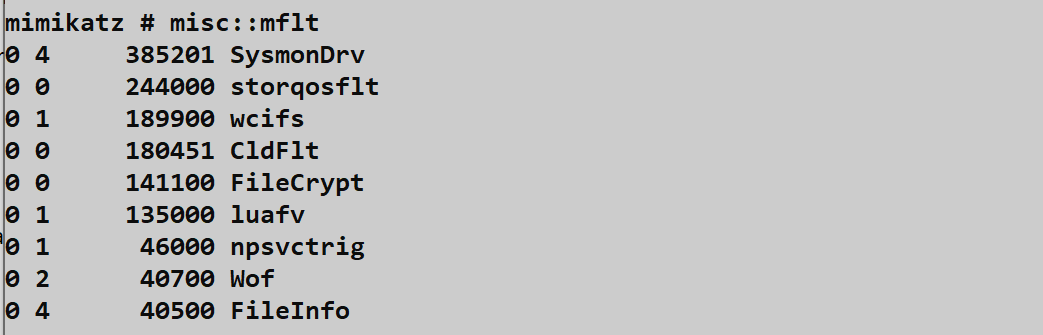
The screenshot shows:
- SysmonDrv at altitude 385201 (Activity Monitor range)
- storqosflt at altitude 244000 (Storage QoS)
- wcifs at altitude 189900 (Windows Container)
- CldFlt at altitude 180451 (Cloud Files - OneDrive)
- FileCrypt at altitude 141100 (Encryption - EFS)
Interpreting Results
| Filter | Altitude | What It Means |
|---|---|---|
| SysmonDrv | 385201 | Sysmon active - file/process monitoring |
| WdFilter | 328010 | Defender active - real-time scanning |
| CsFlt | 38xxxx | CrowdStrike active - EDR monitoring |
| CbFlt | 38xxxx | Carbon Black active - EDR |
| MfeEpeFlt | 32xxxx | McAfee active - AV |
Operational Value: This is quiet reconnaissance. You're just querying the Filter Manager, which generates minimal logs. But it tells you exactly what security stack you're up against.
misc::detours - API Hook Detection
Detects inline API hooks placed by security software.
Syntax
misc::detours| Parameter | Required | Description |
|---|---|---|
| (none) | N/A | Scans all processes for API hooks |
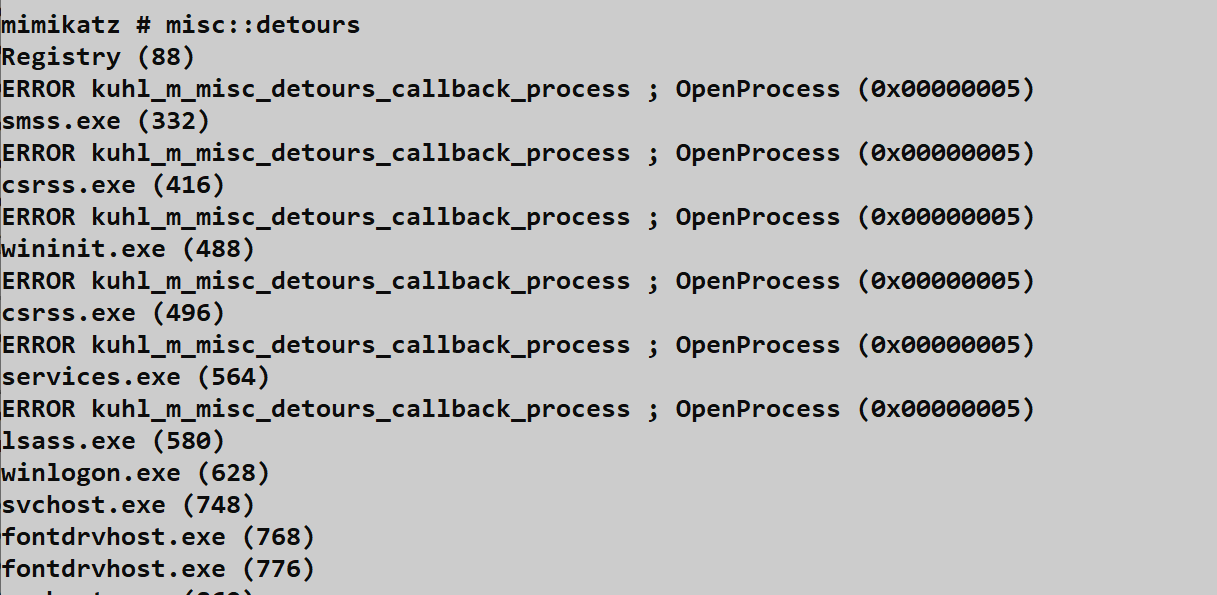
What It Reveals
Process: chrome.exe (PID: 1234)
  ntdll.dll!NtCreateFile: Hooked by avghookx.dll
  kernel32.dll!CreateProcessW: Hooked by avghookx.dll

Process: powershell.exe (PID: 5678)
  ntdll.dll!NtReadVirtualMemory: Hooked by SentinelAgent.dll
This tells you:
- Which processes are being monitored
- Which APIs are hooked
- Which DLL is doing the hooking (identifies the EDR)
The Risk: This is extremely loud. To run this, Mimikatz opens handles to every process on the system. This generates:
- Sysmon Event ID 10 (Process Access) - potentially hundreds
- Security Event ID 4663 if Object Access auditing is enabled
- EDR alerts for mass process enumeration
Detection Event Storm
yaml
# What the SOC sees when misc::detours runs
Events in 5-second window:
- 150+ Sysmon Event ID 10 (ProcessAccess)
- Target: every running process
- SourceImage: mimikatz.exe
- GrantedAccess: 0x1410 or similar

# Guaranteed alert in any mature SOC
misc::cmd - Launch Command Prompt
Attempts to launch cmd.exe using alternative methods that may bypass certain restrictions.
Syntax
misc::cmd| Parameter | Required | Description |
|---|---|---|
| (none) | N/A | Launch command prompt |
How It Works: Instead of simple CreateProcess("cmd.exe"), this uses alternative API calls or process manipulation to potentially bypass:
- Basic AppLocker rules
- Simple process name blocking
- Kiosk restrictions
Modern Reality: Sophisticated AppLocker configurations with hash rules will still block this. EDR behavioral analysis will still flag it. Useful for legacy environments or poorly configured restrictions.
misc::regedit and misc::taskmgr
Similar to misc::cmd, these launch Registry Editor and Task Manager respectively.
Syntax
misc::regedit
misc::taskmgr| Parameter | Required | Description |
|---|---|---|
| (none) | N/A | Launch respective tool |
Use Case: Helpful on kiosks, terminal servers, or systems where these tools are "disabled" through weak Group Policy (hiding rather than truly blocking).
misc::compressme - LZ Compression
Uses Windows' built-in LZ compression to compress the Mimikatz executable.
Syntax
misc::compressme| Parameter | Required | Description |
|---|---|---|
| (none) | N/A | Compress Mimikatz executable |

The screenshot shows:
- Input file: mimikatz_trunk 2\x64\mimikatz.exe
- Original size: 1,011,864 bytes
- Compressed size: 620,016 bytes (61.27% of original)
- Output: mimikatz_x64.compressed
Historical Context: This was once used for basic signature evasion. Today:
- Modern AV decompresses before scanning
- Behavioral detection catches execution regardless
- EDR monitors the decompression itself
Modern Use: Primarily interesting as an example of RtlCompressBuffer API usage.
misc::wp - Wallpaper Injection
Injects code into explorer.exe to change the desktop wallpaper.
Syntax
misc::wp /file:<image_path>| Parameter | Required | Description |
|---|---|---|
| /file:<path> | Yes | Path to image file |

The screenshot shows:
- Command:
misc::wp /file:Capture.png - Target: explorer.exe (PID 4508)
- Result: OK
Operational Use Cases:
| Purpose | Value |
|---|---|
| Proof of concept | Demonstrates process injection capability |
| Psychological impact | "You've been hacked" messaging |
| Capability demonstration | Shows code execution in another process context |
Detection: This triggers:
- Sysmon Event ID 8 (CreateRemoteThread)
- Sysmon Event ID 10 (ProcessAccess to explorer.exe)
misc::clip - Clipboard Monitoring
A powerful passive credential harvester that monitors clipboard contents.
Syntax
misc::clip| Parameter | Required | Description |
|---|---|---|
| (none) | N/A | Start clipboard monitoring (Ctrl+C to stop) |

The screenshot shows:
- "Monitoring ClipBoard...(CTRL+C to stop)"
- "ClipData: 1st piece of text I copy"
- "ClipData: 2nd piece of text I copy"
- The Notepad window shows the text being copied
How It Works
1. Mimikatz calls OpenProcess() on csrss.exe
2. Allocates memory in csrss.exe via VirtualAllocEx()
3. Writes monitoring shellcode via WriteProcessMemory()
4. Creates monitoring thread via CreateRemoteThread()
5. Thread hooks clipboard change notifications
6. Every Ctrl+C sends data back to Mimikatz
What Gets Captured
| Source | Potential Loot |
|---|---|
| Password managers | Passwords, usernames |
| Configuration files | API keys, connection strings |
| Documentation | Sensitive commands, credentials |
| RDP sessions | Copied credentials |
| Sensitive content |
The Risk:
csrss.exeis a critical system process- Crashing it = Blue Screen of Death
- Injection into csrss.exe is high-confidence IOC for any EDR
misc::ncroutemon - VPN Route Monitor Bypass
Bypasses Juniper Network Connect VPN client's route monitoring.
Syntax
misc::ncroutemon| Parameter | Required | Description |
|---|---|---|
| (none) | N/A | Bypass route monitoring |
Historical Context: The Juniper VPN client used to block manual route changes to prevent split-tunneling abuse. This command disabled that monitoring.
Modern Status: Largely addressed by vendors. Included for historical reference and as an example of targeting specific enterprise software.
misc::skeleton - Skeleton Key Attack
Patches LSASS to install a master password that works for all domain accounts.
Syntax
misc::skeleton| Parameter | Required | Description |
|---|---|---|
| (none) | N/A | Install skeleton key (password: "mimikatz") |
How It Works:
- Patches the authentication functions in LSASS
- Adds a check for the "mimikatz" password
- Both real password AND "mimikatz" now work for any account
Requirements:
- Domain Controller access
- SYSTEM privileges
- Must be run on DC
Persistence: Only survives until DC reboot. For persistent skeleton key, the attacker needs to patch the ntds.dit or use other persistence mechanisms.
Detection:
- LSASS process modification
- Unusual authentication patterns
- Multiple accounts using same password hash
Attack Scenarios
Scenario 1: Pre-Attack Reconnaissance
Objective: Understand the security stack before attempting credential extraction.
# Step 1: Check what's monitoring files
mimikatz # misc::mflt
# If you see SysmonDrv - full file/process logging active
# If you see WdFilter - Defender real-time protection
# If you see CsFlt - CrowdStrike watching

# Step 2: Decide your approach based on findings
# Sysmon present? Consider timestomping your files
# EDR present? May need to use alternative techniques
# Clean system? Proceed with standard extraction
Scenario 2: Passive Credential Harvesting
Objective: Harvest credentials without touching LSASS.
# On a compromised workstation where admin frequently works:
mimikatz # misc::clip

# Wait for user activity...
# ClipData: Server1Password123!
# ClipData: apikey=sk-123456789...
# ClipData: mysql -u root -pSecretPass

# Ctrl+C to stop when you have what you need
Scenario 3: Proof of Code Execution
Objective: Demonstrate arbitrary code execution capability.
# Create an image with your message
# "PENETRATION TEST - System Compromised"

mimikatz # misc::wp /file:C:\temp\pwned.png
# Desktop wallpaper changes on all logged-in users
# Visual proof of compromise for report
Scenario 4: Bypass Kiosk Restrictions
Objective: Break out of a restricted terminal environment.
# On a locked-down kiosk or terminal server:
mimikatz # misc::cmd
# If successful, you now have a command prompt

mimikatz # misc::taskmgr
# If successful, you can see running processes

mimikatz # misc::regedit
# If successful, you can browse the registry
Detection and Indicators of Compromise
High-Confidence Detection Events
| Command | Event ID | Source | Detection Confidence |
|---|---|---|---|
| misc::detours | 10 (mass) | Sysmon | Critical |
| misc::clip | 8 | Sysmon | Critical |
| misc::clip | 10 | Sysmon | High |
| misc::wp | 8 | Sysmon | High |
| misc::skeleton | 10 | Sysmon | Critical |
SIGMA Detection Rules
Mass Process Enumeration (misc::detours)
yaml
title: Potential Mimikatz misc::detours - Mass Process Access
status: experimental
logsource:
    category: process_access
    product: windows
detection:
    selection:
        GrantedAccess|contains:
            - '0x1410'
            - '0x1010'
    timeframe: 10s
    condition: selection | count(TargetImage) by SourceImage > 50
level: critical
tags:
    - attack.discovery
    - attack.t1057
CreateRemoteThread to Critical Process
yaml
title: Remote Thread Creation in Critical Process (misc::clip)
status: experimental
logsource:
    category: create_remote_thread
    product: windows
detection:
    selection:
        TargetImage|endswith:
            - '\csrss.exe'
            - '\lsass.exe'
            - '\services.exe'
    filter_legitimate:
        SourceImage|endswith:
            - '\csrss.exe'
            - '\lsass.exe'
    condition: selection and not filter_legitimate
level: critical
Filter Manager Enumeration
yaml
title: Minifilter Driver Enumeration
status: experimental
logsource:
    category: process_creation
    product: windows
detection:
    selection:
        CommandLine|contains:
            - 'fltMC'
            - 'misc::mflt'
    condition: selection
level: medium
Defensive Strategies
Strategy 1: Monitor for Mass Process Access
Configure alerting for mass process enumeration:
powershell
# Real-time monitoring for process access storms
$threshold = 50
$timeWindow = 10 # seconds

# Query Sysmon logs for pattern
Get-WinEvent -FilterHashtable @{
    LogName = 'Microsoft-Windows-Sysmon/Operational'
    ID = 10
    StartTime = (Get-Date).AddSeconds(-$timeWindow)
} | Group-Object {$_.Properties[4].Value} | # Group by SourceImage
    Where-Object { $_.Count -gt $threshold }
Strategy 2: Protect Critical Processes
Use Windows Defender Exploit Guard to protect critical processes:
Computer Configuration → Administrative Templates → Windows Components →
Windows Defender Antivirus → Windows Defender Exploit Guard → Attack Surface Reduction

Enable:
- Block credential stealing from LSASS
- Block process injections
Strategy 3: Alert on CreateRemoteThread to System Processes
yaml
# Sysmon config to capture critical CreateRemoteThread
<RuleGroup name="" groupRelation="or">
  <CreateRemoteThread onmatch="include">
    <TargetImage condition="end with">csrss.exe</TargetImage>
    <TargetImage condition="end with">lsass.exe</TargetImage>
    <TargetImage condition="end with">services.exe</TargetImage>
    <TargetImage condition="end with">winlogon.exe</TargetImage>
  </CreateRemoteThread>
</RuleGroup>
Strategy 4: Restrict Debug Privilege
Limit which accounts can debug processes:
Computer Configuration → Windows Settings → Security Settings →
Local Policies → User Rights Assignment → Debug programs

# Remove all users except specific administrative accounts
Strategy 5: Deploy Application Whitelisting
Use AppLocker or WDAC with hash-based rules:
powershell
# AppLocker rule example
New-AppLockerPolicy -RuleType Exe -FileInformation "C:\Windows\System32\cmd.exe" `
    -User "Everyone" -RuleType Deny
Strategy 6: Monitor Clipboard Activity
If clipboard monitoring is a concern, use Data Loss Prevention (DLP) solutions that:
- Monitor clipboard content
- Restrict what can be copied
- Log clipboard activity
Operational Considerations
For Red Teams
- Run mflt first: Understand what's watching before you act
- detours is loud: Only use when detection doesn't matter
- clip is high-risk: csrss.exe injection is guaranteed EDR alert
- compressme is obsolete: Don't rely on it for evasion
- Document your recon: misc::mflt output goes in your notes
For Blue Teams
- Alert on mass process access: 50+ processes in seconds = enumeration
- Protect csrss.exe: Any injection here is malicious
- Monitor filter manager queries: Unusual for standard users
- Track parent-child relationships: mimikatz → cmd.exe is suspicious
- Log CreateRemoteThread: Especially to system processes
Detection Summary Table
| Command | Primary Detection | Secondary Detection | OPSEC Rating |
|---|---|---|---|
| misc::mflt | Filter Manager access | Process creation | Good |
| misc::detours | Mass Sysmon 10 | API enumeration | Very Bad |
| misc::clip | Sysmon 8 to csrss | Sysmon 10 to csrss | Very Bad |
| misc::wp | Sysmon 8 to explorer | Sysmon 10 to explorer | Bad |
| misc::cmd | Sysmon 1 parent-child | AppLocker blocks | Medium |
| misc::compressme | File creation | Process creation | Medium |
| misc::skeleton | LSASS modification | Auth anomalies | Very Bad |
Practical Lab Exercises
Exercise 1: Minifilter Reconnaissance
Run minifilter enumeration and understand your security stack:
cmd
# Step 1: Run the enumeration
mimikatz # misc::mflt

# Step 2: Research each filter
# For each driver, determine:
# - What product does it belong to?
# - What altitude range is it in?
# - What does it monitor?

# Step 3: Compare to fltMC
fltMC
# Native Windows command for same information
Exercise 2: Hook Detection (Lab Environment Only)
Test the detours command and observe the detection artifacts:
cmd
# Step 1: Ensure Sysmon is running with ProcessAccess logging

# Step 2: Run detours
mimikatz # misc::detours

# Step 3: Immediately check Sysmon logs
Get-WinEvent -LogName "Microsoft-Windows-Sysmon/Operational" -MaxEvents 200 |
    Where-Object { $_.Id -eq 10 } |
    Select-Object TimeCreated, @{N='Source';E={$_.Properties[4].Value}},
    @{N='Target';E={$_.Properties[8].Value}}

# Step 4: Count how many events were generated
# This demonstrates why this command is operationally dangerous
Exercise 3: Clipboard Monitoring
Test passive credential harvesting:
cmd
# Step 1: Start monitoring
mimikatz # misc::clip

# Step 2: In another window, copy some text
# Open Notepad and type test credentials
# Select and Ctrl+C

# Step 3: Observe captured data in Mimikatz

# Step 4: Check for Sysmon Event ID 8
Get-WinEvent -FilterHashtable @{
    LogName = 'Microsoft-Windows-Sysmon/Operational'
    ID = 8
} -MaxEvents 10
Exercise 4: Process Launch Alternatives
Test the application control bypass commands:
cmd
# Step 1: Try standard cmd.exe
mimikatz # misc::cmd

# Step 2: If AppLocker is configured, compare results
# Does misc::cmd succeed where direct execution fails?

# Step 3: Test taskmgr and regedit
mimikatz # misc::taskmgr
mimikatz # misc::regedit
Exercise 5: Compression Analysis
Examine the compression feature:
cmd
# Step 1: Run compression
mimikatz # misc::compressme

# Step 2: Compare file sizes
dir mimikatz.exe
dir mimikatz_x64.compressed

# Step 3: Scan both with AV
# Modern AV should detect both equally
# Demonstrates why this is no longer effective for evasion
Exercise 6: Building Detection Rules
Create and test detection rules for misc module commands:
yaml
# Test this Sysmon configuration
<Sysmon schemaversion="4.90">
  <EventFiltering>
    <!-- Detect mass process access -->
    <ProcessAccess onmatch="include">
      <GrantedAccess condition="is">0x1410</GrantedAccess>
    </ProcessAccess>

    <!-- Detect CreateRemoteThread to critical processes -->
    <CreateRemoteThread onmatch="include">
      <TargetImage condition="end with">csrss.exe</TargetImage>
      <TargetImage condition="end with">explorer.exe</TargetImage>
    </CreateRemoteThread>
  </EventFiltering>
</Sysmon>
Summary
The Miscellaneous Module is a reminder that Windows security is a layered defense. We've seen how to identify those layers (mflt, detours) and how to occasionally step through them (cmd, clip).
Key Takeaways:
misc::mfltis your first recon step—understand what's monitoring before you actmisc::detoursreveals the security stack—but at the cost of massive detection eventsmisc::clipis powerful but dangerous—csrss.exe injection is guaranteed EDR alert- Application bypass commands are situational—work on poorly configured systems only
misc::compressmeis historical—modern AV handles compression trivially- Altitude numbers tell a story—learn to read them for instant security stack identification
- Process injection is high-risk—CreateRemoteThread to system processes is always suspicious
- These techniques informed modern defenses—understanding them helps both offense and defense
While some of these techniques are older, the underlying principles of system enumeration, process manipulation, and security software analysis remain core to modern tradecraft.
Part I: Foundations - Complete
Congratulations! You've made it through the foundational chapters. You now understand:
- The history and purpose of Mimikatz
- How to handle architectures and privileges
- How to stay organized and stealthy with the Standard Module
- How to use the Miscellaneous Module for reconnaissance and utility
Now, we're ready to get serious. In Part II, we'll dive into the real power of Windows security: Privileges and Tokens.
Next: Chapter 5: Privilege ModulePrevious: Chapter 3: Standard Module