
Appearance
Chapter 7: The Event Module
Introduction
Every action on a Windows system generates evidence. Login attempts, process creation, privilege escalation, network connections—all of these leave traces in the Windows Event Log infrastructure. For defenders, these logs are the foundation of detection and forensic analysis. For attackers, they're a liability. Every credential theft, every lateral movement, every persistence mechanism creates log entries that can reveal the intrusion.
The Event Module in Mimikatz addresses this operational reality directly. It provides two fundamentally different approaches to dealing with Windows logging: you can clear logs entirely (accepting the trace that clearing itself leaves), or you can patch the Event Log service in memory to prevent new events from being recorded at all.
I want to be clear about the operational context here. Log manipulation is one of the more ethically fraught areas of security testing. In real engagements, I only use these techniques when anti-forensics testing is explicitly within scope—and even then, only after discussing the implications with the client. Clearing production logs can destroy evidence needed for legitimate security investigations, compliance audits, and incident response. That said, understanding these capabilities is essential for defenders who need to protect their logging infrastructure and recognize when it's been compromised.
This chapter covers the technical implementation of both log clearing and log patching, the forensic artifacts each technique creates, detection strategies that can identify log manipulation, and defensive architectures that render these techniques ineffective. We'll also examine the broader context of anti-forensics and why centralized logging is the only definitive countermeasure.
Technical Foundation
Windows Event Log Architecture
Understanding how to manipulate Windows logging requires understanding how logging works. The Windows Event Log system has evolved significantly over the years, and Mimikatz must handle both generations.
The Event Log Service
The Event Log service (EventLog) is responsible for:
- Receiving event records from applications and the kernel
- Writing events to the appropriate log files
- Managing log file rotation and size limits
- Handling event subscriptions and forwarding
The service runs within a svchost.exe instance and maintains handles to all active log files. Critically, the writing functions are implemented in user-mode code that can be patched.
Log File Formats
| Format | File Extension | Windows Versions | Structure |
|---|---|---|---|
| Classic | .evt | XP, Server 2003 | Binary records |
| Modern | .evtx | Vista+, Server 2008+ | XML-based, binary-packed |
Mimikatz supports both formats, allowing these techniques to work across the Windows ecosystem.
Primary Log Files
| Log Name | Purpose | Key Events |
|---|---|---|
| Security | Authentication, privilege use, object access | 4624 (Logon), 4625 (Failed), 4672 (Special Privileges) |
| System | Service operations, driver loading, errors | 7045 (Service Install), 6 (Driver Load) |
| Application | Software-specific events | Varies by application |
| PowerShell/Operational | PowerShell script execution | 4104 (Script Block), 4103 (Module) |
| Sysmon/Operational | Enhanced process/network monitoring | 1 (Process), 3 (Network), 10 (Process Access) |
Why Attackers Target Logs
The adversarial motivation for log manipulation is straightforward: logs create risk. Consider what a typical credential theft operation generates:
- Initial Access: Failed authentication attempts before success (4625, 4624)
- Privilege Escalation: Special privilege assignment (4672), process creation (4688)
- Credential Access: Process access to LSASS (Sysmon 10), DLL loading (Sysmon 7)
- Lateral Movement: Network logon events on remote systems (4624 Type 3)
- Persistence: Service installation (7045), scheduled task creation (4698)
Every one of these creates evidence. An attacker who can manipulate logs can obscure their timeline, eliminate specific incriminating events, or blind defenders entirely.
The Forensic Value of Logs
For defenders, logs provide:
- Detection: Real-time alerting on suspicious patterns
- Investigation: Reconstructing attack timelines and identifying scope
- Attribution: Identifying threat actors through TTPs
- Compliance: Meeting regulatory requirements for audit trails
- Legal: Evidence for law enforcement and civil proceedings
Log manipulation attacks all of these capabilities simultaneously.
Command Reference
event::clear - Direct Log Deletion
The event::clear command deletes all events from a specified Windows Event Log. It's the most straightforward approach to log manipulation but leaves a distinctive forensic trace.
Syntax
mimikatz # event::clear
Using 'Security' log
Cleared!

mimikatz # event::clear /log:System
Using 'System' log
Cleared!
Parameters
| Parameter | Description | Default |
|---|---|---|
/log:<name> | Specifies which log to clear | Security |
Supported Log Names
| Log Name | Command Example |
|---|---|
| Security | event::clear or event::clear /log:Security |
| System | event::clear /log:System |
| Application | event::clear /log:Application |
| PowerShell/Operational | event::clear /log:Microsoft-Windows-PowerShell/Operational |
| Sysmon/Operational | event::clear /log:Microsoft-Windows-Sysmon/Operational |
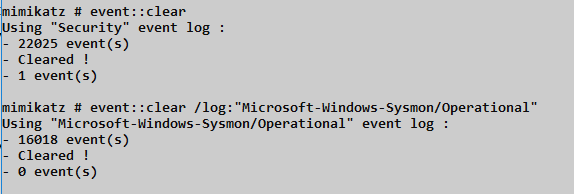
Technical Implementation
The command uses the Windows API ClearEventLog() function, which:
- Opens a handle to the specified event log
- Deletes all event records from the log file
- Resets the log file to its initial state
- Optionally saves cleared events to a backup file (not used by Mimikatz)
The 1102 Problem
Here's the critical limitation of event::clear: Windows automatically generates Event ID 1102 ("The audit log was cleared") after the clearing operation completes. This event:
- Is written after the clear completes
- Survives the clear operation
- Identifies the account that performed the clear
- Records the exact timestamp
xml
Event ID: 1102
Source: Microsoft-Windows-Eventlog
Description: The audit log was cleared.
Subject:
    Security ID: CORP\AdminUser
    Account Name: AdminUser
    Domain Name: CORP
    Logon ID: 0x12345
For forensic investigators, Event 1102 is a high-priority indicator. If it appears outside of scheduled maintenance windows or doesn't correlate with documented administrative activity, it signals potential compromise.
event::drop - Memory Patching
The event::drop command takes a fundamentally different approach. Instead of deleting existing logs, it patches the Event Log service in memory to prevent new events from being recorded.
Syntax
mimikatz # event::drop
Patching EventLog service...
 - svchost.exe (PID: 1234)
 - Event Log service handle: 0x...
 - Patching ElfWriteEvent...
   Pattern found @ 0x...
   Patched!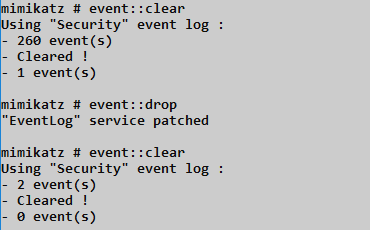
Technical Implementation
The event::drop command performs these operations:
- Locates the Event Log Service: Identifies the
svchost.exeprocess hosting the EventLog service - Opens Process Handle: Obtains a handle with PROCESS_VM_READ, PROCESS_VM_WRITE, and PROCESS_VM_OPERATION
- Locates Target Functions: Finds internal event writing functions like
ElfWriteEvent()andElfReportEvent() - Applies Memory Patch: Modifies the function prologue to return success without executing the actual write logic
The patch is version-specific because function addresses and code patterns change between Windows builds.
Advantages Over Clearing
| Aspect | event::clear | event::drop |
|---|---|---|
| Existing events | Deleted | Preserved |
| Event 1102 generated | Yes | No |
| Visible gap | Empty log | Timestamp discontinuity |
| Reversibility | Irreversible | Restores on service restart |
| Detection difficulty | Easy (1102) | Moderate (behavioral) |
Limitations and Considerations
Memory-Only: The patch exists only in process memory. Restarting the EventLog service or rebooting restores normal logging.
Version Sensitivity: The patch targets specific code patterns. Windows updates can change these patterns, breaking the patch or causing service instability.
Timestamp Gaps: While no 1102 is generated, forensic analysis may detect suspicious gaps in event timestamps.
Service Restart Effects: Some manifest display information may not process correctly after the EventLog service is restarted following a patch.
Speed Advantage: The patching operation executes quickly enough that it often completes before Sysmon Event ID 10 or Security Event ID 4663 can be logged—though this is not guaranteed.
Attack Scenarios
Scenario 1: Pre-Operation Log Clearing
Context: Attacker has initial foothold and wants a clean slate before credential theft.
Attack Flow:
- Establish SYSTEM privileges:
token::elevate - Clear the Security log:
event::clear - Perform credential extraction:
sekurlsa::logonpasswords - Clear again to remove credential theft evidence:
event::clear
Limitation: Two 1102 events will exist, clearly indicating manipulation occurred.
Scenario 2: Surgical Operation with event::drop
Context: Attacker needs to perform noisy operations without generating log evidence.
Attack Flow:
- Patch the Event Log service:
event::drop - Verify patching was successful
- Perform credential extraction, lateral movement, persistence
- Optionally restore logging by restarting service
- Continue operations knowing no evidence was recorded
Advantage: No 1102 event, existing logs appear normal.
Scenario 3: Targeted Log Manipulation
Context: Attacker wants to eliminate evidence of specific activity without raising suspicion.
Attack Flow:
- Export logs to backup file:
wevtutil epl Security C:\temp\backup.evtx - Clear logs:
event::clear - Parse backup, remove incriminating events
- (Requires custom tooling to re-inject modified log—complex and fragile)
Note: This scenario requires additional tooling beyond Mimikatz and is rarely practical.
Scenario 4: Cover Tracks Before Exfiltration
Context: End of engagement, attacker wants to minimize forensic evidence before departing.
Attack Flow:
- Complete all objectives
- Remove persistence mechanisms
- Clear Security, System, and Application logs
- Clear Sysmon and PowerShell logs if present
- Clear relevant custom application logs
Reality Check: Multiple 1102-equivalent events across multiple logs is extremely suspicious and often triggers automated alerts.
Detection and Indicators of Compromise
Detecting event::clear
Event ID 1102 - The Primary Indicator
Every cleared Security log generates Event 1102. This is the most reliable detection point:
xml
<Event xmlns="...">
  <System>
    <EventID>1102</EventID>
    <TimeCreated SystemTime="2024-01-15T14:30:00.000Z" />
    ...
  </System>
  <UserData>
    <LogFileCleared xmlns="...">
      <SubjectUserSid>S-1-5-21-...</SubjectUserSid>
      <SubjectUserName>AdminUser</SubjectUserName>
      <SubjectDomainName>CORP</SubjectDomainName>
      <SubjectLogonId>0x12345</SubjectLogonId>
    </LogFileCleared>
  </UserData>
</Event>
Equivalent Events for Other Logs
| Log | Clear Event ID |
|---|---|
| Security | 1102 |
| System | 104 |
| Application | 104 |
Detection Rule (SIEM)
index=wineventlog (EventCode=1102 OR EventCode=104)
| stats count by ComputerName, user, _time
| where NOT match(user, "scheduled_admin_account")
Detecting event::drop
The event::drop technique is harder to detect because it doesn't generate the telltale 1102 event. Detection relies on behavioral and statistical analysis.
Timestamp Gap Analysis
Normal systems generate events continuously. A gap in event timestamps—especially on an active system—indicates either service failure or manipulation.
Detection Logic:
- Calculate expected event frequency for each host
- Alert when actual frequency drops to zero or near-zero
- Correlate with system uptime (not rebooted) and service status (EventLog running)
# Pseudo-query for timestamp gap detection
SELECT
    ComputerName,
    MAX(TimeGenerated) as LastEvent,
    DATEDIFF(minute, MAX(TimeGenerated), GETDATE()) as MinutesSilent
FROM SecurityLog
GROUP BY ComputerName
HAVING MinutesSilent > 15
    AND ComputerName IN (SELECT ComputerName FROM ActiveSystems)
Process Access to EventLog Service
While the patching operation is fast, it may generate process access events:
xml
Event ID: 10 (Sysmon ProcessAccess)
TargetImage: C:\Windows\System32\svchost.exe
TargetService: EventLog
GrantedAccess: 0x1F0FFF (PROCESS_ALL_ACCESS) or 0x0438
Service Restart Correlation
If you observe:
- A gap in logging timestamps
- Followed by EventLog service restart (System Event ID 7036)
- Without corresponding system reboot
This pattern strongly suggests event::drop usage.
Key Detection Events Summary
| Detection Method | Event Source | Event ID | Description |
|---|---|---|---|
| Log clearing | Security | 1102 | Audit log was cleared |
| Log clearing | System/Application | 104 | Event log was cleared |
| Timestamp gap | All logs | - | Statistical absence of events |
| Service access | Sysmon | 10 | Process access to EventLog svchost |
| Service restart | System | 7036 | EventLog service stopped/started |
| Memory manipulation | Sysmon | 8 | CreateRemoteThread (potential) |
Defensive Strategies
1. Implement Centralized Logging
The only definitive defense against local log manipulation is forwarding events to a central collector that the attacker cannot access.
Windows Event Forwarding (WEF)
Configure source computers to forward events to a Windows Event Collector:
powershell
# On source computer
wecutil qc /q
winrm quickconfig /q

# Create subscription on collector (simplified)
wecutil cs subscription.xml
Events are forwarded in near-real-time. Even if an attacker clears local logs, the forwarded copies are already safe on the collector.
SIEM Integration
Deploy agents or collectors that forward events to your SIEM platform:
| Solution | Forwarding Method | Latency |
|---|---|---|
| Splunk Universal Forwarder | Agent-based | Seconds |
| Elastic Agent | Agent-based | Seconds |
| Azure Sentinel | Windows Agent | Minutes |
| Syslog-ng | Protocol-based | Seconds |
Critical: The collector/SIEM must be in a separate security domain that compromising endpoints doesn't automatically compromise.
2. Alert on Log Manipulation Events
Create high-priority alerts for:
- Event ID 1102 (Security log cleared)
- Event ID 104 (Other logs cleared)
- EventLog service stops outside maintenance windows
- Gaps in expected event volume
# Example alert logic (pseudo-code)
IF EventID = 1102
   AND User NOT IN ('backup_service', 'scheduled_maintenance')
   AND Time NOT IN (MaintenanceWindows)
THEN ALERT(Priority: CRITICAL, "Potential Log Manipulation")
3. Protect the EventLog Service
Limit which processes can access the EventLog service:
Windows Defender Application Control
Create policies that prevent untrusted processes from interacting with critical services.
Process Access Monitoring
Monitor for unusual processes opening handles to the EventLog service's svchost.exe process.
4. Enable Protected Event Logging
On Windows 10/Server 2016 and later, Protected Event Logging encrypts sensitive log data:
Computer Configuration → Administrative Templates →
Windows Components → Event Logging →
Enable Protected Event Logging
This prevents attackers from reading and selectively manipulating events even with SYSTEM privileges.
5. Maintain Audit Policy Awareness
Ensure audit policies are configured and monitored for changes:
powershell
# Check current audit policy
auditpol /get /category:*

# Monitor for policy changes
# Security Event ID 4719: System audit policy was changed
6. Implement Immutable Log Storage
Archive logs to write-once storage:
- S3 with Object Lock
- Azure Blob with Immutable Storage
- WORM (Write Once Read Many) tape
- Air-gapped backup systems
7. Deploy Endpoint Detection and Response (EDR)
Modern EDR solutions can detect log manipulation attempts through:
- Memory modification detection
- Behavioral analysis
- Process genealogy tracking
- API hooking detection
Operational Considerations
Legal and Ethical Boundaries
Log manipulation during security testing requires explicit authorization. Standard penetration testing rules of engagement rarely include anti-forensics. Before using these commands:
- Verify Scope: Confirm anti-forensics testing is explicitly in scope
- Document Authorization: Have written approval from appropriate stakeholders
- Coordinate with Defenders: Inform the SOC/blue team if operating in a monitored environment
- Preserve Evidence: Keep records of what you clear for post-engagement reporting
Engagement Considerations
When log manipulation is in scope, consider:
| Consideration | Recommendation |
|---|---|
| Timing | Clear logs during expected quiet periods |
| Scope | Only clear logs on explicitly authorized systems |
| Documentation | Record exactly what was cleared and when |
| Restoration | Discuss with client whether to restore from backup |
Operational Security
If using event::drop:
- Apply the patch just before noisy operations
- Minimize the patching duration
- Restore logging (service restart) after operations complete
- Account for the fact that service restart itself generates events
Detection Considerations from Attacker Perspective
Even with log manipulation:
- Network traffic still exists (firewall logs, network taps)
- Memory forensics can recover recent events
- Endpoint telemetry may exist on EDR platforms
- Centralized logs are unaffected
Log manipulation reduces local evidence but rarely eliminates all traces.
Anti-Forensics Context
The Broader Anti-Forensics Landscape
Log manipulation is one component of anti-forensics. Related techniques include:
| Technique | Purpose | Detection |
|---|---|---|
| Log clearing | Remove evidence | Event 1102 |
| Timestomping | Alter file timestamps | MFT analysis |
| Secure deletion | Prevent file recovery | Disk forensics gaps |
| Memory cleaning | Remove in-memory artifacts | Memory forensics gaps |
| Artifact removal | Delete tools, prefetch, registry | Forensic baseline comparison |
Why Anti-Forensics Testing Matters
For defenders, understanding anti-forensics helps:
- Design Resilient Logging: Architecture that survives manipulation attempts
- Identify Gaps: Discover what evidence might be lost
- Improve Detection: Create alerts for manipulation attempts
- Validate Controls: Confirm centralized logging captures events before they're cleared
Practical Lab Exercises
Exercise 1: The 1102 Trail
Objective: Observe the forensic evidence left by event::clear.
- Generate several test events (failed logins, process creation)
- Verify events are present in Security log
- Run:
event::clear - Open Event Viewer → Security
- Observe: The log should contain only Event 1102
- Document: Subject account, timestamp, and Logon ID
Analysis Questions:
- Would this event appear in centralized logging?
- How would you alert on this in your SIEM?
Exercise 2: The Silent Test
Objective: Observe the behavior of event::drop.
- Note the current timestamp in the Security log
- Run:
event::drop - Generate events that should log:
- Failed login attempt
- Process creation (launch notepad.exe)
- Privilege use
- Check the Security log—are the events present?
- Restart the EventLog service:
net stop eventlog && net start eventlog - Generate similar events again
- Verify logging has resumed
Analysis Questions:
- What forensic evidence might indicate the patching occurred?
- How long was your logging gap?
Exercise 3: Timestamp Gap Detection
Objective: Build detection for logging gaps.
- Configure a system to forward events to a central collector
- Apply
event::dropon the source system - Generate events (which won't be logged locally)
- On the collector, query for event frequency per host
- Identify the gap in the source system's event timeline
- Build an alert rule for hosts that stop generating events
Exercise 4: Forwarding Validation
Objective: Confirm centralized logging survives local manipulation.
- Configure Windows Event Forwarding or SIEM agent
- Generate several identifiable test events
- Verify events appear on the central collector
- Run
event::clearon the source - Confirm pre-clear events still exist on the collector
- Confirm Event 1102 was also forwarded
Exercise 5: Protected Event Logging
Objective: Evaluate Protected Event Logging effectiveness.
- Enable Protected Event Logging via Group Policy
- Configure encryption certificate
- Generate events with sensitive data
- Attempt to read events without the decryption key
- Document the protection mechanism
Summary
The Event Module demonstrates both the vulnerability of local logging and the importance of defensive architecture that anticipates log manipulation. So please send your logs to a SIEM and back them up.
Key Takeaways:
event::cleardeletes all events from a log but always generates Event ID 1102, revealing that manipulation occurredevent::droppatches the EventLog service in memory to prevent new events from being written, avoiding the 1102 indicator- The drop patch is temporary—restarting the EventLog service or rebooting restores normal logging
- Timestamp gaps are the primary detection method for event::drop
- Centralized logging is the only definitive defense—events forwarded to a secure collector survive local manipulation
- Anti-forensics testing requires explicit authorization and should be documented thoroughly
Understanding these techniques is essential for both offensive and defensive practitioners. Attackers must understand what traces they leave; defenders must understand what attackers can eliminate. The key defensive insight is architectural: if you design your logging infrastructure assuming local logs can be compromised, centralized collection becomes non-negotiable.
Next: Chapter 8: RPC Remote ControlPrevious: Chapter 6: Token Module