
Appearance
Chapter 43: DPAPI Basics
Introduction
If you’ve ever wondered how Chrome remembers your passwords or how Windows saves your Wi-Fi keys without asking for a master password, you’re looking at the Data Protection API (DPAPI). It’s one of the most fundamental security mechanisms in Windows, yet it’s often misunderstood. Since Windows 2000, DPAPI has provided a way for developers to encrypt sensitive data at rest by tying the encryption keys directly to the user’s own credentials.
In my experience, DPAPI is a treasure trove for post-exploitation tradecraft. It protects everything from browser data and Outlook tokens to private SSH keys and EFS file keys. If you can compromise a user’s DPAPI master keys, you effectively own their entire digital life on that system. But DPAPI isn’t just a single file; it’s a complex chain of dependencies involving user passwords, SIDs, and even domain-level backup keys.
In this chapter, we’re going to build the technical foundation you need to handle DPAPI professionally. We’ll look at the master key derivation process (PBKDF2 and HMAC), the role of the CREDHIST file in maintaining access after password changes, and the structure of the DPAPI blobs themselves. We’ll also discuss the impact of modern protections like Credential Guard and the Protected Users group on DPAPI security. Understanding these basics is the absolute prerequisite for the practical Mimikatz operations we’ll cover in Chapter 44.
Technical Foundation: The Protection Chain
What is DPAPI?
DPAPI is essentially a "black box" for developers. They call CryptProtectData, hand it a blob of data, and Windows gives them back an encrypted mess. The developer doesn't have to worry about key management, storage, or rotation—Windows handles all of that behind the scenes. This simplicity is precisely why DPAPI is so widely adopted, and why it's such a valuable target for us operationally.
The initial version shipped with Windows 2000, and Microsoft has been refining it ever since. The two core functions that make it all work are:
- CryptProtectData – Encrypts a data blob
- CryptUnprotectData – Decrypts a data blob
There's also CryptProtectMemory and CryptUnprotectMemory for protecting data in memory, but for our purposes, the file-based functions are what matter most.
The Dependency: The security of that data is only as strong as the user's logon credential.
- Data is encrypted by a Master Key.
- Master Keys are encrypted by a key derived from the User's Password.
The Developer's View
If you're trying to understand what you're looking at during an engagement, it helps to know what developers see. Here's the C++ function signature:
c
DPAPI_IMP BOOL CryptProtectData(
    DATA_BLOB   *pDataIn,           // Data to encrypt
    LPCWSTR     szDataDescr,        // Optional description
    DATA_BLOB   *pOptionalEntropy,  // Optional entropy (salt)
    PVOID       pvReserved,         // Reserved (NULL)
    CRYPTPROTECT_PROMPTSTRUCT *pPromptStruct,  // Optional prompt
    DWORD       dwFlags,            // Scope: user, system, or machine
    DATA_BLOB   *pDataOut           // Encrypted blob output
);
And for .NET developers, the System.Security.Cryptography.ProtectedData class wraps this nicely:
csharp
public static byte[] Protect(
    byte[] userData,              // Data to encrypt
    byte[] optionalEntropy,       // Optional entropy
    DataProtectionScope scope     // CurrentUser or LocalMachine
);
The DataProtectionScope parameter is particularly interesting from an attack perspective—it determines whether the blob is tied to the current user or the local machine. Machine-scoped blobs require SYSTEM privileges to decrypt, while user-scoped blobs require the user's context or their master key.
Master Key Derivation
Every 90 days (or whenever you change your password), Windows generates a new 64-byte master key.
The Derivation Process:
- Pre-Key Generation: PBKDF2-HMAC-SHA1(Password, Salt, ~24,000 iterations).
- Master Key Derivation: HMAC-SHA1(Pre-Key, User SID).
- Encryption: The resulting 64-byte key is then encrypted and stored on disk.
Algorithms and Ciphers
The cryptographic strength of DPAPI has evolved significantly over the years. Knowing the version helps you estimate the time required for offline cracking.
| Windows Version | Encryption | Integrity | PBKDF2 Iterations |
|---|---|---|---|
| 2000 | RC4 | HMAC-SHA1 | 1 |
| XP / 2003 | 3DES | HMAC-SHA1 | 4,000 |
| Vista / 2008 | 3DES | HMAC-SHA1 | 24,000 |
| 7 / 2008 R2 | AES-256 | HMAC-SHA512 | 5,600 |
| 8 / 10 / 11 | AES-256 | HMAC-SHA512 | 5,600+ |
Note: The number of PBKDF2 iterations can vary based on domain policy and specific updates, but these are the baselines.
Critical File Locations
To manually target DPAPI data, you need to know where it lives.
Master Keys
- User Master Keys:
%APPDATA%\Microsoft\Protect\<SID>\- Hidden files named with GUIDs.
Preferredfile: Contains the GUID of the currently active master key.
- System Master Keys:
%WINDIR%\System32\Microsoft\Protect\S-1-5-18\ - Computer Account Keys:
%WINDIR%\System32\Microsoft\Protect\S-1-5-18\User\- These protect machine-level secrets like Wi-Fi profiles and service credentials.
Credentials & Secrets
- Credential Manager:
%LOCALAPPDATA%\Microsoft\Credentials\ - System/User Vaults:
%LOCALAPPDATA%\Microsoft\Vault\and%PROGRAMDATA%\Microsoft\Vault\ - Chrome/Edge Data:
%LOCALAPPDATA%\Google\Chrome\User Data\Default\(Login Data, Cookies, Local State) - Wi-Fi Profiles:
%PROGRAMDATA%\Microsoft\Wlansvc\Profiles\Interfaces\
CREDHIST: The History Book
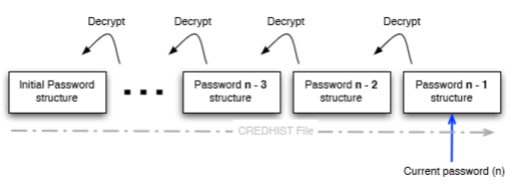
What happens if you change your password? Windows doesn't re-encrypt all your old data. Instead, it maintains a CREDHIST file. This file stores hashes of your previous passwords, allowing DPAPI to "roll back" and decrypt old master keys. From a forensic perspective, CREDHIST is incredible because it gives us a timeline of a user's previous credentials.
The Domain Backup Key: The "God" Key
In a domain environment, DPAPI has a fail-safe. Domain Controllers store a 2048-bit RSA public key. When a domain user generates a master key, a copy of that key is encrypted with the domain's public key and stored in the user's AD object (msPKI-DPAPIMasterKeys).
The Attack: If you compromise the Domain Admin and export the Domain Backup Key (the private half), you can decrypt the master keys for any user in the entire domain.
Identifying DPAPI Blobs
Before diving into extraction, it helps to know what you're looking at. DPAPI blobs have a distinctive signature—they always start with the DPAPI provider GUID:
01 00 00 00 D0 8C 9D DF 01 15 D1 11 8C 7A 00 C0 4F C2 97 EBWhen you're examining an unknown binary file or registry value and see these bytes at the offset, you know you're dealing with DPAPI-protected data. This is useful during forensic analysis or when you're hunting for secrets in unexpected locations.
Mimikatz Implementation: Extracting the Keys
Listing Keys from LSASS (sekurlsa::dpapi)
If a user is currently logged in, their decrypted master keys are likely sitting in LSASS memory. This is the fastest way to get them—no password cracking required.
mimikatz # privilege::debug
mimikatz # sekurlsa::dpapi

         [00000000]
         * GUID      :  {a8f9c7e6-d5b4-43a2-9f1e-8d7c6b5a4f3e}
         * MasterKey :  3f8a9c7e5d4b2a1f0e9d8c7b6a5f4e3d2c1b0a9f8...
OPSEC Note: This approach accesses LSASS memory directly. In environments with EDR or AV solutions, this is one of the most heavily monitored activities. Many security products specifically watch for the memory access patterns that sekurlsa:: commands generate. If you're operating in a defended environment, consider the filesystem-based approach instead.
Decrypting Keys from Disk (dpapi::masterkey)
If the user isn't logged in, but you have their password (or its SHA1 hash), you can decrypt the master key files directly from disk. This approach is more OPSEC-friendly since it doesn't touch LSASS.
Example:
mimikatz # dpapi::masterkey /in:"C:\Users\alice\AppData\Roaming\Microsoft\Protect\S-1-5-21-...\a8f9..." /sid:S-1-5-21-... /password:P@ssw0rd!The Domain RPC Route
In a domain environment where you have network connectivity to a DC, you can ask the Domain Controller to decrypt the master key for you using the MS-BKRP (BackupKey Remote Protocol). This is the same protocol Windows uses legitimately for key recovery.
mimikatz # dpapi::masterkey /in:"C:\Users\alice\...\a8f9..." /rpcThis is operationally useful when you have a domain user's context but not their password.
The Domain Backup Key Route
If you have the domain backup key (.pvk file), you don't need the user's password at all. This key can decrypt any domain user's master keys.
mimikatz # dpapi::masterkey /in:"C:\Users\alice\...\a8f9..." /pvk:ntds_capi_0_domain_backup.pvkDetection - The SOC View
- Event ID 4662 (Active Directory): Look for any account requesting the
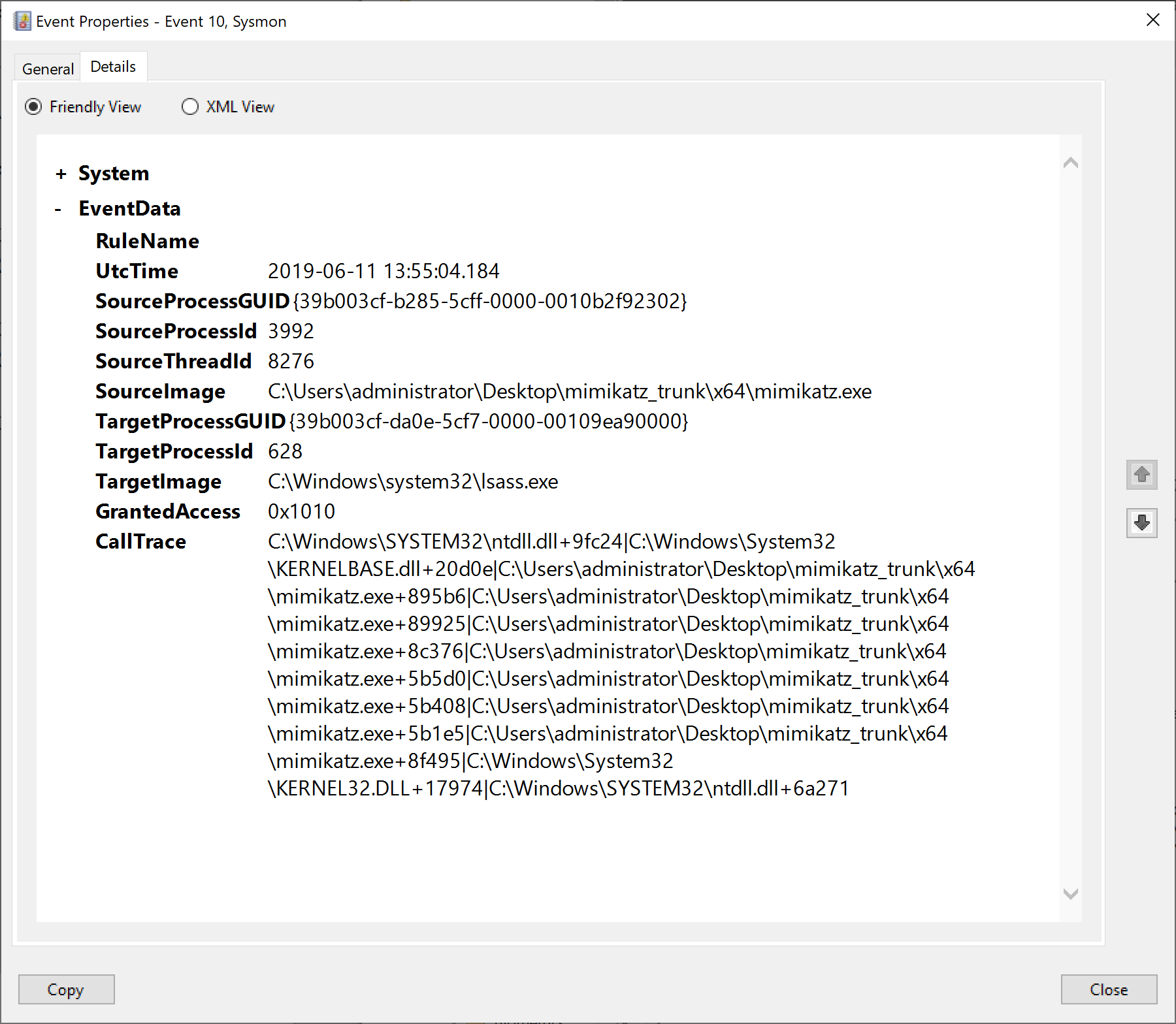
BCKUPKEYobject. If this isn't a Domain Controller, someone is trying to steal the domain backup key. - Sysmon ID 10 (Process Access): Watch for non-system processes reading LSASS with the
0x1010mask. This is the signature ofsekurlsa::dpapi. - Registry Auditing: Monitor for access to
HKCU\Software\Microsoft\SystemCertificates. This is where many DPAPI-protected assets are referenced.
Defensive Strategies
Credential Guard
This is the most effective mitigation against DPAPI attacks. Credential Guard moves credential material into a secure Virtualization-Based Security (VBS) container, making it significantly harder for tools like Mimikatz to scrape keys from memory. When you encounter a system with Credential Guard enabled, traditional sekurlsa:: commands will fail or return incomplete results.
Protected Users Group
Members of the Protected Users security group get a much stronger key derivation process. Here's the technical detail that matters operationally: for domain users in the Protected Users group, the DPAPI master key derivation uses a double PBKDF2/HMAC-SHA2 process with the SID as salt, followed by HMAC/SHA1 with the resulting hash and SID again.
What this means in practice is that if you need to decrypt a Protected User's master key offline, you'll need a specific hash that's different from the standard NTLM or SHA1. You can obtain this hash using sekurlsa::msv—look for the DPAPI-specific hash in the output. Without it, offline cracking becomes significantly more difficult.
LSA Protection
Enabling LSA Protection (RunAsPPL) prevents non-protected processes from accessing LSASS memory. While this can be bypassed with kernel-level access, it raises the bar considerably and generates additional telemetry when attempted.
Practical Exercises
- The Scrape: Use
sekurlsa::dpapion your lab workstation. Identify the GUIDs of the currently cached keys. - The Database: Locate your Chrome "Login Data" file. Try to read it using a tool like DB Browser for SQLite. Notice the passwords are encrypted blobs.
- The History: Use
dpapi::credhiston your lab user to see how many password changes are recorded in the history file.
Summary
DPAPI is the "hidden" layer of Windows identity, and understanding it is essential for effective post-exploitation work.
- Master Keys are the heart of the system, protecting all user secrets. Each user and the system itself maintain separate key stores.
- CREDHIST allows access to persist across password changes for local users—and gives us a window into password patterns.
- Domain Backup Keys provide a domain-wide "backdoor" for recovery (and attack). Compromise this key, and you own every user's secrets.
- Protected Users and Credential Guard are the primary defenses. Know how to identify when you're up against them.
- OPSEC matters—filesystem-based extraction is quieter than hitting LSASS, and the RPC route leverages legitimate protocols.
In the next chapter, we'll put this knowledge into practice with the full dpapi:: module command reference in Chapter 44.
Next: Chapter 44: DPAPI ModulePrevious: Chapter 42: DCShadow